














What Copilot Means for Businesses
Copilot is more than a single tool. It’s an intelligent layer woven throughout Microsoft 365, Dynamics 365, and the Microsoft ecosystem. Whether you’re writing a proposal, analyzing reports, serving customers, or managing operations, Copilot helps you simplify work and focus on what matters most.
At Stoneridge Software, we help you understand, prepare for, and adopt Copilot with confidence, turning intelligent technology into real business results.
Your Data. Your Control.
- Copilot does not train on company data
- Content stays within your secure Microsoft 365 tenant
- Microsoft’s enterprise-grade security ensures protection
- Stoneridge experts help configure and monitor Copilot safely
Your Copilot Journey with Stoneridge
We meet you where you are — helping you plan strategically, train effectively, and innovate intentionally.

AI Executive Briefing
A focused planning session for leadership to align on AI goals and opportunities.
How Stoneridge Helps:
Define success, understand impact, and envision the possibilities.

AI Readiness Assessment
Evaluate your data, security, and processes to determine where and how AI should be adopted first. Then build from there with the next level of copilot adoption with our AI training and adoption.
Copilot Flight Plan
Your structured readiness starting point.
How Stoneridge Helps:
Align leadership on business value, assess your environment, and prepare your teams – cohort style.

Copilot Flight Schools
Hands-on configuration and training for Microsoft 365 and Dynamics 365 users.
How Stoneridge Helps:
Experience Copilot in real-world scenarios and apply it to daily work.
Lift off Labs with Copilot Studio
A creative space to design and build agentic solutions using a variety of AI tools.
How Stoneridge Helps:
Collaborate with our architects to solve process challenges and explore new ideas.
What Sets Copilot Apart?
It’s the only AI solution built into the Microsoft tools your teams already trust. Copilot is designed to understand your work, supported by advanced agents, secured by Microsoft, and flexible enough to grow with your business.
A unified AI experience for real work
Copilot brings chat, search, agents, and creation tools together in one place.
Works inside the apps your team already uses
Integrated into Teams, Microsoft 365 & Dynamics 365 with your security and compliance built in.
Advanced agents that support complex tasks
Research, analyze, and act with AI that works like a virtual teammate.
A platform to build your own agents
Create custom agents with Copilot Studio using a consistent, scalable framework.
Flexible ways to adopt and scale
Predictable licensing and pay-as-you-go options that grow with your business.
Enterprise security and governance
Robust controls for permissions, data protection, monitoring, and reporting.
Video Resources
9 Ways Companies Are Using Microsoft Copilot Today

Inside the Copilot M365 Flight Plan: Building AI Champions

An Introduction to Microsoft Copilot: What You Need to Know!

How Your Business Can Effectively Use Microsoft Copilot

Exploring Copilot for Microsoft 365: Tips for Saving Time and Money

More Than a Tool
A Connected Platform for Intelligent Work
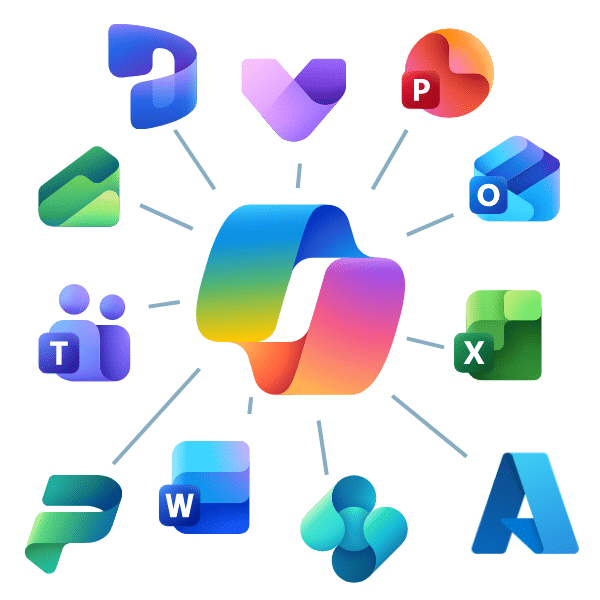
Copilot connects to your Microsoft data across Outlook, Teams, SharePoint, OneNote, Word, Excel, PowerPoint, Loop and Dynamics 365 — while it can also integrate securely with thousands of third-party systems like Salesforce and SAP through pre-built connectors.
This creates the most single, connected experience in the market, where insights and automation flow naturally across the tools your teams use every day.
Dynamics 365 Copilot – Increased Efficiency in Sales, Marketing, Service, and Business Processes
With Copilot, you can now use AI-powered tools and natural language processing in all of your Dynamics 365 systems. It’s built natively into your cloud-based systems and can be utilized by all members of your team.
Microsoft Copilot is available in nearly every aspect of your Dynamics 365 ERP and CRM systems. AI empowers your team to streamline efficiency and focus on the most important aspects of their jobs in the these areas:

Dynamics 365 Sales
Copilot accelerates sales productivity by generating personalized emails, summarizing meetings, and providing real-time insights from CRM data, helping sellers focus on building relationships and closing deals faster.

Dynamics 365 Customer Service
Copilot enhances agent efficiency by drafting responses, summarizing cases, and surfacing relevant knowledge articles, enabling faster resolution and improved customer satisfaction.

Dynamics 365 Marketing
Copilot streamlines campaign creation by generating engaging content, analyzing audience data, and suggesting optimization strategies, making marketing more personalized and data-driven.

Dynamics 365 Finance
Copilot simplifies financial operations by automating report generation, analyzing trends, and providing actionable insights for budgeting and forecasting, reducing manual effort and improving accuracy.

Dynamics 365 Supply Chain Management
Copilot improves operational agility by predicting demand, optimizing inventory, and summarizing supply chain data, helping businesses respond quickly to disruptions and maintain efficiency.

Dynamics 365 Business Central
Copilot boosts productivity for SMBs by assisting with financial reconciliations, drafting documents, and answering natural language queries about business data, making ERP tasks faster and easier.

Why Partner with Stoneridge
We don’t start with the tool. We start with your business goals.
Laying a solid foundation for emerging technology is key, which is why our proven process includes a solid executive alignment and user adoption model.
Our consultants and architects help you uncover where Copilot and the broader Microsoft platform can drive measurable results. Sometimes the best solution is Copilot. Other times it’s automation through Power Automate, a Power App, or a custom Copilot Agent built with Copilot Studio.
No matter the path, we guide you with clarity, confidence, and care.
Ready to Take Off?
Start your Copilot journey today with Stoneridge Software. Our team will help you plan, train, and implement Copilot the right way.
Copilot FAQ

What can I do with Copilot?
Microsoft Copilot serves to optimize and streamline your business processes in several dynamic ways:
- You can use Microsoft Copilot generative AI service with data from the public web in the Bing search index. This version of Copilot is free. You can use it to help write content, generate ideas, create images, ask questions, search the web, and more. You just ask Copilot a question and it will give you an answer.
- Copilot for Microsoft 365 integrates with the applications you use daily, such as Microsoft Teams, Word, Outlook, PowerPoint, Excel, and more. You can use new AI functionalities in these apps to create presentations, develop appealing data visualizations, automate email generation, create summaries, and more. It saves your team valuable time, allowing them to focus on work that drives your business forward.
- In Dynamics 365, you can use Copilot to enhance many business processes in your ERP and CRM systems. This includes:
- In the new Microsoft Copilot Studio, you can create custom Copilots and chatbots tailored to your business. In this studio, you can:
- Customer Copilot for Microsoft 365, giving you increased control by letting you set responses to scenarios your team might ask Copilot about.
- Create custom Copilots and chatbots tailored based on your data and can answer questions and inquiries from your team or customers.
- Use a connected platform, as Copilot Studio is built on the foundation of existing AI tools like Power Virtual Agents. It also operates with Azure AI studio and more.
Are there pre-requisites if I want to use Copilot in my CRM and/or ERP systems?
If you want to use Microsoft Copilot in your Dynamics 365 CRM or ERP systems, you need to have licenses for Copilot in Microsoft 365. If you want more information, contact Stoneridge and our licensing team can help you decipher what you need to implement Copilot.
Can I do a Proof of Concept, and who would be the best fit to champion Copilot for my organization?
You can for certain aspects of Copilot. For example, the free Copilot is there for you to try at any time. Copilot Pro comes with a free trial that you can get by contacting Stoneridge Software. However, Microsoft Copilot for Microsoft 365 and Dynamics 365 is not available for a free trial. That doesn’t necessarily mean you can’t find out if its right for your business.
Stoneridge’s cloud consulting team will sit down with you and your team to go over your environment and ensure you and your users are ready for a Copilot implementation.
Do I have a minimum spend with Copilot?
The answer to this question is a little more complex than it seems. If you want to use the regular Copilot, it is free. You can upgrade to Copilot Pro for $20 per user per month. Meanwhile, you can get Copilot for Microsoft 365 for $30 per user per month. With Copilot for Dynamics 365, you pay an additional $20 per month per user on top of the $30 for Microsoft 365 Copilot.
At the end of the day, it depends on your business needs.
Are there any risks I should be aware of?
It’s important to be aware of what data your team is using in Microsoft Copilot, especially the free version. Stoneridge can help you guard against the inadvertent disclosure of sensitive information by helping you set up a solid security, identity, access management, and data protection processes.
What is Copilot Studio, and how is it different from Copilot in Microsoft 365 or Dynamics 365?
Copilot Studio is a tool that lets you create and customize your own Copilot Agents—intelligent assistants designed around your unique processes and data.
While Copilot in Microsoft 365 and Dynamics 365 enhances built-in workflows, Copilot Studio allows your team to go further by building tailored experiences that automate tasks, answer questions, or connect with other systems such as Power Platform apps, Salesforce, or SAP.
Stoneridge experts help you identify the right use cases, design your agents, and bring them to life securely and efficiently.
Can I integrate Copilot with my Power Platform?
Yes. Copilot integrates with the different aspects of the Microsoft Power Platform to allow you to use AI to streamline more processes. This includes:
- The ability to use natural language requests to let Copilot help you build a Power App or Power Page
- A similar function with automating the creation of workflows in Power Automate
- Asking Copilot to help you retrieve data or build visuals in Power BI
- And more
Does Microsoft Copilot train on my company’s data?
No. Microsoft Copilot does not use your company data or user interactions to train AI models. All activity and content remain within your secure Microsoft 365 environment, governed by Microsoft’s enterprise-grade privacy, compliance, and security standards.
With Stoneridge Software’s guidance, you can be confident your Copilot setup follows the right governance and security practices to protect your business.
Read More on Our AI and Copilot Blog
Start the Conversation
It’s our mission to help clients win. We’d love to talk to you about the right business solutions to help you achieve your goals.