















Agent 365: The New Nerve Center for Enterprise AI
Microsoft has introduced Agent 365, an important step forward for organizations using AI in the Microsoft 365 ecosystem. It acts as a central control point for AI agents across your business, helping teams manage agents in one place instead of across disconnected tools and processes. Whether your organization is using Copilot Studio, building custom agents, or adopting embedded agents in apps like Excel, Agent 365 provides the management layer that often becomes essential as adoption grows.
In the sections below, we’ll walk through what Agent 365 is, why it matters, and how to prepare your environment and team for rollout, including how to get access through the Microsoft Frontier program.
What Is Agent 365?
Agent 365 functions as the central hub for managing AI agents within the Microsoft 365 environment. Rather than having agents dispersed across various platforms—such as Excel add-ins, Copilot Studio projects, Teams bots, or departmental experiments—Agent 365 consolidates everything into a single, unified location.
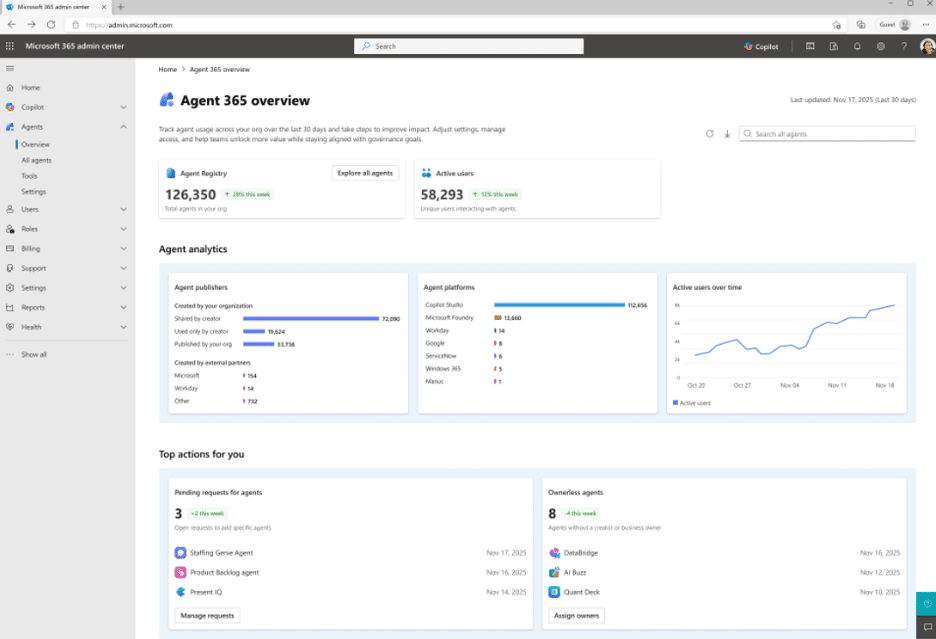
Key Capabilities of Agent 365
- Discover agents in your organization: Easily identify all active AI agents, no matter where they were deployed
- Understand agent access: Gain insights into what data and resources each agent can access within your organization
- Monitor usage, performance, and risk: Track adoption, evaluate performance, and assess potential risks
- Control permissions and compliance: Manage agent permissions and keep compliance requirements consistent
- Standardize best practices: Promote and enforce best practices for deploying and managing AI agents across teams
By introducing Agent 365, Microsoft signals a shift: AI agents are now recognized as critical enterprise software components, requiring the same level of visibility, governance, and lifecycle management as other business applications.
Why Agent 365 Is Critically Important
Agent 365 addresses a fundamental challenge facing most organizations as they adopt AI. In many cases, AI agents are either proliferating rapidly within teams—often without oversight—or their deployment is stalled due to governance concerns. Agent 365 serves as a bridge between these two scenarios, ensuring both innovation and control are possible.
Benefits for Leadership
Agent 365 gives leaders clear visibility into AI activity across the business. They can see who’s building what and apply governance guardrails without slowing progress or creativity. That visibility helps teams scale AI with more confidence and fewer surprises.
Benefits for Makers
For those developing agents, Agent 365 supports a more collaborative and transparent way to build. Teams can reuse proven patterns and approved connectors, which speeds up development and reduces uncertainty around permissions.
Benefits for IT and Security Teams
Agent 365 gives IT and security teams the tools to monitor, audit, and manage AI activity effectively. With Telemetry, sensitivity labels, and DLP policies, they can manage risk proactively instead of reacting after issues appear.
In short, Agent 365 gives leaders, makers, and IT a shared framework for managing AI agents with clarity and consistency.
Benefits for Team Collaboration
Agent 365 improves collaboration by centralizing how agents are created, shared, and managed across Microsoft 365. Teams can use agents for onboarding, training, and knowledge sharing, which reduces duplicate work and encourages reusable workflows. Shared tools like meeting summaries and real-time document collaboration keep teams aligned, while transparent governance supports secure innovation.
Overall, Agent 365 helps create a connected, transparent environment where teams can collaborate efficiently, innovate confidently, and build on shared best practices.
Key Capabilities of Agent 365
Centralized Registry
Agent 365 gives you one unified inventory of all agents within an organization—both custom-built and Microsoft-developed. Instead of tracking agents across links, spreadsheets, or tribal knowledge, teams get a single source of truth for agent management.
Access & Permissions
Role-based controls help protect sensitive data by ensuring only authorized users can run or modify agents. This makes permission management simpler and more secure.
Telemetry & Monitoring
Agent 365 provides usage analytics, error reporting, and performance insights. Teams can see what’s working, catch issues quickly, and track adoption over time.
Interoperability
Agent 365 is built for secure interoperability, allowing agents to work across data sources, business apps, and even with other agents. That makes more connected, cross-system workflows possible.
Enterprise-Grade Security
Security is built in from day one, including encryption, auditing, compliance checks, and policy enforcement. This helps organizations maintain strong protection and meet regulatory requirements across the agent lifecycle.
Implications for Your Copilot Strategy
Agent 365: The Governance Solution
Agent 365 introduces a governance framework that many organizations have been anticipating. By integrating this layer, businesses can follow a structured approach to deploying AI agents, in alignment with the established Flight Plans operating model.
Step 1: Discover
Begin by conducting an inventory of all AI agents currently in use within your organization. It's common to have more agents in operation than initially expected, so a thorough review is essential.
Step 2: Pilot
Select two or three use cases where agent oversight is particularly valuable. Focus on building, testing, and measuring the effectiveness of these pilot projects to ensure governance and compliance are maintained.
Step 3: Scale
Leverage Agent 365 to standardize operational patterns, templates, guardrails, and lifecycle management across various departments. This approach enables consistent governance and supports sustainable growth of AI initiatives.
By following these steps, organizations move beyond viewing AI as a series of isolated demonstrations. Instead, Agent 365 helps establish a system that fundamentally transforms work processes and drives meaningful change.
Accessing Agent 365 via the Frontier Early Access Program
Gaining access to Agent 365 is a crucial step, as the service is currently available exclusively through Microsoft’s Frontier early-access program. To begin utilizing Agent 365 within your organization, several specific actions must be taken to ensure successful enrollment and activation.
Enrollment Requirements
- Opt-in to Frontier: Your organization must proactively choose to participate in the Frontier early-access program. This opt-in process is essential for making Agent 365 available in your environment.
- Feature Enablement: Once enrolled, the Agent 365 feature must be enabled within your Microsoft 365 tenant. This step is necessary before anyone in your organization can begin using the tool.
- Permission Assignment: An administrator must assign the appropriate permissions to users who require access to Agent 365. Without these permissions, even after enrollment and enablement, users will not be able to utilize the service.
Enrolling in the Frontier Early Access Program
To begin using Agent 365, organizations must first enroll their Microsoft 365 tenant in Microsoft’s Frontier early-access program. This process requires active involvement from an administrator and cannot be completed automatically. The steps provide a clear pathway for organizations and advisors to ensure successful enrollment. Microsoft Agent 365: The Control Plane for Agents
Conclusion
Available through the Frontier Early Access Program, Agent 365 helps organizations standardize and simplify AI operations across teams. By opting into Frontier, enabling features, and assigning the right permissions, companies can build a strong foundation for responsible AI adoption. The result is stronger governance, smoother operations, and better business outcomes from AI.
If you’re ready to put Agent 365 to work, Stoneridge can help guide your team through each step of the Frontier Early Access Program—from enrollment through activation. Reach out today, and we’ll help you move forward with a clear plan and practical support.

Under the terms of this license, you are authorized to share and redistribute the content across various mediums, subject to adherence to the specified conditions: you must provide proper attribution to Stoneridge as the original creator in a manner that does not imply their endorsement of your use, the material is to be utilized solely for non-commercial purposes, and alterations, modifications, or derivative works based on the original material are strictly prohibited.
Responsibility rests with the licensee to ensure that their use of the material does not violate any other rights.