















AI in Agriculture, Solving Real Grain Industry Challenges with Microsoft Copilot
Grain companies do not need more AI hype. They need practical ways to use this technology within the business systems they already rely on.
In this post, we explore how Microsoft Copilot can work alongside Microsoft systems like Dynamics 365 and Levridge to help address real grain industry challenges, reduce manual work, and improve day-to-day decision-making.
We’ll also look at what an AI-centric business system really means, why agriculture leaders should be paying attention, and how these tools can deliver value in a real-world scenario.
You can also watch my presentation on the topic here:
What is an AI-Centric Business System?
For years, businesses have thought in terms of ERP and CRM systems. You buy a system, implement it, train your team, and add some custom integrations. While those traditional things still exist, they’re increasingly outdated ways of describing what modern platforms do. Today, we should be thinking in terms of business systems because they manage workloads, processes, and data across the organization.
AI-centric business systems take that a step further.
An AI-centric system is one where:
- AI agents are natively integrated, not added on
- These agents can interact directly with data, transactions, and forms you use to manage data
- The system is designed for automation-first workflows
In other words, AI isn’t just a “nice to have” add-on. It’s a core part of the system.
At a practical level, this means AI agents can log into your system like users do and navigate interfaces, retrieve data, and execute transactions. They do this while understanding how to operate within a system that uses protocols like Model Context Protocol. (MCP)
Think of it this way: In the past, your business system was a tool that your team used. Workflows were repeatable, and outside of some system updates, the features and tools they used largely remained the same. With AI-powered systems, the platform facilitates both humans and AI agents working side by side.
Traditionally, you would buy an ERP business system and then layer tools, customizations, and integrations on top of it to fill gaps. Now, you can buy a system with built-in agents that handle a lot of valuable automation out of the box.

Why Should Agribusiness Leaders Be Looking at AI-Centric Systems?
Agriculture is uniquely positioned to benefit from this shift and arguably has the most to gain. Ag is one of the most complex industries in the world, but many organizations still rely on fragmented and/or outdated systems. Processes are often manual, reactive, labor-intensive, and lead to significant bottlenecks in various sectors like contract management, inventory tracking, production planning, customer communication, and more.
The Crawl, Walk, Run Model
Adopting AI isn’t as simple as flipping a switch, giving it to your team, and letting them run away with it. It’s about carefully and thoughtfully rolling its capabilities out. A basic but fun way to think about it is to treat it like a child learning to move through the world:
1. Crawl – Modernize the Foundation
- Implement an AI-Centric business system installed
- Cover core processes (AR, AP, commodity contracts, risk management, etc.)
2. Walk – Identify Automation Opportunities
- Look for repetitive, manual workflows and identify automation needs
- Introduce, test, and optimize AI agents to handle them
3. Run – Scale AI Across the Business
- Expand and customize agent capabilities to streamline core processes.
- Automate increasingly complex workflows
Here’s the key mindset shift:
The “crawl” phase is no longer just system implementation—it’s about getting AI-ready from day one while still phasing its rollout.
Why It Matters Now
If automation weren’t essential, AI wouldn’t exist. AI-centric systems allow you to:
- Reduce manual workload
- Improve response times
- Increase operational visibility
- Scale without adding headcount
- Focus on higher-value work, not repetitive tasks.
Do AI-Centric Systems Really Work?
Let’s address the elephant in the room for a lot of businesses. A lot of hype has surrounded AI, and with hype comes skepticism and uncertainty.
The honest answer is that AI works very well, but it’s not a silver bullet that is going to solve all of your company’s problems – and it certainly doesn’t replace human workers.
It also won’t instantly fix broken processes, replace leadership decision-making, or eliminate the need for a sound organizational structure, and it requires significant effort to ensure it runs smoothly.
AI agents are incredibly effective at:
- Repetitive, low-complexity tasks
- Pattern recognition and natural language processing
- Content generation and communication
- Lightweight, modular workflows
AI is not ideal for:
- Complex strategic decisions
- Unstructured, ambiguous processes
- Heavy mathematical or transactional logic without guardrails
The “6-Year-Old” Analogy
While it might sound a bit funny to say, a useful way to think about AI agents and their role within your system is that they are like very capable six or seven-year-olds.
If you give them clear instructions and make sure to spare no detail while staying concise, you will get great results. Give them vague directions or leave out key pieces of information, and you may get unpredictable or even bad outcomes that could lead team members astray.
The Importance of Structure
If you were onboarding a new employee, you wouldn’t just sit them down at a computer and tell them to figure it out. You would provide them with training, documentation, and step-by-step processes on how they can streamline their workflows and performance. AI agents are no different.
To succeed with AI, you need:
- Clearly defined workflows that run within your system. The agent needs to know where to find data, how to use it, and how to display the information user’s request.
- Clear rules and expectations. Agents should be treated like users in terms of what data they can access and what they can do. In the workplace, a marketing person would not have access to financial or inventory reports. Similarly, an agent that helps you automate marketing emails shouldn’t be able to pull data from those more sensitive areas either.
- Having a security strategy that includes steadfast permissions sets and access rules for AI agents will keep your data safe.
- Employee awareness and feedback. Getting your team engaged early on is a huge step in the process. People will not only continue to power your business post-AI implementation, but they will be the ones using AI every day and can tell you what works and what doesn’t. It’s important to listen.
With all of this in place, you should have access to successful agents who:
-
- Tackle low-complexity repetitive tasks (You want smaller agents that address specific workflows rather than one big agent that tries to address everything.
- Are not typically transactional in nature
- Are lightweight and are typically modular (an agent per type of task)
- Do not perform mathematical operations
- Have topics used to funnel the conversation and work on instructional steps.
- Do not try to act like leadership – They act like the boots on the ground that tackle daily task needs.

Demo: How Copilot Solves Real Grain Industry Challenges
Now let’s get into what this looks like in action. This demo showcases how Copilot can automate real-world grain industry workflows. We will look at how you can use Copilot within Dynamics 365 Finance and Supply Chain Management, with Levridge built on top of it to generate and convert commodity contracts.
Step 1: Accessing Copilot in Dynamics 365
As mentioned, we are using D365 F&SCM with specific commodity contract capabilities added through Levridge. The first way you can access Copilot and AI in this business system is through the sidecar.
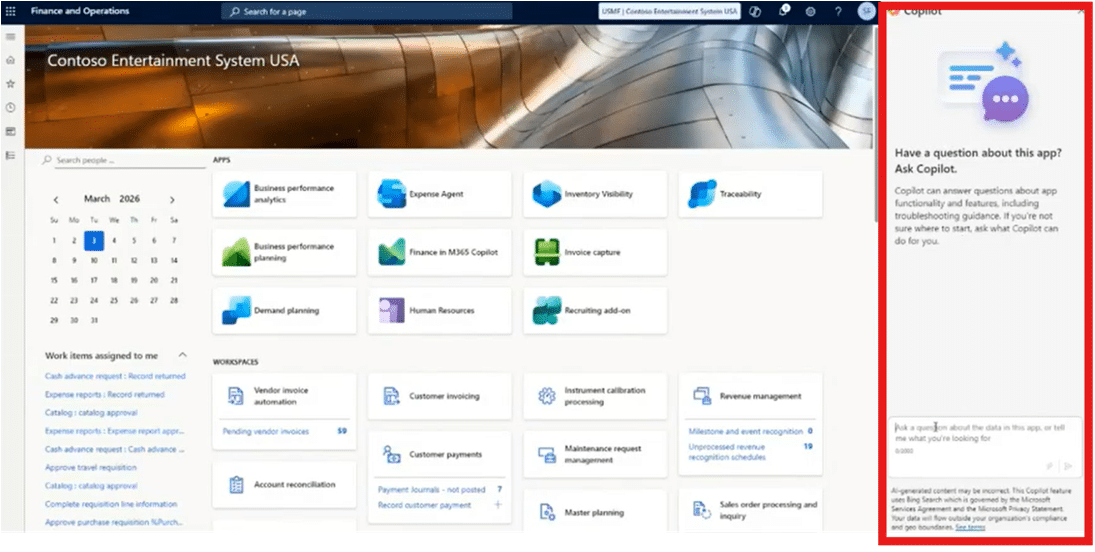
This panel allows your users to make natural language queries like:
- Ask questions about processes
- Retrieve system data
- Get guidance on tasks
At this stage, this type of AI is more interactive and good if you need to find smaller bits of information quickly, but this won’t help you with the heavy lifting of automation.
Step 2: AI Identifies Operational Impact
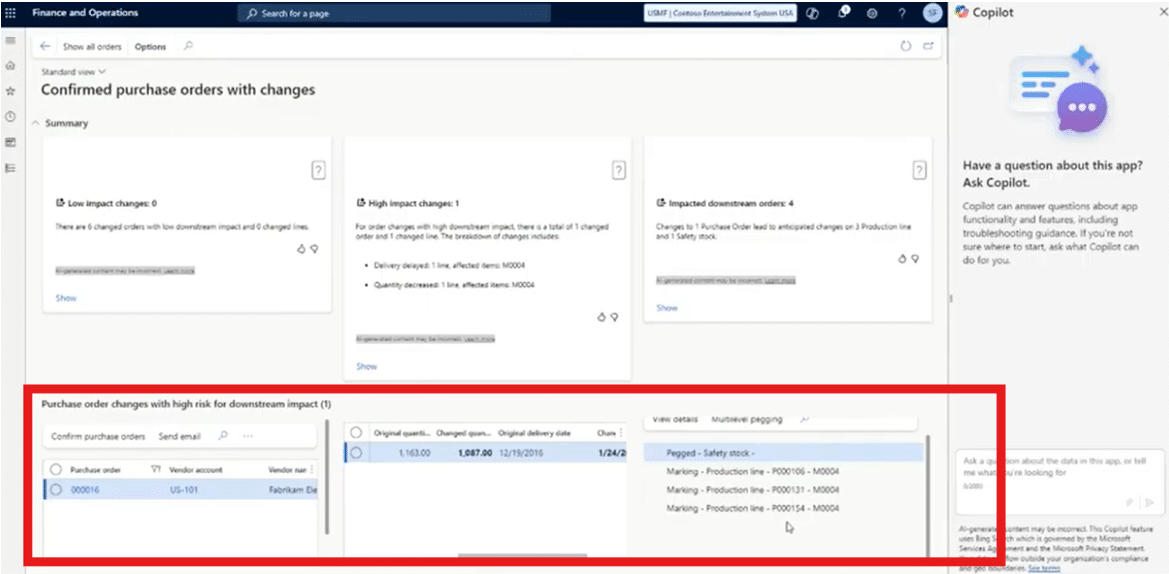
Next, we see AI being used to monitor production, like a purchase order changing (quantity/date), which impacts production planning.
Copilot detects the change, analyzes the impact it will have downstream, and will automatically surfaces insights so the team can review. This replaces manual checks and time-consuming analysis, freeing your production team up to focus more time on what matters.
Step 3: Introducing a Custom AI Agent
Let’s shift to something more powerful: custom agents. There are several agents already built into the system (or are likely being released soon), like the supplier communications and account reconciliation agents, but you can also create your own agents in Microsoft Copilot Studio to fit your specific needs.
For this example, we are going to use a custom “commodity support agent " that can communicate directly with growers, provide pricing and other information, and generate contracts.
Key capabilities:
- Operates via email or text directly with growers and purchasers
- Can function without human intervention
- Uses predefined “topics” to guide behavior
Let’s look a little more at how this commodity support agent was set up.
Step 4: Configuring Agent Logic
Behind the scenes, the agent is structured with topics (e.g. “Create Quote” or “Create Contract” and actions like (e.g. retrieve pricing, generate documents)
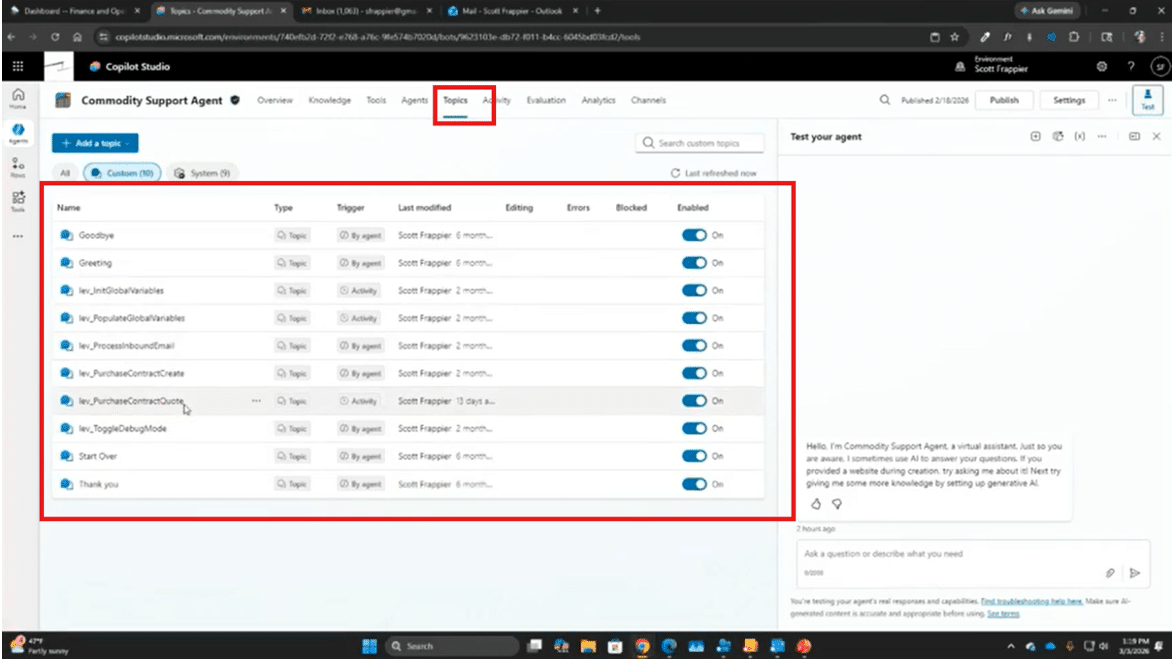
When a request comes in, the agent can identify the correct topic and then execute the right workflow. This is the “scaffolding” mentioned earlier in action.
Step 5: A Grower Requests a Quote
Now that your agent is set up and optimized, let’s get into the meat and potatoes of how it will work for you. A grower has sent an email to you saying:
“What are you paying for 4,000 bushels of corn?”
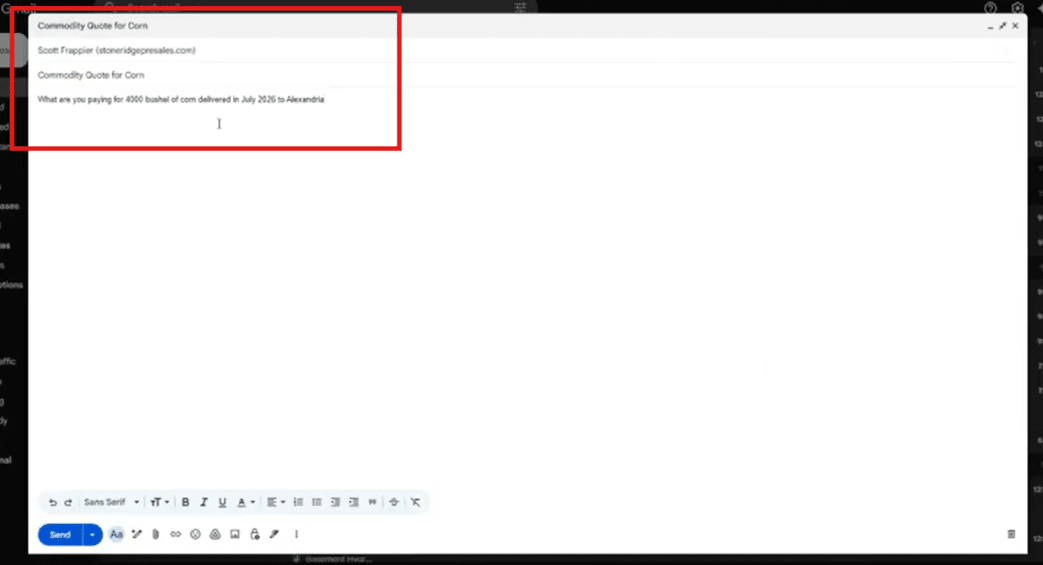
What happens next is that the agent will
- Recognizes the sender (existing customer data)
- The agent retrieves relevant pricing and finds the topic that best aligns with the inquiry
- It generates a formatted quote that can then be automatically sent back to the person who sent the email.
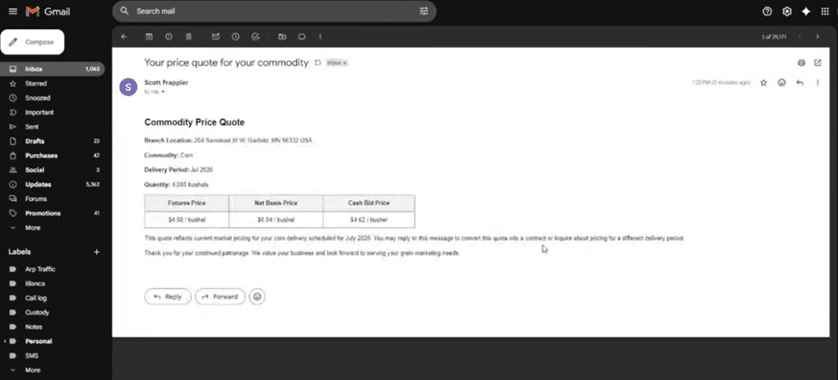
Within moments, the agent generates a professional quote that includes commodity details, quantity, pricing (futures, basis, cash bid), and brand information without any human intervention.
Step 7: Converting the Quote to a Contract
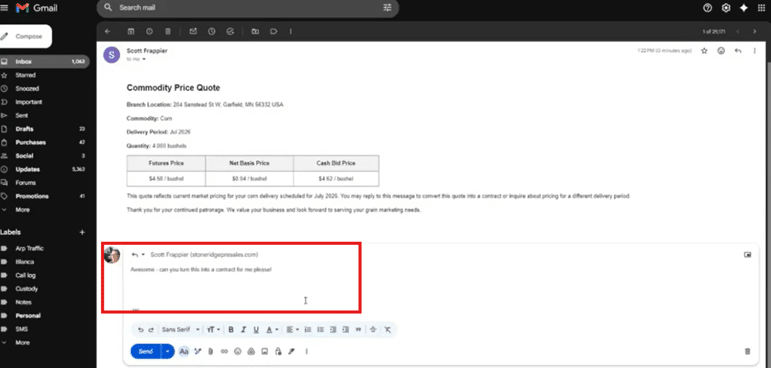
Once you have your automated quote, you can ask Copilot a simple question using natural language directly from your email account.
By simply asking, “Can you turn this into a contract for me?”, the agent can interpret the request, convert the quote into a contract, enter the transaction into the system, and send an automated confirmation via email.
The final contract details should look something like this:
Step 8: Behind-the-Scenes Integrations Expand Data Sources
What makes this possible? Connectors, Integration frameworks, Model Context Protocol (MCP). These helps your agent connect to:
- The business system that your company is currently operating
- Email platforms like Outlook, Gmail, and many more
- Data sources across your system, like SharePoint, OneDrive, Excel, and more.
It will navigate system forms, execute transactions, and retrieve and update data automatically through Connectors, integration frameworks, and MCP.
Step 9: Expanding Use Cases
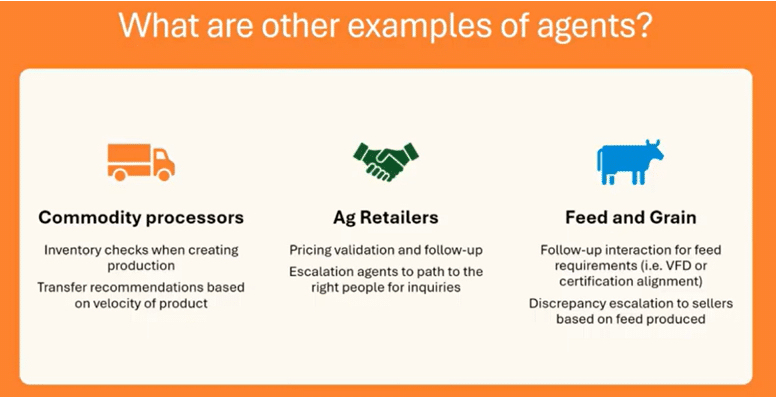
While additional scenarios where a custom agent like this one will depend on your business, what it needs to address, and the people powering it. Here are just a few examples to get you thinking about other areas where you can use Copilot agents in ag manufacturing:
For Commodity Processors
- Detect shortages during production
- Notify purchasing teams automatically
For Retailers
- Validate pricing before orders are finalized
- Route inquiries to the right department
For Feed & Grain Operations
- Follow up on missing compliance data (e.g., VFDs)
- Flag discrepancies in production vs. schedule
In every case, AI monitors the system, performs actions, identifies issues, creates content, sends emails, escalates to management, and so much more. Ultimately, the actions your agent will take depend on your unique business needs.
The Bottom Line: From Manual Work to Intelligent Automation
AI in agriculture isn’t about replacing people, it’s about making their jobs easier and empowering them to focus on more valuable tasks by:
- Eliminating repetitive work
- Improving responsiveness
- Enabling smarter operations
The grain companies that embrace AI-centric systems today will move faster, operate smarter, and server their customers better. All of these things will combine to boost your sales and drive profits.
Harvesting the Future: Where to Go From Here
If there’s one takeaway from all of this, it’s simple: AI works best when it’s embedded into the fabric of your business—not layered on top.
For ag leaders, it’s important to think about adopting these new tools and rethinking how your systems are designed to operate.
Start by assessing your AI readiness by asking:
- Are our systems AI-ready?
- Where are our biggest manual bottlenecks?
- What processes could be automated today?
From there, build your roadmap and start optimizing your use of AI today by:
- Modernizing your foundation
- Introducing targeted automation
- Scaling intelligently
Ready to Implement and Optimize AI within your Processes? Talk to Stoneridge!
Our experts can help you develop and implement an AI strategy that pinpoints exactly where it can be useful to you and how you can get your team on board with adoption.

Under the terms of this license, you are authorized to share and redistribute the content across various mediums, subject to adherence to the specified conditions: you must provide proper attribution to Stoneridge as the original creator in a manner that does not imply their endorsement of your use, the material is to be utilized solely for non-commercial purposes, and alterations, modifications, or derivative works based on the original material are strictly prohibited.
Responsibility rests with the licensee to ensure that their use of the material does not violate any other rights.