















How to Build AI Agents That Actually Work with Copilot Studio
Building an AI agent in Copilot Studio can be surprisingly easy.
However, a common challenge is building an agent that consistently does what you need, works with your business data, handles failures appropriately, and continues delivering value months from now. Doing that takes a little more thought.
If you’ve experimented with Copilot Studio, you already know the basics. You can create an agent, connect it to data, add tools, write instructions, and start testing. The real challenge is moving from
“I built an agent”
to
“I built an agent that actually works for my business.”
The difference comes down to how you approach the agent’s purpose, architecture, prompts, data, and ongoing maintenance.
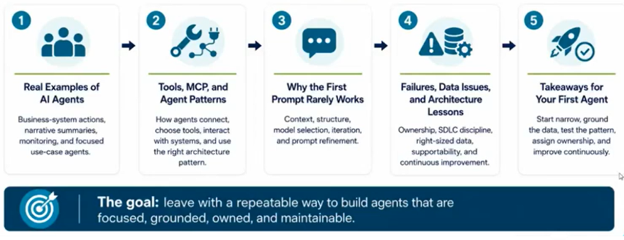
In this guide, you’ll learn practical lessons for building more focused, effective, and maintainable AI agents, from choosing the right use case and refining prompts to knowing when to use tools, MCP, topics, or child agents.

Real Examples of AI Agents in Use Today
On the surface, that approach makes sense. You have an AI assistant that you can give access to sales, customer service, finance, email, reporting, and any other processes your organization wants to automate.
The problem is that more capability doesn't necessarily mean a better agent.
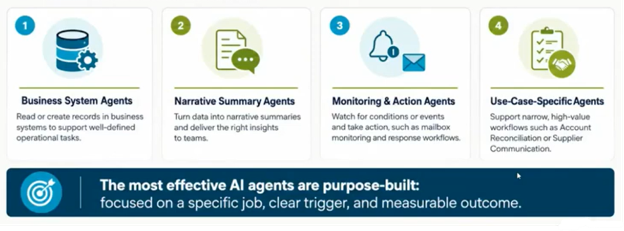
In practice, some of the most effective agents focus on smaller, more specific business tasks. Across business environments, several patterns appear repeatedly:
- Business system agents that look up, create, or update information in systems such as Dynamics 365.
- Narrative summary agents that gather information and turn it into a useful summary for employees or leaders.
- Monitoring and action agents that watch for something to happen and then take an action, such as monitoring an inbox and processing incoming information.
- Use-case-specific agents designed around a narrow, high-value workflow.
Consider a sales opportunity agent. Instead of asking an employee to search through opportunities and figure out which ones haven't received a follow-up, an agent can identify opportunities that have fallen outside an established contact cadence and notify the salesperson.
Or consider a case-management agent. When a new case is created, an agent could look for similar historical cases, identify relevant documentation, and provide useful information before the case reaches a human employee.
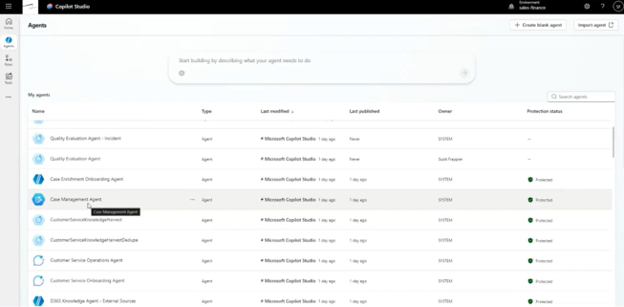
The important part isn't simply that these agents use AI. It's that each agent has a clearly defined job.
Don't Build One Agent to Rule Them All
The more responsibilities you give an agent, the more opportunities you create for it to choose the wrong path.
For example, imagine building a Copilot Studio agent with 15 different topics. You ask it to work with quote information, but it decides to create an order instead. The problem may not be the underlying functionality. The problem may be that the agent doesn't have enough context to distinguish between those two tasks reliably.
Agents don't always make decisions through simple, deterministic logic. They evaluate your request's context and determine which capability best matches it.
That means you need to think about probability and context, not just whether a particular topic technically exists. Your agent will still be complex, but its complexity should support a clearly defined objective.
The first question you should ask when designing an agent isn't
“What can I make this agent do?”
It should be
“What one task am I trying to automate?”
Tools, MCP, and Agent Patterns
Once you have a clear task, you need to determine what your agent needs to accomplish it.
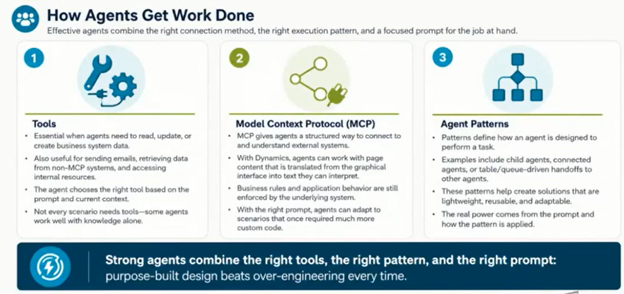
That's where tools, Model Context Protocol (MCP), Power Automate, knowledge, and agent patterns come into play.
Give Your Agents the Right Tools
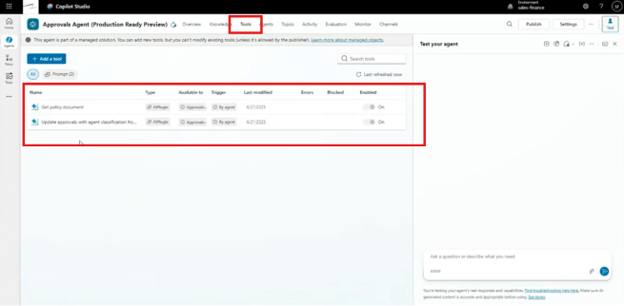
Tools allow an agent to interact with business information and systems. Depending on your environment, that could mean reading, creating, or updating business data through AI plugins, Power Automate, or MCP.
Not every agent needs tools. A knowledge-based agent may simply need to retrieve information and provide an answer. But when your agents need to interact with a business system or dataset, the way you connect those agents to your system matters.
If you have a system that doesn't support MCP, for example, Power Automate can provide a useful bridge. A flow can connect to SQL Server or another business application, retrieve the required information, and return it to the agent.
The agent then has access to that capability without you having to build an entirely separate integration.
Why MCP Changes the Design Approach
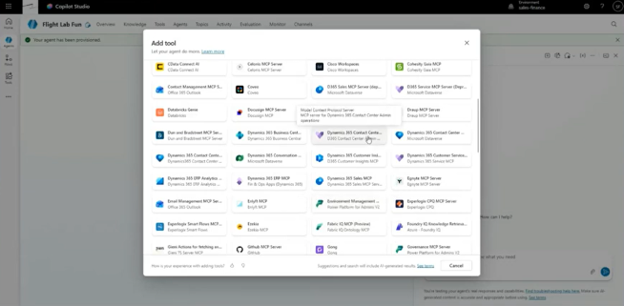
MCP is particularly useful because it gives agents a richer understanding of connected systems and the actions those systems make available.
Instead of hardcoding every step into a topic, you can expose the appropriate system capabilities to the agent and give it instructions about when and how those capabilities should be used.
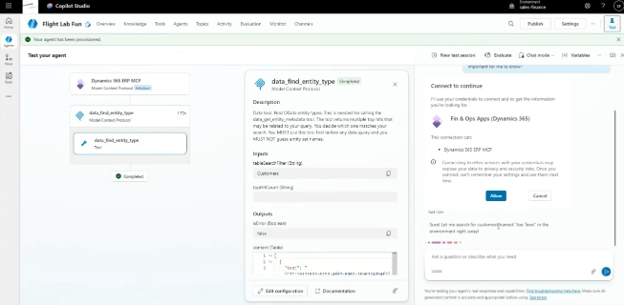
For example, a Dynamics 365 MCP connection can expose actions associated with a business system. Your instructions can then tell the agent to use that connection when a user asks for customer information.
That means you aren't necessarily telling the agent:
- Open this system.
- Find this table.
- Run this action.
- Return the result.
You're providing the agent with the tools and context it needs, then allowing it to determine how to accomplish the task. This shifts the focus away from building a rigid sequence of instructions and toward giving the agent the context and capabilities required to complete a task autonomously.
Choose the Right Architecture
That doesn't mean topics are obsolete. In fact, a production agent may use a combination of approaches.
For example, a contract-processing agent can have:
- MCP connections to business systems
- Email capabilities
- Topics for consistent processing and debugging
- Child agents that specialize in specific subtasks
Think of the primary agent as an overseer. It coordinates the larger process while specialized child agents handle individual responsibilities.
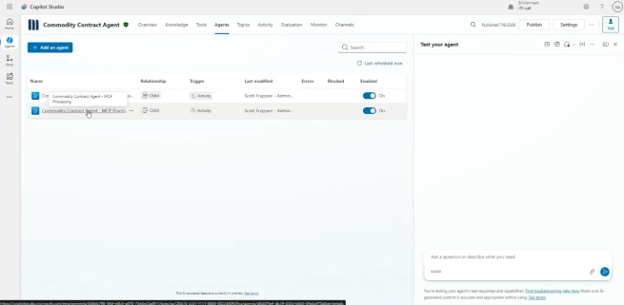
This creates a solution that is more lightweight, reusable, and adaptable than trying to put every responsibility into a single agent. The pattern you choose should ultimately reflect the task you're trying to solve.
Better Prompting: Why the First Prompt Rarely Works
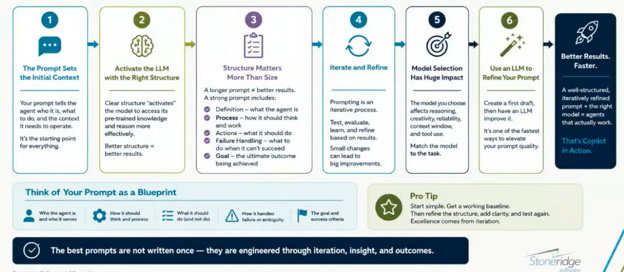
You've connected your tools. You've defined the task. You've built your agent. Now comes the part that can make or break the entire experience: your instructions.
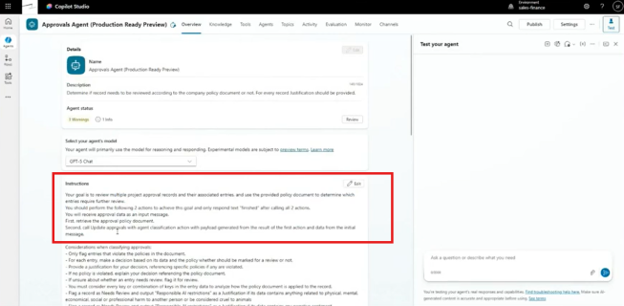
One of the biggest mindset shifts with Copilot Studio is recognizing that you're writing context rather than code to control every action. Your instructions establish what the agent is, what it needs to do, what tools it should use, what success looks like, and what it should do when something goes wrong.
The most important thing to remember is this: your first attempt probably won’t be perfect, and that’s normal.
Give Your Agent Enough to Work With, But Not Too Much
Your instructions shouldn't be a single vague sentence, but they also shouldn’t be an enormous block of text that tries to account for every possible situation. Instead, organize them around five elements:
- The agent's role: What is this agent responsible for?
- The process: What does it need to do to accomplish its task?
- The actions: What tools or capabilities should it use?
- Failure conditions: What happens if something doesn't work?
- The goal: What does successful completion look like?
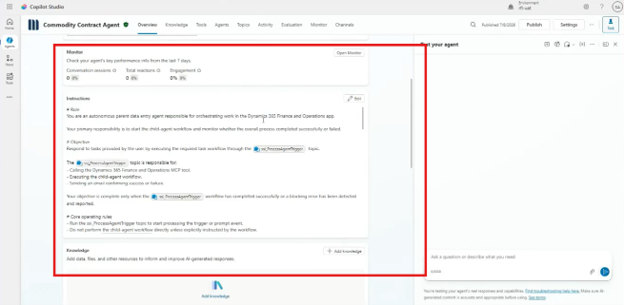
For example, you might define an agent as responsible for moving specific data between Dynamics 365 Sales and Dynamics 365 Finance and Operations.
From there, you can define the process it should follow, the business rules it needs to respect, the source of truth for the information, the parameters it should use, and what constitutes success or failure.
This provides the structure the agent needs without forcing every decision into a rigid topic path. It’s almost like training new hires: you can throw data and processes at them, but if you don’t teach them what to do with that information, how to resolve errors, and why they are doing the work, they aren’t likely to succeed.
The Prompt Is a Starting Point – Not a Finished Product
This is where AI agent development differs from simply writing a traditional process. You can start with version one of your instructions, test the agent, discover something isn't working, change the instructions, test again, and continue refining.
For example, imagine that a rounding issue requires roughly 10 iterations to produce the desired result. The agent may be technically following the instruction, but the wording may not produce the desired interpretation consistently, leading to bad answers.
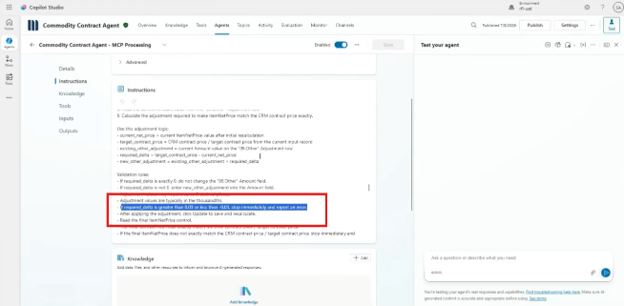
That's an important lesson: if your agent isn't behaving correctly, don't immediately assume the technology is the problem. Examine the context you're giving it.
You can even use Copilot to help refine your Copilot Studio instructions. Explain what you're trying to accomplish, identify the model you're using, provide your existing instructions, and ask for help refining them. Test the revision. Then test it again. Do that until you get it right.

Models Matter
The model you're using can affect how your instructions behave.
A prompt that works well with one model may not produce the same results with another. That means model selection should be part of your testing and refinement process. When you change models, don't assume your existing instructions will automatically perform the same way:
- Test them.
- Measure the results.
- Refine where necessary.
Don’t ask an agent to “think out loud” as part of its processing. Exposing its internal reasoning can affect performance and, in some situations, increase the potential for hallucinations because the generated reasoning becomes part of the ongoing conversational context. You are more likely to achieve useful results and appropriate updates if you aren’t running a commentary on every internal step.
Failures, Data Issues, and Architecture Lessons
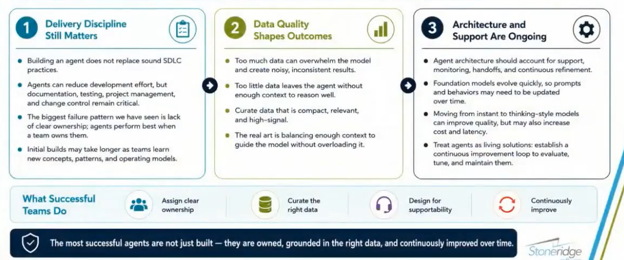
Getting an agent to work once is one thing. But getting it to work reliably in a live production environment is another. When you start moving beyond prototypes, consider these lessons:
Treat Failure as Part of the Design
Your agent shouldn't only know what success looks like; it should also know what failure looks like. If an operation fails, you will want to know three core things: what happened, why it happened, and what the fallout was. You should also ask questions about what happens next:
- What should happen?
- What information should be captured?
- Who needs to know?
- Should the process stop, retry, or hand the task to another agent or employee?
These decisions should be built into your instructions and architecture.
For example, an agent can maintain success and failure information based on the results of its processing, then use a specialized email agent to communicate the outcome.
You don't necessarily need to hardcode every possible email template. You can give the email agent focused instructions around what a successful or unsuccessful outcome should communicate and establish a preferred format based on your testing.
Let the agents handle appropriate decisions while still giving them enough structure to produce a consistent result.
Don't Drown Your Agent in Data
When it comes to feeding your agent data, quality over quantity reigns supreme. Giving your agent an overwhelming amount of data will make it harder for it to identify what matters.
Your data should be:
- Relevant
- Compact
- High-signal
- Aligned with the context of the task
Think carefully about what information the agent needs to accomplish its objective. If your employees would have trouble finding the important information in a massive document, there's a good chance your agent will benefit from having that information refined and properly grounded as well.
Build With Discipline
AI agents may be quick to prototype, but that doesn't mean they should be treated as throwaway experiments once they reach production. You still need discovery, project management, a software development lifecycle, ownership, and support.
This becomes particularly important because AI models continue to evolve. A model available today may eventually be replaced, upgraded, or deprecated. When that happens, you may need to update the model behind your agent, revisit your prompts, and test the agent again.
Like any other software solution, AI agents are not “set it and forget it” tools. They require ongoing care and support after go-live.
Agents are a Continuous Improvement Loop
Traditional software can require maintenance, but AI agents introduce another layer of ongoing change because the underlying models and reasoning capabilities continue to evolve. Your architecture, prompts, tools, data, and business processes can all change over time.
That means you should establish ownership for your agent after deployment:
- Who monitors it?
- Who evaluates its performance?
- Who updates its instructions?
- Who tests it when a model changes?
- Who decides when the agent should be modified or retired?
Answering those questions early can help prevent a promising AI project from becoming an orphaned solution six months down the road.
Ultimately, building an effective AI agent isn't about creating the most complicated solution you can. It's about creating a solution that understands its job, has access to the right context and capabilities, and can reliably deliver the outcome your business needs.
Turn Your AI Ideas into Business Results – Talk to the Stoneridge Experts Today!
The opportunity with Copilot Studio isn't simply to add another AI tool to your technology stack. It's to rethink how work gets done across your business. The right combination of focused agents, reliable data, thoughtful architecture, and continuous optimization can help you automate repetitive work while giving your people faster access to the information they need to make better decisions.
The Stoneridge team of experts can help you move beyond simply creating agents to building agents that effectively automate processes specific to your business.
Reach out to the Stoneridge team to learn how AI agents can streamline your business and drive success.

Under the terms of this license, you are authorized to share and redistribute the content across various mediums, subject to adherence to the specified conditions: you must provide proper attribution to Stoneridge as the original creator in a manner that does not imply their endorsement of your use, the material is to be utilized solely for non-commercial purposes, and alterations, modifications, or derivative works based on the original material are strictly prohibited.
Responsibility rests with the licensee to ensure that their use of the material does not violate any other rights.