









How to Use Asset Leasing in Dynamics 365 Supply Chain
Managing lease accounting often means keeping payment schedules, accounting calculations, journal entries, and financial reporting aligned throughout the lease term. As lease portfolios grow, coordinating these activities can become more complex and challenging. Fortunately, Dynamics 365 Finance & Supply Chain Management (D365 F&SCM) offers tools to help manage these processes more efficiently, specifically its Asset Leasing module.
This module brings lease information and related accounting together in one place within D365 F&SCM, helping you calculate lease liabilities and right-of-use (ROU) assets, generate accounting entries, and track lease activity throughout the lease term. It also supports ASC 842, the U.S. accounting standard for leases, and IFRS 16, the international financial reporting standard for leases.
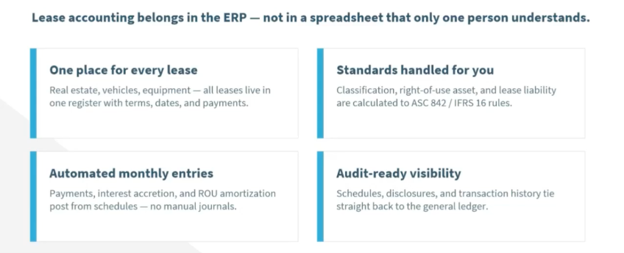
In this blog, I’ll explore the capabilities of Asset Leasing, from configuring the module and creating leases and payment schedules to generating accounting entries and accessing information for reporting and review.
Want to see the process in action? Watch the demonstration below, as I walk through setting up leases, generating accounting entries, and managing ongoing lease activity in D365 F&SCM.
Getting Started with Asset Leasing
Before setting up a lease in D365 F&SCM, it helps to understand a few key components of the Asset Leasing module. Together, these components help you manage lease information, define accounting rules, calculate payment schedules, and generate the journal entries needed to record lease activity. The module has a wide variety of applications and can be used to manage leases for real estate, vehicles, and equipment, and supports accounting under ASC 842 and IFRS 16.
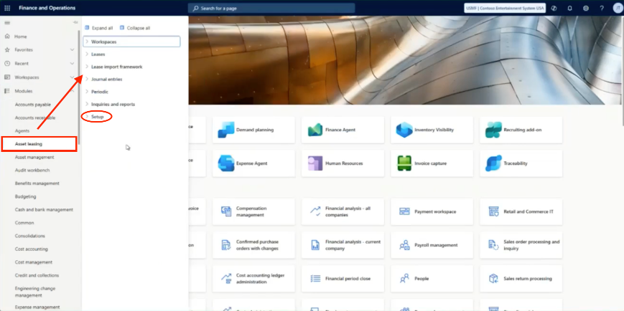
Within the module, there are four key components to understand:
- Lease record: Stores the details of the lease agreement, including the lease term, commencement and end dates, and payment information. This record provides the foundation for calculating lease accounting values and managing activity throughout the lease term.
- Lease book: Defines how the lease is accounted for, including its classification, discount rate, and posting accounts. Organizations can configure multiple lease books when they need to account for a lease under different accounting requirements.
- Payment schedule: Outlines the timing and amounts of lease payments over the lease term. D365 F&SCM uses this information to calculate present value and determine the amounts needed for lease accounting.
- Asset leasing journal: Contains the accounting entries associated with the lease, including initial recognition and recurring entries for lease payments, interest, and ROU asset amortization. D365 F&SCM can generate these entries based on configured schedules, allowing users to review and post them without recreating the calculations and journals each period.
Understanding how these components work together provides a foundation for the setup process. Next, let’s look at how to configure Asset Leasing in D365 F&SCM.
Configure the Module and Lease Books
Before entering leases, you’ll need to configure Asset Leasing to reflect your accounting requirements and posting processes. These settings establish how the system classifies leases, calculates amounts, and generates accounting entries.
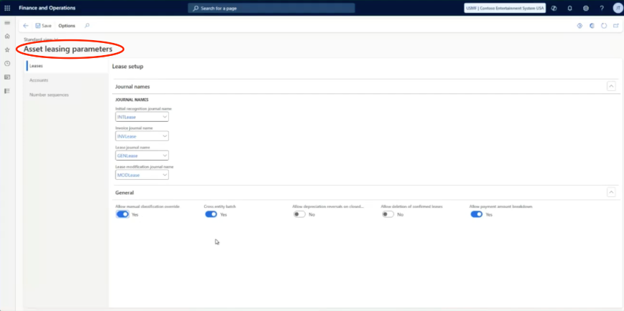
To do this, start with the Asset Leasing parameters in D365 F&SCM. Here, you can configure calendars, number sequences, and default posting behavior, along with the general ledger accounts used for lease-related transactions.
Next, configure your lease books, which define the accounting rules applied to each lease. You can create multiple books to accommodate different accounting standards.
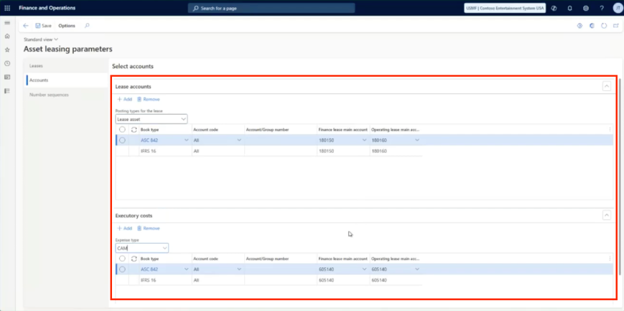
Other configuration options include:
- Lease groups and classification criteria: Define the rules used to classify leases for accounting purposes.
- Posting accounts: Map the general ledger accounts used for ROU assets, lease liabilities, interest, and payables.
- Discount rates and journal names: Establish the rates used in lease calculations and the journal names for accounting entries.
- Fixed asset integration: Link lease records to fixed asset records if your organization uses fixed assets in D365 F&SCM.
- Index-based and variable payments: Configure the module to account for these types of lease payments where applicable.
Configuring these settings upfront helps establish the groundwork for accurate lease calculations and accounting entries. With the setup in place, you’re ready to create a lease record and enter the details of an agreement.

Create a Lease and Build Its Payment Schedule
Once Asset Leasing is configured, you can begin entering lease agreements in D365 F&SCM. The system uses the lease details and payment terms to calculate the schedules needed for accounting. Let’s walk through the process using a building lease as an example.
Enter the Lease Details
You can access lease records through the Lease Management workspace, which provides an overview of lease activity, including open books, leases nearing expiration, and records that have not yet been commenced.
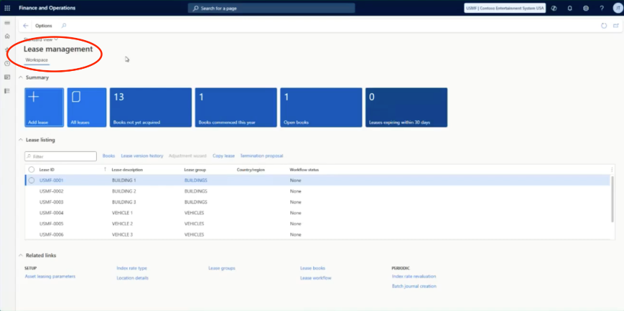
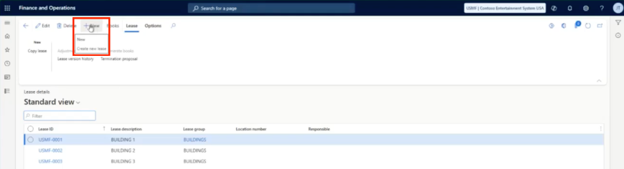
From there, you can open the lease details and create a new lease.
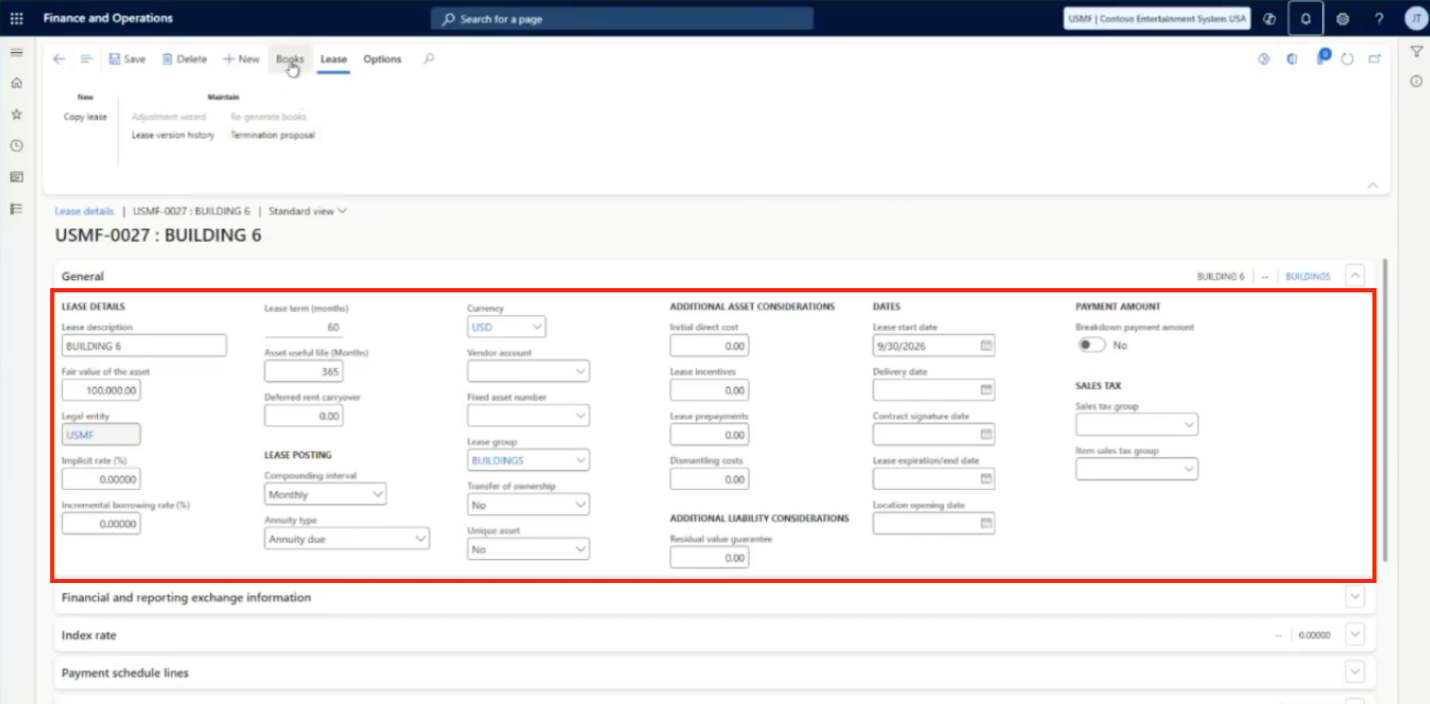
When creating a lease, you’ll enter the information the system needs to calculate the lease and apply the appropriate accounting rules.
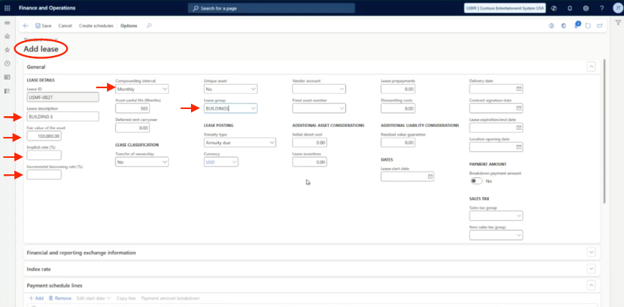
These may include:
- Lease and asset details: Entering a description for the lease, the asset’s fair value, and the applicable lease group, such as buildings or vehicles.
- Lease dates and term: Specifying the lease commencement date and the duration of the agreement.
- Discount rate information: Entering the implicit rate, when known, or the incremental borrowing rate used for the lease calculation.
- Additional accounting details: Depending on the lease, you may need to specify the compounding frequency, asset useful life, ownership transfer details, and whether the lease is linked to a vendor account or fixed asset record.
Next, enter the payment schedule lines. These capture the payment amount, frequency, term, and other applicable details, including index rates where relevant.
Once the lease information and payment terms are saved, you can generate the schedules.
Generate and Confirm Payment Schedules
After entering the lease details, D365 F&SCM can generate the payment schedule based on the dates, terms, and payment information you provided. The system also creates related expense, depreciation, and amortization schedules to support subsequent accounting processes.
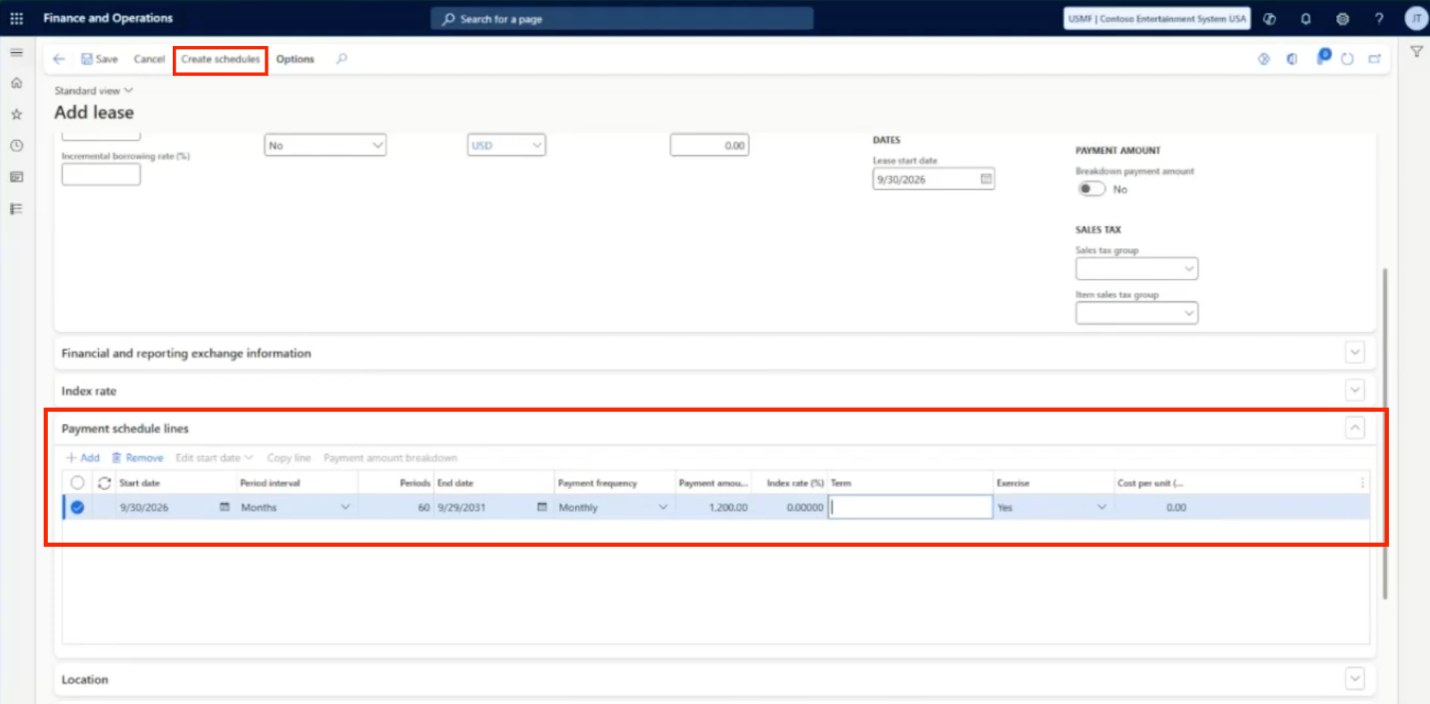
The schedules and calculated values are available within the lease books. For example, the system can calculate the initial right-of-use (ROU) asset and lease liability according to the accounting rules configured for each book. It also can display lease classification information, including the relevant fair value and lease-term tests.
Before proceeding, review the generated payment schedule to verify that it reflects the lease agreement. You can review individual payment amounts, variable payments, and present values, and make adjustments where needed.
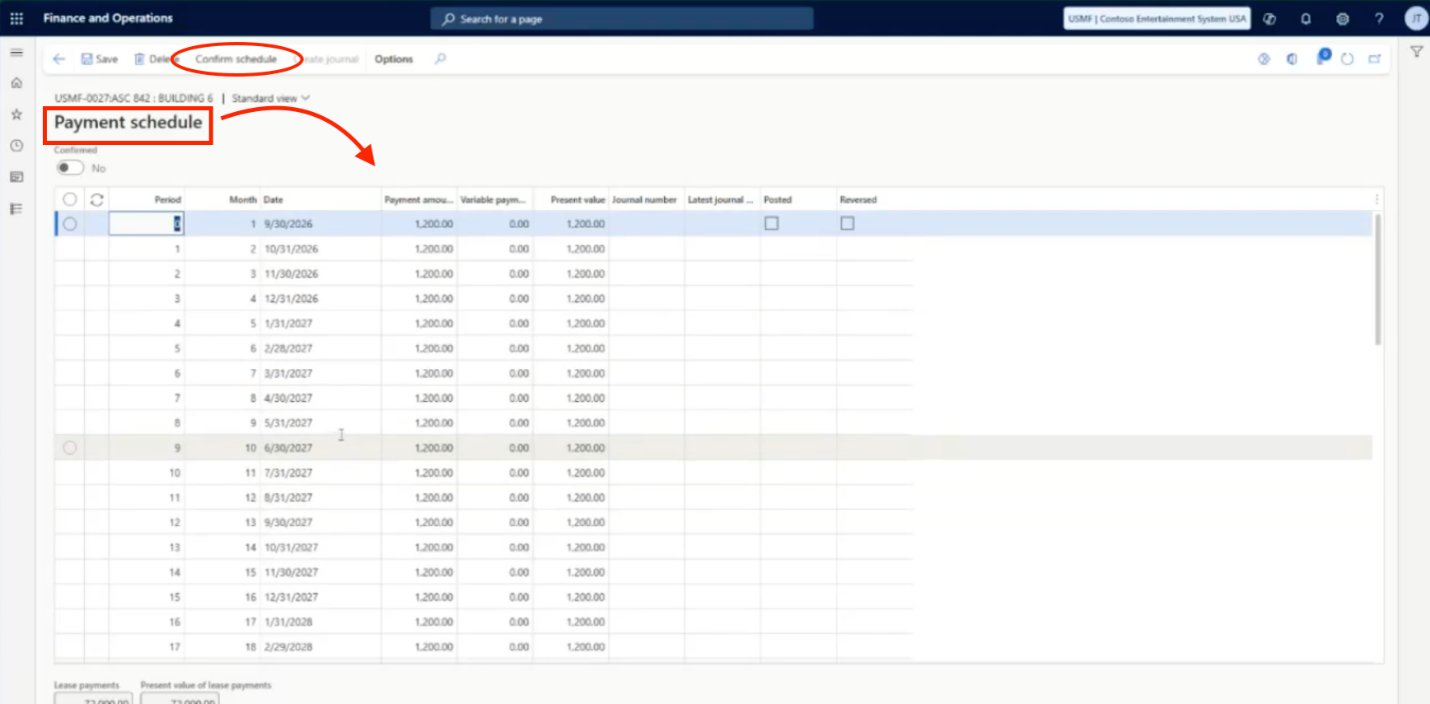
When the schedule is correct, confirm it. This step makes the lease available for journal entry creation. If the lease has multiple books, such as ASC 842 and IFRS 16, you can review and confirm the schedule for each book separately.
Once the schedules are confirmed, the lease is ready for the next step: generating the initial recognition journal. This records the lease’s calculated values in the general ledger and establishes the accounting entries needed to begin tracking the lease.
Generate the Initial Recognition Journal
Once the lease schedules are confirmed, you can generate the initial recognition journal directly from the lease record. In D365 F&SCM, navigate to the Functions tab and select the option to create the initial recognition journal. The system generates an Asset Leasing journal based on the lease’s calculated values and the accounting rules configured for the applicable lease book.

Before posting, you can open the Asset Leasing journals and review the journal lines and voucher details. This allows you to verify the accounting entries before they are recorded in the general ledger.
When you’re ready, post the journal. The initial recognition entries establish the ROU asset and lease liability in the general ledger, providing the starting point for ongoing lease accounting.
By generating these entries directly from the lease record, D365 F&SCM reduces the need to calculate and enter initial lease amounts manually.
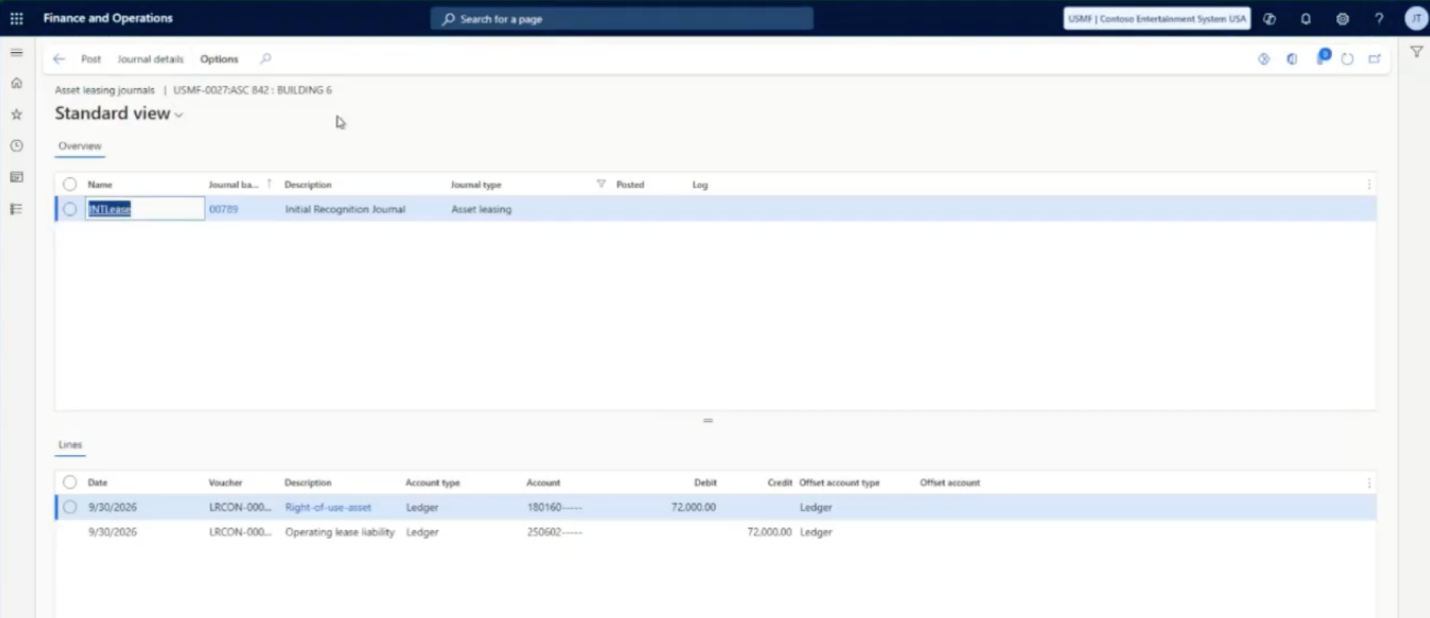
Once the initial recognition journal is posted, the lease is established in the general ledger. The next step is managing the recurring accounting activity throughout the lease term. D365 F&SCM can automate much of this work, reducing the need to prepare monthly lease journal entries manually.
Automate Recurring Lease Accounting
After the initial setup and schedule confirmation, recurring lease accounting becomes more of a review-and-post process. Rather than rebuilding spreadsheets and calculating entries each month, accounting teams can use Asset Leasing to generate the recurring journals based on the lease terms and accounting rules already configured.
These recurring activities can include:
- Lease payments and payables: Generate entries that reduce the lease liability and record the vendor payable for the applicable payment period.
- Interest accretion: Calculate interest on the outstanding lease liability using the discount rate configured for the lease book.
- ROU asset amortization: Generate amortization entries according to the applicable accounting method. This may include straight-line amortization for finance leases and level-cost amortization for operating leases.
Generate Recurring Journals in Batches
To streamline this process across a lease portfolio, D365 F&SCM includes a Batch Journal Creation option under Asset Leasing’s periodic tasks. This allows you to generate journals for leases within a selected period, lease group, or book ID.
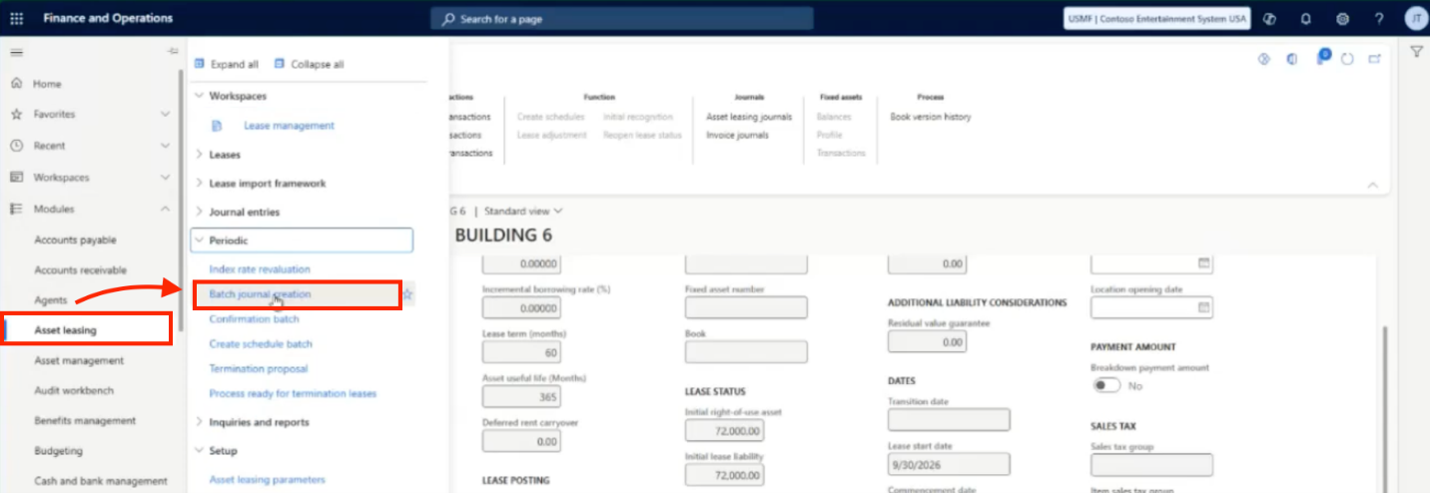
For example, you can run the process for a particular lease group or accounting book to create the recurring journals needed for that period. The accounting team can then review the generated entries and post them, keeping recurring lease activity organized within the regular accounting cycle.
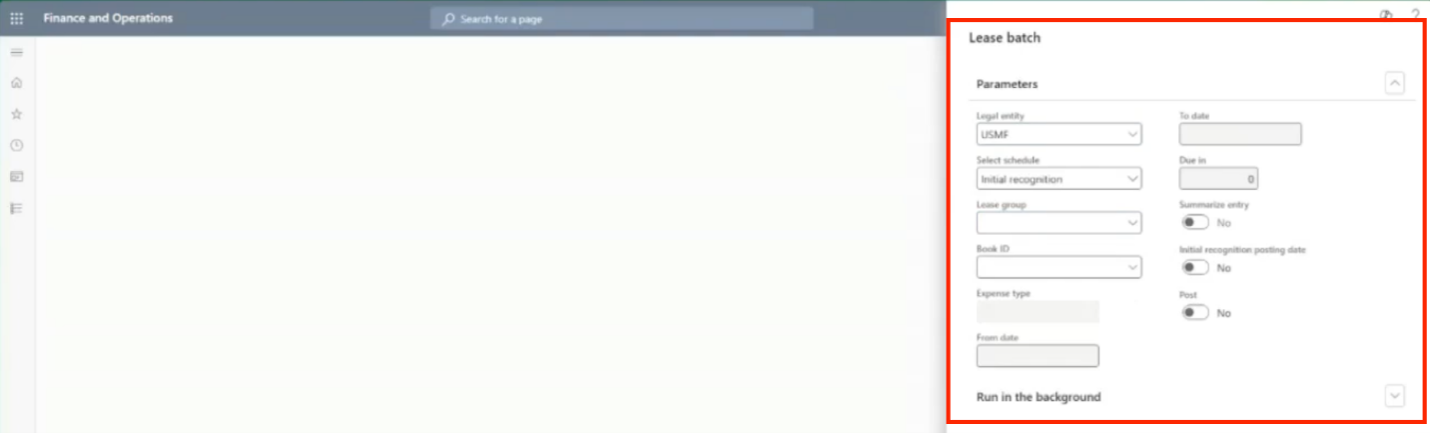
By automating journal creation, Asset Leasing reduces repetitive manual work while preserving the review and posting steps needed to complete the accounting process.
Once recurring journals are generated and posted, you can continue to monitor lease activity and review the accounting information associated with each lease. D365 F&SCM keeps lease details, schedules, and transactions connected, making it easier to track activity and access information for reporting and review.
Track Lease Activity and Support Reporting
Once leases are set up, Asset Leasing provides tools to monitor activity, review accounting details, and access reporting information.
- Monitor Lease Activity in the Lease Management Workspace
The Lease Management workspace provides an overview of lease activity, with visibility into open lease books, leases that have not yet been acquired, and leases nearing expiration. From the workspace, you can drill into individual leases to review their details and status.
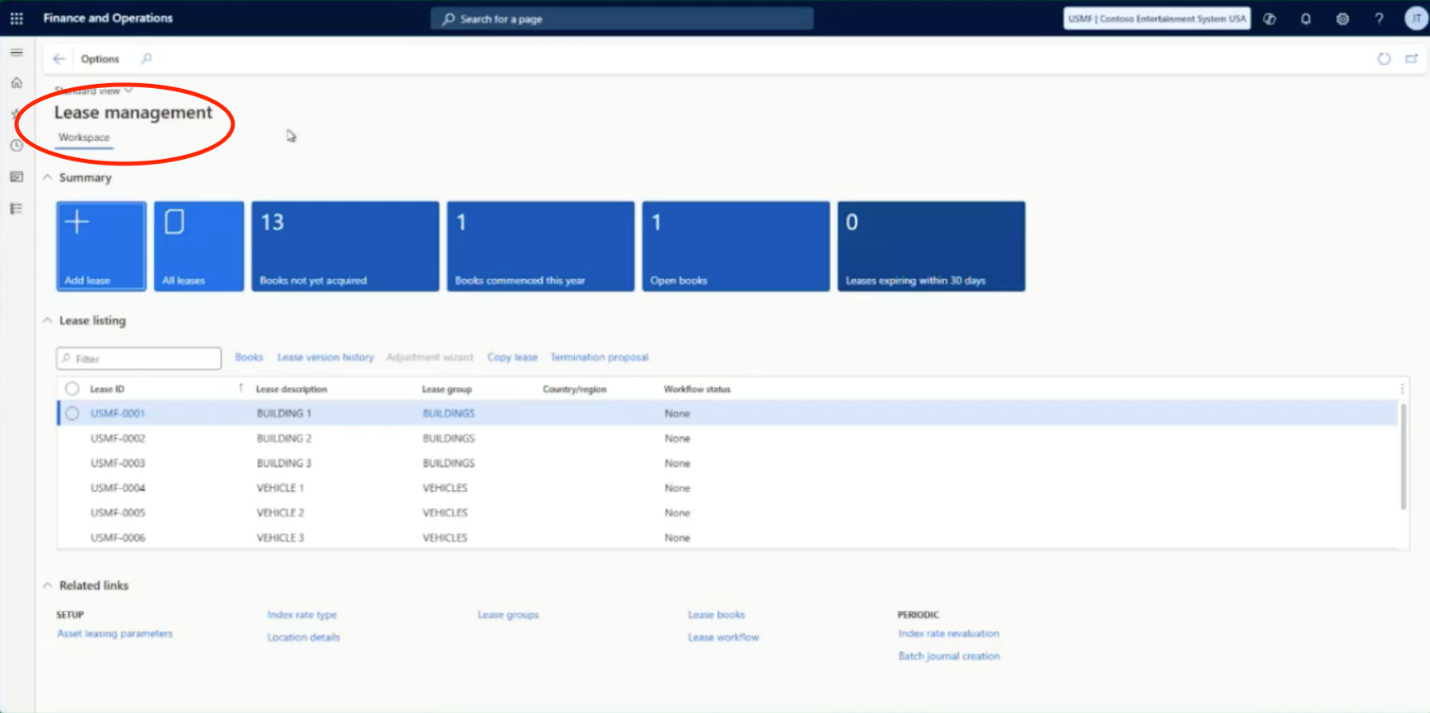
Within each lease, you can also access the related payment, depreciation, and expense schedules, along with transaction history tied to the lease’s accounting activity. This connected information helps you trace transactions back to the underlying lease and review how its accounting has been handled.
- Access Reports and Manage Lease Changes
Asset Leasing also provides access to lease inquiries, maturity reports, and disclosure information to support financial reporting and audit processes. Having lease details, schedules, and related transactions available in the system helps accounting teams gather the information they need for review and reporting.
Beyond routine tracking, D365 F&SCM supports changes throughout the lease term. Depending on the circumstances, you can modify lease terms, apply index adjustments, record impairment of an ROU asset, or process an early termination, including writing off the remaining lease liability as appropriate.
By keeping lease information and accounting activity connected, Asset Leasing makes it easier to monitor leases throughout their lifecycle, review transactions, and access the information needed for financial reporting and audits.
Make Lease Accounting Part of Your D365 Workflow
Managing leases involves more than tracking payment dates. It requires consistent accounting, accurate calculations, and visibility into lease activity throughout the term. Asset Leasing in D365 F&SCM brings these activities together, helping organizations manage lease information, apply the appropriate accounting rules across lease books, and generate the schedules and journals needed for lease accounting.
By automating schedule calculations and recurring journal creation, the module can reduce manual work while giving accounting teams a clearer view of lease transactions and reporting information. Teams can spend less time preparing entries and more time reviewing results and managing their lease portfolios.
If your organization uses D365 F&SCM, Asset Leasing may be worth exploring as a way to bring lease accounting into your existing workflows.
For More Information
Have questions about how Asset Leasing could fit into your D365 environment? We’d be happy to help. Connect with us at Stoneridge Software to talk through your lease accounting needs and explore how D365 F&SCM can help support your processes.

Under the terms of this license, you are authorized to share and redistribute the content across various mediums, subject to adherence to the specified conditions: you must provide proper attribution to Stoneridge as the original creator in a manner that does not imply their endorsement of your use, the material is to be utilized solely for non-commercial purposes, and alterations, modifications, or derivative works based on the original material are strictly prohibited.
Responsibility rests with the licensee to ensure that their use of the material does not violate any other rights.