















Improve Accuracy and Traceability with Barcode Label Verification in Power Apps
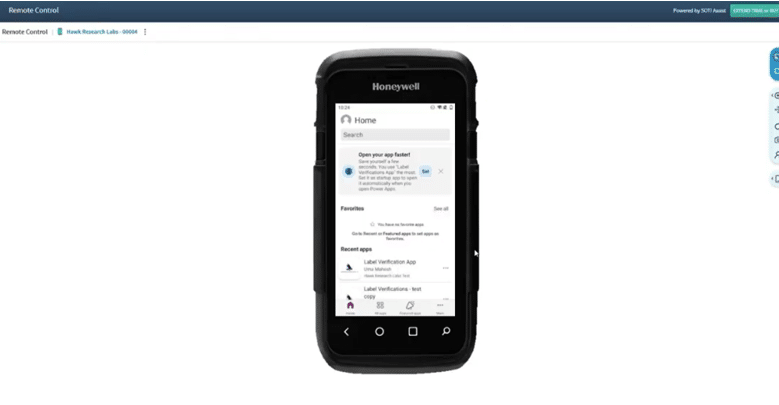
The margin for error in product labelling is slim, which is why implementing smart technology solutions is key to improving accuracy and traceability.
Barcode Label Verification – a Dynamics 365 solution built on Power Apps can help you meet those challenges head-on. By embedding barcode scanning directly into frontline workflows, you can ensure that the right label is applied to the right product without slowing down operations.
This app is purpose-built for handheld devices and comes equipped with real-time validation and backend data capture. It will have huge benefits for your operators and serve as a powerful control mechanism for your business, improving both accuracy and traceability while maintaining efficiency.
In this blog and video recording, you will learn about what this application does, how it can help you solve real challenges, and learn the ins and outs of how your team can start using it today.
Business Challenge: Labelling Accuracy and Traceability
Many organizations still rely on manual checks and human judgment to validate labels. In a high-speed environment with tight timelines, that can be a significant risk.
Even small errors can lead to:
- Mislabeling and product rework
- Compliance and regulatory risks
- Customer dissatisfaction and returns
At the same time, visibility into the process is often limited. When an issue occurs, it can be difficult to determine:
- Who performed the scan
- When it occurred
- Which batch or order was impacted
This traceability issue, driven by a lack of centralized data, makes audits, investigations, compliance and continuous improvement significantly harder. The challenge isn’t simply about accuracy. It’s about improving accuracy and traceability without adding more stress and friction to your frontline workers.
Barcode Label Verification will help.
How Barcode Label Verification Works
This solution is designed with simplicity at its core, ensuring quick adoption and minimal disruption.
Here is an example of a common workflow that a user might deploy this app for:
- Scan the Sales Order: The operator begins by scanning a sales order barcode, establishing the batch context.
- Scan Label and Product: The label and product (e.g., bottle) are scanned in sequence.
- Real-Time Validation: The system instantly validates the combination against predefined data to tell the operator if the scan is correct.
- Automatic Data Capture: Every interaction is logged in Microsoft Dataverse, capturing key details like user, timestamp, and result—without manual input.
- Continuous Workflow: Once the batch is set, operators can continue scanning additional items without restarting the process.
The application is optimized for rugged devices such as the Honeywell CT60 and Zebra scanners, ensuring it performs reliably in warehouse and production settings.
Key Capabilities: Real-Time Validation and Feedback
What makes this solution particularly effective is how it delivers validation and feedback in real time using centralized reference data.
Here are some other core features:
Immediate Error Detection
Errors are caught at the point of scan, reducing rework and improving overall quality. This gives your team peace of mind knowing that if an error occurs, they can catch it and resolve it right away with full visibility rather than it happening later in the process, when it might become more costly.
Clear Visual and Audio Feedback
Operators receive instant confirmation through:
- Green screens for correct matches
- Red alerts for mismatches
- Distinct audio cues for each scenario
This is especially valuable in noisy environments where visual cues alone may not be enough.
Speed and Simplicity
The user-friendly interface minimizes user interaction with features like auto-advancing fields and streamlined navigation, enabling high throughput without sacrificing accuracy. Ensuring users can comfortably using this tool is huge in boosting the overall efficiency you can draw from it.
Built-In Traceability
Every action is automatically recorded, creating a complete audit trail for compliance and operational insights. This not only gives you visibility in your data for internal improvement, but it keeps you ready for any audits that might come your way.
Simply put, the impact and business outcomes speak for themselves:
- Reduced labelling errors and rework
- Improved traceability and audit readiness
- Increased operator confidence and efficiency
- Standardized label verification processes
- A scalable foundation for future enhancements

Demo: See The Barcode Label Verification App in Action
Now, let’s take a look at how intuitive this tool is by walking through some common scenarios that we have seen with clients.
Scanning a Sales Order, Label, and Bottle (Match Scenario)
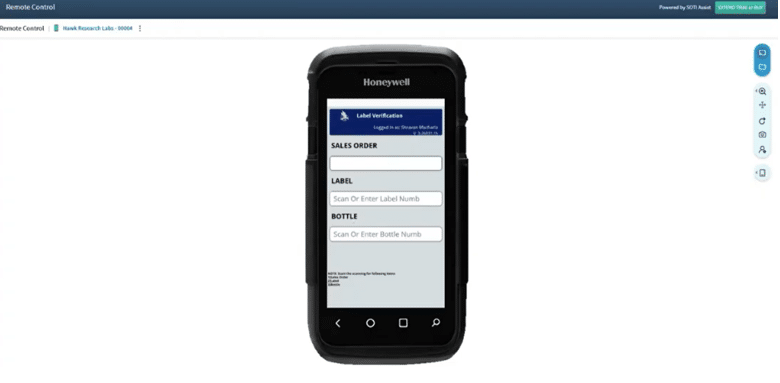
The process begins with scanning a sales order, which automatically populates the relevant field and advances the user to the next step. From there, the user scans the label and the product (bottle).
Correct Match
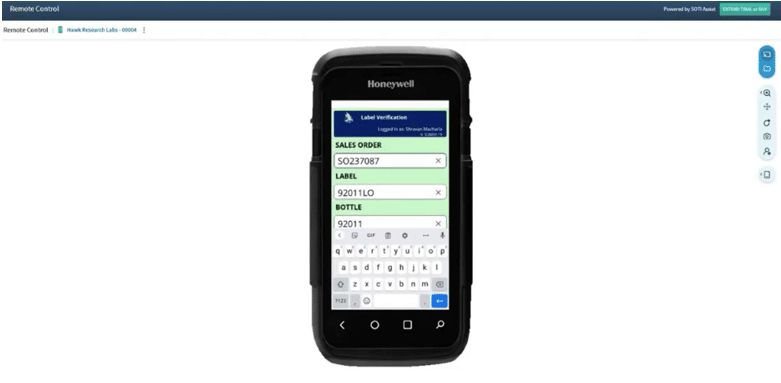
If the combination is correct, the user will receive immediate feedback in the form of a green confirmation screen, an audio cue, and automatic progression to the next scan.
- The label is scanned
- The product (bottle) is scanned
If the combination is correct, the system provides immediate feedback:
- A green confirmation screen
- An audio cue
- Automatic progression to the next scan
The batch context remains active, so users can continue scanning without re-entering the sales order. This happens because the system automatically captures and stores batch context, such as matches, mismatches, corrections, and overrides.
Mismatch Detection and Operator Correction
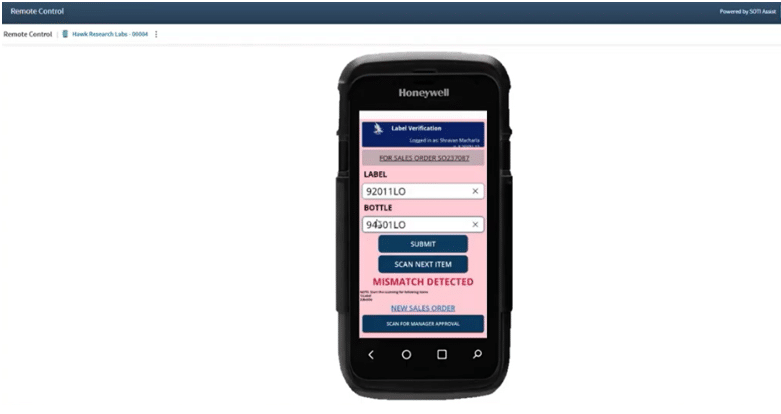
When an incorrect label-product combination is scanned:
- The screen turns red
- A mismatch message is displayed
- A distinct audio alert is triggered
If the error is accidental, the operator can quickly correct it by rescanning the correct item. The system immediately revalidates and confirms once the correct combination is scanned. This is important because it means that the workflow doesn’t stop, and operators can move forward efficiently.
Supervisor Override Workflow
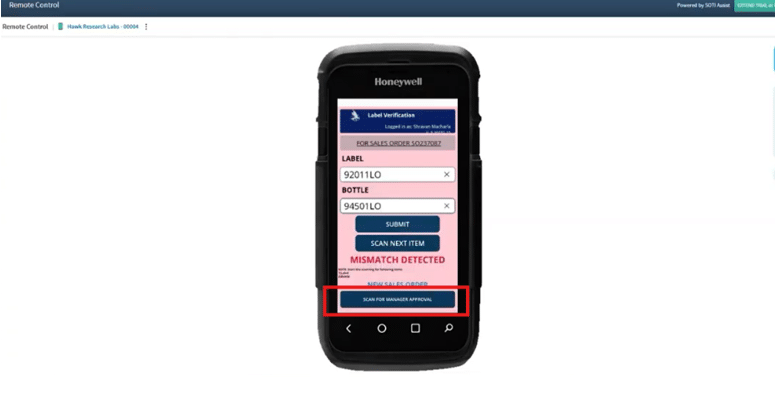
In cases where the system doesn’t recognize a valid combination, supervisors can step in to resolve the issue. Operators can trigger this process easily by:
- Initiating a supervisor override
- Getting a manager to scan the manager’s badge for approval
- The system validates whether the manager is authorized
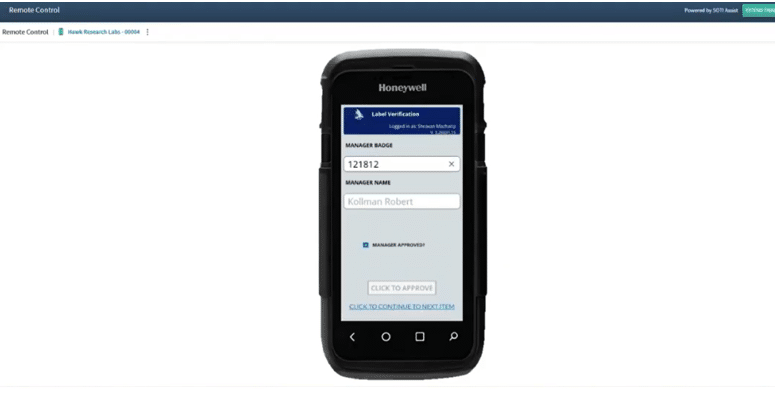
If approved, the override is corrected, and the operator can proceed without scanning. If it’s unauthorized, the system will block the action and prompt for a valid approver. This ensures governance and accountability while maintaining operational flexibility.
Dataverse Overview: Tables and Transaction Logging
Behind the scenes, Microsoft Dataverse powers the solution with a structured data model that captures and stores all of the important information you need without any human intervention.
For our bottle scanning example, key tables include:
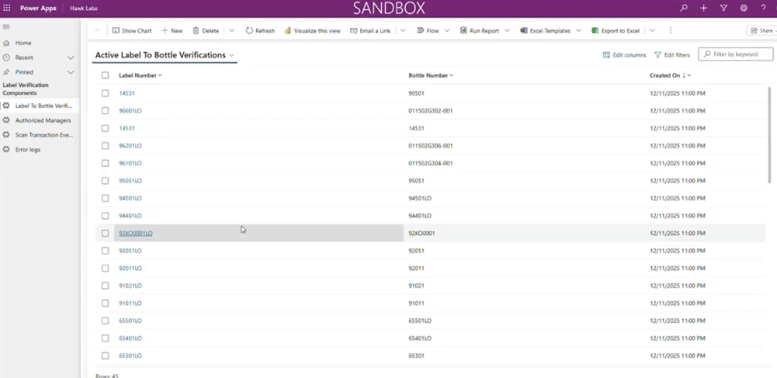
- Label-to-Product Verification Table: Stores valid combinations of labels and products for real-time validation.
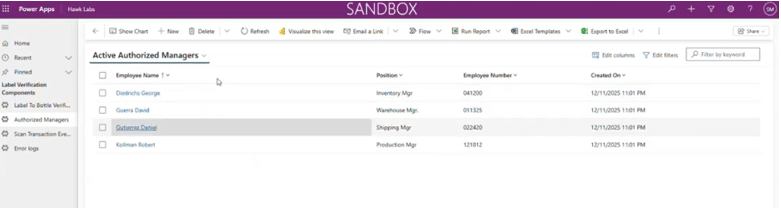
- Authorized Manager Table: Maintains a list of users permitted to approve overrides and resolutions to mismatches.
- Transaction Log Table: Captures every scan event, including:
- Sales order
- Label and product scanned
- User performing the action
- Validation result
- Timestamp
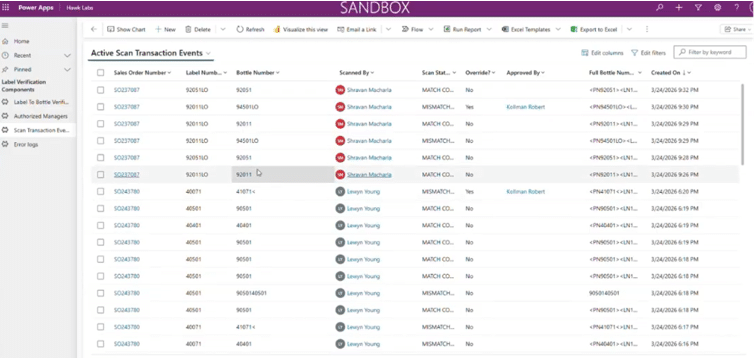
- Error Logs: If there is a technical error with the app, it will get automatically logged into the system. This automation captures all the data your IT or support team will need to fix the issue.
This architecture ensures both performance and scalability while enabling deep operational insight.
Reporting, Audit Trail, and Business Value of Barcode Label Verification with Power Apps
One of the most powerful aspects of this barcode solution is the visibility it creates. With every scan captured, organizations gain:
- A complete audit trail for compliance
- Detailed reporting on scan activity (daily, weekly, monthly)
- Insight into error patterns and operational bottlenecks
- Data to support root cause analysis and continuous improvement
Reach Out to Stoneridge for Assistance in Setting up Barcode Labels
Barcode Label Verification is a tremendous feature to have and is a critical capability for organizations looking to empower their users, improve quality and compliance, and streamline operational efficiency. Stoneridge Software experts can help you implement this tool with Power Apps, customize it to your organization, and ensure you are using it to its fullest ability.
If you’re ready to use this tool to reduce errors, improve traceability, and modernize your frontline operations, contact the Stoneridge team today.

Under the terms of this license, you are authorized to share and redistribute the content across various mediums, subject to adherence to the specified conditions: you must provide proper attribution to Stoneridge as the original creator in a manner that does not imply their endorsement of your use, the material is to be utilized solely for non-commercial purposes, and alterations, modifications, or derivative works based on the original material are strictly prohibited.
Responsibility rests with the licensee to ensure that their use of the material does not violate any other rights.