















Strengthen Agribusiness Customer Relationships with Dynamics 365 Sales & Power Pages
Create a modern customer portal that makes it easier for customers to connect, access information and do business with you.
In today’s world, customers are used to getting information when they need it. You can track a package, check an order, or manage an account online without waiting for someone to respond. For agribusinesses, however, I have seen that many customer interactions still depend on strong personal relationships supported by phone calls, emails, spreadsheets, and someone in the office tracking down an answer. That can create extra work for the sales and operations teams and a frustrating experience for customers. The good news is that there is a way to make routine interactions easier and more accessible without losing the personal relationships that remain central to agribusiness. The answer: modern customer portals.
A customer portal gives agribusiness customers secure, self-service access to the information they need while allowing your sales and operations teams to remain closely connected to the customer relationship. With Microsoft Power Pages and Dynamics 365 Sales (D365 Sales), agribusinesses can create a connected experience where customers can view quotes and orders, submit support requests, and check updates on their own, while your employees can continue managing those interactions through the systems they already use. This makes routine interactions more efficient without replacing the personal service and relationships customers value.
In this blog, I’ll explore how Microsoft Power Pages and D365 Sales work together to create modern customer portals for agribusiness, the key capabilities they can provide, and how connecting customer interactions to a shared source of data can improve efficiency, responsiveness, and visibility across the business.
I want to start by taking a look at a common agribusiness customer experience I often see.
The Challenge: When Customer Information Is Hard to Access
For many agribusinesses, customer service has naturally developed around the people. A customer may call for a quote, check on an order or delivery, or contact the office for a contract or other account information. An employee then finds the information, provides an answer, and often records or follows up on the interaction manually.
There’s nothing inherently wrong with this approach. In fact, I believe personal service is an important part of many agribusiness relationships. The challenge is what happens when the information needed to support those relationships is spread across multiple systems, spreadsheets, emails, and individual employees. Finding an answer can take time, information can be duplicated or outdated, and routine requests can pull your sales and operations teams away from higher-value work.
This is where customer portals can provide another option. Rather than changing how agribusinesses build and maintain customer relationships, a portal can give your customers what they are beginning to expect, a more direct way to access routine information, while allowing your employees to stay involved when their expertise or personal attention is needed.
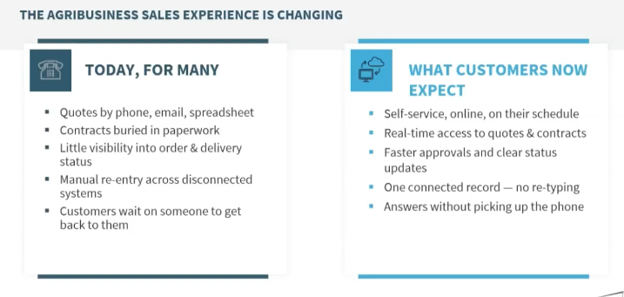
In the video below, I take a closer look at how modern customer portals can improve the customer experience through an online demonstration. If you prefer, keep reading for a closer look at what customers expect from a modern portal and how to meet those demands.
What Customers Expect From a Modern Portal
Something I have seen firsthand is that a modern customer portal should do more than put information online. It should make it easier for your customers to see where things stand, take action when needed, and get answers without having to navigate multiple channels. For agribusinesses, I believe that means creating a digital experience that complements the way customers already work while still supporting the personal service they value.
Convenience is an important part of that experience, but so is visibility. When customers can see the status of an order, review a quote, or check account information themselves, they have a clearer picture of what is happening without having to wait for an employee to respond. At the same time, sales and operations teams can spend less time handling routine requests and more time on the work that requires their knowledge and attention.
Again, a modern customer experience isn't about less connection or eliminating the personal relationships that are so important in agribusiness. I believe it's about making the connection easier.
Key Agribusiness Customer Portal Capabilities
An effective portal connects customer interactions to the systems and processes already supporting the business. Power Pages provides the customer-facing experience where customers can access information and complete common tasks, such as:
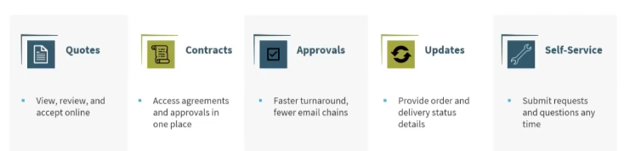
- Quotes: Review quotes and line items, then accept them online without printing, scanning, or sending emails back and forth.
- Contracts and account information: Access contracts, agreements, approvals, signed documents, and other account information in one convenient place.
- Approvals: See where an approval stands and move it forward without lengthy email chains or manual follow-up.
- Order and delivery updates: Check order and delivery status rather than calling or emailing the office for an update.
- Self-service requests: Submit questions, request support, start a reorder, or make other requests when it’s convenient for them.
- 24/7 access: Access information and complete routine tasks from a phone, tablet, or computer whenever they need it.
Just as important, these interactions shouldn't require employees to manually move information back into the business. A well-designed portal allows customer activity to become part of the team's existing workflows.
When a customer accepts a quote, checks an order, or submits a request, that activity can flow back to the business efficiently. The customer gets a more convenient experience, while employees spend less time rekeying information or managing routine requests.
Power Pages provides the customer-facing layer, giving businesses a way to create a secure, personalized portal while controlling what each customer can see and do. Let’s dive into this in more detail.
Power Pages: The Customer-Facing Experience
Power Pages can be designed around the way your customers actually interact with your business. After securely signing in, a customer can see information specific to their account, such as current orders, quotes, support requests, and other relevant information.
The customized experience can also include:
- Personalized information: Show customers the orders, quotes, account details, and other information relevant to them.
- Online forms: Let customers submit support requests, orders, quotes, or other requests directly through the portal.
- Support and knowledge: Give customers access to existing support requests, company information, and knowledge base articles.
- Mobile access: Provide an experience that works across phones, tablets, and desktops, so customers can interact with the portal wherever they are.
- Custom experiences: Design the portal around your business, including the information, forms, dashboards, and workflows that matter most to your customers.
- AI and Copilot: Add AI-powered experiences that can help customers find information, answer questions, and potentially initiate actions without navigating through multiple screens.
I know security is also an important part of the experience. With Power Pages, businesses can use authentication and permissions to ensure customers only see the information they should have access to. That means the portal can provide a personalized experience without exposing information from other customers or areas of the business.
And the experience doesn’t have to stop at providing information. A customer can submit a request, attach a photo or document, and receive updates as the team works on it. Behind the scenes, those interactions can flow directly into the systems the business is already using.
However, what the customer sees is only part of the equation. The value of a modern portal extends to the processes and data supporting that experience. When Power Pages is connected to D365 Sales through Dataverse, customer and sales information can stay connected from the initial interaction through fulfillment.
The Real Value: Connecting the Portal to D365 Sales
Think of Power Pages as the front door to your business. It’s where customers log in, view information, and submit requests. Behind that experience is Microsoft Dataverse, which provides a shared data foundation. D365 Sales then gives your sales team access to that same information.
In simple terms:

Each piece plays a role:
- Power Pages provides the customer-facing experience.
- Dataverse provides the shared data foundation.
- D365 Sales gives the sales team access to the same customer and sales information.
- Operations and fulfillment can update information that flows back into the customer experience.
The important part is that this isn't a series of separate systems passing copies of information back and forth. The portal reads and writes to the shared data in Dataverse, so your sales team can work with the same customer records and activity.
For example, if a customer accepts a quote through the portal, your sales team doesn't need to reenter that information. Also, if a customer submits a request at 10 p.m., that request can already be in the system when your team starts work the next morning.
The connection also works in the other direction. When your operations team updates an order or delivery status, that information can be reflected in the customer portal without someone having to send an email or make a phone call.
That creates one connected flow of information across the customer, sales, and operations teams. Instead of piecing together what is happening from email inboxes, spreadsheets, and multiple systems, everyone can work from the same information.
This is the difference between a portal that simply looks modern and one that actually improves the way the business works. The real value isn't the portal itself. It's what the portal makes possible for the business.
That same setup gives your internal team better visibility. Instead of managing portal activity separately, sales and service teams can see those customer interactions alongside the rest of the account information they already use.
What Working with a Customer Portal Looks Like for the Sales Team
Inside D365 Sales, customer activity from the portal becomes part of the broader account record. That means your sales team can see what customers are doing and respond without manually transferring information from the portal into their sales system.
A connected account view can bring together:
- Customer activity: See portal interactions, requests, and other customer activity alongside the account record.
- Quotes and orders: Access current and historical quotes, orders, and invoices in one place.
- Opportunities and pipeline: See active sales opportunities and where they stand.
- Support requests: View requests submitted through the portal, including descriptions and attachments, without rekeying the information.
- Account history: See contacts, sales activity, support history, and other relevant customer information in one record.
- Dashboards and KPIs: Give teams visibility into pipeline, sales activity, quotes, orders, and other measures that help them manage the business.
For example, when a customer submits a delivery issue through the portal, the request can appear directly in D365 Sales with the customer's information, description, and any attachments they provided. Your team can then work the request and provide updates from the same system.
The result is a simpler experience on both sides. The customer gets an easier way to interact with the business, while your internal team gets a more complete view of the customer and the work happening around the account.
From my experience, everything comes back to a simple question: what does a connected customer experience make easier for the business? The payoff comes down to three areas: efficiency, responsiveness, and visibility.
The Business Payoff: Efficiency, Responsiveness and Visibility
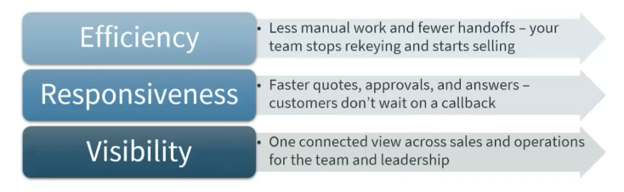
- Efficiency: A connected portal can reduce manual, repetitive work such as rebuilding quotes, rekeying information, and tracking down paperwork. That gives teams more time to focus on customers rather than administrative tasks.
- Responsiveness: Customers can get answers, check information, submit requests, and move quotes or approvals forward when they need to, whether they’re in the field, at home, or in the office. Faster access can mean faster action for both customers and employees.
- Visibility: When sales and operations work from connected information, teams have a clearer view of the customer and what is happening across the account. Leadership can see what has been quoted, approved, and fulfilled without piecing together updates from multiple people or systems.
And this doesn't require building a one-off system from scratch. Power Pages and D365 are designed to work together, giving agribusinesses a way to create the modern customer experiences people now expect while working with the systems they already rely on.
The result is straightforward: a better experience for customers, less manual work for employees, and better visibility across the business.
Modernize the Customer Experience Without Losing the Personal Touch
Agribusinesses are built on relationships, and modernizing the customer experience doesn't mean changing that. A customer portal can give customers more control over routine interactions while giving employees more time to focus on the relationships, conversations, and work that matter most. The goal is to create a more connected customer experience using technology that works with the systems a business already relies on, rather than adding another standalone system. Power Pages and D365 Sales give agribusinesses a way to modernize routine customer interactions while keeping the people, relationships, and systems at the center of the experience.
If you're exploring how a modern customer portal could work for your business, Stoneridge Software can help. Our team can help you evaluate your current customer processes, identify opportunities for self-service, and build a connected experience using Microsoft D365 and the Power Platform. Please reach out to start the conversation.

Under the terms of this license, you are authorized to share and redistribute the content across various mediums, subject to adherence to the specified conditions: you must provide proper attribution to Stoneridge as the original creator in a manner that does not imply their endorsement of your use, the material is to be utilized solely for non-commercial purposes, and alterations, modifications, or derivative works based on the original material are strictly prohibited.
Responsibility rests with the licensee to ensure that their use of the material does not violate any other rights.