















Inside Our Extension Reviews: A Look at Simple Object Designer for Business Central
One of the many strengths of Microsoft Dynamics 365 Business Central lies in its ability to adapt to any workflow to a precise degree. The vast network of vendors created a strong herd of vertical and horizontal extensions. And it continues to grow.
At Stoneridge, we evaluate extensions from many points. We start with the customer-specific requirements for the functionality, and finish with what the use of this extension means to the customer in the long run.
In every customer project, the functionality evaluation considers three factors: sufficiency, excess, and budget. Figuring out the long‑term cost of using the extension is much harder. We stay with the project from delivery through long‑term support, so our choices must hold up over time.
In this blog, you'll see how extension decisions are evaluated to find the best fit for different project scenarios, starting with Simple Object Designer.
This post is for people considering Business Central, existing Business Central users who want to get more from it, and teams who support their system day-to-day.
With this overview, you’ll be able to look at extensions the way we do and choose what truly fits your business.
Background: Where Extensions Fit in the Business Central Lifecycle
The strength of Business Central lies in its adaptability - especially the capability to introduce custom fields to entities (pages, reports) and ensure they’re reflected across all relevant documents.
A typical life cycle of Business Central for a customer consists of 3 phases:
Phase 1: Net New Implementation. The initial setup of Business Central is to align the system with the customer’s workflow. Vendor (in this case, Stoneridge Software) implements custom functionality. This includes the creation of new fields in bulk, which keeps the cost per field low and embedded in the overall solution.
Phase 2: Adopting the System. Once the customer begins using Business Central in daily operations, they aim to centralize their information. This often reveals missing fields that were not identified during implementation. These fields are typically added individually and rarely require custom logic.
Phase 3: New Projects. Once Phase 1 is fully adopted, customers are more fluent in using Business Central. They begin to think beyond just new fields. Custom logic is now a required component to support their workflows.
Throughout Phase 1, introducing new fields is a normal activity. It’s scoped in from the start and doesn’t stand out as a separate task.
At Phase 2, the cost of adding a new field is billed separately, based on how the requests are coming in. Customers frequently compare this to the bulk pricing in Phase 1, where adding new fields seemed much cheaper, and ask why there is a difference. This phase is also marked by the customer’s desire to optimize spending and provide users with relief from the pain of initial setup.
With Phase 3, there's a growing emphasis on streamlining operations through automation.
Phase 2 introduces foundational elements, with Phase 3 calling for developer-led enhancements to implement custom logic.
Common customer concerns during Phase 2:
- Avoiding costs for adding fields, updating reports, and minor master data changes.
- Minimizing both financial and workflow disruptions.
Customer Goals During System Adoption
- Cost-effective system adoption
- Minimal operational disruption
- Reduce dependency on 3rd party
There are two approaches to meeting these goals:
- Simple Object Designer (SOD)
- Stoneridge Software support
Option 1: Using Simple Object Designer (SOD)
The Simple Object Designer empowers organizations to seamlessly customize their Dynamics Business Central system, proving invaluable for non-developer organizations by saving considerable time and resources. The Simple Object Designer has an app generator and compiler built in, and outputs a new extension.
Option 2: Stoneridge-Lead Customization and Support
Who can benefit? Customers with tight budgets, limited areas of Business Central, no complicated business processes, and no integrations. Having an IT department is beneficial, as it brings technical knowledge. These customers consider the system a necessary tool.
Goal Alignment Review
- Offers an affordable Phase 2 plan ($500 per year)
- Prioritization and timing depend only on internal resource availability
- No 3rd-party involvement except for initial training
- Allows Stoneridge to show up as a true strategic partner by demonstrating ways to reduce support expenses after implementation
Key Considerations
- Success requires users to have training and basic tech knowledge
- Users don’t fully understand the workflow in Business Central, which results in deeper review and re-structure in Phase 3
- Phase 2 implementation of SOD drives additional investment in Phase 3 as developers adopt and extend the codebase
Note: SOD is limited to what can be done through the user interface. The new field can be created to hold data. SOD does not provide a possibility to add extensive logic. That will require a developer.
Simple Object Designer Usage Guidance
Simple Object Designer (SOD) generates an extension. For ease of reference: SOD CE (Simple Object Designer customer extension). It’s published by default in Sandboxes, and it provides a download to be published in Production.
Setup and Configuration Considerations
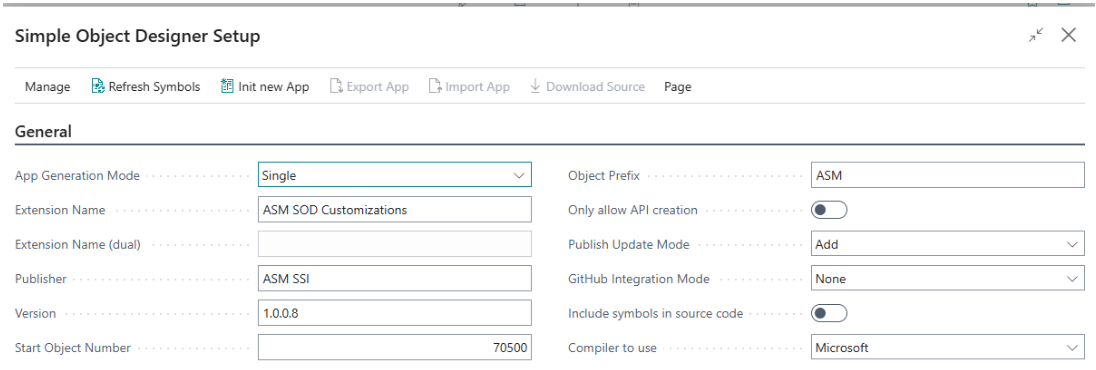
App Generation Mode – should be Single. This will ensure every time a new change is made, the new version of the App is created.
Start Object Number – every field and object in Business Central has an internal name, caption, and ID. Both the internal name and ID should be unique across all extensions published to the environment. Two extensions using the same object range are not allowed to be published in the same Environment.
Start Object Number represents the first ID to be used within the SOD CE, and this number should be discussed with Stoneridge before development to prevent collisions.
Note: Microsoft's general usage guide can be a helpful resource for this step.
Object prefix – every field and object in Business Central has an internal name, caption, and ID. Both the internal name and ID should be unique across all extensions published to the environment. The prefix is used with the internal name. This ensures that ISV, Microsoft, and the custom extension won’t run into the same internal name.
SOD adds a prefix to new objects and tables. It doesn’t add the prefix to the new fields. When a new field is created, “Field Name” should be manually edited to add the prefix.
“Field Name” is an internal name, and "Caption" is what is shown on the pages. The "Caption" doesn’t need to have a prefix (but won't harm if it does).

Publish update mode – general guidance to use Add. This will make sure to check if any breaking changes are introduced and prevent the app from publishing. For example, it will check if all the fields from a previous version are present in a new version. Removing fields in the new version will result in the deletion of data. In some rare cases, Force can be used. For more guidance, visit this Microsoft blog on retaining table data.
Dependencies and Extension Relationships
During the process of creating a new version, SOD creates dependencies on all existing extensions in an Environment. Dependency means SOD CE uses all present extensions in the environment as a basis. It gives SOD CE the ability to expose the fields from any base extension on the page, create a new API page, place a field on the report, extend a custom page, etc.
Creating an extension based on SOD CE will lead to a loop dependency. For example, Sandbox has an extension called “Commissions”. A new SOD CE extension is created and named "New Fields," with "Commissions" listed as a base extension. If a change is later requested in the "Commissions" extension to reference a field from "New Fields," the "Commissions" extension would then require a discrepancy in "New Fields."
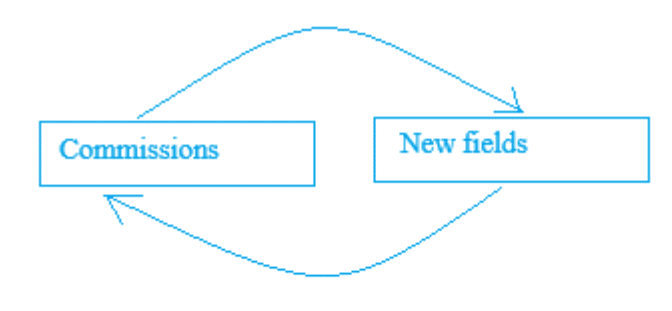
This can lead to unpredictability and errors in the environment.
SOD CE should always “stay on top” of all extensions in an Environment. No other extension should be using SOD CE as a dependency to prevent the loop.
SOD CE can be extended only by SOD. For a change not provided by SOD deeper work is required. If Stoneridge Software is tasked with a new functionality based on an existing one from SOD CE, we will merge the provided version of SOD CE into the Stoneridge extension. The time spent on merge is proportional to the SOD CE number of customized objects, new fields, new master data, etc.
After the SOD CE is merged, the new setup for SOD CE should be provisioned.
Precautions and Long-Term Maintenance Risks
- To prevent loop dependencies, only one version of the SOD CE should be present in the customer’s Environment.
- SOD allows the initiation of a new App. That should be avoided, unless the previous App is merged with another extension.
- Only the last version of SOD CE should be published to the Environment. Going a version down can cause trouble during the upgrade of Business Central.
- Only a selected group of users should be allowed to create/modify SOD CE. The effort should be coordinated among them. The smaller group - the better.
- Deployment in Production should be done after-hours.
- In case SOD CE includes a new table (new Feature: table or table-data), it needs to be added to the permission sets and assigned to the users. SOD doesn’t include functionality to do so.
- Not recommended to be used during Net-new implementation or during a big project implementation.
- During a major release of Business Central upgrade, some of the fields or objects can be deprecated or changed by Microsoft. Responsible user (or group) should be taken an active role in revising the upgrade path for the SOD CE.
- When the “base” extension is unpublished, SOD CE is unpublished as well. A user can not define not to use a dependency. Even if SOD CE does not expose/modify a field/object from a dependency, it’s still be unpublished in case “base” is unpublished.
- Any API page exposed via SOD CE will be unavailable with SOD CE is unpublished.
Final Notes
Exposing the first API page will require the setup of App registration in MS Entra. Client ID and Client secret should be enabled in Business Central. This is not handled by SOD and should be done manually: in Entra and in Business Central.
Different extensions can add functionality differently. In case of the function of ‘flowing’ the field through the documents and ledgers is done via subscribers, it’s not clear what will be executed first.
Simple Object Designer offers a flexible, cost‑effective way for Business Central users to add and manage custom fields during system adoption. Stoneridge helps customers evaluate when SOD is sufficient and when deeper, developer‑driven customization is the better long‑term fit. If you’re evaluating how to extend Business Central or deciding whether SOD or expert-led customization is right for you, reach out to our team.

Under the terms of this license, you are authorized to share and redistribute the content across various mediums, subject to adherence to the specified conditions: you must provide proper attribution to Stoneridge as the original creator in a manner that does not imply their endorsement of your use, the material is to be utilized solely for non-commercial purposes, and alterations, modifications, or derivative works based on the original material are strictly prohibited.
Responsibility rests with the licensee to ensure that their use of the material does not violate any other rights.