















Preparing Your Data for Better Copilot Results
While AI is rapidly transforming the way we work, it is only as effective as the data behind it.
Implementing a tool like Copilot across Microsoft 365 and Dynamics 365 gives you faster insights, streamlined workflows, and the ability to pull up knowledge from across your environment in seconds. While that might sound like a magic solution to your business problems, it’s important to know why data quality and structure are important when it comes to AI and how you can avoid frustrating outputs.
Let’s explore how Copilot uses your data, why structure matters, and how organizations can begin preparing their data today.
What is Copilot Doing with Your Data?
To understand why data preparation matters, it’s important to first understand what Copilot is actually doing behind the scenes.
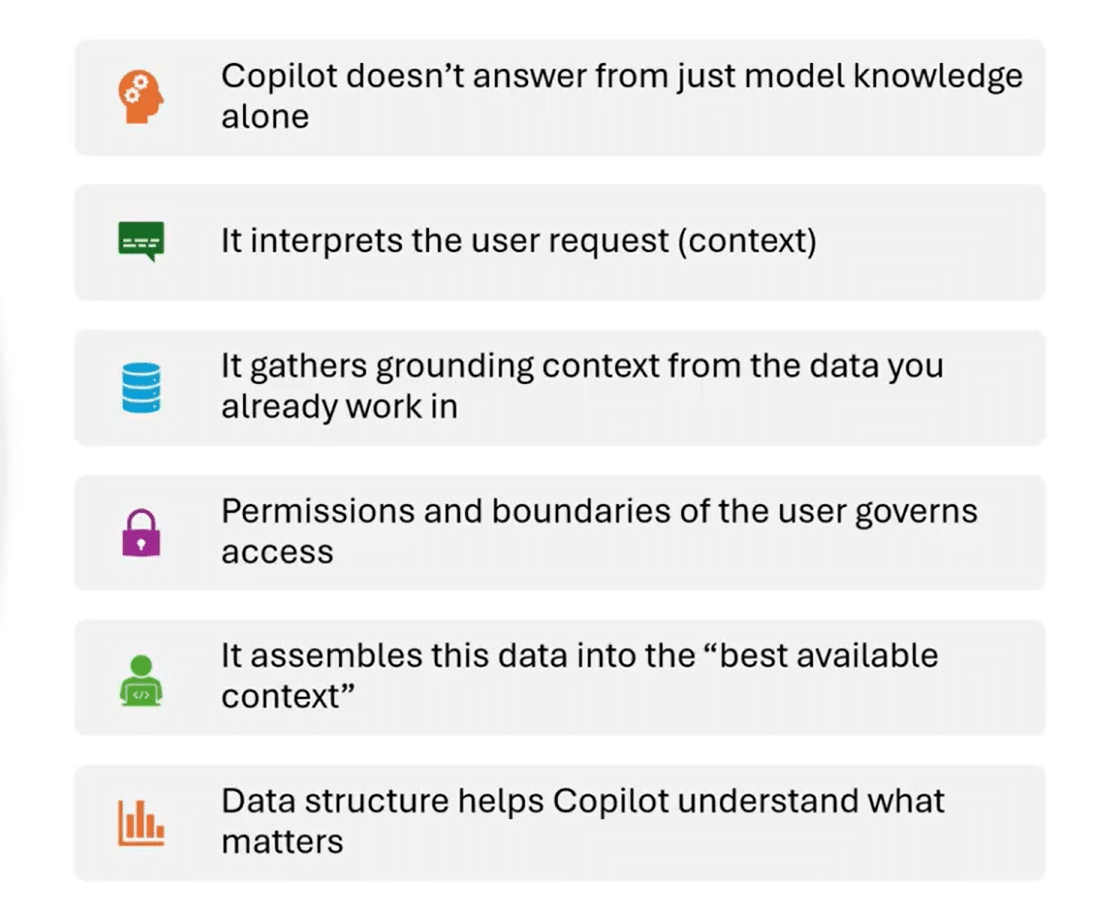
Unlike many AI tools that rely primarily on a large language model, Copilot is an integrated experience across the Microsoft ecosystem. When you ask a question, Copilot doesn’t simply generate an answer from its training data; it gathers context from your organization’s own information.
This includes data from sources such as:
- Emails
- Teams conversations
- SharePoint repositories
- Documents
- Internal business systems
- The web
Just as importantly, Copilot respects your organization’s permissions, governance, and security boundaries. If a user cannot access a particular document or repository, Copilot cannot access it either.
The process generally looks like this:
- A user asks Copilot a question.
- Copilot gathers context from your organization’s data sources.
- It applies permissions and governance rules.
- It combines the user prompt with the gathered information.
- The model generates a response based on the best available context.
Copilot does not guarantee the most accurate answer, but if your data is clear, structured, and reliable, the results will likely be strong. If your data is messy, incomplete, or inconsistent, Copilot may produce confident but incorrect answers.
How Does Structure Impact Copilot Responses?
Data structure plays a major role in how effectively Copilot can interpret and respond to questions. Large language models are incredibly good at identifying patterns and generating language, but they still rely on clear signals in the data they analyze. When the structure is poor or ambiguous, Copilot must “guess” what your data means.
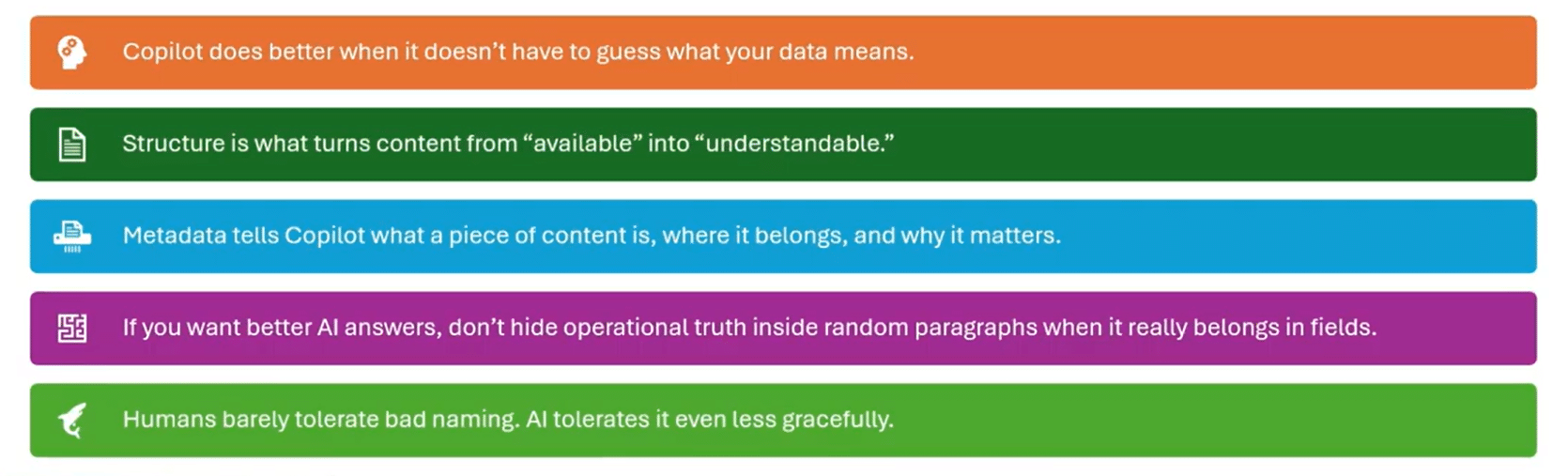
Structure impacts Copilot responses in several key ways.
Structured vs. Unstructured Data
Structured data — such as properly defined fields in systems like CRM or ERP — gives Copilot clear signals about what information represents.
Unstructured data, such as long documents or free-form notes, requires more interpretation and can introduce ambiguity. It’s important to consider your tables, fields, labels, and the relationships between all of those things to make sure they are connected. Another key tip is to use consistent naming conventions, so Copilot knows specifically what data it is pulling and where it is getting that data from.
For example:
- A field labelled “Contract Expiration Date” clearly communicates meaning.
- A field labeled “Field17” forces Copilot to infer what the value represents.
The more explicit the structure, the less work AI must do.
Metadata and Categorization Improve Context
Metadata is the structured information attached to or extracted from files and data that provides context for Copilot to work with. Metadata helps Copilot understand:
- What a field represents
- Where the data belongs
- Why it matters
When metadata is present, information becomes more structured. It moves from merely being available to truly understandable, audit-ready, and relevant.
Relationships Between Data
Structure is not just about columns and fields. It’s also about the relationships between information.
Examples include:
- A record that references a summarized document
- A transaction linked to a customer
- A workflow status tied to a process stage
These connections make it easier for Copilot to assemble meaningful context. If you want better AI answers, don’t hide operational information inside of random paragraphs of documents. Make sure they are in the field where they belong.
Too Much Data Can Be a Problem
Interestingly, more data is not always better. Very large documents, such as 30-page legal briefs or massive policy manuals, can be difficult for AI to process efficiently.
Breaking information into smaller, well-structured components often produces better results.
Why Does Clean and Trustworthy Data Improve AI Results?
Even with well-structured systems, data quality still determines whether Copilot can generate reliable answers. Several common data problems can significantly degrade AI performance, including:
- Duplicate records
- Missing fields
- Outdated content
- Conflicting information
- Inconsistent terminology
- Low-confidence data sources
These issues are familiar to anyone who has implemented a CRM or ERP system — but with AI, their impact becomes even more visible.
The Source of Truth Problem
If the same customer appears in multiple systems or records, Copilot may struggle to determine which version is authoritative.
For example:
- Customer A appears under two different names.
- Revenue numbers differ between CRM and finance systems.
- Vendor records exist in multiple databases.
Without a clear source of truth, Copilot may produce inconsistent results. While it is often tempting for users to blame the tool for the data, when you drill down into the data, more often than not, many of the issues listed above exist.
AI Adoption Depends on Trust
While it is often tempting for users to blame the tool for the data, when you drill down into the data, many of the issues listed above exist. The cleaner and more trustworthy the source data is, the stronger the context package Copilot can build before it generates a response. And good responses lead to better adoption rates.
If users receive unreliable answers early, they quickly lose trust in the system, even if the problem is actually the data. After all, users don’t grade your data environment; they grade the answer they got from Copilot.
Some other ways either poor or healthy data can impact your results include:
- Data can be technically correct but still not trustworthy enough for Copilot: You might have an old document or outdated versions or files that have all the correct details, but they may be out of date. However, Copilot may still look at that data as being relevant to your prompt.
- Missing data does not always break Copilot: In an ideal world, your data will be structured and laid out perfectly, but this is rarely the case. However, missing data isn’t always the end of the world; it might just make Copilot seem less confident, less precise, and less useful.
- Clean data does not make Copilot Bulletproof: Having well-structured data won’t make Copilot infallible; it just makes it better anchored.
Practical Examples of Preparing Your Data
During real-world Copilot deployments, several common data issues appear regularly. Here are a few real-world and frequent examples that organizations frequently encounter:
Duplicate Master Data
Copilot can summarize what it sees, but cannot magically resolve master data problems like:
- Customers stored under multiple names
- Duplicate vendor records across systems
- Employees listed differently in HR and directory systems
- Multiple account owners assigned inconsistently
These inconsistencies would certainly confuse your human users, and AI is no different.
Outdated Content
Old documents often appear authoritative even when they’re no longer valid; this can muddle your results and lead users to rely on outdated data.
Common outdated content examples include:
- Previous versions of company handbooks
- Old “final” policy documents stored alongside current ones
- Legacy knowledge articles that were never archived
- Old SOPs without expiration dates
Copilot may surface outdated material simply because it appears relevant.
Data Hidden in the Wrong Format
Just because information exists in your system doesn't mean it's easily usable by AI. Common examples include:
- Risks buried in meeting notes
- Action items only mentioned in email threads
- Product issues hidden in long chat conversations
- Contract terms embedded in PDFs without metadata
When important information isn’t structured properly, Copilot cannot consistently interpret it. Copilot is strongest when your organization has already decided what the single source of truth is. This can avoid issues like:
- Revenue forecasts differ between CRM and finance reports
- Project status differs between Teams updates and PM tracker
- Policy differs between HR portal and an emailed PDF
- Inventory numbers differ between the operations sheet and ERP
Inconsistent Terminology
Organizations often use different terms for the same concept. This makes AI work harder to connect ideas that your business already knows are the same. Some examples include:
- “Customer” vs. “Client” vs. “Account”
- Slightly different product names by department
- Different workflow status terms across teams
- Regional naming variations for the same process
These inconsistencies make it harder for AI to connect related ideas.
Fragmentation
Fragmented data can turn simple data searches into full-blown scavenger hunts. Not only does Copilot need to access your business systems, but it also needs to monitor Outlook, Teams, and other tools. This can confuse
Copilot and return poor results.
How Do You Prepare Your Data for Better Copilot Outcomes?
Improving data for Copilot doesn’t require perfection, but it does require hard work and intentional data management. Here are several practical steps organizations can take.
Standardize Naming Conventions
Establish consistent terminology across departments and train your staff to use it. This includes:
- Customer naming standards
- Product naming rules
- Field labels and definitions
- File naming conventions
Consistency allows AI systems to interpret information more reliably. Think of it this way: a file name should answer basic questions before Copilot even opens the file. For example, you can:
- Replace a file name like “proposal_final_V2.docx” with something more specific like “Contoso_Proposal_2026-04_Approved.”
- Include dates in policy and procedure titles
- Use standard project and customer naming
- Distinguish draft, approved, and archived content clearly
Reduce Duplicate and Conflicting Records
Identify and eliminate duplicate records wherever possible, including:
- • Customer master records
- • Vendor records
- • Employee directories
- • Financial accounts
Clear master data improves accuracy dramatically. Fun fact: You can do this with Copilot in some instances. For example, if you have vendor records and can export them to Excel, you can use the Copilot feature built in to identify duplicates and then remove them.
Strengthen Master Data Discipline
Encourage teams to fully populate key fields in business systems and not take any shortcuts. AI can only use the information that exists, and incomplete fields often lead to incomplete answers.
For example, content written for human skimming is usually also better content for Copilot retrieval and summarization. This could include:
- Breaking giant SOPs into focused pages
- Using headings like “Eligibility,” “Approval,” and “Exceptions”
- Put policy dates and owners at the top
- Avoid burying key rules in long narrative paragraphs
Improve Metadata
Metadata is one of the most powerful tools for improving AI outcomes, as it defines:
- What a field represents
- What type of data it contains
- How it should be interpreted
Well-defined metadata helps Copilot understand your environment much faster. Some common examples of implementing smart metadata include:
- Adding “effective date” to policy content
- Adding “owner” and “status” to knowledge articles
- Adding “customer” and “project” tags to key files
- Using managed metadata instead of free-text chaos where possible
Define Authoritative Data Sources
Your organization should clearly identify:
- Which system owns customer records
- Which platform contains financial truth
- Which repository holds official documents
When multiple systems contain conflicting information, Copilot cannot reliably determine which one to trust.
Make Data Easier to Find, Not Just Easier to Store
Organizing content properly can significantly improve Copilot responses.
This may involve:
- Structuring SharePoint repositories logically
- Separating draft documents from published versions
- Archiving obsolete files
- Cleaning stale folders
- Removing duplicate “final” documents
Copilot doesn’t need more data, it needs less noise competing with the right data.
Where to Start?
Data cleanup can feel overwhelming, but organizations don’t need to solve everything at once. A more practical approach is to start with small, repeatable processes and then build momentum from there.
Focus on Specific Use Cases
Instead of attempting enterprise-wide data perfection, start with the data that supports a particular AI use case.
For example, you can look at common workflows such as:
- Customer service responses
- Weekly sales reporting
- Contract generation
- Knowledge base search
Clean the data supporting that use case first. At the end of the day, those small processes that team members do weekly – or even daily – can often be the most useful time-savers.
Target High-Frequency Questions
AI delivers the most value when it automates repetitive questions. Focus on questions employees ask frequently rather than complex strategic questions asked only a few times per year.
Clean Data in Phases
Data improvement can happen in manageable phases:
- Identify the use case
- Improve the data supporting that process
- Measure AI performance improvements
- Expand to the next use case
This iterative approach prevents organizations from getting lost in the woods in trying to solve every problem at the same time. Simply put, do the easy clean first and save the big stuff for later.
Involve the Right People
Your Copilot adoption team should include both enthusiastic early adopters and subject matter experts who can analyze answers and identify when they are wrong. Experts can also drill down into incorrect responses to determine where the problems lie in the model or the underlying data.
Those two groups – and buy-in from leadership – are the core groups you should get on board before rolling it out to the entire team.
Unlock the Full Potential of Copilot
Organizations that invest in structured, trustworthy, and well-governed data will see dramatically better results from AI initiatives. More accurate answers, higher user trust, and stronger adoption all begin with better data practices.
That’s where the right partner makes a difference.
Reach out to Stoneridge Today to Optimize Your Copilot Journey!
At Stoneridge Software, our team brings deep expertise across the entire Microsoft ecosystem—from Microsoft Dynamics 365 and Microsoft 365 to modern data platforms and AI strategy. We help organizations not only implement Copilot but also assess their AI readiness and build the data foundation needed to make AI truly effective.
Talk to our experts today to start building the data strategy that powers real AI impact.

Under the terms of this license, you are authorized to share and redistribute the content across various mediums, subject to adherence to the specified conditions: you must provide proper attribution to Stoneridge as the original creator in a manner that does not imply their endorsement of your use, the material is to be utilized solely for non-commercial purposes, and alterations, modifications, or derivative works based on the original material are strictly prohibited.
Responsibility rests with the licensee to ensure that their use of the material does not violate any other rights.