














Copilot Cowork Agent Explained: Best Practices, Cost & Availability, and Which Claude Model to Use
If you’ve been watching the AI space closely, you know the pattern now. A big announcement drops, the demos look incredible, and then the reality of actually using it inside a real enterprise turns out to be… messier. So when Microsoft announced Copilot Cowork Agent at the beginning of March, I wanted to sit with it before writing anything. Now that it’s in Frontier preview and I’ve had time to dig in, here’s what I actually think — including the stuff Microsoft’s marketing glosses over.
What Is Copilot Cowork Agent, really?
At its core, Cowork Agent is Microsoft’s answer to a question that’s been on every enterprise AI roadmap: can AI actually do the work, not just help me do it? My answer: It’s transforming the way I work in a matter of days.
Until now, Copilot has mostly operated as a smart assistant — you ask, it answers, you act. Cowork Agent flips that model. You describe an outcome, and Cowork goes and executes multi-step workflows across Outlook, Teams, Word, Excel, PowerPoint, and SharePoint — autonomously, without you having to hand-hold each step.
It was announced March 9, 2026, as the centerpiece of Wave 3 of M365 Copilot, and became available in the Frontier early-access program on March 30. Under the hood, it’s powered by Anthropic’s Claude — a result of Microsoft’s deepening partnership with Anthropic (a $5B investment and a $30B Azure compute deal). This matters because it explains why Cowork behaves differently than other Copilot features — Claude is particularly strong at multi-step reasoning and following nuanced instructions.
Think of it this way: instead of asking Copilot to summarize a document, you might say “Prep me for tomorrow’s client QBR — pull the relevant emails from the past two weeks, draft a briefing doc with key talking points, create a one-page slide summary, and block 30 minutes on my calendar tonight to review it.” And then it does all of that.
My Experience
Microsoft’s Copilot Agent demos naturally showcase the most polished scenarios. Here’s where I am finding genuine value in these early days:
- Researched, wrote, and refined THIS blog post on the Cowork Agent itself — from kicking off parallel research across a dozen sources to incorporating my live edits, exporting a polished Word document, and sending a review email to a colleague, all in a single conversation.

- In a single working session, Copilot Cowork helped me analyze a business with sourced client data and deliver a Word report and Excel model — then shifted gears to plan the client's 7-week AI champion training program, compress it to fit a real-world schedule, draft stakeholder emails, and create calendar invitations, all without switching tools or losing context.
- In just a few moments, I asked Copilot Cowork Agent to help me explore adding notes to our team's shared OneNote space and to pull together a summary of my recent 1:1 with my manager — and it surfaced key discussion points, decisions, and follow-up action items directly from my Teams chat and meeting notes, all without me having to dig through anything myself.
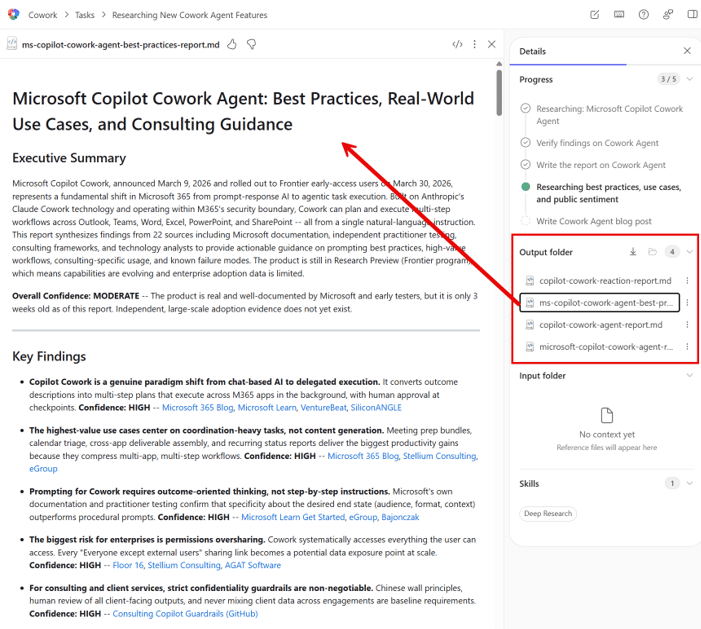
Copilot Cowork Best Practices: How to Actually Get Good Results
1. Describe the outcome, not the steps.
This is the most important habit shift. Don’t think about Cowork like you’re writing instructions for a junior employee. Describe what “done” looks like. The more context you provide about the desired end state, the better. Cowork supports up to 16,000 characters of input — use that space. Give it context about who the audience is, what format you want, what’s most important.
2. Be specific about scope.
Cowork will use its best judgment to interpret your request — which can be great or can lead to surprises. When it matters, tell it exactly which emails, which date range, and which documents. Vague instructions produce vague outputs.
3. Keep a “Copilot prepares — you advise” mindset.
This is the golden rule for consulting work especially. Cowork is excellent at preparation, aggregation, and first-pass drafting. It should never be the final voice on client recommendations, pricing, strategic advice, or anything that requires professional judgment. Use it to get to a solid starting point faster, then apply your expertise.
4. Audit your permissions before going wide.
This one is aimed at IT and practice leaders: the biggest enterprise risk with Cowork is permissions oversharing. Cowork operates within whatever SharePoint and M365 permissions the user has. If your tenant has loose sharing policies, Cowork can inadvertently surface or include information that shouldn’t flow into a deliverable. Governance-first deployment is not optional here.

Which Claude Model Should You Use? Claude Sonnet vs Opus
When you’re prompting Cowork, you’ll have the ability to choose between Claude models. Right now in the Frontier program, you’ll see two primary options: Claude Sonnet 4.6 and Claude Opus 4.6. Here’s how to think about the choice:
Claude Sonnet
Claude Sonnet 4.6 is your everyday workhorse. It’s fast, responsive, and handles the vast majority of Cowork tasks exceptionally well — email drafting, document summaries, status reports, meeting prep, calendar management. If you’re running frequent, moderate-complexity tasks, Sonnet 4.6 gives you the best speed-to-quality ratio. This is where I’d start for 80% of use cases.
Claude Opus
Claude Opus 4.6 is the heavy lifter. It’s slower and more deliberate, but it brings significantly deeper reasoning to the table. Reach for Opus 4.6 when the task requires nuanced judgment — complex multi-document synthesis, executive-level writing that needs to hit exactly the right tone, anything where you’d review the output under a microscope before sending it to a client or leadership. Think of it as bringing in your most senior team member when the stakes are high.
Recommendation
The practical rule: start with Sonnet 4.6 as your default. Upgrade to Opus 4.6 for high-stakes or complex deliverables.
One important caveat for global organizations: EU, EFTA, and UK tenants have the Anthropic sub-processor toggle turned off by default due to data sovereignty considerations. Until Microsoft offers in-region Claude processing, this is a real deployment blocker for organizations with strict data residency requirements. Government cloud tenants are blocked entirely for now.
Cost and Availability: What You Actually Need to Know
This is where I want to be especially clear, because there’s been some confusion in the market.
You do not need to buy a new license to access Cowork right now. Currently, Cowork is included with your existing Microsoft 365 Copilot license ($30/user/month add-on). The new M365 E7 Frontier Suite at $99/user/month does bundle Cowork along with other advanced capabilities — but it is not required to access Cowork in preview.
The Frontier program is an opt-in program — it is not invite-only. Any tenant with active Copilot licenses can join through the M365 Admin Center.
For IT admins enabling Cowork, the path is: M365 Admin Center > Copilot > Agents > All Agents > Cowork. You have three access tiers: all users, specific groups, or blocked. You can also pre-deploy and pin it for users. It’s important to note that Cowork is currently in preview—meaning it is not a finished product and may have limitations or issues. The term “Frontier” in this context indicates that you are opting into preview Copilot features, not just Cowork, so admins should expect early-access functionality that could change, expand, or be improved before general availability.
General availability has no committed date from Microsoft — analyst estimates put it at Q2 2026. Post-preview pricing (including whether any consumption-based billing emerges for long-running tasks) hasn’t been announced.
The Bottom Line on Copilot Cowork Agent
Copilot Cowork Agent marks an exciting new chapter for enterprise productivity in Microsoft 365. Not because the demo scenarios are impressive — they are — but because the underlying architectural shift (from assistant to agent) is real and the integration with M365 is genuinely differentiated.
This is a product that’s newly into public preview. The early adopters who will get the most out of it are the ones who go in with governance first, clear expectations about what it can and can’t do today, and a willingness to invest in building good prompting habits.
My recommendation: get your tenant in the Frontier program now, run a controlled pilot with a handful of power users, and start seeing how Cowork changes the way you work!
Questions about how to evaluate or implement Copilot Cowork for your organization? Let’s talk.

Under the terms of this license, you are authorized to share and redistribute the content across various mediums, subject to adherence to the specified conditions: you must provide proper attribution to Stoneridge as the original creator in a manner that does not imply their endorsement of your use, the material is to be utilized solely for non-commercial purposes, and alterations, modifications, or derivative works based on the original material are strictly prohibited.
Responsibility rests with the licensee to ensure that their use of the material does not violate any other rights.