















Dynamics 365 Copilot Agents: Use Cases for Business Central and Finance & Operations
If you are already using Copilot to summarize information, generate content, and speed up everyday work, you may be ready for the next step: AI-powered agents.
Copilot agents can go beyond simply answering questions. They can monitor information, interpret incoming data, act in your Dynamics 365 environment, and help accelerate business processes. Whether you use Dynamics 365 Business Central or Dynamics 365 Finance and Supply Chain Management, agents can help you reduce repetitive work while keeping your employees involved in the decisions that matter.
The real opportunity is not to replace your ERP system or the people who use it. It is to combine AI, automation, and your existing business processes in ways that help your team work faster and focus on higher-value tasks.
Let’s dive into the nuts and bolts of what Copilot agents are and how you can use them to make your business more efficient and more successful.
Standard vs. Custom Agents
One of the best places to start with Copilot agents is understanding the difference between standard, first-party agents and custom agents.
Microsoft is increasingly embedding agents directly into Dynamics 365 applications. These first-party agents are designed to address common business scenarios and can provide a useful starting point for organizations that want to explore what AI can do inside their ERP environment.
Examples include agents that can help with:
- Account reconciliation
- Supplier communications
- Sales order processing
- Accounts payable document processing
- Employee expense reporting
While these agents are valuable on their own, they can also serve as inspiration for custom agents. If you believe the underlying concept of an agent could be useful elsewhere, you have built-in agents as a solid foundation to start with. For example, if an agent can monitor an inbox, interpret an incoming request, gather information, and create a transaction, could a similar approach work for purchase orders? Service requests? Production processes? Journal entries?
That is where custom agents become especially interesting.
Extending AI Around Your Actual Processes
Out-of-the-box agents are built around common scenarios. Your organization, however, may have unique business rules, approval requirements, data structures, or process variations.
For example, creating a sales order may involve several manual decisions that are specific to your business. An agent may need additional instructions or access to specific information before it can support that process effectively.
In these situations, you can potentially:
- Extend an existing first-party agent.
- Create a new agent around a specific business requirement.
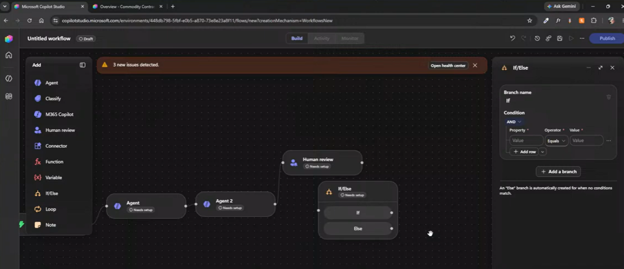
- Combine an AI agent with Power Automate or other automation tools.
- Build an interactive agent that works alongside an employee.
- Create an automated agent that works in the background and reports results to users.
The key is choosing the right technology for business problems.
Keep the Human in the Loop
It is also important to remember what the name Copilot implies. It’s not taking over anything; it’s simply flying alongside you.
Agents can perform heavy lifting, process information, and recommend or prepare actions. But employees should remain involved where validation, judgment, accountability, or business risk is involved.
This concept is often referred to as “human-in-the-loop.” Depending on the process, an agent might perform several key processes and then present the results to a team member and allow them to review and approve the final action.
That approach can help you gain efficiency without giving AI unchecked control over important business decisions.

How Clients are Using Copilot Agents Today
Organizations are becoming increasingly familiar with AI and what agents can do. Many business leaders and employees are already experimenting with tools such as Copilot and other generative AI platforms.
As a result, the conversation is changing.
The question is no longer simply,
“What is an AI agent?”
Increasingly, organizations are asking:
“Where can we use an agent in our business?”
One of the most important lessons is that successful agent projects usually begin with the business process, not the technology.
Your ERP system provides the transactional foundation. It stores and organizes the information that keeps your business running. Data quality, business rules, security, and process design still matter.
An AI agent can then work with that foundation much like an employee does: accessing the appropriate information, interpreting what it finds, and acting based on defined instructions.
Designing Agents: Start with the Exceptions
One practical lesson when designing agents is to avoid sending unnecessary information to AI.
Consider account reconciliation. An agent does not necessarily need to receive every transaction in your ledger and determine what balances from scratch.
Instead, your ERP system can perform the transactional processing it is designed to do. The process can identify the transactions or situations that require attention. Those exceptions can then be passed to the agent for additional analysis.
This approach can help you:
- Reduce the amount of information being processed by AI.
- Improve efficiency.
- Improve accuracy by narrowing the task.
- Better manage Copilot credit consumption.
- Focus AI resources on the work that actually requires interpretation.
Your ERP system remains the transactional engine. The agent helps people interact with exceptions, unstructured information, communications, and decisions that would otherwise require more manual effort.
Practical Use Cases for Copilot Agents
The most useful agent opportunities often begin with a simple question:
What work does your team repeatedly perform that requires reading, interpreting, summarizing, generating, or moving information between systems?
Here are several practical examples:
Production and Inventory Readiness
Agents can also help prepare employees for decisions before they begin their work.
For example, an agent could review production orders scheduled for release and identify shortages. It could then:
- Check whether required materials are available.
- Review the relevant shortage information.
- Flag production orders that require attention.
- Update a review status.
- Present the results to the appropriate employee.
The agent completes most of the preliminary work so your team members can spend their time reviewing and making smart decisions.
Expense Processing
Expense reporting is another strong example of where AI can reduce repetitive work. An employee can capture or upload a receipt, while an AI-powered process helps identify information such as:
- The vendor.
- The amount.
- The currency.
- Other relevant expense details.
The result is a faster experience for the employee and less manual data entry.
Journal Imports
Custom agents can also help with information that traditionally requires significant manual entry. For example, an agent could accept a file containing journal information from another system, interpret the data, ask for clarification when necessary, and help create the journal in Dynamics 365.
This is particularly useful when information arrives in formats that are not perfectly structured for a traditional automated import.
Preventive Maintenance
Agents can also help identify patterns that employees might otherwise discover manually.
Imagine an asset that has failed several times. An agent could identify similar assets within the same classification and recommend preventive maintenance actions. Rather than waiting for someone to run a report, notice the trend, and manually determine the next step, the agent can bring that information forward.
The employee remains responsible for the decision, but the agent reduces the amount of work required to get there.
Customer-Facing Agents
Agents are not limited to internal employees.
A customer-facing agent can potentially interact with customers through channels such as email or messaging, gather information, and create a draft transaction.
For example, a customer might request a quote through email. The agent could:
- Identify the customer.
- Interpret the request.
- Gather missing information.
- Generate the appropriate transaction or draft.
- Flag the result for internal review.
- Allow an employee to approve the final action.
This approach can help you scale customer interactions while maintaining internal oversight.
In this blog, we are going to focus on some primary agents in cloud-based ERP systems like Dynamics 365 Business Central and Dynamics 365 Finance and Operations. These agents will focus on core processes like supplier communications, accounts payable, and sales and purchase orders.
Demo: Agents in Dynamics 365 Business Central
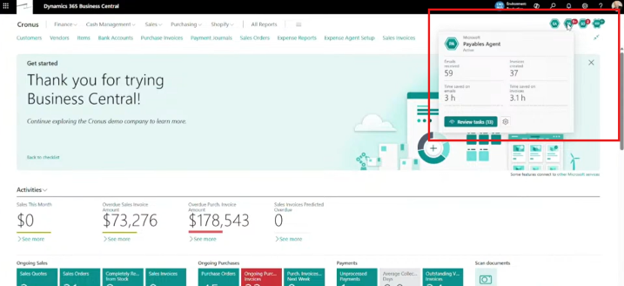
Dynamics 365 Business Central includes an Agent Center with several examples of first-party agents. These examples demonstrate how agents can monitor incoming information and assist with ERP transactions.
Sales Order Agent
The Sales Order Agent is designed around customer communications and order processing.
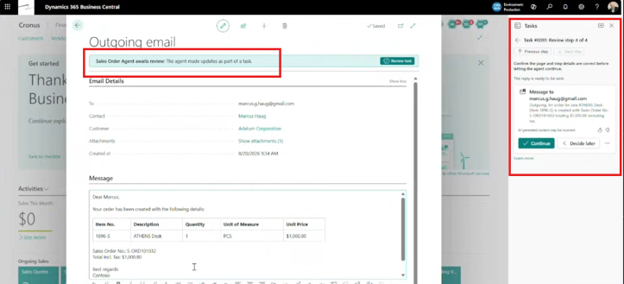
At a high level, the process works like this:
- Configure an email source: The agent monitors an email inbox for incoming customer requests.
- Receive the customer's request: A customer can send information about an order, requested items, quantities, or other relevant details.
- Allow the agent to interpret the message: The agent reads the incoming email and identifies the information required for the transaction.
- Review the information: Users can review what the agent has interpreted and how it is responding to the request.
- Generate the appropriate customer communication: Depending on the scenario, the process can support communications such as sales order acknowledgments or sales quotes.
- Continue the customer interaction: The value is not limited to simply reading one email. The agent can support the back-and-forth communication that often occurs during order processing.
The important takeaway is the pattern behind the agent. Business Central is demonstrating how an agent can monitor unstructured communications, interpret them, and help move a structured ERP process forward.
That same pattern can inspire custom agents for other processes.
Payables Agent
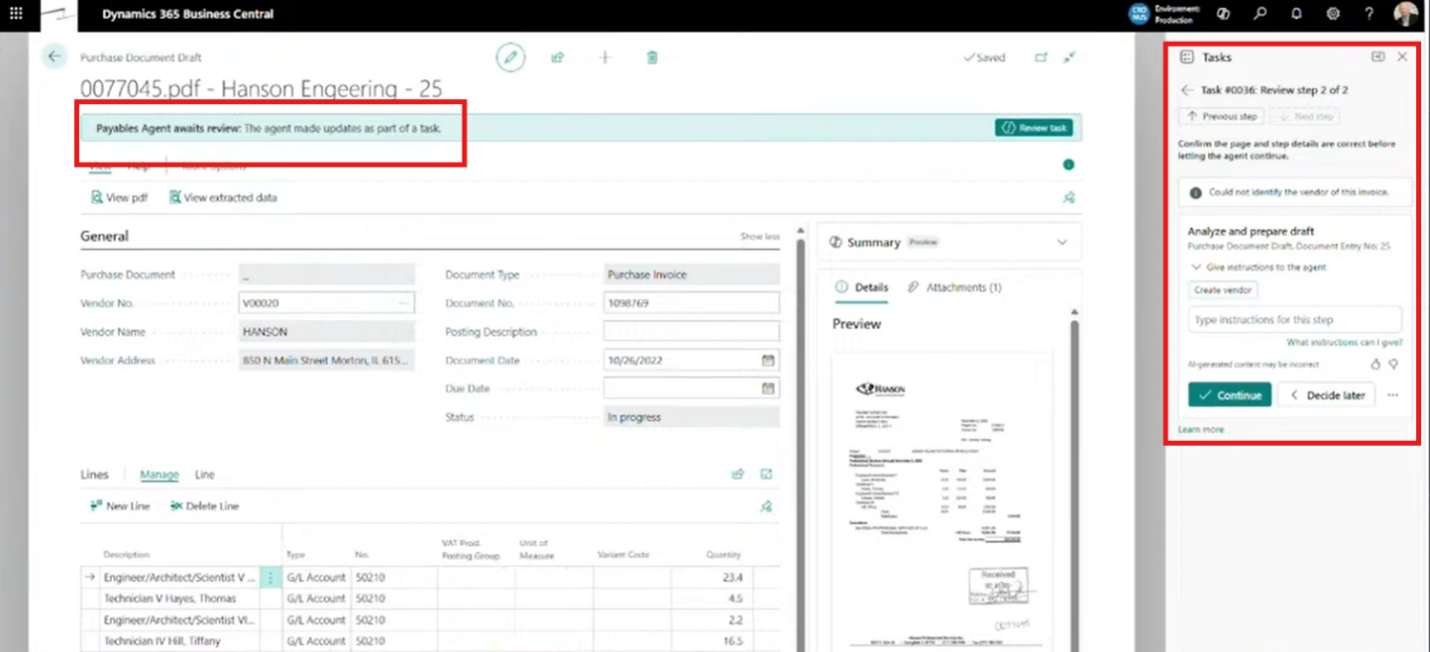
The Payables Agent brings AI-powered document processing into Business Central.
The general process includes:
- Receive an inbound vendor document: A vendor sends a document through email.
- Allow the agent to read and interpret the document: The agent uses document and OCR capabilities to identify relevant information.
- Create a draft purchase document: Rather than immediately creating a final transaction, the process can create a draft for review.
- Review and edit the draft: Your employees can validate the information before completing the transaction.
- Create or identify the vendor: If the vendor cannot be located, the process can help create the vendor information.
- Perform purchase order matching. The agent can support matching the incoming vendor document with the appropriate purchase order information.
This is a good example of how agents can help bridge the gap between unstructured documents and structured ERP transactions.
Employee Expense Agent
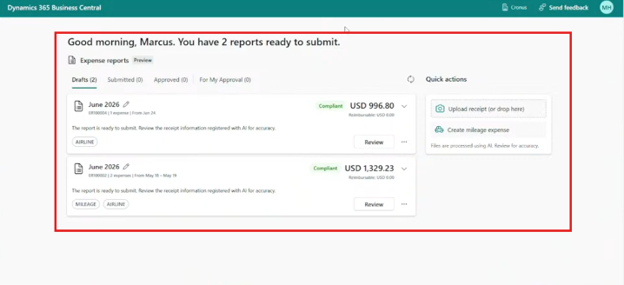
Business Central also includes an employee expense experience designed to simplify receipt and expense processing.
The process can include:
- Open the expense reporting experience.
- Upload a receipt or capture an image using a device camera.
- Allow AI to interpret the receipt.
- Review the extracted information.
- Confirm details such as vendor, amount, and currency.
- Continue building and submitting the expense report.
The experience can be used through a browser and is designed to work across different devices, including phones.
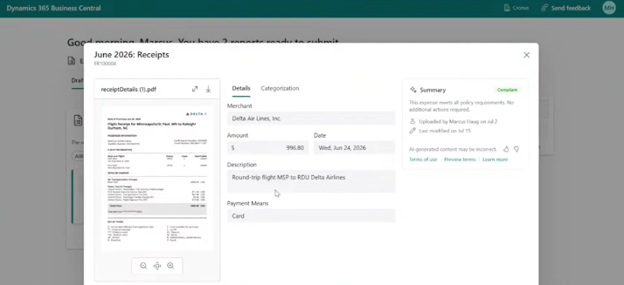
For employees, that means less time manually entering receipt information and more flexibility in how they submit expenses.

Demo: Agents in Dynamics 365 Finance and Operations
Dynamics 365 Finance and Supply Chain Management includes agents designed to support specific ERP processes.
Two examples highlight how agents can combine transactional information, generative AI, and employee oversight.
Account Reconciliation Agent
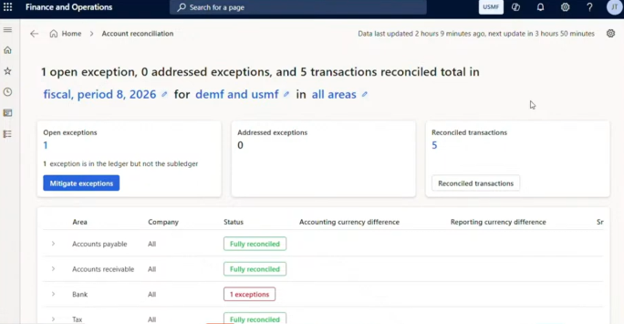
Account reconciliation can be a time-consuming process. The Account Reconciliation Agent helps identify transactions that reconcile and brings exceptions to the attention of employees.
The process follows a practical pattern.
Step 1: Review the Relevant Transactions
The agent works with transaction information across areas such as:
- Accounts payable.
- Accounts receivable.
- Bank transactions.
- Tax transactions.
Step 2: Identify Transactions That Reconcile
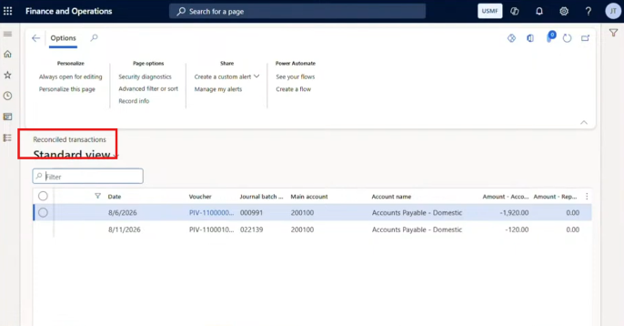
Where the appropriate ledger and subledger information aligns, the process can identify the transaction as reconciled.
Employees still have visibility into the information and can review the underlying transaction details.
Step 3: Surface Exceptions
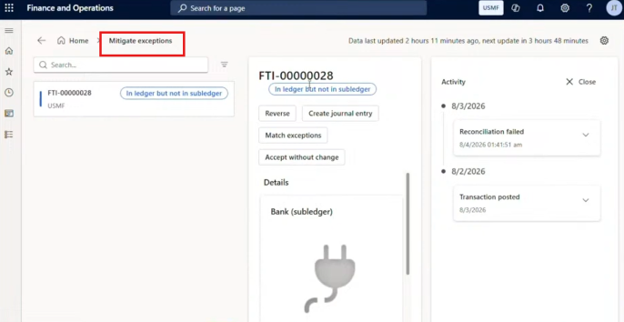
Not every transaction will reconcile correctly.
When an exception occurs, the agent can help expose the issue, such as a situation where a ledger transaction exists without the expected corresponding subledger transaction.
Step 4: Review Available Resolution Options
Depending on the situation, users can consider options such as:
- Creating a reversing entry.
- Creating a journal entry.
- Matching exceptions with another transaction.
- Accepting the exception without making a change.
This is an important example of an agent doing the preliminary work while keeping the employee involved in resolving the exception.
Supplier Communications Agent
The Supplier Communications Agent helps procurement teams stay on top of purchase order activity and vendor communications.
The setup process can be approached step by step.
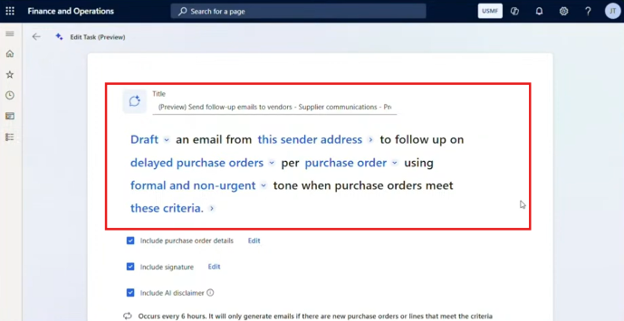
Step 1: Open the Agent Configuration
Begin by accessing the agent setup and determining what type of supplier communication you want the agent to manage.
Step 2: Choose Draft or Automatic Sending
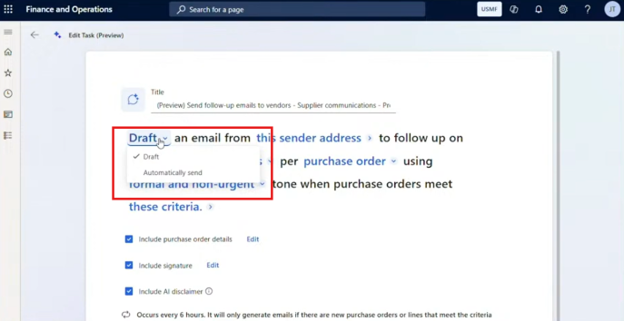
You can decide whether the agent should:
- Draft emails for employee review, or
- Send communications automatically.
For organizations beginning their agent journey, starting with drafts can provide an important opportunity to validate the agent's output before increasing automation.
Step 3: Select the Sending Address
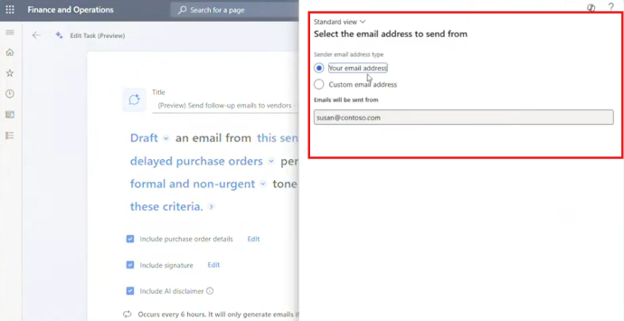
Determine where the communication should originate, such as:
- An individual employee's email address.
- A shared or custom business address.
Step 4: Define What the Agent Should Monitor
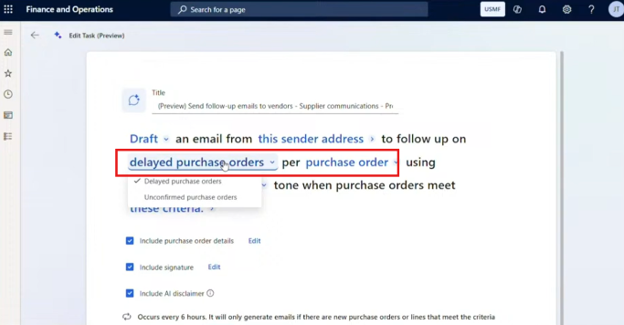
The agent can be configured around scenarios such as:
- Delayed purchase orders.
- Unconfirmed purchase orders.
- Other purchase order follow-up requirements.
Step 5: Determine the Level of Communication
You can decide whether the agent should communicate about:
- A specific purchase order, or
- The vendor's overall purchase order activity.
Step 6: Configure Tone and Urgency
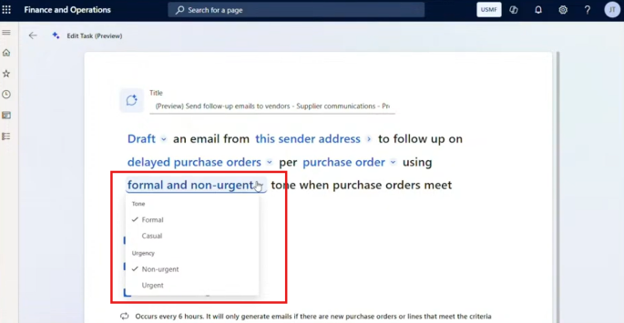
You can define different communication approaches based on timing and urgency. For example:
- Several days before a deadline, the agent could use a more casual and non-urgent tone.
- Once an order becomes overdue, the agent could use a more formal and urgent approach.
Step 7: Add Relevant Details
The communication can include:
- Purchase order information.
- A signature.
- An AI-related disclaimer, where appropriate.
Step 8: Review the Generated Draft
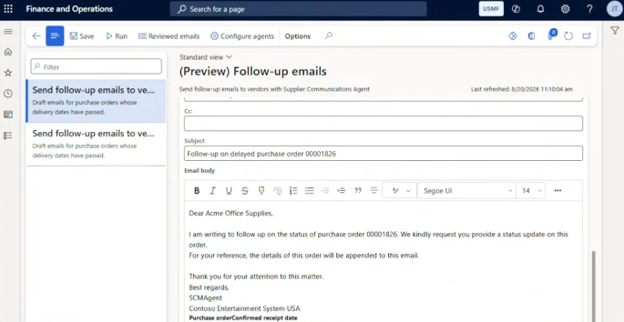
When configured for drafting, users can review the generated email directly within the purchase order workflow.
This allows your procurement team to validate the communication before sending it.
Building Agents in Copilot Studio
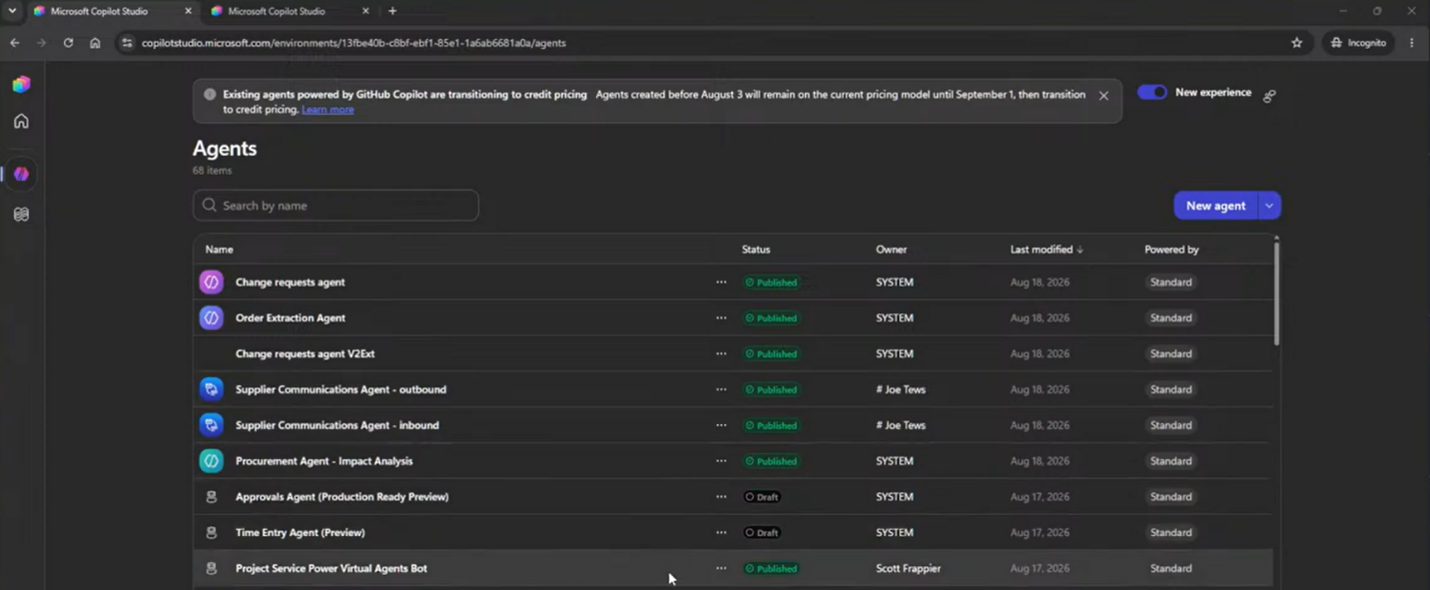
Once you have explored first-party agents, you may begin identifying opportunities that are unique to your organization.
That is where Microsoft Copilot Studio comes in.
Copilot Studio provides a dedicated environment for building and managing custom agents that can connect with Dynamics 365 and other Microsoft technologies.
Start with the Business Case
Before building anything, start with the process.
Ask yourself:
- What specific task are we trying to improve?
- Is AI necessary?
- Would Power Automate be a better solution?
- Does the process require interpretation of unstructured information?
- Should an employee interact with the agent?
- Should the agent work automatically in the background?
- What information does the agent need?
- What actions should it be allowed to take?
This upfront work remains important.
AI can accelerate development, but it does not eliminate the need to understand your processes, data, requirements, and testing approach.
Example: A Journal Import Agent
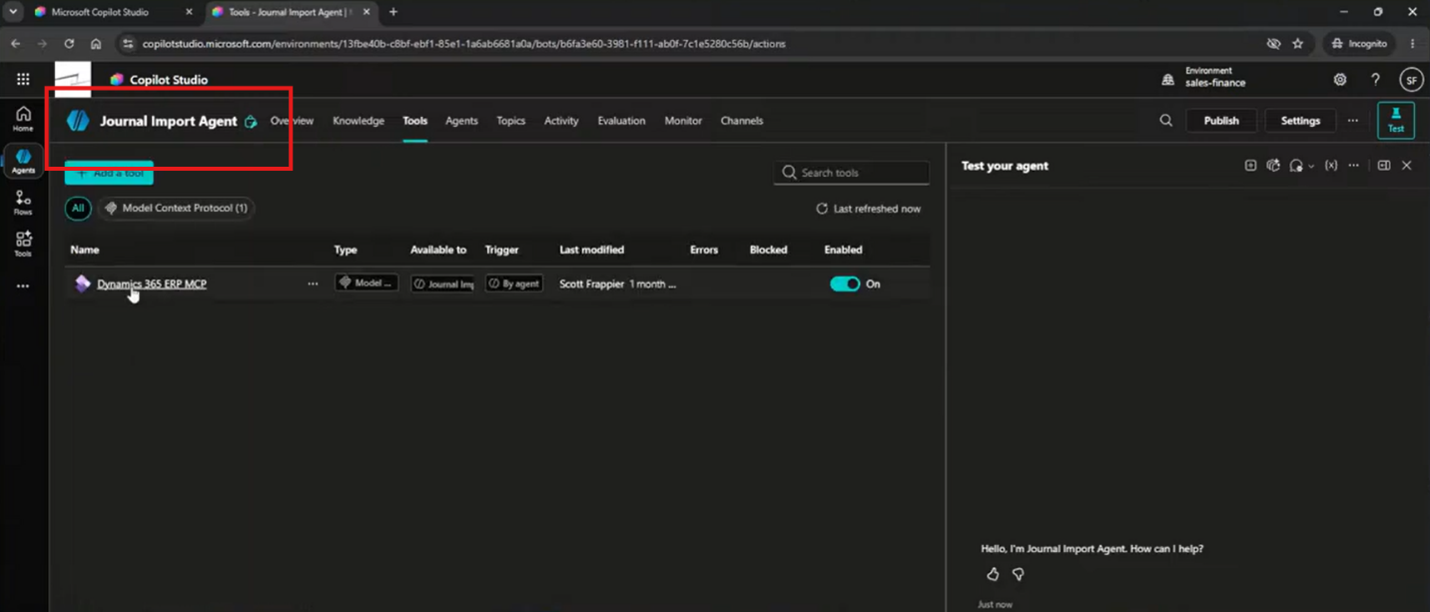
A journal import agent can demonstrate how custom agents work.
The process can look like this:
- Build the agent in Copilot Studio.
- Define the agent's objective in natural language.
- Provide instructions about what the agent should do.
- Connect the agent to the appropriate Dynamics 365 tools and data.
- Allow the user to provide an input file.
- Ask follow-up questions when required information is missing.
- Identify information such as accounts or journal details.
- Create the appropriate journal information in Dynamics 365.
- Return the result to the user for confirmation and review.
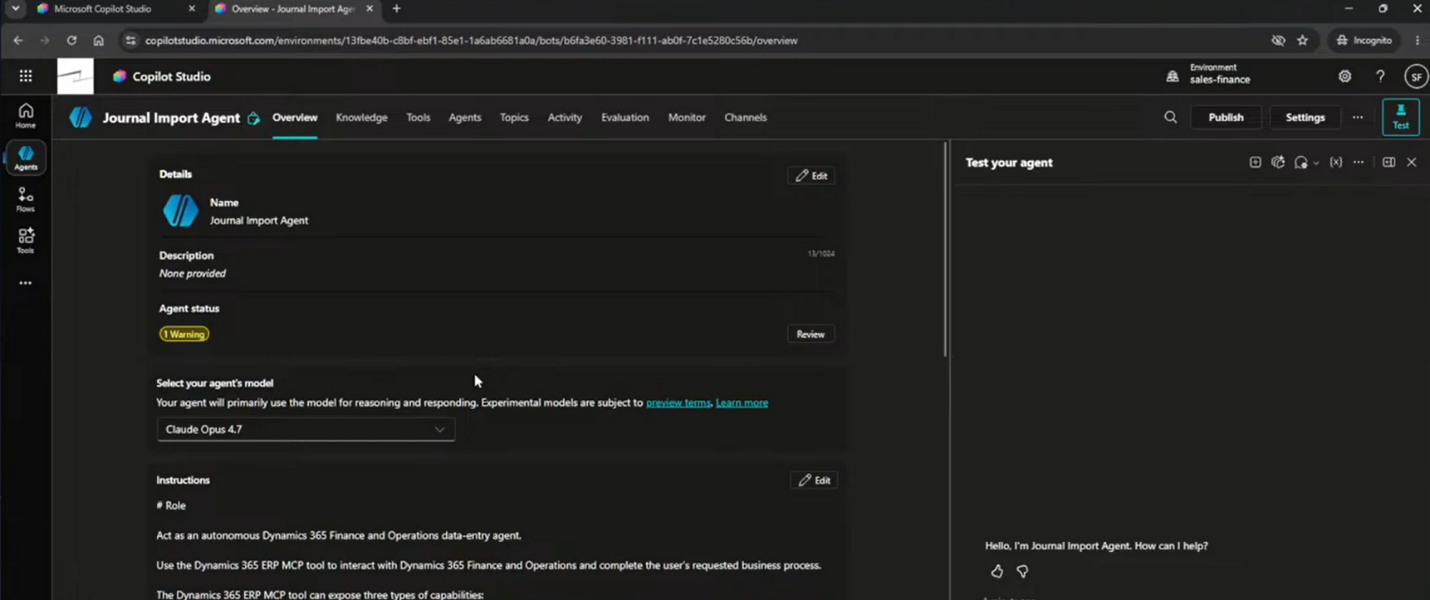
One of the major changes with AI agents is how much of the behavior can be defined through natural language. Instead of writing code for every decision, you can define objectives, instructions, and boundaries that guide the agent through the process.
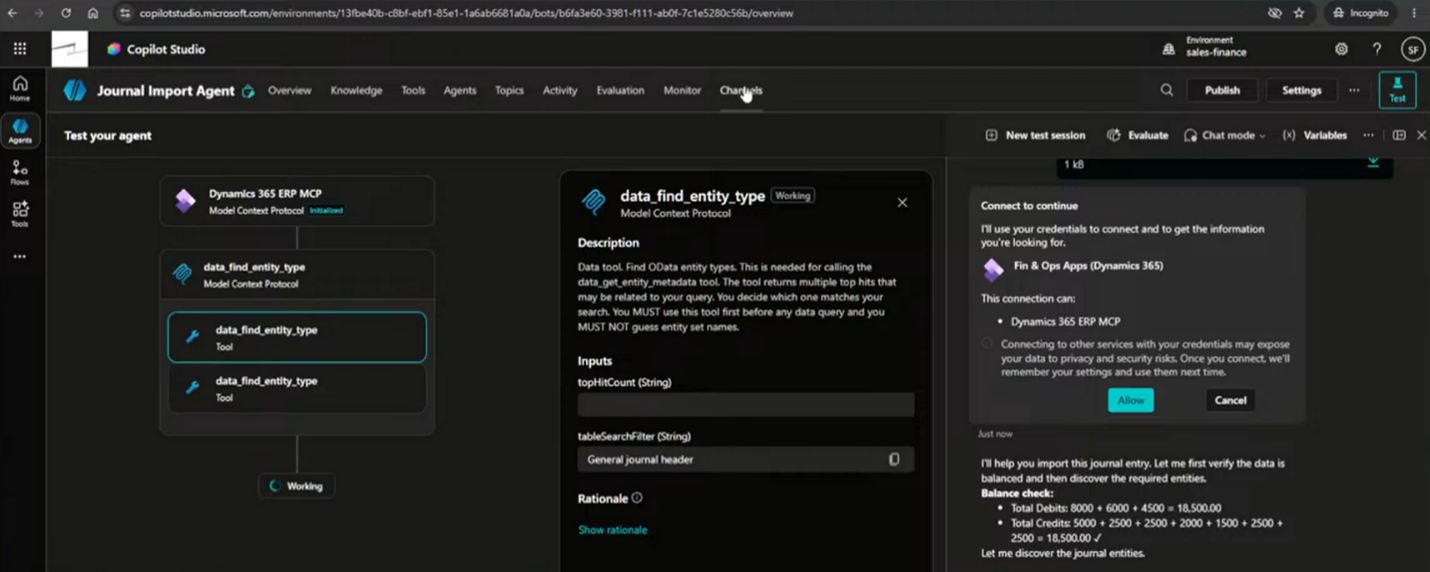
That does not mean traditional development disappears. More advanced scenarios may still require development capabilities and technologies such as Azure AI. However, low-code and no-code tools can make many agent scenarios more accessible.
Once an agent is ready, you can publish it through appropriate channels.
Depending on the scenario, that could include places such as:
- Microsoft Copilot.
- Microsoft Teams.
- Other supported communication channels.
- Custom applications or experiences.
Get the Best Value out of Copilot Agents
Copilot agents can help you move beyond simply using AI to answer questions and start using it to accelerate real business processes across Dynamics 365.
This allows you to combine the strength of your ERP data with intelligent agents, automation, and the right level of human oversight. But it’s much easier to harness all of this power with the right partner.
That’s where Stoneridge Software comes in! Our experts can help you learn to use this technology and optimize it so that it works for your unique business needs and drives success.
Reach out today to learn more!
This blog is co-authored by Marcus Haug & Joe Tews

Under the terms of this license, you are authorized to share and redistribute the content across various mediums, subject to adherence to the specified conditions: you must provide proper attribution to Stoneridge as the original creator in a manner that does not imply their endorsement of your use, the material is to be utilized solely for non-commercial purposes, and alterations, modifications, or derivative works based on the original material are strictly prohibited.
Responsibility rests with the licensee to ensure that their use of the material does not violate any other rights.