















How to Use the Account Reconciliation Agent in Dynamics 365 Finance
For many organizations like yours, account reconciliation can be a time-consuming, reactive process that is often reserved for month-end close and dependent on manual report reviews, spreadsheets, and exceptions lists.
Microsoft is streamlining this process and revising the model with the Account Reconciliation Agent in Dynamics 365 Finance.
This intelligent, AI-powered agent provides a more continuous, proactive financial close, helping finance teams focus on exceptions rather than rechecking transactions that already align. In this blog, we’ll break down what the Account Reconciliation Agent is, how it’s set up, and how it works in practice.
What Is the Account Reconciliation Agent?
The Account Reconciliation Agent is an intelligent agent within D365 Finance that continuously monitors financial transactions and automatically reconciles those that clearly match. It can also flag exceptions or errors for you to review.
Instead of reconciling everything at the end of the month, the agent works proactively in the background, allowing organizations to:
- Shift from reactive or SSRS-based reconciliation to a proactive experience
- Reduce reliance on manual reports and Excel files
- Proactively and intelligently identify and suggest mitigations for exceptions, minimizing the risk of errors
- Run regular reconciliations to ensure that customer financial records are consistently up to date
At a high level, the agent scans transactions, identifies matches between subledgers and the general ledger, and automatically reconciles what it can within your system. When it encounters any potential issues or errors, it surfaces those items as exceptions for user review rather than making assumptions. This eliminates a huge manual process from your plate while allowing you to maintain control over the final reconciliation.
Supported Reconciliation Areas
Out of the box, the Account Reconciliation Agent supports four key areas within finance:
- Bank reconciliation
- Accounts payable (AP) reconciliation
- Accounts receivable (AR) reconciliation
- Tax reconciliation
Microsoft has indicated that additional reconciliation areas will continue to be added over time. Stay tuned to the Microsoft documentation or talk to your partners at Stoneridge for updates.
Prerequisites for the Account Reconciliation Agent
Before enabling and using the Account Reconciliation Agent, there are several important prerequisites to consider across both D365 and the Power Platform.
Dynamics 365 Requirements
- D365 Finance version 10.0.44 or higher
- The feature is currently a production-ready preview
- The following features must be enabled in Feature Management (If you don’t see these features, check your system for updates):
- Immersive homepage
- Agent management (production-ready preview)
- Account reconciliation agent (production-ready preview)
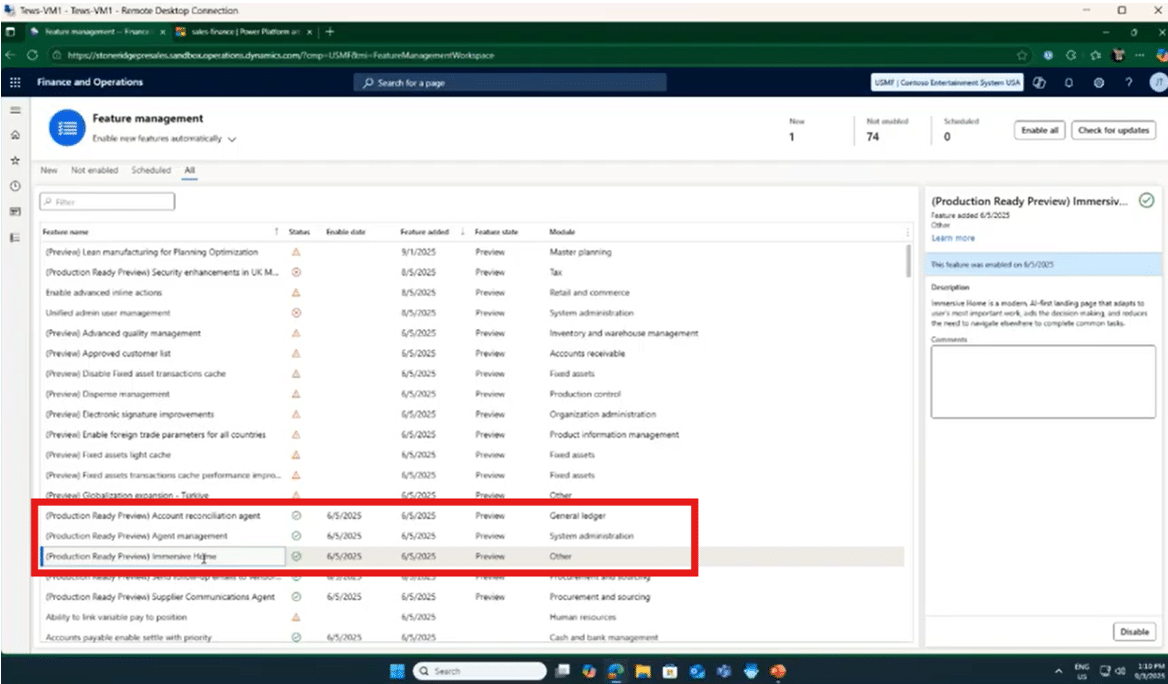
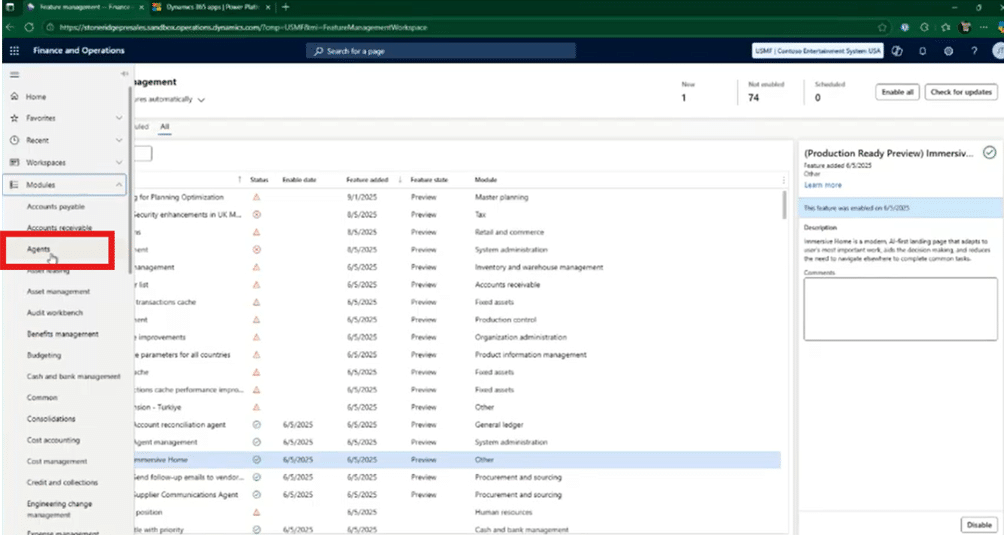
These features are enabled through the Feature Management workspace, where administrators can review feature descriptions and activate them directly.
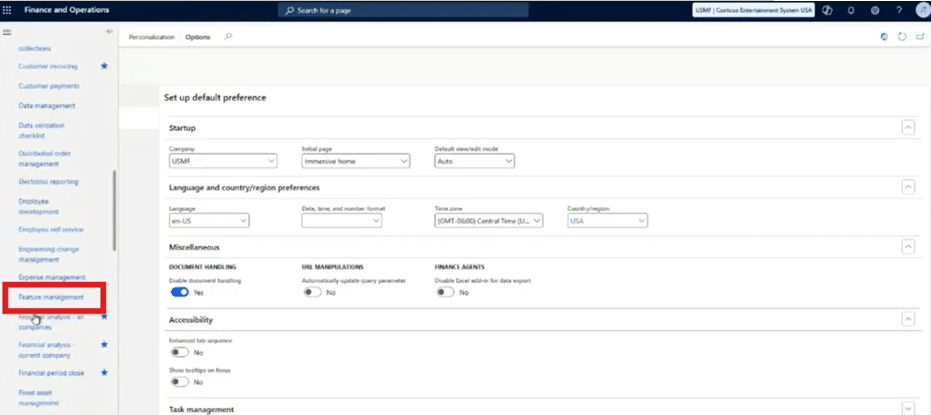
Power Platform Requirements
Within the Power Platform Admin Center, the following applications must be installed in your environment:
- Copilot for Finance and Operations apps (version 1.0.3048.2 or later)
- Copilot in Microsoft Dynamics 365 Finance (version 1.0.3049.1 or later)
To complete this, follow these steps:
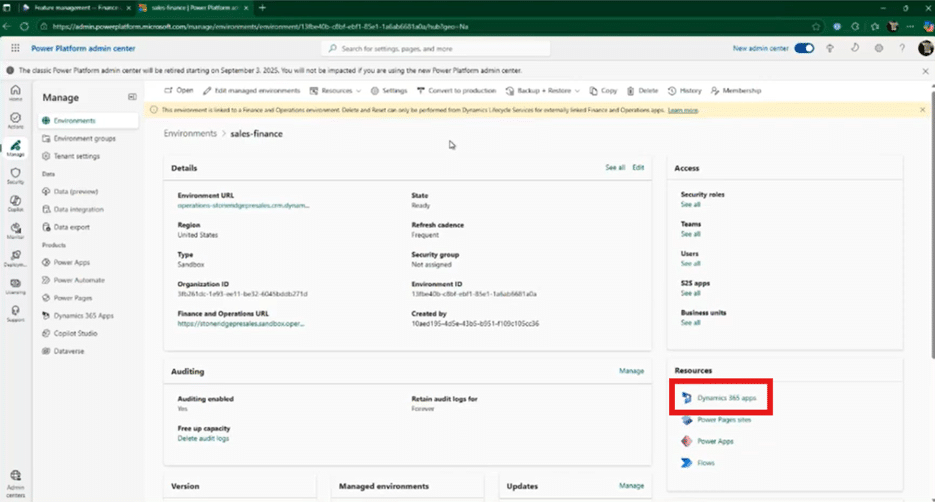
- From the Power Platform admin center, click on “Dynamics 365 apps” under the Resources heading.

- Make sure the two apps listed above are installed.

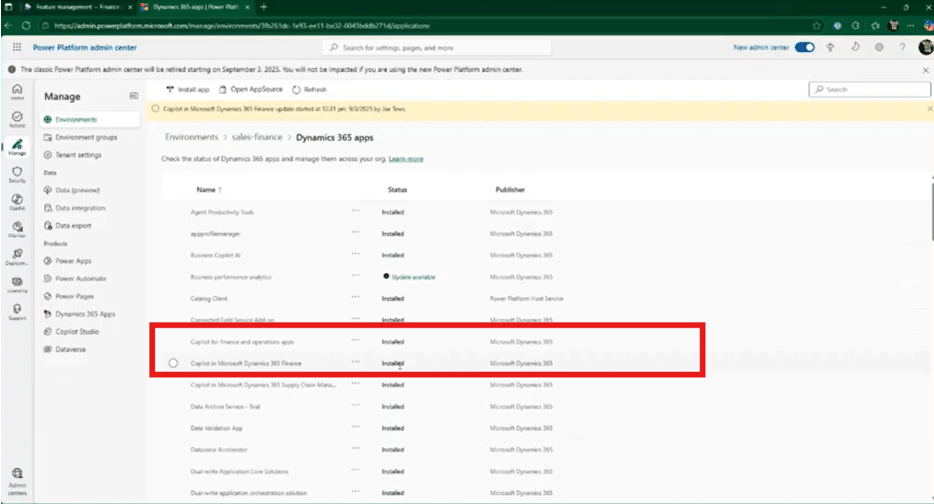
While these prerequisites may sound extensive, Microsoft provides clear documentation, and once enabled, the experience is largely configuration-driven rather than code-heavy.
Fun fact: In this view, you can also check out some other agents that are either released or in preview and try to find others that might help your business. For example, if you have D365 Supply Chain Management, you can test out the Supplier Communications agent.
Setting Up the Agent Identity
To operate securely, the Account Reconciliation Agent requires an agent identity. This identity can be an existing user, but it is best practice to create a dedicated user for security and audit purposes.
Setting up the identity includes:
- Assigning required user roles in Dataverse, such as:
- Finance and Operations basic user
- Account reconciliation agent role
- Environment maker
- Assigning required Finance user roles:
- Account reconciliation agent
- System user
- Configuring required Power Apps connections for Dataverse and Copilot Studio
- Setting up a connection reference to activate and trigger Power Automate flows
Microsoft Learn documentation walks through this process step by step, ensuring the agent can authenticate, execute actions, and log activity appropriately.
How to Use the Account Reconciliation Agent
Once prerequisites are met and features are enabled, users can begin working directly with the Account Reconciliation Agent inside D365.
Navigating the Immersive Homepage
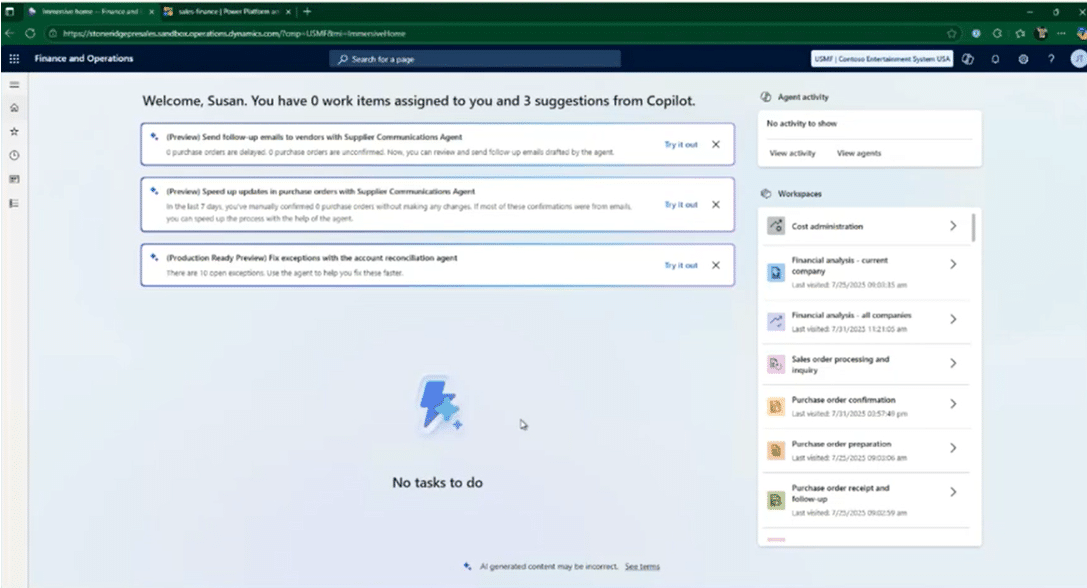
After enabling the immersive homepage, users are introduced to a new Copilot- and agent-focused experience. This redesigned homepage is one of the most significant UI changes since the original release of AX7.
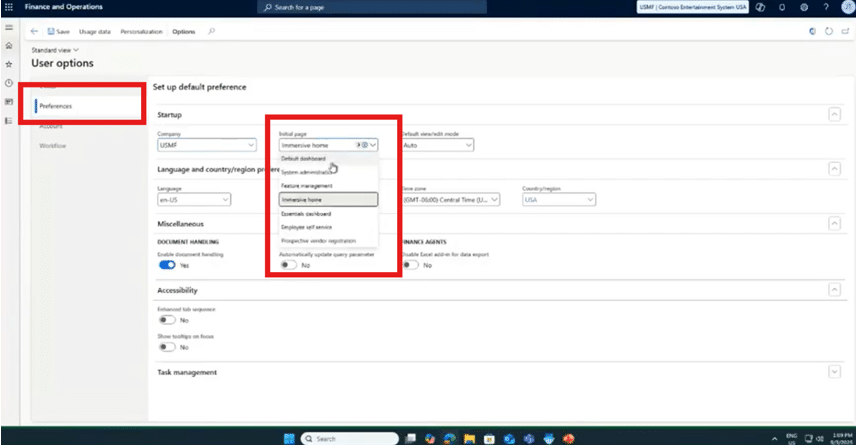
For users who prefer the classic interface, the homepage can be reverted through User Options → Preferences → Initial Page drop-down menu -> select “Default dashboard” without disabling the feature entirely.
Activating the Agent
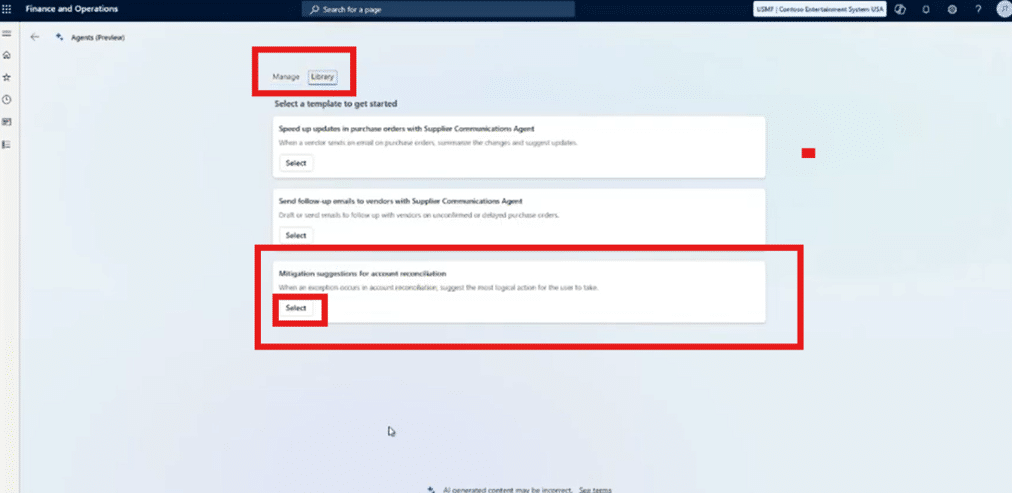
- Navigate to Agents

- View active agents under Manage – This screen may appear empty
- Browse available agents under Library
- Select the Account Reconciliation Agent

- Define how far back the agent should analyze data:
- Last fiscal period
- Beginning of the fiscal year
- Beginning of the calendar year
- Activate the agent

- Lastly, you will get a pop-up asking if you want to save changes. Click Yes.
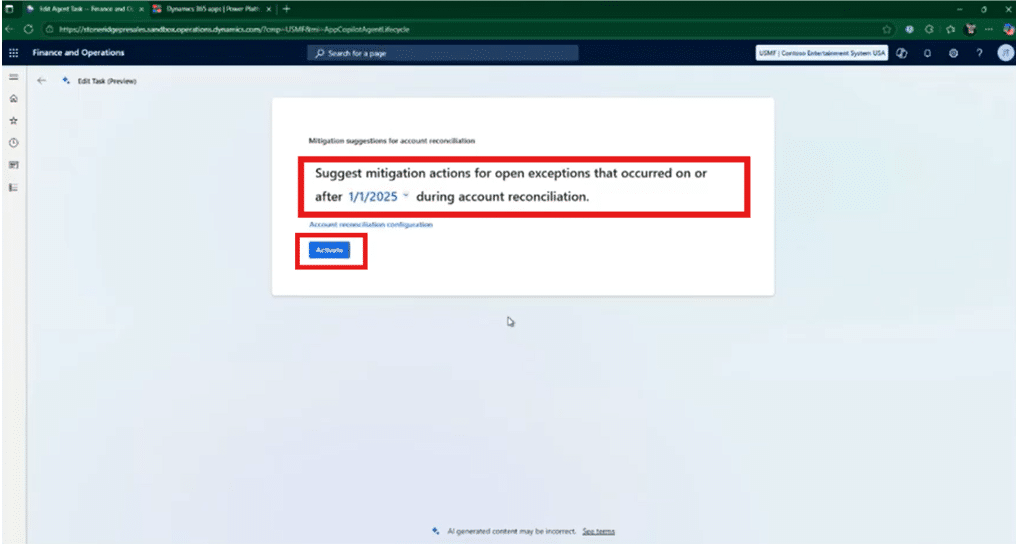
Note: Whatever starting point you choose will become the agent’s baseline for analyzing transactions and identifying reconciliation opportunities.
Using the Account Reconciliation Workspace
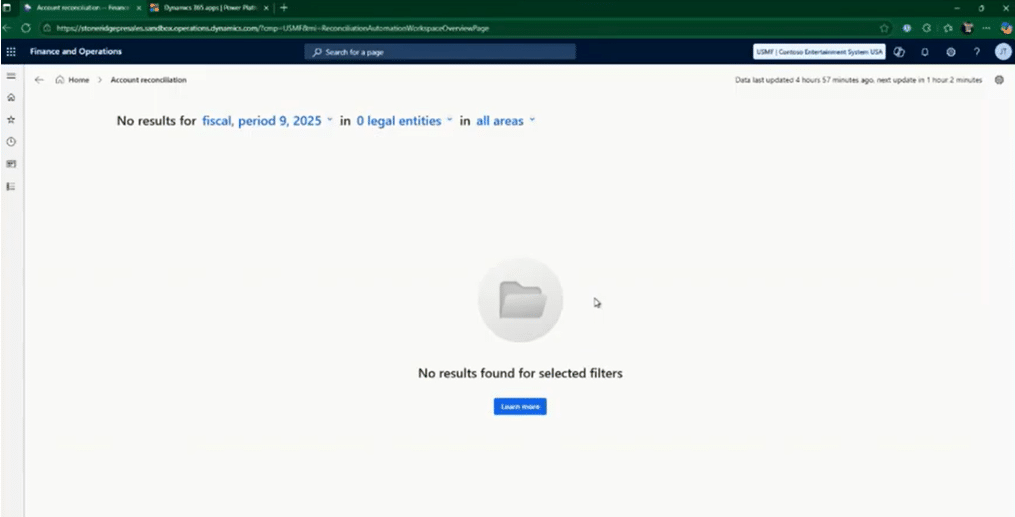
Once activated, a new Account Reconciliation workspace becomes available. This workspace is where the agent’s value truly comes to life.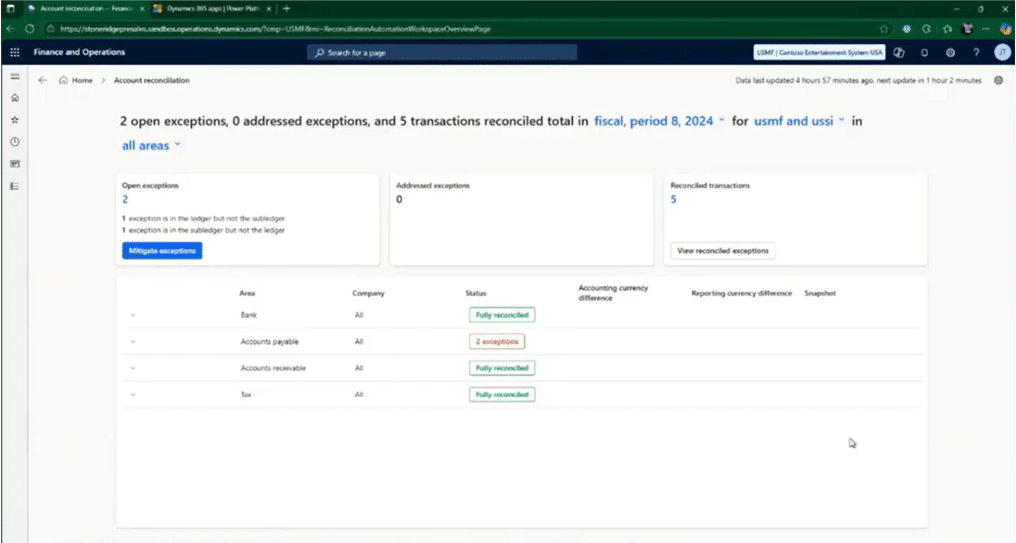
The interface uses a natural language, filter-driven experience that allows users to quickly define certain views. For example:
- Fiscal periods
- Legal entities
- Reconciliation areas (Bank, AR, AP, Tax)
Filters dynamically update results and help narrow the view when dealing with high transaction volumes. This is important because it ensure that your users only see the data they need to see.
Reviewing Reconciled Transactions
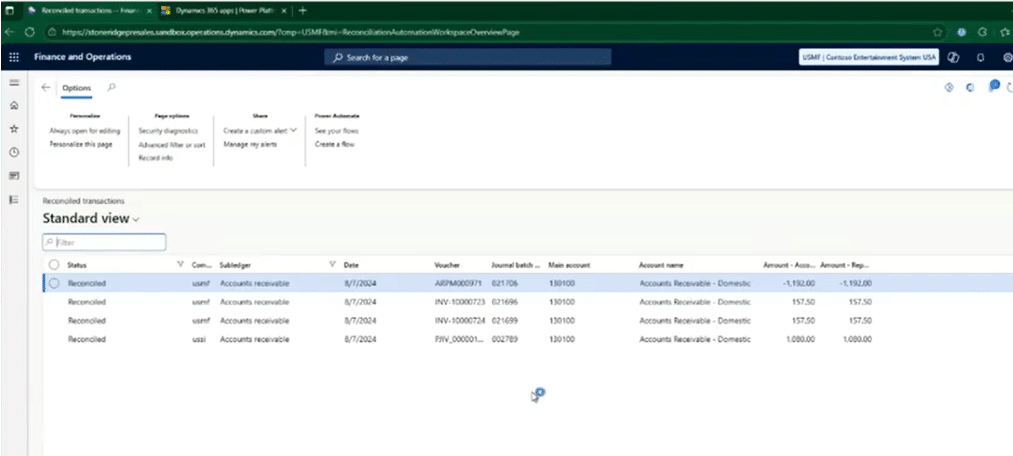
On the workspace dashboard, users can immediately see things like:
- Automatically reconciled transactions
- Reconciliation counts by area
- Visual indicators highlighting exceptions
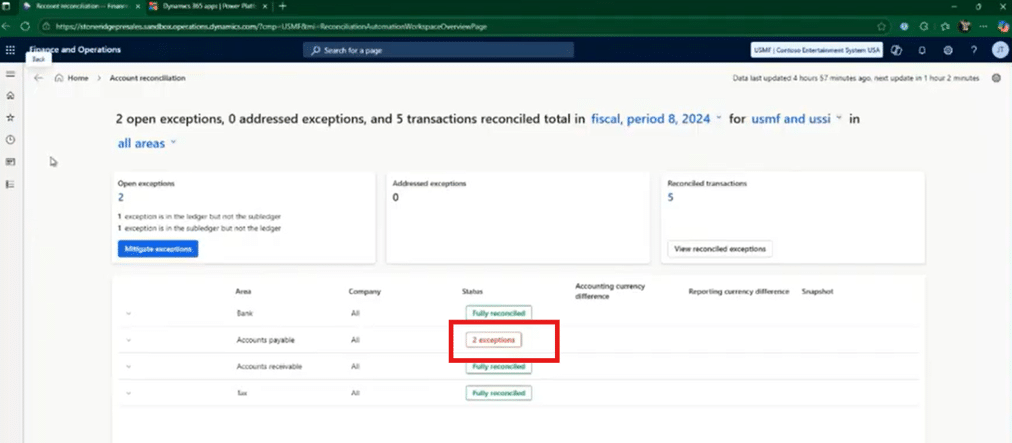
Transactions that clearly match between the subledger and ledger are reconciled automatically, eliminating hours of routine reconciliation work each month.
Handling Exceptions
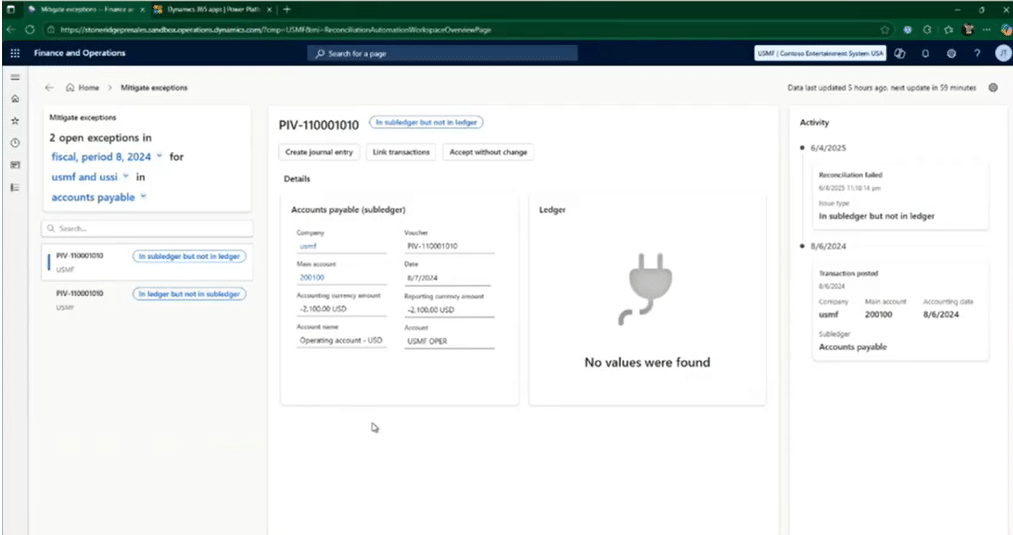
When the agent encounters transactions it cannot reconcile with full confidence, it flags them as exceptions. You can drill into those exceptions by clicking on the visual indicator in the image above. Exceptions will vary, but some common examples include:
- Transactions present in the subledger but not the ledger
- Transactions present in the ledger but not the subledger
For each exception, users are given guided options, including:
- Create a journal entry
- The agent generates the entry automatically
- The user only needs to add a comment
- Link transactions
- Connects related ledger and subledger entries
- Resolves reconciliation instantly
- Reverse a transaction
- Useful for erroneous ledger entries
- No manual journal creation required
- Accept without change
- With optional justification comments
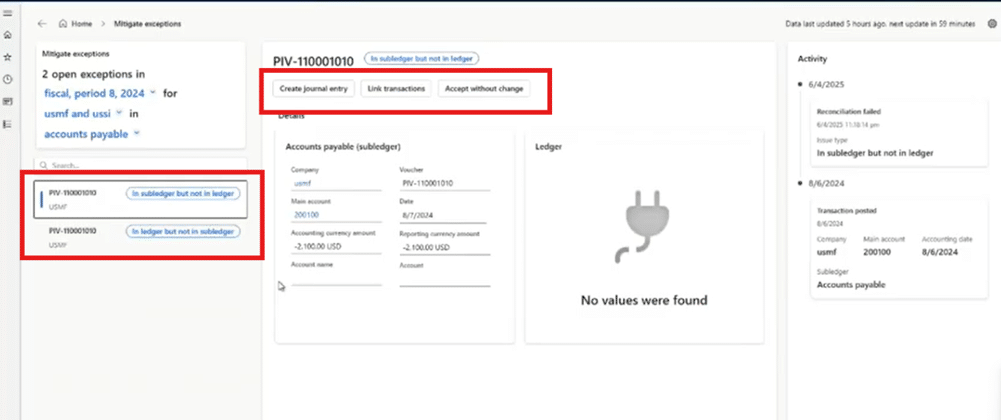
These actions resolve exceptions directly from the workspace, without navigating away to traditional journal screens.
Trust, Transparency, and Auditability: How Microsoft Helps You Trust The Agents with Your Data
A common concern we hear from clients when it comes to implementing new AI-driven tools and automations in their environment is trust and data security. Of course, you want to implement and use an exciting, technologically advanced tool, you also want to protect your data and your organization’s integrity.
Luckily, Microsoft has built safeguards directly into the agent experience. The Account Reconciliation Agent:
- Only reconciles transactions when confidence is high
- Flags ambiguous items instead of guessing
- Logs every action it takes
It also stores an audit trail of actions, allowing you to review the history and take manual control if needed. To access this audit trail, you can navigate to the side menu on the left side of your screen and select Agents -> Agent activity, where you will see:
- Recommendations made by the agent
- Reconciliations performed
- Supporting reasoning behind each action
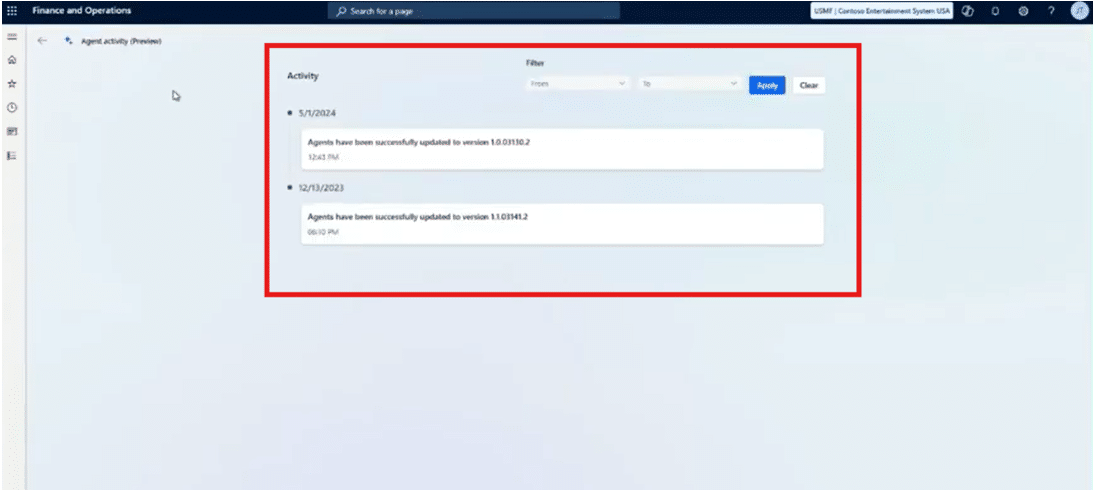
This ensures full transparency and maintains compliance and internal control requirements. Not only can you rest easy knowing smart automation is taking over time-consuming processes, but you can also rest easy knowing that you retain full control over the tool.
Get Expert Help Implementing the D365 Finance Account Reconciliation Agent!
This agent is a very big step toward continuous reconciliation and smarter financial operations. Like any advanced capability, it delivers the most value when implemented and configured properly.
Talking to the team at Stoneridge Software can help you navigate prerequisites, configure agent security, and ensure your organization gets the most out of its investments in the latest intelligent Microsoft tools and capabilities.

Under the terms of this license, you are authorized to share and redistribute the content across various mediums, subject to adherence to the specified conditions: you must provide proper attribution to Stoneridge as the original creator in a manner that does not imply their endorsement of your use, the material is to be utilized solely for non-commercial purposes, and alterations, modifications, or derivative works based on the original material are strictly prohibited.
Responsibility rests with the licensee to ensure that their use of the material does not violate any other rights.