














Extending MCP Server in Business Central with Custom API Pages
Why MCP Answers Fall Short in Business Central
If you’ve tested MCP‑based agents against real Business Central questions, you’ve likely seen this pattern: answers reference correct records, use correct terminology, and still lead to wrong conclusions. The data isn’t wrong—the data surface is incomplete.
MCP can only reason over what API pages expose. When key relationships, intent, or constraints are missing or weakly described, the agent produces answers that reflect that partial view. This isn’t an MCP limitation; it’s a data‑modeling one.
Understanding why this happens requires looking at how MCP Server defines what an agent is allowed to see and reason over inside Business Central.
Read this article or watch the video for an explanation of how to extend the MCP Server with custom API pages so agents operate on the same data model your team depends on.
How MCP Server Defines What an Agent Can Reason Over
MCP Server sits between an agent and Business Central, defining exactly which data surfaces the agent is allowed to reason over. It does not add intelligence. MCP only exposes selected data in a structured, predictable way. In practice, answer quality depends more on what MCP exposes than on the agent.
Think of MCP Server as defining a book an agent is allowed to read. Each API page becomes a chapter about a specific slice of Business Central data. Standard API pages already cover many chapters, but not the entire book. Large parts of Business Central remain visible to users, yet invisible to the agent, because they are never exposed through MCP Server.
That gap is where custom API pages become unavoidable. The data exists, but without deliberate exposure, the agent cannot reason over it. The rest of this article walks through how to extend MCP Server to close that gap—and which details matter.
API Pages as the Source of MCP Understanding
Everything that follows builds on a single constraint: MCP can only reason over intent that is explicitly modeled in API pages.
The goal here isn’t to explain how to build an API page. It’s to show where business intent is expressed or lost when data is exposed for MCP to reason over. These details matter because they are the only signal MCP has.
API pages expose data without the implicit context users rely on. That means intent must be made explicit. To make this concrete, let’s look at the BOM Components page.:

The BOM Components page describes which components are required to assemble a Conference Package and which resources are involved. It exposes fields such as Type, No., Description, Assembly BOM, Quantity per, and Unit of Measure.
To make this data available to an agent, we expose the same fields through an API page.
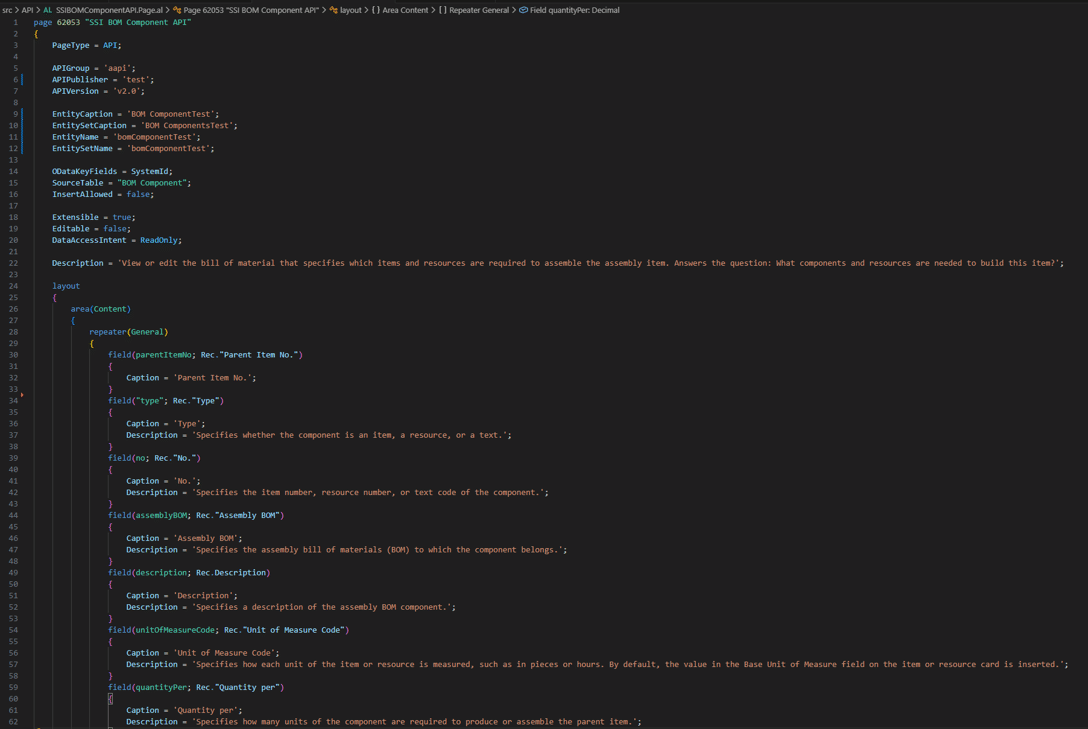
The critical behavior appears at the field level. This is where MCP either understands how a value participates in a process or treats it as a value with no operational meaning.
field(assemblyBOM; Rec."Assembly BOM")
{
Caption = 'Assembly BOM';
Description = 'Specifies the assembly bill of materials (BOM) to which the component belongs.';
}
We bind the field to Rec."Assembly BOM", the same field users see on the BOM Components page in Business Central.

Each API field includes a caption and a description that gives the field semantic meaning for MCP.
MCP has no implicit understanding of your domain. It relies entirely on what your API pages explicitly describe. Tooltips are one way that intent is conveyed:

Exposing data alone is rarely enough. When API pages don’t describe how data fits into a business process, agents struggle. Adding a new chapter requires intent, not just exposure.

With the API page defined, the next step is practical: deciding how MCP Server discovers and uses it. The sections below focus on exposure, scope, and behavior.
Scope as a Design Decision
Scope is where overexposure causes the most harm. More data does not make MCP more accurate. It increases uncertainty.
Allowing MCP Server to use an API page is a boundary decision that limits which data the agent can reason over. When those boundaries are too broad, agents reason over ambiguous data and produce plausible answers based on the wrong records.
To make an API page available to MCP Server, open MCP Server Configuration in Business Central and add the page to Available tools. Once all your pages are in there, activate the package.
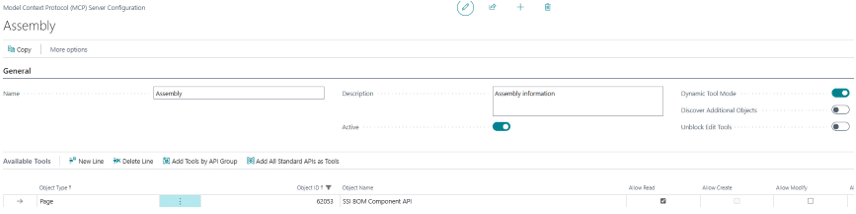
Note: Enabling “Discover Additional Objects” removes intentional boundaries. MCP is no longer limited to the API pages you designed and can reason over any available surface, even when it does not reflect the business process you intended to support.
Copilot Studio Enforces, It Does Not Improve
Copilot Studio does not change how MCP reasons. By the time MCP Server is added as a tool, the behavior is already locked in by the API pages and scope defined in Business Central. Copilot Studio simply enforces those boundaries.
If answers are incomplete or misleading at this point, the cause is not prompting or agent configuration. It is the data surface MCP was allowed to reason over.
In Copilot Studio, MCP Server is added as a tool and connected to a specific Business Central environment and MCP configuration. At a high level, this involves creating an agent, adding the Dynamics 365 Business Central MCP tool, and selecting the environment, company, and configuration name defined earlier.
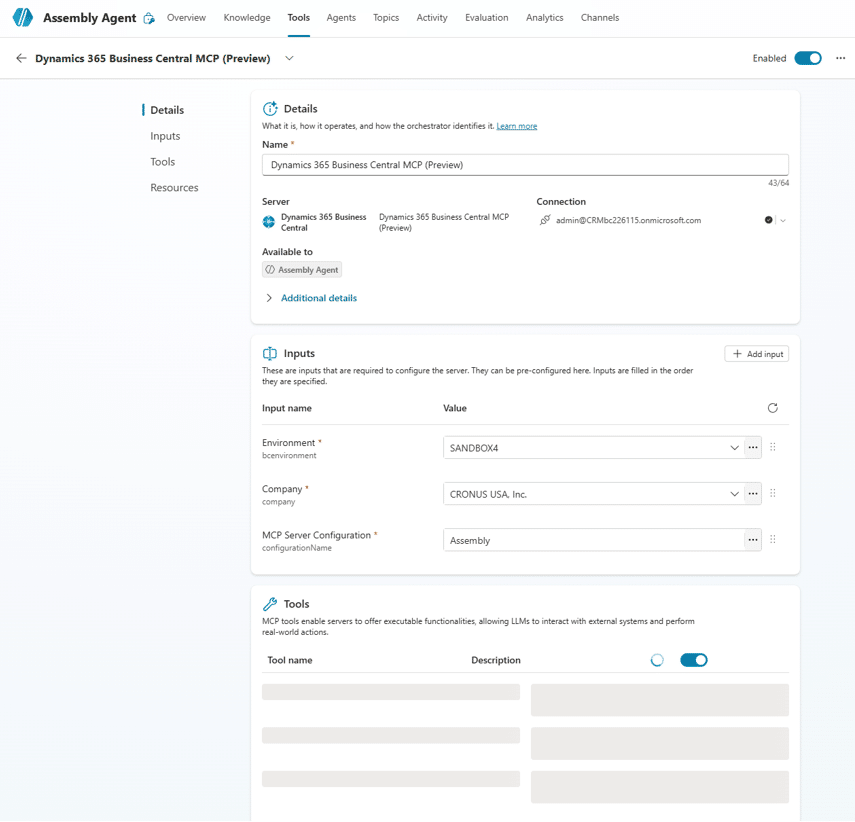
Note: Disabling Web Search makes MCP behavior predictable. It ensures answers are produced solely from the Business Central data surface you designed.

At this point, the setup work is complete. MCP Server has access to your API pages, and the agent knows where it is allowed to look.
The focus now shifts to how MCP Server answers real Business Central questions using that data.
MCP in Practice: Answering Business Central Questions
In practice, MCP rarely fails in obvious ways. Relationships are often partially exposed, quantities exist but lack clear meaning, and date fields are present without indicating whether they reflect history or expectation. Calculated fields are exposed, but the logic behind them is not, leaving MCP to treat derived values as raw facts. In these cases, MCP produces answers that are technically valid and operationally misleading.
These are not edge cases. They are the predictable result of API pages that expose data without fully expressing intent.
These failures repeat because MCP answers rely on a small set of predictable reasoning patterns.
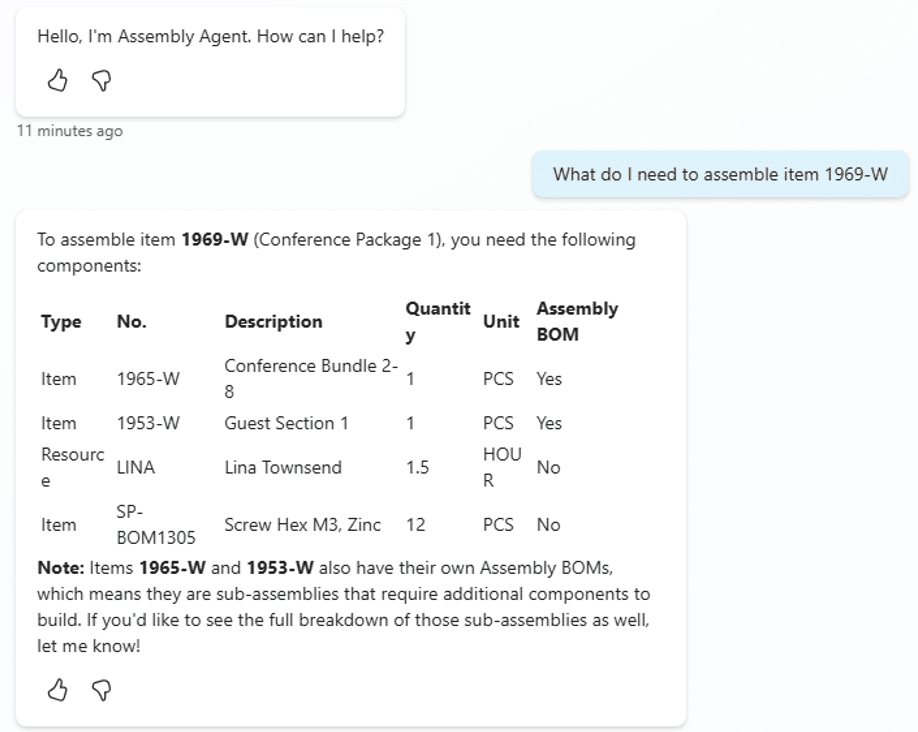
1. Structure and relationship reasoning
These questions rely on how records relate to one another across tables.
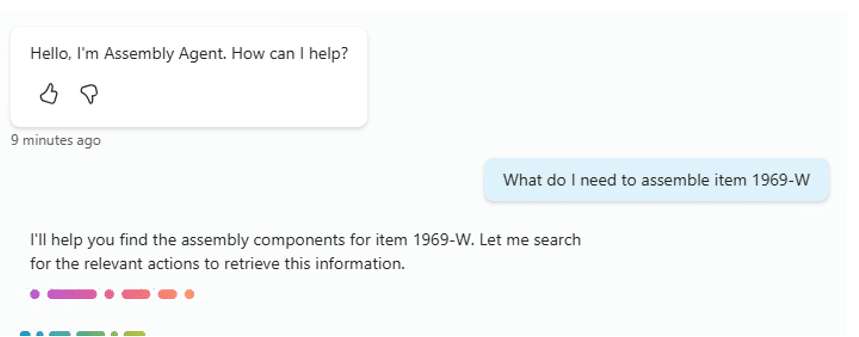
- What do I need to assemble item 1969‑W?
- Which BOMs use the resource “Marty”?
They work only when relationships between BOMs, components, and related entities are explicitly exposed and described.
MCP cannot infer structure that is not modeled.
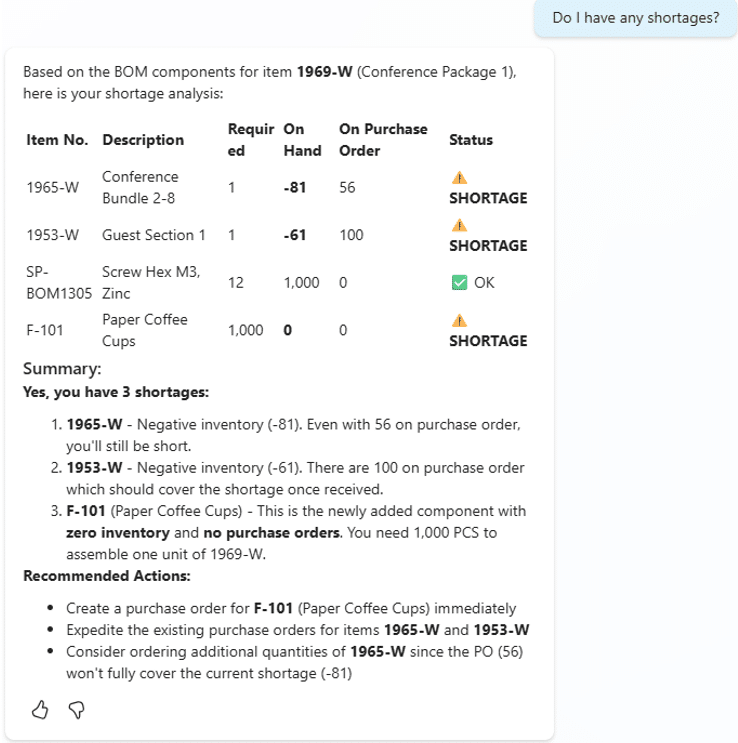
2. State‑ and quantity‑based reasoning
These questions depend on quantities, balances, and calculated state.
- Do I have any shortages?
- Which sales order lines have a non‑zero Qty. to Assemble?
MCP answers these by reasoning over filtered sets of records. Missing quantities, unclear status fields, or ambiguous calculations prevent this pattern from working.
3. Time‑ and expectation‑based reasoning
These questions focus on dates and forward‑looking signals.
- When is the expected receipt date?
MCP answers these only when intent is clear in date fields. Without explicit meaning, it cannot distinguish expected dates from historical ones.
When a question is asked, MCP Server maps it to one or more of these patterns. It selects the relevant API pages, applies filters and relationships based on intent, and returns an answer using only the exposed data.
These patterns are not agent features. They reflect how clearly API pages express structure, state, and intent.
Adding Context Without Expanding Scope
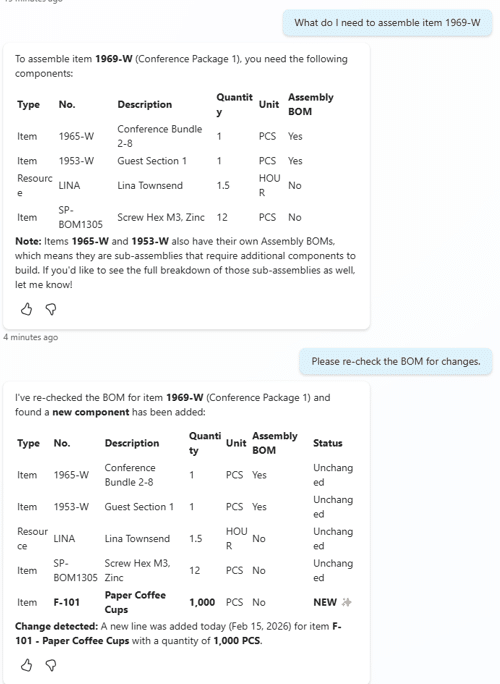
System fields change how MCP answers are interpreted by making reasoning explainable rather than expanding access. Without them, MCP answers are static facts. With them, answers gain recency, ownership, and change context.
Exposing system fields such as SystemCreatedAt, SystemModifiedAt, and SystemModifiedBy does not change what MCP Server can access. It enables MCP to reason about what changed, who modified it, and when. Architecturally, this turns static lookups into explainable, time aware answers users can validate within existing boundaries.
What’s the Takeaway?
MCP does not fail because it guesses poorly. It fails because it reasons correctly over an incomplete model. Custom API pages, intentional scope, and explicit intent are not enhancements. They are prerequisites for reliable answers.

Under the terms of this license, you are authorized to share and redistribute the content across various mediums, subject to adherence to the specified conditions: you must provide proper attribution to Stoneridge as the original creator in a manner that does not imply their endorsement of your use, the material is to be utilized solely for non-commercial purposes, and alterations, modifications, or derivative works based on the original material are strictly prohibited.
Responsibility rests with the licensee to ensure that their use of the material does not violate any other rights.