














Get Your Organization AI-Ready: The Work Behind the Win
AI is no longer a futuristic concept. It is now a practical business tool that is becoming more practical and impactful almost overnight.
While there are businesses at all stages of the AI revolution – some that don’t use it at all, and others that are already building out custom agents and workflows – the question they need to ask themselves is no longer “if” they should adopt AI, but how to do it responsibly and securely.
Watch the video above or continue reading to learn the steps to prepare your organization for AI.
How to Build a Strong and Smart AI Strategy Framework
At Stoneridge Software, we work with organizations every day that want to harness tools like Microsoft Copilot and AI-powered agents, but many aren’t quite sure where to start. The reality is that becoming AI-ready will not happen overnight. It requires smart planning, sound strategy, robust governance, and clean data. When you have all those things in place, you can implement a thoughtful and effective rollout plan.
Stoneridge Is Your Microsoft Copilot and AI Partner
No matter where you are on your AI journey, Stoneridge Software has a team of experts to help you develop a strong AI strategy framework, drive adoption, and use AI to streamline operations and boost profits. Reach out to our team today and learn more about our Copilot-specific offerings:
- AI Agent Tools: Learn more about how Agent Builder, Copilot Studio and Azure AI Foundry can help you build smarter agents.
- AI Executive Briefing: Prep your leadership team with a 90-minute educational session on high level AI concepts and how you can roll AI out effectively in your organization.
- AI Readiness Assessment: A complimentary evaluation of your systems, processes, and organizational mindset going into developing an AI plan.
- Copilot Flight Plan: Align leadership on business value, assess your environment, and prepare your teams to use AI effectively.
- Copilot Flight Schools: Hands-on training that helps your team understand where they can and should apply Copilot within their daily tasks.
- Liftoff Labs: Workshops where the Stoneridge experts walk you through the steps in creating Copilot agents to help with your unique business needs.
Now, let’s walk through what that journey looks like and how your organization can prepare for the AI-powered future.
AI Today: How You Should Think About It Going In
AI has come a long way since it burst onto the scene, and many companies – and their team members – are already using it to supplement their own skills and streamline workflows.
AI Is a Resource Multiplier
When we say AI is a resource multiplier, we’re saying that it is essentially a sidekick that enables your employees to do far more in less time. It has become a major technology shift that fundamentally changes the way we work.
Some of the most common ways AI is already boosting productivity include:
- Conducting large volumes of research in seconds instead of hours
- Generating content, presentations, and documentation quickly
- Summarizing meetings, conversations, emails, and reports
- Enhancing work inside tools like Excel, Outlook, and Teams through built-in Copilot features
- Automating repetitive transactions and communication through agents specifically designed for Sales, Account Reconciliation, and Supplier Communications.
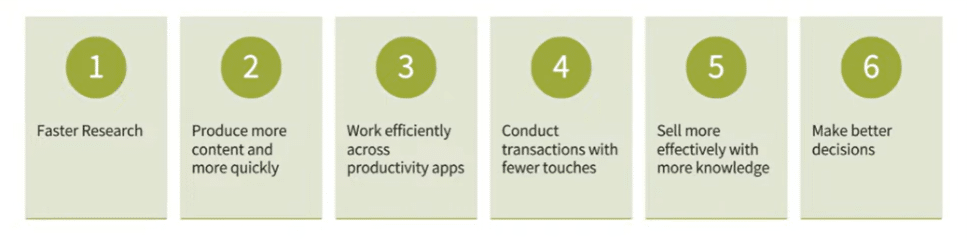
All this productivity culminates in easier and faster access to vital data, which leads to smarter decisions. Organizations that embrace AI thoughtfully will gain major competitive advantages over those that don’t.
How AI Changes the Way We Work
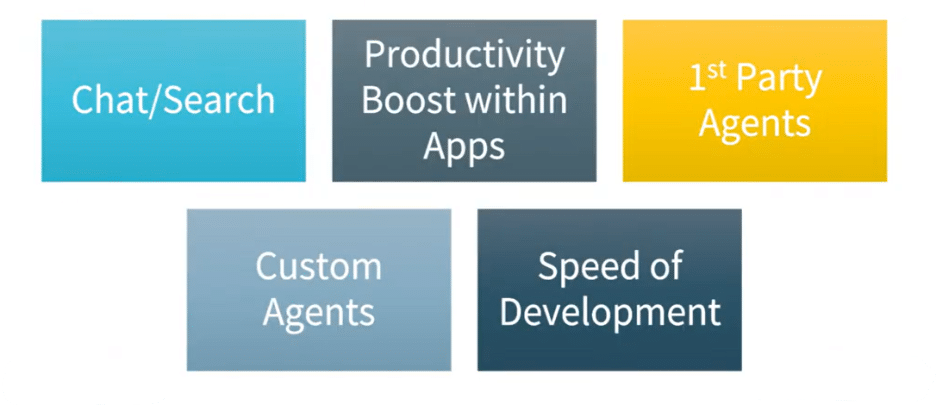
AI is fundamentally changing how you interact with technology and with the data inside the systems where you work. In the past, it was possible to boost productivity. However, the challenge of manually searching for data across different systems and applications was always present. AI can pull insights from across your organization and present them instantly.
Imagine you are preparing for a client meeting and need to get up to speed. Instead of going to your inbox, digging through emails, and jotting down hand-written notes for invoices, support tickets, and CRM information, you can simply use Copilot to summarize:
- Current customer sentiment, so you know what a customer is feeling before you go into the meeting
- Outstanding invoices, which you may need to remind the customer about
- Open support cases, so you can come to the meeting prepared with solutions for the customer’s issues
- Project status updates that keep you informed on how things are going and what still needs to be done
This shift enables professionals to make better decisions faster.
AI Is the New UI
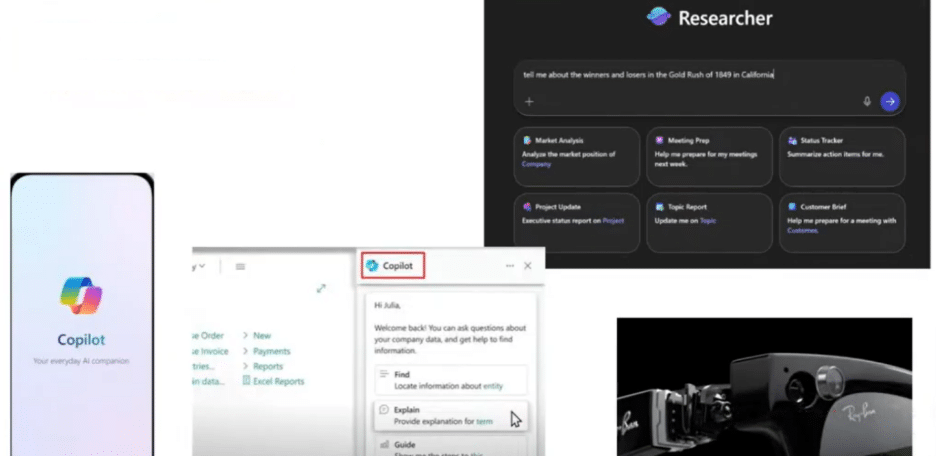
We are also witnessing a major shift in how users interact with software. Traditionally, we navigated applications through menus, buttons, and forms. Increasingly, AI is becoming the new user interface.
Instead of navigating screens, users can simply ask questions on their phone, PC, agent or even smart glasses like:
- “Summarize my upcoming meetings.”
- “What projects are behind schedule?”
- “Draft a response to this customer email.”
Natural language is becoming the new programming language. AI tools like Copilot are not only available to use online, but they are also embedded into your CRM and ERP systems, and on mobile devices as well. Understanding that AI is always close by will drive organizational adoption and boost usage.
You might notice pretty quickly that Copilot might be the first tool your users enable every morning.

What Is an Agent?
A key concept in the evolution of AI is building agents that address specific purposes. These agents are purpose-built and use specific knowledge sources to respond to requests or automate activities. Some examples include:
- An agent that scans incoming invoices, puts them into your ERP system with the correct information and send them for approval.
- An agent that reviews demand for the product and current inventory and automatically orders additional materials based on need.
There are several examples of agents that already exist within the Microsoft Copilot ecosystem (known as First-Party Agents), and you can also create your own Custom Agents (Microsoft calls these Third-Party Agents). The most important thing to remember when it comes to agents is that they thrive on curated knowledge sources, rather than the whole internet. If you overload an agent with too much data that is outside of the scope of its responsibilities, it might produce inaccurate results.
Agents can range from simple assistants to complex automation systems embedded within business applications. You can also orchestrate agents that exist within similar workflows to boost their capabilities.
The Road to AI Adoption
Now that you understand a bit more about where AI is today, let’s look at how you can pave a smooth and easy-to-navigate road to adoption.
Understand that Your Employees Are Already Using It
One reality that surprises many executives is this:
Whether you have an AI strategy framework in place or not, your employees are very likely already using it.
- If you assume your team isn't using it, you're very likely wrong
- They are at least using it personally for random tasks, make sure confidential information is not being accessed
- Build a plan for how you can make it available securely within your environment
Whether leadership has approved it or not, many team members are experimenting with tools like:
- Copilot
- OpenAI’s ChatGPT
- Anthropic’s Claude
- Google’s Gemini
- xAI’s Grok
- Perplexity
They use them to write emails, summarize information, analyze data, or speed up everyday tasks. Ignoring this reality doesn’t stop adoption—it simply pushes it into the shadows.
That’s why organizations need a clear AI strategy and governance model.
Why You Need a Plan to Make AI Usage Safe
Without a plan, AI adoption can create real risks, such as:
- Employees could unknowingly upload proprietary data into public AI models
- Sensitive internal information might be shared too broadly
- Teams may use tools that lack enterprise security controls
A thoughtful AI plan helps organizations encourage innovation while keeping their data protected. It does this by making sure it’s done securely, protecting confidential information through roles and permissions, establishing clear usage guidelines, and providing approved AI tools for team members.
The goal isn’t to restrict AI—it’s to enable it safely and protect your data.
What Is Your AI Vision and Policy?
A successful AI strategy starts with clear leadership direction. This is instrumental in establishing an AI vision and AI policy to guide adoption and keep users and your data safe. Let’s look at the key elements of these two important pieces of your AI strategy framework.
How to Secure Your Environment

Security and governance must come before you roll out AI broadly to your organization. When implemented properly, AI won’t cause problems, but it could potentially expose ones that already exist both internally and externally. Here are a few things to keep in mind:
Protection from Outsiders
- Be careful about queries you use in public tools like ChatGPT because it might use those to train the model.
- Engage in security reviews and security checks to keep outsiders out of your cloud environment
- Make sure you have a comprehensive offboarding plan for employees who are leaving, so they don’t take any data with them
- Train your team to recognize phishing attempts
Protection from Insiders
- Security by obscurity doesn’t work – If you hide files, AI agents will find them faster and with more success than a human would. You must have proper permission sets in place and establish well-defined roles in terms of who can access what types of data.
- Implement Purview document management to enhance data governance, compliance, information protection, data loss prevention, and insider risk management.
- Review your internal SharePoint site and set permissions for sensitive information like payroll or financials.
If sensitive files are poorly secured today, AI will simply make them easier to find.
Determine Your Valuable Data Sources and Clean Them
AI is only as good as the data you feed into it. If your systems contain inconsistent, duplicate, or outdated data, AI will produce confusing or inaccurate results.
Common challenges include:
- Duplicate customer records
- Inconsistent naming conventions
- Outdated CRM entries
- Disconnected data sources
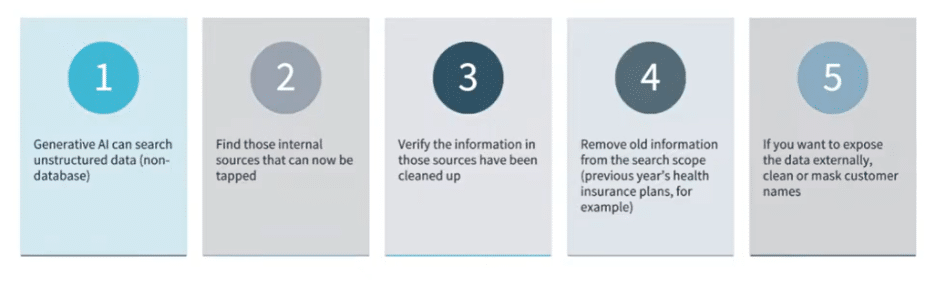
Organizations should focus on five key areas:
- Optimizing data for Generative AI: Generative AI will sometimes pull in unstructured data from outside the database, which can muddy the results.
- Find a “system of record”: This essentially means you need to find your single source of truth and cry to clean and centralize your data there for optimal AI results.
- Verify that data has been cleaned: Don’t assume that it’s clean; always check it before feeding it into an AI model.
- Remove old information: If you want to analyze a client list or look at how your sales numbers have progressed over three years, you don’t need information from 10 years ago clogging up the system.
- Clean or mask customer names and other sensitive information: Especially if you want to expose the data externally. If this isn’t done, it could lead to a huge compliance headache.
Clean data dramatically improves AI outcomes and the information your team receives.
Roll Copilot Out in Phases
One of the biggest mistakes organizations make is trying to roll AI out to everyone at once. While it seems like it would be easy and intuitive, it can lead to confusion, disjointed workflows, and potential employee pushback. That’s why we recommend a phased adoption strategy you can break into three parts:
1 – Roll out Copilot for a Small Group of Enthusiastic Users
Start with a small pilot group of users who are eager to use AI. This typically 8 to 12 employees who are willing to experiment and provide feedback on:
- Discovering practical use cases
- Refining prompting techniques
- Identifying process improvements
You can monitor for any access issues or potential pitfalls that you didn’t think of before.
2 – Let the Broader Group Use It
Once the pilot group gains experience and delivers feedback, they can help train the next group of users on how and when to use it so they can demonstrate its value. This will create a ripple effect across your organization and positively influence AI adoption.
3 – Review Usage
Throughout every phase of the rollout, make sure you are monitoring for usage. At any point, you may find there is a user who simply does not want to use it for anything, and that’s fine. Just make sure you know that so you aren’t wasting money on licenses for users that won’t use the tool.

What's Next on Your AI Journey?
You don’t have to “solve AI” in one move. The organizations that get real value are the ones that treat AI adoption like a capability: set a clear vision, put governance and security first, clean the data that matters, and roll Copilot out in phases so usage grows naturally. Once those fundamentals are in place, you’re ready to move from experimenting with AI to operationalizing it in the workflows your teams rely on every day.
Stoneridge is here to help you no matter what stage you're in! Let us know how we can assist.
Want to Learn More?
In Part 2, we’ll shift from readiness to execution—how to start building agents (including what MCP enables), how to think about accuracy vs. summaries, and the core building blocks of a ‘good’ agent.”

Under the terms of this license, you are authorized to share and redistribute the content across various mediums, subject to adherence to the specified conditions: you must provide proper attribution to Stoneridge as the original creator in a manner that does not imply their endorsement of your use, the material is to be utilized solely for non-commercial purposes, and alterations, modifications, or derivative works based on the original material are strictly prohibited.
Responsibility rests with the licensee to ensure that their use of the material does not violate any other rights.