















Microsoft Dynamics 365 Generative Pages 101: What They Are, When to Use Them, and How They Work
If you’re seeking a quicker, more adaptable way to design tailored app experiences without getting buried in manual setup, Generative Pages in Microsoft Dynamics 365 Customer Engagement (D365 CE) may be worth exploring. Rather than defining fields, sections, and layouts individually, you can use plain language to outline what you want to create and let Artificial Intelligence (AI) produce a page connected to your data that’s ready for easy refinement. Simply put, it replaces traditional setup with a more efficient path to usable results.
In this blog and video, we’ll walk through what Generative Pages in D365 Customer Engagement are, where they fit within app development, and how you can use prompts, iteration, and testing in the maker portal to move from idea to working page quickly.
Before diving into how to build one, it’s helpful to clearly define what Generative Pages are and when they make the most sense to use. Let’s start there.
Generative Pages vs. Standard Forms
Generative Pages are AI-powered pages created from plain language prompts, but their impact is best understood in how they differ from standard forms in D365 CE.
Standard forms are structured and predictable, designed around a defined layout where fields are placed intentionally within a consistent framework. Generative Pages take a different approach, giving you more freedom to shape the experience by bringing together elements like KPI tiles, work queues, and contextual panels into a single, cohesive view.
That flexibility is where they stand out. Generative Pages are a strong fit for scenarios like command centers, dashboards, or any experience that brings together multiple data sources—such as accounts, cases, and users, into one place for faster insight and action.
However, without a doubt, standard forms still have a clear role. They are great solutions for straightforward data entry or scenarios where consistency matters more than flexibility, forms remain the better fit.
The distinction has to do more with what you are working to develop. Generative Pages are flexible and expand what you can build and how quickly you can build it, but they don’t replace the need in other situations for the straight-forward, structured, standard forms.
To understand how this works and differs in practice, it’s useful to walk through how a Generative Page is created, step-by-step, in the maker portal next.
From Prompt to Page: How It Works
Creating a Generative Page in Microsoft D365 CE follows a simple three-step flow inside the maker portal. The process moves from setup, to definition, to generation, and most of the interaction happens through natural language.
Step 1: Set up the page and provide context
You start by setting up the page and giving the system the data it needs to work with. This context defines what the AI can actually build. Here are the steps to get started:
- Open your app in the maker portal
- Add a new page
- Select “Describe a page”
- Choose your data sources (for example: Account, Case, User)
These data sources matter, they shape how the page is structured and what information can be accessed.
Step 2: Describe the experience
Once the context is in place, you move into defining what you want the page to do. This is where Generative Pages start to differ from standard forms. To do this:
- Write a natural language prompt
- Describe layout, behavior, and intent
- Include elements like KPI tiles, work queues, or detail panels
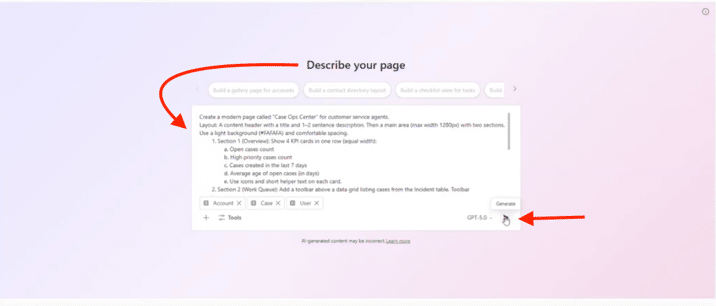
At this point, your prompt becomes the full input the system uses to shape the page.
Step 3: Generate the page
When you hit generate, the system interprets your prompt as structured requirements and builds the page end-to-end.
Behind the scenes, a few things happen in parallel:
- The prompt is broken into structured requirements
- Layout and components are generated
- Logic is created to connect the page to your data
What you get back isn’t just a layout, it’s a working experience connected directly to your data model.
Step 4: Iterate and refine (because nothing is one-and-done)
It’s tempting to treat generation as the final step, but in reality, iteration is always part of the workflow. Just like traditional development, you build a function, test it, and keep refining it. Generative Pages work the same way: you generate a first pass, test it in context, then adjust the prompt and design until the page matches the experience you’re aiming for.

Built-in transparency
A notable part of building a Generative Page is visibility into how the page was created. You can easily see:
- “Agent thoughts” show how the system interpreted your prompt
- A summary explains what was generated and why
If needed, this helps give you further insight into how AI interpreted your intent and developed the final output.
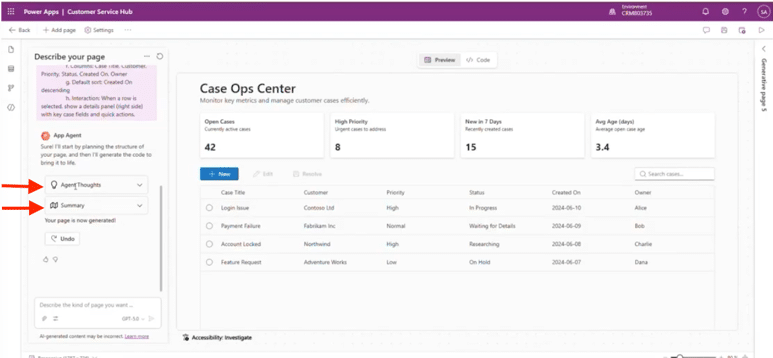
With Generative Pages you’re not building a page step by step, you’re describing the experience you want, and the system generates both the interface and the behavior directly from your data at the same time.
Once the page is generated, the real work often starts in refining it and shaping the output through small, iterative changes. It is not designed to be final on the first pass.
Iteration Is the Workflow
Building with Generative Pages in Microsoft D365 is rarely a one-and-done process. Instead, the experience is built around continuous refinement, adding direction, adjusting behavior, and evolving the layout over time.
In practice, that means you can start with a working page and then layer in improvements through additional prompts. You might refine how data is displayed, adjust how users interact with elements like KPI tiles, or introduce more visual structure to the page.
What quickly becomes clear is that each change builds on the last, rather than replacing it entirely.
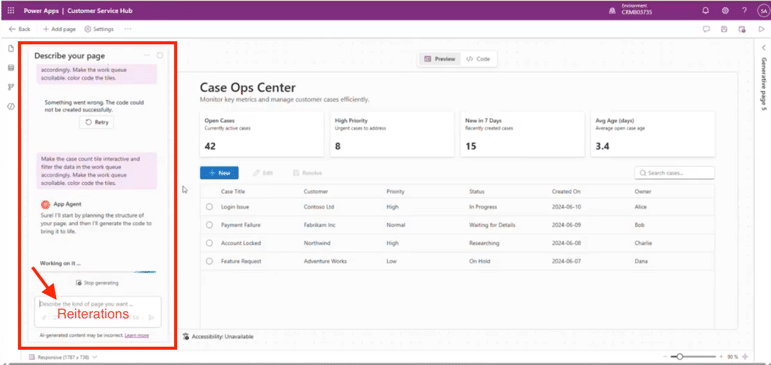
There’s also a bit of realism in the process. Results don’t always land perfectly as you envision or hope. Prompts may need to be adjusted, rephrased, or retried, and the preview doesn’t always reflect exactly how the final experience will behave once published. Even then, the value isn’t in getting it right immediately, it’s in how quickly you can move from idea to working version and continue refining it. Generative Pages are, by design, iterative.
As you refine the page, the next step is to test how it actually performs inside the app to learn and further fine-tune.
Testing and Publishing in the App
Once a Generative Page is ready, the process moves into a familiar pattern in Microsoft D365 of:
- Save your changes
- Publish the page
- Open the app to view it in context
This step matters because the designer preview doesn’t always reflect the final experience. What you see during creation can differ slightly from how the page behaves once it’s running inside the app.
Testing in context allows you to confirm a few key areas:
- Data accuracy: Is the page pulling the correct records and values?
- Interactions: Do filters, tiles, and navigation behave as expected?
- Layout behavior: Does the page render and respond correctly?
Often, some elements worked as expected, while others didn't carry through as intended. These are the kinds of details that only become clear once the page is running in the app.
Now that you have the page where you want it, it’s worth taking a moment to recognize the efficiency of the process, what you learned along the way, and how quickly you were able to move from idea to a working solution—while also considering where else this approach could be applied.
Key Takeaways and Practical Use Cases
Generative Pages in Microsoft D365 Customer Engagement change the pace at which you can move from idea to a working solution. What previously required significant time, configuration, and customization can now be created and refined much more quickly through iteration.
At a practical level, this enables:
- Faster page creation
- Reduced reliance on heavy customization or code
- A more efficient way to prototype and test ideas
That speed and flexibility make Generative Pages a strong fit for scenarios that extend beyond standard form design. They work especially well for:
- Case command centers
- Role-based dashboards
- Proof of concept designs
- More complex UI scenarios that don’t fit traditional layouts
At the same time, the process is still iterative. As we have already mentioned, results may not be perfect on the first pass, and refinement is part of how the tool is intended to be used. The real value comes when speed and flexibility matter more than rigid structure.
Ultimately, the shift to using Generative pages is practical. Instead of building pages piece by piece, you describe the experience you want and refine it with AI, expanding what you can build and how quickly you can get there without replacing the need for traditional forms. Used in the right scenarios, it becomes a straightforward way to extend what you can build without adding unnecessary complexity.
Talk to Stoneridge about how you can apply Generative Pages to your Dynamics 365 Customer Engagement environment!

Under the terms of this license, you are authorized to share and redistribute the content across various mediums, subject to adherence to the specified conditions: you must provide proper attribution to Stoneridge as the original creator in a manner that does not imply their endorsement of your use, the material is to be utilized solely for non-commercial purposes, and alterations, modifications, or derivative works based on the original material are strictly prohibited.
Responsibility rests with the licensee to ensure that their use of the material does not violate any other rights.