














Microsoft Licensing Updates Explained: Opportunities You Might Be Missing
Microsoft’s upcoming licensing updates to Microsoft 365 will be a strategic advantage for clients, with new tools that use artificial intelligence, stronger security, and easier ways to manage devices. However, these improvements come with a price hike, which will take effect alongside the new features on July 1, 2026. Many clients may see this as just another price increase but, if you really understand the value packed into these licenses, the increase feels minimal compared to what you’re getting.
The New Features in Microsoft 365
Microsoft is adding powerful features, especially around security. Take Defender, for example. It’s not just an add-on anymore; it’s becoming a core part of the experience. Even if you’re not ready to dive in fully, start exploring these features. A little dabbling can go a long way in strengthening your security posture.
AI Everywhere:
- Copilot Chat now integrated into Word, Excel, PowerPoint, Outlook, and OneNote.
Enhanced Security:
- Defender for Office 365 Plan 1 added to Office 365 E3 licenses and Microsoft 365 E3 licenses for advanced phishing and malware protection.
URL checks included in E1 licenses, Business Basic, and Business Standard.
Endpoint Management Upgrades:
- Intune Remote Help, Advanced Analytics, and Plan 2 added to E3/E5 licenses.
- E5 licenses customers gain Endpoint Privilege Management, Enterprise App Management, and Microsoft Cloud PKI.
Security Copilot for E5 Licenses:
- Built-in security agents across Defender, Entra, Intune, and Purview, plus 70+ Microsoft and partner agents for faster threat response.
Full Feature Breakdown:

Pricing Changes
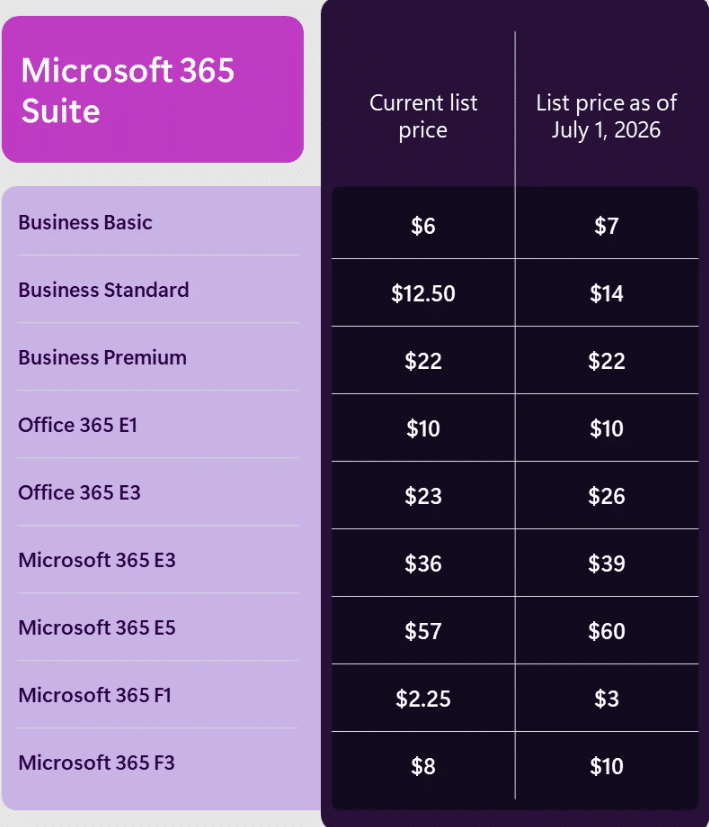
Starting July 1, 2026, global list prices for Microsoft 365 suites will increase, with local market adjustments. Nonprofit and government pricing will align with these changes. Surprisingly, the Microsoft 365 Business Premium license is staying at $22 user/month, which makes it an even greater value for smaller businesses. For clients currently using Business Standard plus additional security add-ons, upgrading to Business Premium is a cost-effective way to consolidate and enhance capabilities.
The Full List of Increases is Below:
Looking Ahead: What Should You Do?
-
- Plan for Pricing Adjustments
Review your current Microsoft 365 subscriptions and budget for the upcoming price changes. - Assess Security & AI Readiness
With new Defender and Security Copilot features, evaluate your organization’s security posture and AI adoption strategy. - Optimize Endpoint Management
Explore Intune’s advanced capabilities to streamline device management and reduce risk. - Run a Licensing Assessment
New features may shift the value proposition of E3 license vs. E5 license ensure your licensing aligns with business needs. - Remove Duplicate Licenses
Remove Intune P2 if you have Microsoft 365 E5 license and remove Microsoft Defender for Office 365 P1 if you have Office 365 E3 license or Microsoft 365 E3 license.
- Plan for Pricing Adjustments

Under the terms of this license, you are authorized to share and redistribute the content across various mediums, subject to adherence to the specified conditions: you must provide proper attribution to Stoneridge as the original creator in a manner that does not imply their endorsement of your use, the material is to be utilized solely for non-commercial purposes, and alterations, modifications, or derivative works based on the original material are strictly prohibited.
Responsibility rests with the licensee to ensure that their use of the material does not violate any other rights.