















What is a Copilot Harness? Core Aspects and How to Choose the Right One
Building an effective AI agent takes more than connecting it to data and assigning it a task. You also need a way to govern how it interprets instructions, reasons through decisions, selects tools, and determines what happens next.
A Copilot harness defines the underlying technology and runtime that shape how an agent operates. It influences how the agent interprets instructions, chooses and uses tools, makes decisions, and completes work.
In this blog and video, you’ll learn what Copilot harnesses are, how the Standard, Copilot Chat, and GitHub Copilot harnesses differ, and where workflows, skills, tools, and human approvals fit in.

So, What Exactly Is a Copilot Harness?
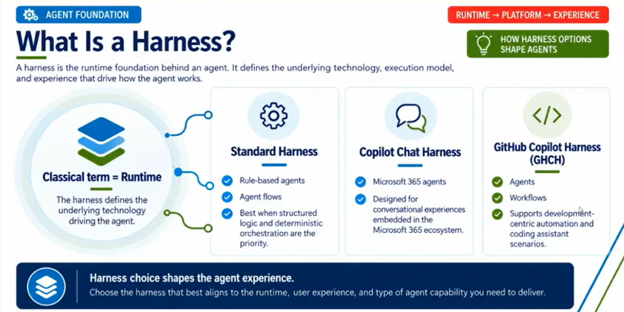
A Copilot harness defines how an AI agent operates behind the scenes. Think of it as the foundation beneath your agent. Your agent may have a specific role, knowledge sources, and tools, but the harness influences how those capabilities come together.
Microsoft’s newer Copilot Studio experiences introduce several harness options:
- Standard harness: Designed for structured, rules-based agent experiences with more predictable orchestration.
- Copilot Chat harness: Designed for interactive experiences in Microsoft 365 Copilot, particularly those focused on conversation, instructions, and knowledge.
- GitHub Copilot harness: Designed for more advanced, development-oriented and agentic experiences where the agent has greater flexibility in determining how to complete a task.
At a glance, choose the Standard harness when you need predictable, rules-based orchestration; the Copilot Chat harness when the experience is primarily conversational and knowledge-driven; and the GitHub Copilot harness when the agent needs greater flexibility to choose tools and determine how to complete a complex objective.
The harness you choose can affect how you design your agent, what capabilities are available, how much control you have over its behavior, and the licensing considerations you need to evaluate.
That makes harness selection an important early design decision: changing harnesses later may require you to revisit the agent’s instructions, orchestration, tools, and licensing.
The Standard Harness: Control and Predictability
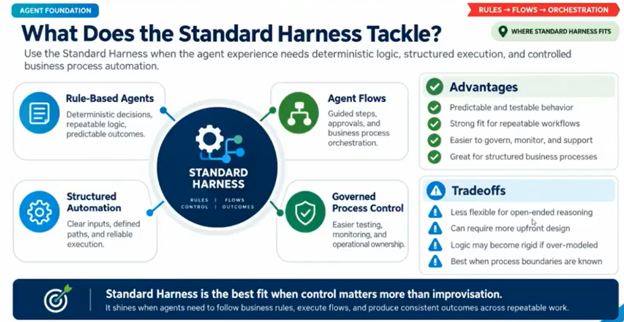
The Standard harness is designed for agents that rely on structured logic, defined topics, and more deterministic decision-making.
You can carefully design the steps an agent should follow and establish how it should respond to different situations. Instead of leaving every decision open-ended, you can build a controlled experience using topics, conditions, prompts, tools, and connected agents.
A Standard harness agent can use:
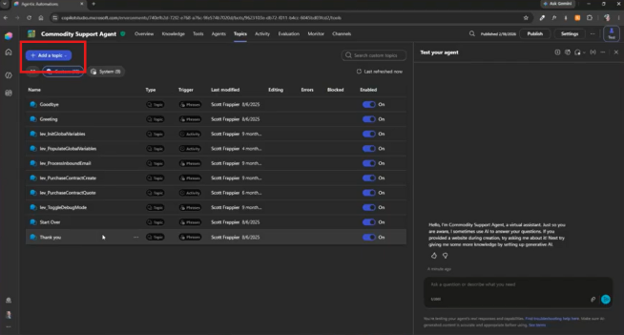
- Topics to define the flow of a conversation or task.
- Triggers to determine when a topic or process begins.
- Variables to store information collected during an interaction.
- Prompts to interpret, summarize, classify, or generate information.
- Conditions to apply if-then logic.
- Tools to interact with business systems and other services.
- Connected agents to delegate specific tasks.
Imagine you’re building a customer support agent. It might identify a customer's issue, gather relevant information, search a knowledge source, determine whether the issue requires escalation, and then route the request to the appropriate team.
You can explicitly define those steps and the conditions that determine what happens next.
This makes the Standard harness useful when:
- The order of operations matters.
- You need predictable outcomes.
- You want detailed business logic.
- You need to control when tools are used.
- You want to separate a larger process into smaller components.
- Consistency is particularly important.
The trade-off is flexibility. A Standard harness requires more design work because you explicitly define more of the agent’s behaviour, but that effort gives you greater control and more predictable execution.
The Copilot Chat Harness: Simple, Interactive Experiences
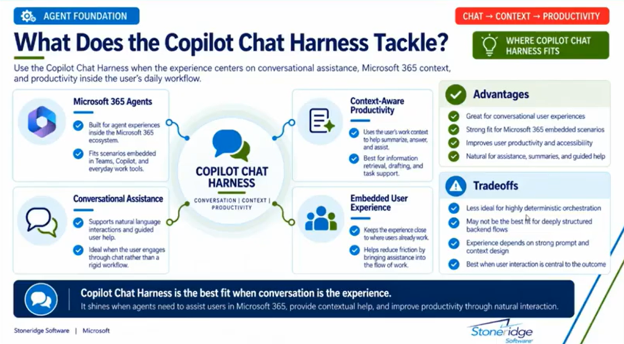
The Copilot Chat harness is designed for interactive agents that operate within Microsoft 365 Copilot.
This can be a good fit when you want to create an agent that answers questions, provides information, or helps employees complete relatively straightforward tasks through conversation.
Instead of building a highly structured process with numerous topics and decision branches, you can focus more on the agent’s instructions, prompts, and knowledge sources.
For example, you could create an internal HR policy assistant that helps employees find answers about:
- Vacation and leave policies.
- Benefits and eligibility.
- Workplace procedures.
- Expense policies.
- Remote-work guidelines.
- Internal documentation.
The Copilot Chat harness can be useful when you want to quickly create a department-specific assistant or give employees conversational access to internal knowledge.
However, it isn't necessarily designed for complex backend processes. If your agent needs to coordinate multiple systems, execute detailed workflows, or perform advanced operations, you may need another approach.
Think of the difference this way: a conversational harness is a natural fit when employees need to ask, “What is our vacation policy?” If the agent must also update business systems, classify a record, request human approval, and initiate follow-up actions, you will likely need more structured orchestration.
The GitHub Copilot Harness: Flexible, Agentic Automation
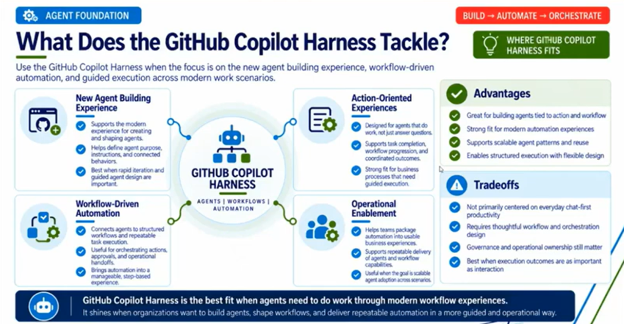
The GitHub Copilot harness introduces a different approach to building agents.
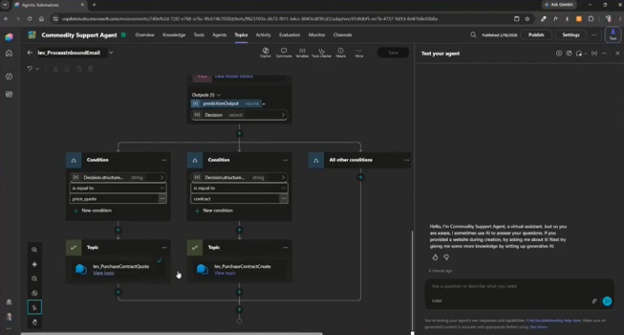
Rather than relying primarily on carefully constructed topic flows, this harness gives the agent more flexibility to determine how to approach a task. You define the objective and provide instructions, tools, knowledge, and skills; the agent then decides which capabilities to use and in what sequence.
For example, instead of explicitly defining every step required to review a customer account, you could give the agent an objective such as reviewing the account, identifying outstanding issues, determining the appropriate next steps, and preparing a summary.
The agent can then determine which capabilities it needs and how to approach the task.
The GitHub Copilot harness can use:
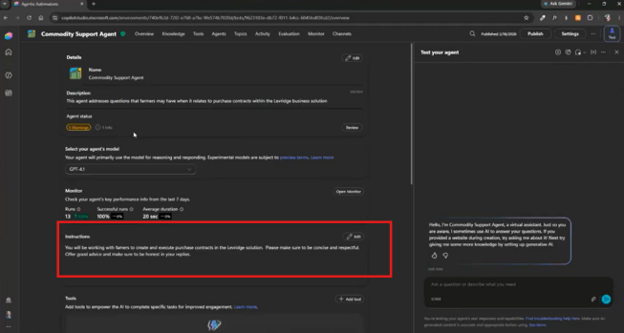
Instructions describing the agent’s role and expected behavior.
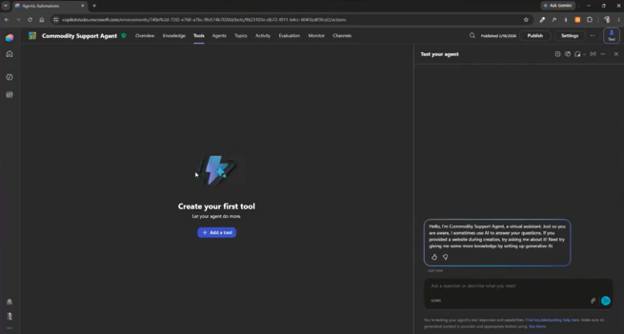
Tools connecting it to applications, services, data, or other capabilities.
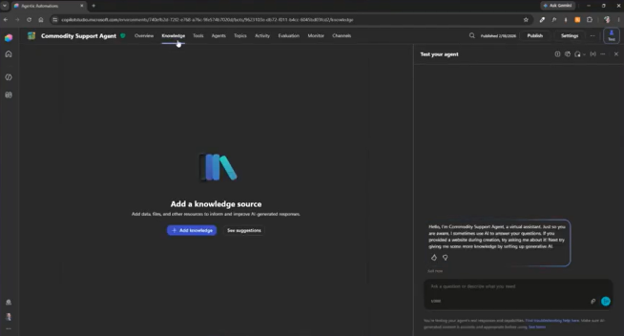
Knowledge sources and topics that provide information needed to complete its work.
Skills that provide specialized or reusable capabilities.
Connected agents that contribute to a larger process.
Unlike the Standard harness, the GitHub Copilot harness does not use topics as the primary way to define the sequence of work. Instead, instructions play a much larger role.
That creates a fundamental trade-off: more flexibility can mean less predictability.
When you give an agent more freedom, you need to be thoughtful about the instructions you provide, the tools it can access, the actions it is allowed to take, and when it should involve a person.
The GitHub Copilot harness can be useful when:
- A task requires flexible reasoning.
- The process varies from one situation to another.
- The agent needs to choose between multiple tools.
- You want to automate a more complex objective.
- You want to reduce manually designed branching logic.
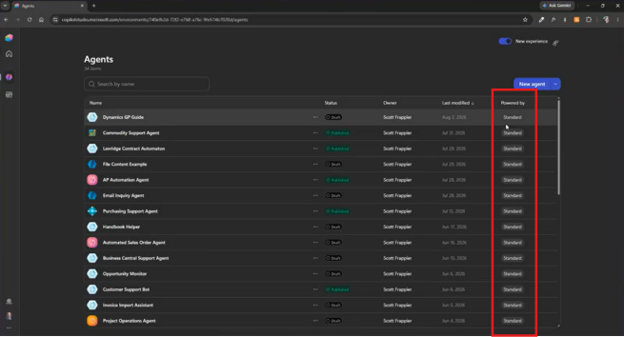
If every step must be explicitly controlled, however, a Standard harness or workflow may still be a better fit. Within Copilot Studio, you can see a full list of your agents and what type of harness they are powered by.
Skills Give Agents Reusable Capabilities
One of the interesting concepts in the GitHub Copilot harness is the use of skills.
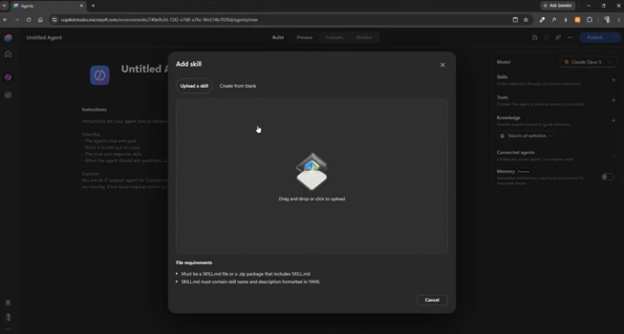
A skill provides reusable instructions for completing a particular type of task. It guides how an agent should perform the work, while a tool gives the agent access to an application, service, data source, or action it can use to carry out that work.
For example, a skill could help an agent:
- Format a PowerPoint presentation.
- Prepare a Word document.
- Follow specific terminology.
- Summarize technical information.
- Organize information into a standard report format.
Skills can be imported from skill files or developed through collaborative experiences with the agent.
This can make it easier to create reusable capabilities that can be applied across different tasks and agent experiences.

Tools Give Agents the Ability to Act
Knowledge helps an agent understand information, but tools allow it to do something with that information.
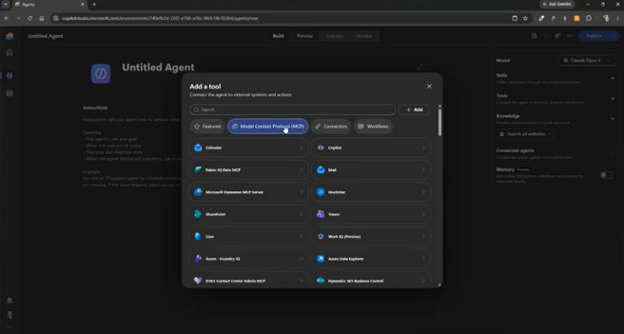
Depending on the configuration, tools can connect an agent to capabilities such as:
- Calendars.
- Email.
- Microsoft Copilot.
- Business applications.
- Model Context Protocol servers.
- External systems.
- Other agents.
For example, an agent might use knowledge to identify an issue with a customer account and then use a tool to retrieve the latest account information from a business system.
When designing an agent, consider carefully which tools it needs and what permissions those tools provide. Giving an agent access to a tool doesn't mean it should use that tool in every situation.
Clear instructions, appropriate boundaries, and testing remain important.
Where Workflows Fit In
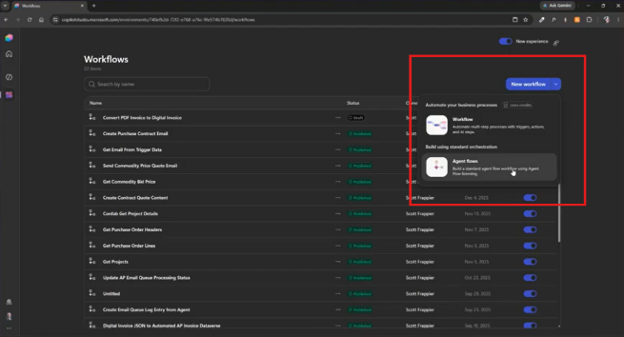
Workflows complement a harness by coordinating business processes across agents, systems, actions, and people. While a harness shapes how an agent reasons and operates, a workflow defines when work starts, which steps run, how approvals are handled, and what happens after the agent completes its task.
A workflow can move work through a series of steps. It can be triggered by an event, perform actions, call an agent, update information, request approval, and notify someone when the process is complete.
Common triggers include:
- A scheduled event.
- A Power Automate event.
- A record being added, modified, or deleted.
- A change in business data.
- An HTTP request.
- A request from an agent.
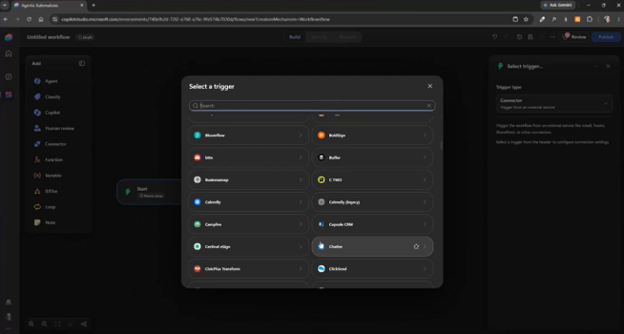
You can also use variables and conditions to control what happens throughout the process. For example, rather than launching a workflow every time a record changes, you can filter the trigger. As a result, the workflow runs only when a particular field is updated or a specific condition is met.
This can help reduce unnecessary processing and keep the workflow focused on the business event that matters.
Workflows Can Bring Agents and Humans Together
Not every business process should be fully autonomous. In many cases, an agent can handle information gathering, classification, and preparation while a person remains responsible for the final decision.
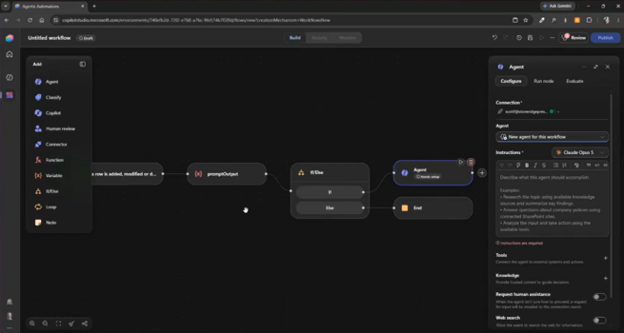
Consider a workflow that manages changes to a customer account:
- A customer account is updated.
- The workflow stores relevant information in variables.
- An agent gathers contact information and summarizes the account.
- Another step classifies the change.
- The workflow sends the results to an employee for review.
- The employee approves or rejects the proposed action.
- The workflow sends an email or updates a record based on the decision.
- A notification confirms completion.
This is an example of a human-in-the-loop design.
The agent and workflow handle repetitive work, while a person remains responsible for decisions that require judgment, accountability, or business approval. This design can automate more of the process without removing the controls the business needs.
How Should You Choose a Harness?
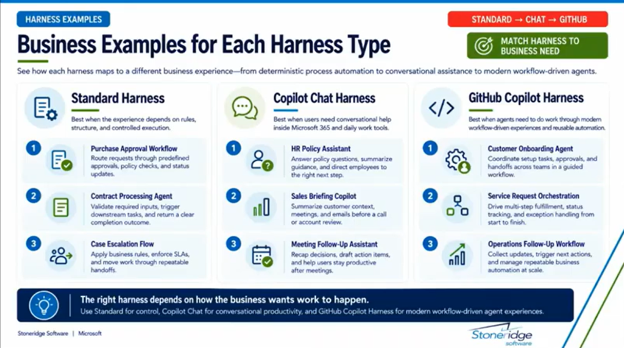
Start with the business problem rather than the technology.
Ask yourself:
Is the task structured or open-ended?
If the task follows a predictable sequence, the Standard harness or a workflow may provide the control you need.
If the task varies significantly between situations, the GitHub Copilot harness may provide more flexibility.
Is the experience primarily conversational?
If users mainly need to ask questions, find information, or interact with a department-specific assistant, the Copilot Chat harness may be appropriate.
Do you need advanced automation?
If the agent needs to use several tools, coordinate multiple actions, or determine its own approach to a complex objective, consider the GitHub Copilot harness or a workflow-based design.
How much control do you need?
Consider whether you need to explicitly define:
- The order of operations.
- The conditions that determine what happens next.
- Which tools can be used.
- When an action is permitted.
- When a human must approve a decision.
- How exceptions are handled.
The more control you need, the more important structured orchestration becomes.
What are the licensing implications?
Licensing should be part of the conversation from the beginning. Different harnesses and agent experiences may carry different usage rights, Copilot credit requirements, and cost considerations. Overall cost can also vary with the volume of data processed and the amount of work agents perform, so validate current licensing terms against the expected usage pattern before committing to a design.
Before committing to a design, evaluate not only whether the agent can perform the task, but how the solution will be licensed and supported over time.
Bring AI and Business Processes Together with Stoneridge Software
Copilot harnesses give you more options for building AI agents, but selecting the right approach is only part of the process. You also need to consider your business requirements, existing systems, licensing, security, governance, user experience, and long-term support.
At Stoneridge Software, we help organizations turn Microsoft Copilot into practical business solutions. Whether you’re exploring Copilot agents, improving business processes, or connecting AI capabilities to your existing Microsoft environment, our team can help you evaluate the options and build an approach that fits your goals.
Talk to our team today to get started!

Under the terms of this license, you are authorized to share and redistribute the content across various mediums, subject to adherence to the specified conditions: you must provide proper attribution to Stoneridge as the original creator in a manner that does not imply their endorsement of your use, the material is to be utilized solely for non-commercial purposes, and alterations, modifications, or derivative works based on the original material are strictly prohibited.
Responsibility rests with the licensee to ensure that their use of the material does not violate any other rights.