















Retrieving the Current Instance Name and Environment Details in Dynamics 365 Finance & Operations
When working with Dynamics 365 Finance & Operations (D365 F&O), it’s often useful to know which environment your code is running in — especially when you want to prevent certain processes from running in DEV, UAT, or PROD.
Why it Matters to Know Which Environment Your Code is In
This is important to prevent accidental data changes in production by adding environment checks for a data fix or another process such as UAT Print Management setup, etc.
The X++ Code
internal final class Class1 extends RunBaseBatch
{
    public static Class1 construct()
    {
        return new Class1();
    }

    public static void main(Args _args)
    {
        Class1 cls = Class1::construct();
        cls.run();
    }

    public void run()
    {
        Class1::getNames();
    }

    private static void getNames()
    {
        // Option 1: Get AOS instance name
        Session currentSession = new Session();
        str aosName = currentSession.AOSName();
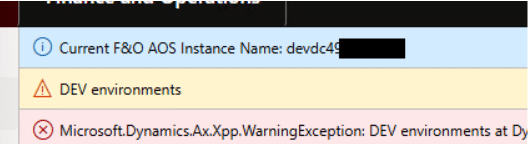
        info(strFmt("Current F&O AOS Instance Name: %1", aosName));

        // Option 2: Get environment details via EnvironmentFactory
        var env = Microsoft.Dynamics.ApplicationPlatform.Environment.EnvironmentFactory::GetApplicationEnvironment();
        str url = env.Infrastructure.HostUrl;

        info(strFmt("Environment Host URL: %1", url));

        // Example: Prevent running in DEV
        if (strScan(url, 'dev', 1, strLen(url)) != 0)
        {
            throw warning('DEV environments');
        }
    }
}

Under the terms of this license, you are authorized to share and redistribute the content across various mediums, subject to adherence to the specified conditions: you must provide proper attribution to Stoneridge as the original creator in a manner that does not imply their endorsement of your use, the material is to be utilized solely for non-commercial purposes, and alterations, modifications, or derivative works based on the original material are strictly prohibited.
Responsibility rests with the licensee to ensure that their use of the material does not violate any other rights.