















Go-Live Is Just the Start: What Comes Next for Your Microsoft Dynamics Software
Going live on new business software is a big milestone.
You made it through planning, design, configuration, testing, training, and cutover. Your team put in the work, your system is in production, and people are finally using the tools you spent months preparing for.
It can feel like the finish line.
But in many ways, go-live is really the start line.
So You’re Live with the Product. Now What?
Once your team is live in the system, a new phase begins. This is where people start using the software in real business scenarios. They ask questions. They run into things they did not expect. They find new ways they want to view data. They notice processes that may need adjustment. They also start forming opinions about whether the system is helping them do their jobs.
I’ve seen first-hand many times that what happens after go-live matters so much.
A successful software investment is not only about getting the system launched. It is about helping your team adopt it, keeping it current, managing changes thoughtfully, and continuing to get more value from the information inside it.
Go-Live Introduces Change. Your Team Still Needs Support.
When a new system goes live, your organization has implemented more than technology. You have implemented change.
Your team may be excited. They may also be tired. They have learned new tools, new processes, and new ways of working. Even with strong training before launch, people are going to need help once they are in the system doing their actual work.
They will ask things like:
-
“Can you show me this again?”
-
“Is this acting the way it is supposed to?”
-
“Why am I getting this error message?”
-
“I wish it worked like our old system.”
-
“I wish I could see this information a different way.”
That is normal. It does not mean the project failed. It means your team is using the system, learning it, and starting to connect it to their day-to-day work.
The important thing is to have a process for what happens next.
Triage Support Issues Separately From Enhancement Requests
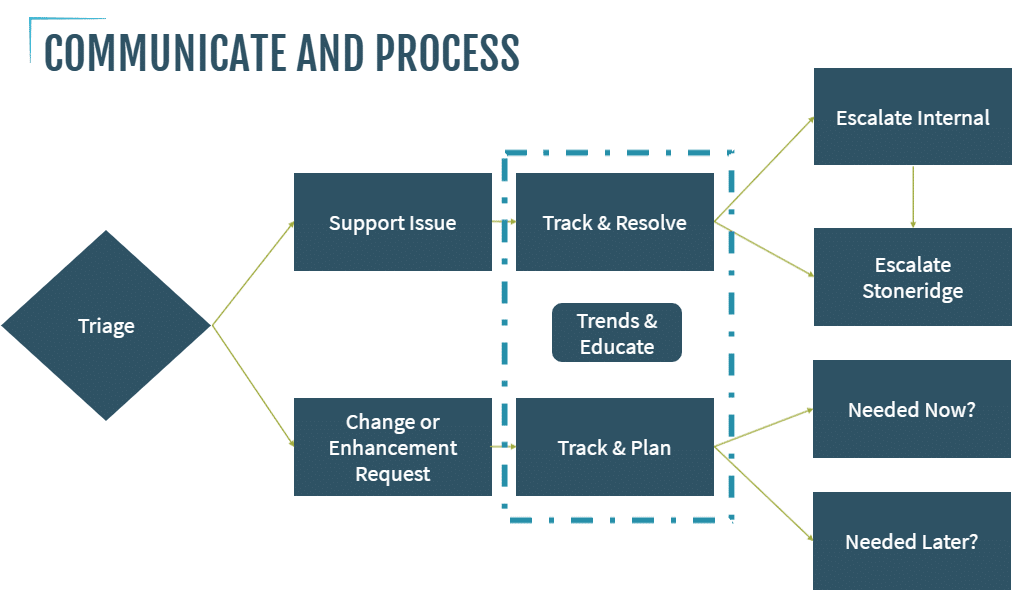
After go-live, requests usually fall into two main buckets: support issues and change or enhancement requests.
Support issues are the things that need help now. These might be how-to questions, error messages, system behavior that does not seem right, or process questions from users who are still getting comfortable.
Change or enhancement requests are different. These are the “I wish it did this” or “I want it to work this way” requests.
Both are important. But they should not be handled the same way.
Support issues need to be tracked, assigned, escalated when needed, and resolved. Enhancement requests should also be tracked, but they usually need more time and context before action is taken.
It can be tempting to react quickly to every request after go-live, especially when users are vocal. But not every request should become an immediate change. Sometimes people are asking for the system to work like the old system because that is what they know. That may be a red flag to pause, observe, and give users time to adapt before changing the new system to match old habits.
A better approach is to collect the feedback, look for trends, and decide what truly needs to change now versus what should be considered later.
Have a Clear Process for Tracking and Escalation
Your post-go-live process does not have to be complicated. It just has to be clear.
You might track requests in Excel, Azure DevOps, a CRM system, or another case management tool. The tool matters less than the discipline behind it.
At a minimum, your team should know:
- Where to submit questions or issues
- Who reviews and triages those requests
- Which internal subject matter experts should be involved
- When something should be escalated to your technology partner
- How enhancement requests are reviewed and prioritized
- How decisions and resolutions are communicated back to users
Subject matter experts are especially important. These are the people in each business area who understand the process and can serve as the first line of defense for questions. They can help users get answers faster, reduce unnecessary escalations, and provide valuable feedback on what is happening across the organization.
The biggest thing is communication. Communicate the process. Communicate where people should go for help. Communicate what is being tracked. Communicate what is changing and what is not.
As our Chief Services Officer Maggie Foster likes to say, "For post go-live success, you really need to communicate, communicate, communicate.”
Use Trends to Improve Adoption
Tracking support requests is not just about resolving one-off issues. It also helps you see patterns.
If your accounts receivable team is submitting a lot of how-to questions, that may be a sign they need more training. If multiple users are struggling with the same process, you may need better documentation, office hours, or a short refresher video.
This is where post-go-live support becomes part of adoption.
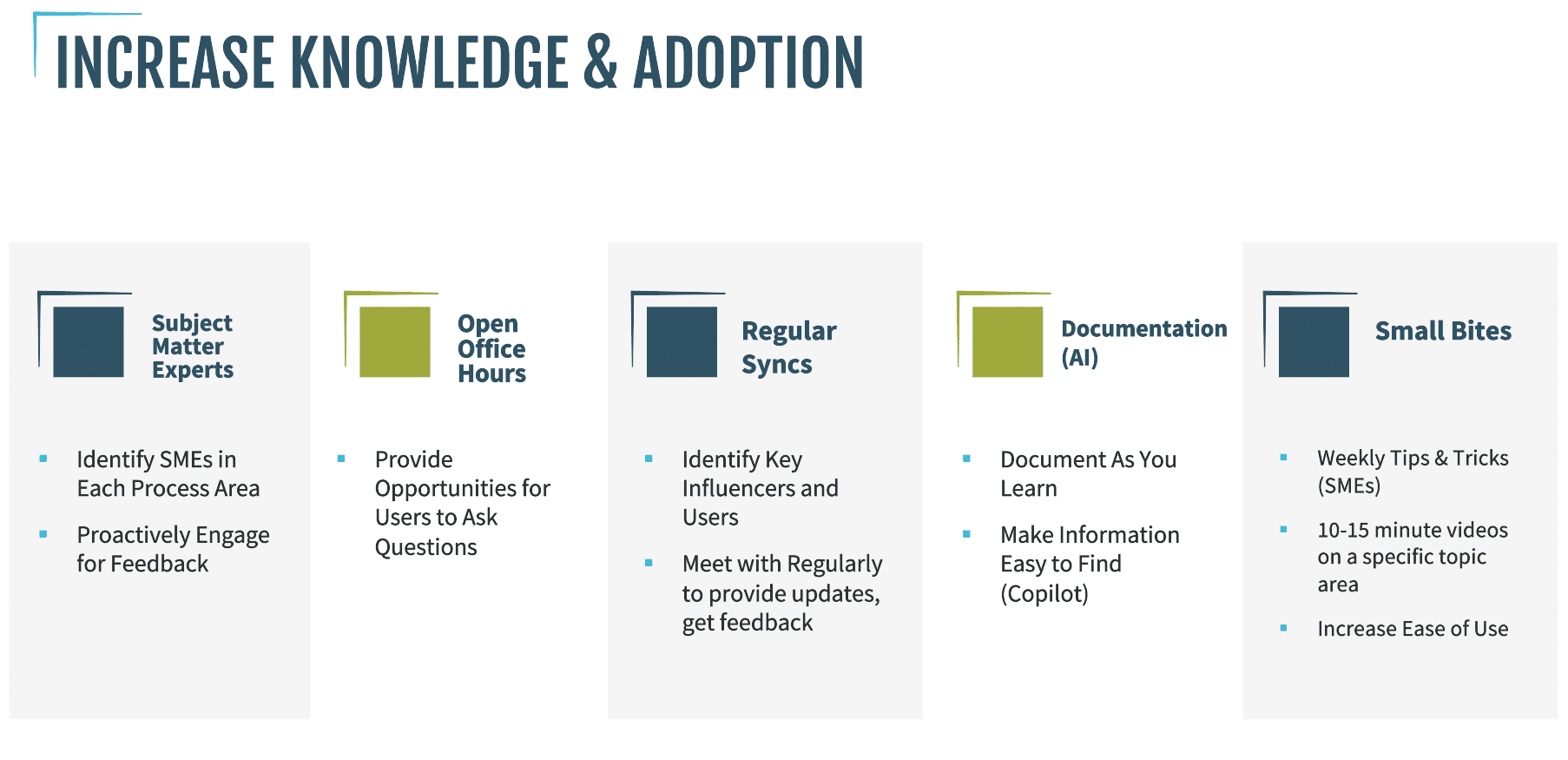
Some effective ways to support users include:
- Identifying subject matter experts in each process area
- Holding open office hours for questions
- Creating regular sync meetings with key users or influencers
- Documenting answers as you learn
- Making information easy to find
- Sharing small bites of training, such as weekly tips or 10- to 15-minute videos
Small, practical training moments often work better than trying to teach everything at once. Your users have already absorbed a lot. Giving them information in smaller pieces helps them apply it in the flow of their work.
Copilot and other Microsoft tools can also help here when your documentation is organized and stored well. If your team has a good way to capture and store knowledge, it becomes much easier for people to find answers later.

Release Management Cannot be an Afterthought
Once your system is live, you also have to keep it current.
This is especially important if you are using software as a service, including Microsoft cloud ERP and business applications. With on-premise systems, you may have had more control over whether or when to apply updates. With cloud-based systems, updates are coming. Microsoft gives you a window to plan and execute, but if you wait too long, that update may still be pushed into your system.
That makes release management one of the most important responsibilities that comes with owning software.
I often think of the phrase, “Failing to plan is planning to fail.” That definitely applies here.
Unmanaged updates can create risk. They can cause business interruptions, security concerns, stress for your team, and lower confidence in the system. The goal is not to make updates scary. The goal is to make them predictable.
Build a release plan that fits your business
A good release plan starts with understanding your process.
Before an update, ask questions like:
- Who are the key stakeholders?
- Who needs to test?
- Who makes decisions if something goes wrong?
- What is the update cadence for this product?
- Who updates sandboxes or test environments?
- Are there ISV solutions or extensions that also need to be updated?
- What release notes or deprecations need to be reviewed?
- How much time does the team need for user acceptance testing?
- What business events should we avoid, such as year-end close, audits, cycle counts, or major operational deadlines?
- When will we communicate updates to users?
The communication piece is critical. The last thing you want is to schedule an update over the weekend and then find out a warehouse team was planning to come in for a cycle count while the system is unavailable.
Updates need to fit into the rhythm of your business.
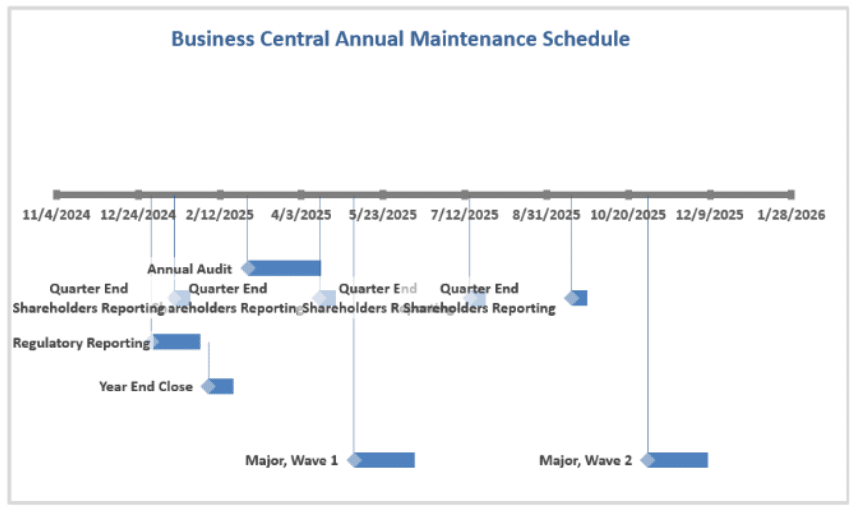
For many organizations, it makes sense to plan updates annually, either early in the year or during fourth-quarter planning for the year ahead. Look at your business calendar, understand your major events, and build your release schedule around them.
Test Before Production and Validate After the Update
A strong update process should include testing before production and validation after production.
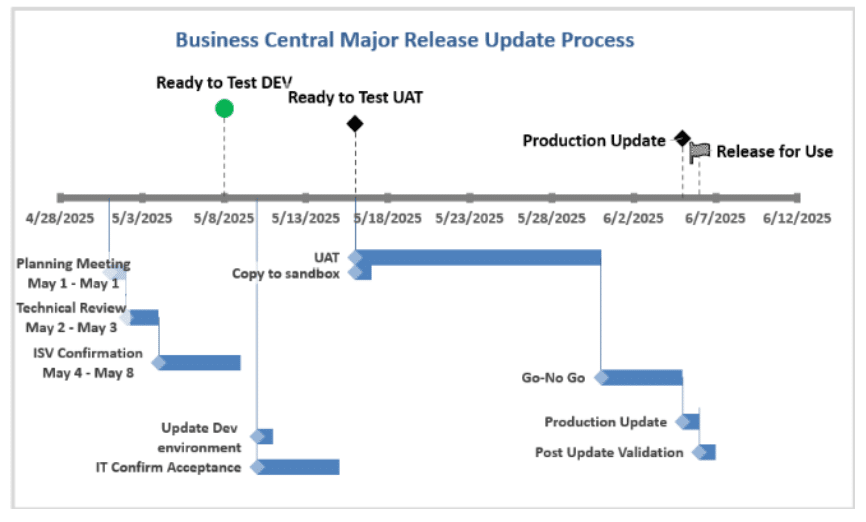
In a typical process, you may update a development or test environment first, complete a technical review, update a user acceptance testing sandbox, and then have users test the business processes they rely on.
You also need to build in enough time to resolve issues. For many organizations, three weeks is a reasonable testing window, but that depends on your complexity, internal capacity, and risk tolerance.
Before moving to production, include a go/no-go decision point. Bring the right people together, review the testing results, confirm whether any remaining issues could affect production, and decide whether you are ready.
Then, after the production update is complete, do post-update validation before live business transactions begin.
That step matters. You do not want to discover half a day later that something like sales tax is calculating incorrectly in live data. It is much easier to catch and correct issues before the business starts processing transactions again.
Plan for Data and Reporting Needs to Evolve
Another thing that happens after go-live is that your reporting needs get smarter.
At first, users may be focused on completing transactions and getting comfortable in the system. But after a few months, they often start asking better questions.
They may say:
-
“I want to see the data this way.”
-
“Can we report on this differently?”
-
“Can we get a dashboard for this?”
-
“Can we combine this information with another view?”
That is a good sign. It means users are moving beyond basic system usage and starting to think about how the system can help them make decisions.
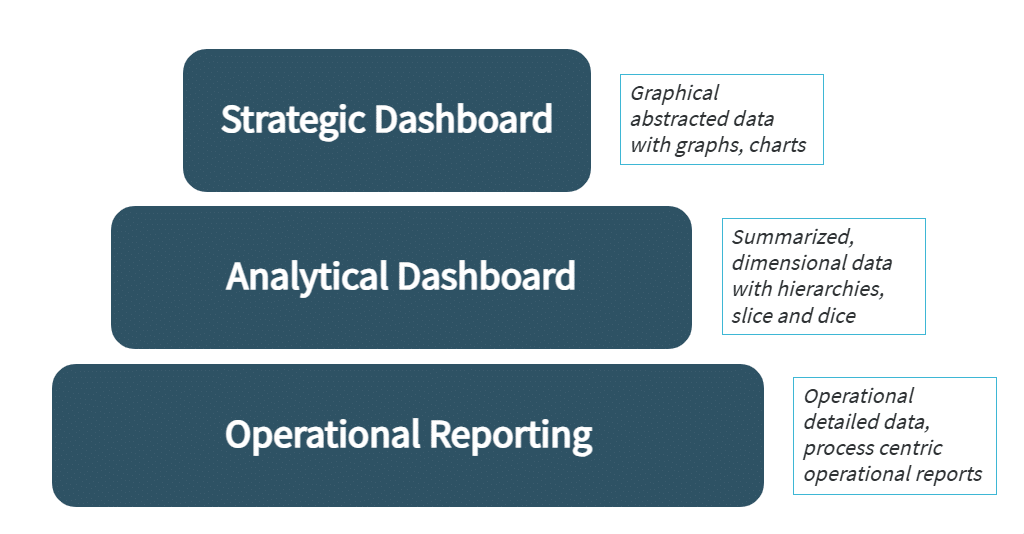
There are generally three levels of reporting to think about:
Operational reporting
This is the everyday transactional reporting your team uses to do their work. Many Microsoft Dynamics systems have strong grids, lists, and out-of-the-box views that can meet a lot of these needs.
Analytical dashboards
These help users look at trends, KPIs, filters, dimensions, and the “why” behind the data. Again, there may be useful out-of-the-box options that can get your team part of the way there.
Strategic dashboards
These are usually more specific to your business. They may show business health, executive KPIs, forecasts, or performance against strategic goals. This is often where tools like Power BI become especially valuable.
The key is to start with what already exists, understand how far it gets your users, and then plan enhancements thoughtfully.
In our experience, many reporting requests grow three to six months after go-live. That is when users have spent more time in the system and have a clearer picture of what they need.
Keep Investing After Go-Live
Your software investment should not stop at launch.
Go-live gets your system into production. But the value grows as your team adopts it, your processes improve, your data becomes more useful, and your organization learns how to manage the system over time.
That requires a plan for support, change requests, release management, and reporting. It also requires patience. Your team will not master everything on day one. But with the right structure, they will keep getting better.
If you are live today, congratulations! That is a big accomplishment.
Now is the time to ask:
- Do users know where to go for help?
- Are we tracking support issues and enhancement requests?
- Do we have subject matter experts in place?
- Are we planning updates before they become urgent?
- Are we reviewing release notes and testing changes?
- Are we continuing to improve reporting and data visibility?
- Are we helping people adopt the system in small, practical ways?
If the answer to any of those is “not yet,” that is okay. The important thing is to start building the process now.
Because going live is not the end of the journey.
It is the start of the next lap.
You Don’t Have to Figure Out Post-Go-Live Alone.
If your team is live on a new system and looking for a better way to manage support, updates, enhancements, or reporting requests, Stoneridge can help. We’ll work with you to understand what’s working, where users need support, and how to keep building value from your Microsoft business applications.
Contact our team to talk about your long-term adoption and support plan.

Under the terms of this license, you are authorized to share and redistribute the content across various mediums, subject to adherence to the specified conditions: you must provide proper attribution to Stoneridge as the original creator in a manner that does not imply their endorsement of your use, the material is to be utilized solely for non-commercial purposes, and alterations, modifications, or derivative works based on the original material are strictly prohibited.
Responsibility rests with the licensee to ensure that their use of the material does not violate any other rights.