















Connecting Systems with MCP and Copilot Studio – Part 2: Finance and Supply Chain Management
AI and Microsoft Copilot agents can answer questions. The bigger opportunity is giving AI tools the context they need to understand what's happening across your business, and the tools it needs to either address roadblocks or optimize existing workflows.
That's where Model Context Protocol (MCP) comes into play.
What is Model Context Protocol?
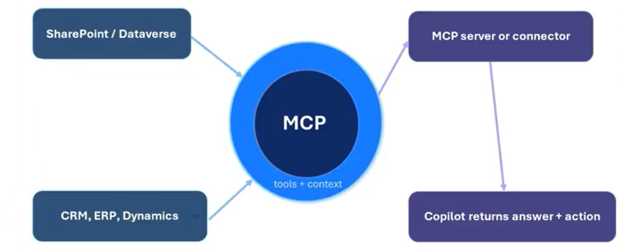
MCP is a standardized layer that allows AI applications to interface with other systems. Think of it like a USB port for AI: instead of creating a unique connection for every application, MCP provides a standardized way for AI applications to interact with business systems through defined tools, context, inputs, and outputs.
That distinction matters because modern organizations have no shortage of data. They have ERP systems, CRM platforms, databases, collaboration tools, and other applications full of valuable business information. The challenge is giving AI access to that information in a way that allows it to reason over the data rather than simply retrieve isolated pieces of it. MCP can help bridge that gap.
How Does MCP Work with Finance and Supply Chain Management?
For Dynamics 365 Finance and Supply Chain Management, Microsoft provides an MCP server that allows Copilot Studio agents to interact with ERP information. The result is an agent that can reason over Finance and Supply Chain data using natural-language requests while still operating within the security and permissions already established in the ERP.
In this second installment of our three-part series, we'll walk through the setup of MCP in Finance and Supply Chain Management and then look at a procurement scenario involving purchase orders and inventory.
Part 1 covered MCP and Business Central. Part 3 will turn our attention to Dataverse MCP, Copilot Studio, and Visual Studio Code.
Let's jump into Finance and Supply Chain Management.

MCP in Finance and Supply Chain Management: Setup and Procurement
Before you get started, there are a few prerequisites to deal with.
The Finance and Supply Chain Management environment needs to be on version 47 or higher. Also, MCP is demonstrated in Tier 2 or UDE environments rather than Tier 1 environments. The feature also needs to be enabled, and users who will work with the agent need to exist in Finance and Supply Chain Management with the appropriate security roles assigned.
Once that foundation is in place, you can connect the MCP server to Copilot Studio.
Enabling the Agent
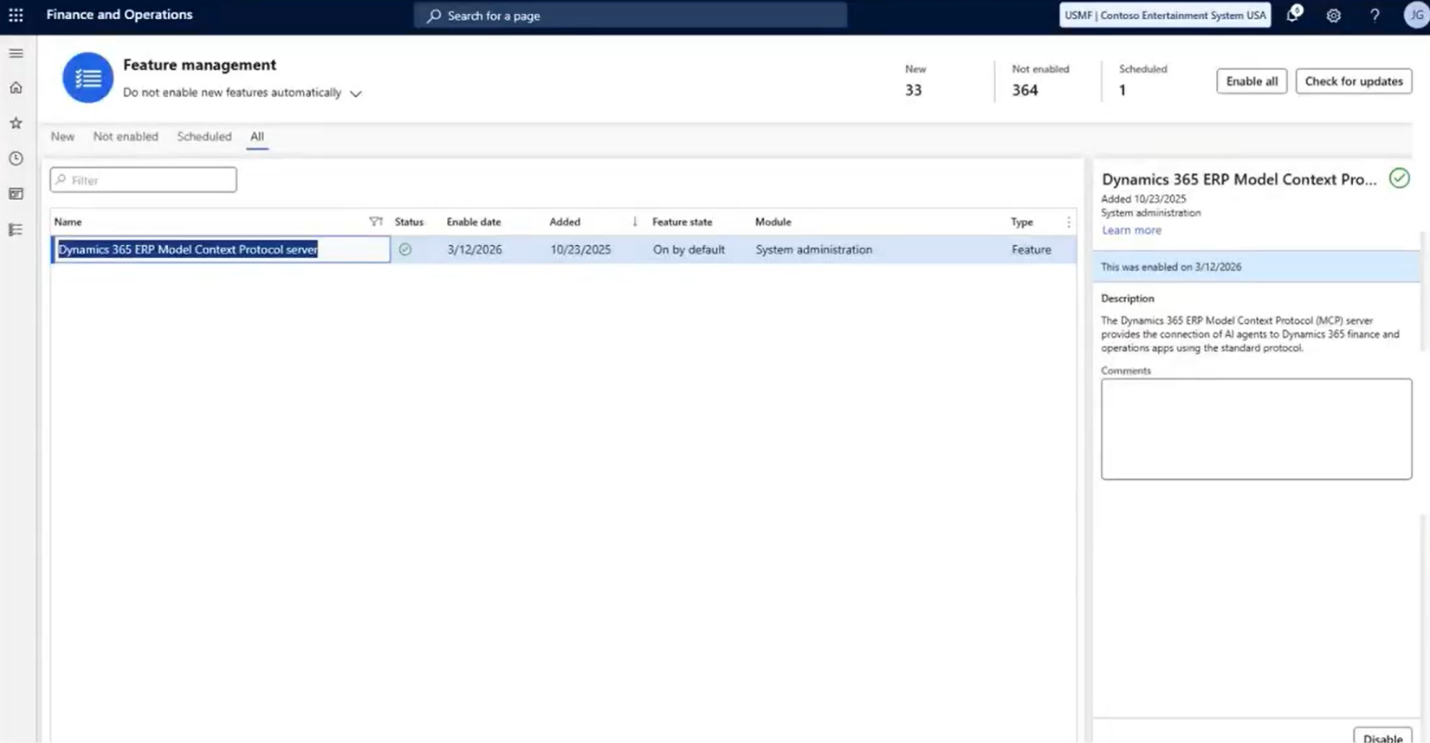
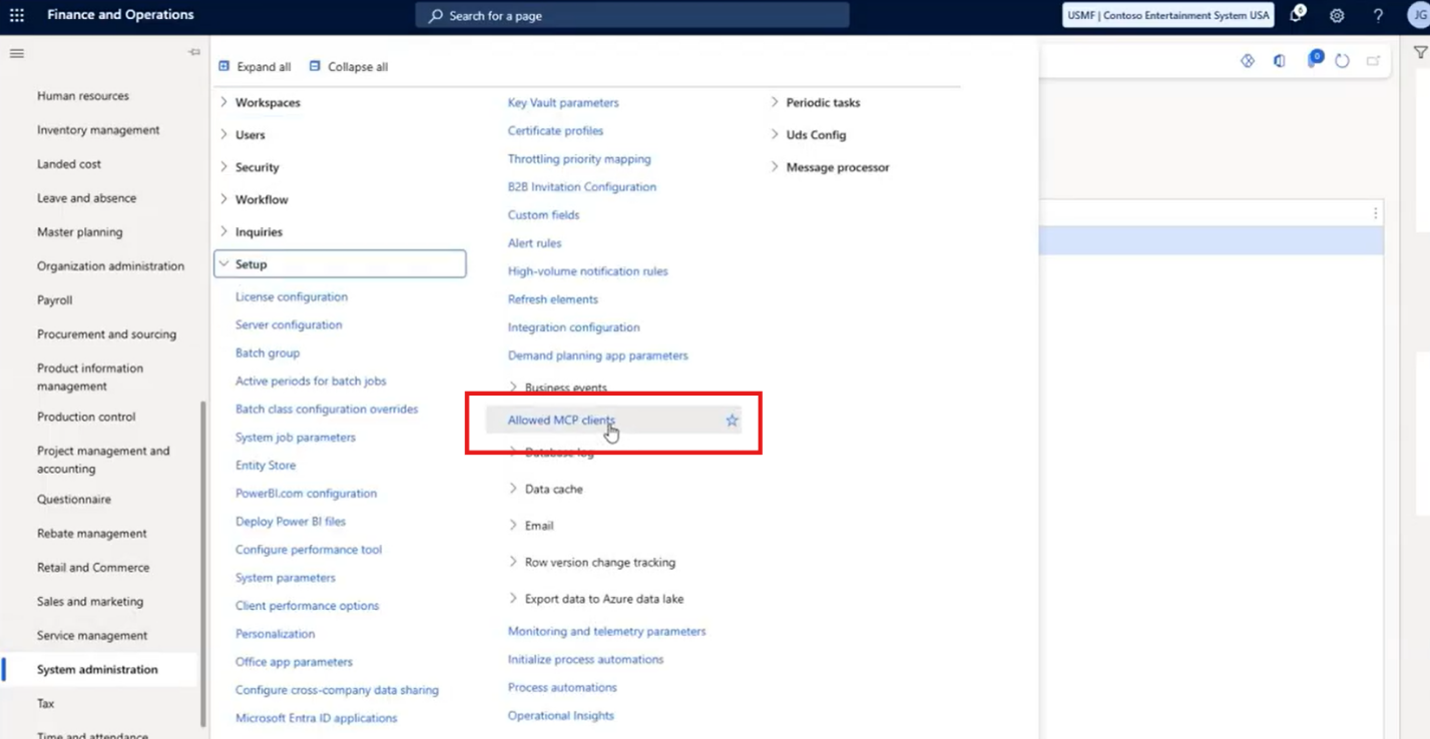
Within Finance and Supply Chain Management, enable the Dynamics 365 Model Context Protocol Server through Feature Management. There is also an Allowed MCP Clients setup where clients such as Copilot Studio and Visual Studio Code can be enabled. The configuration can also accommodate additional MCP servers.
The next step happens in Copilot Studio.
Connecting Your Agent to Your Dynamics 365 Solution(s)
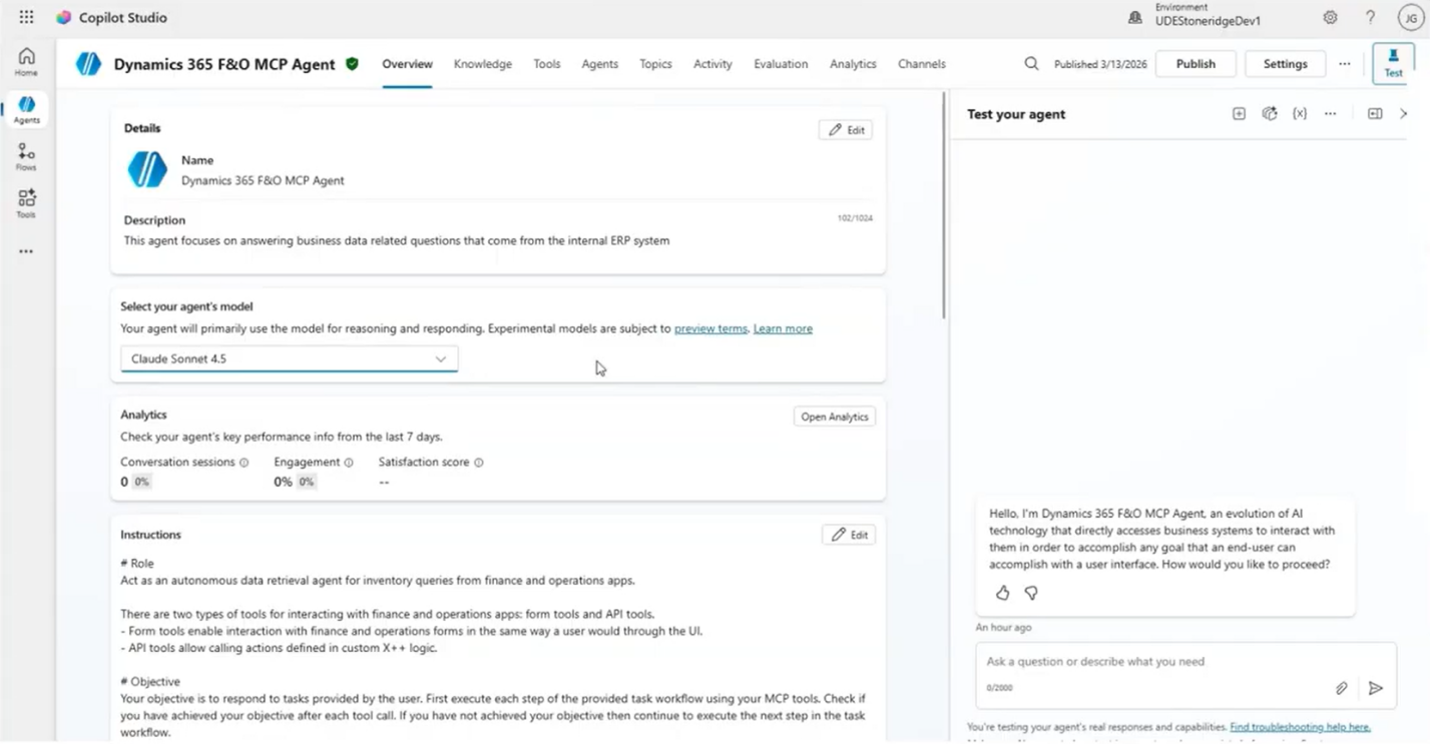
The agent is configured with the Dynamics 365 ERP MCP server and connected to the appropriate Dynamics 365 environment. The environment in Copilot Studio needs to match the environment that contains the Finance and Supply Chain Management instance.
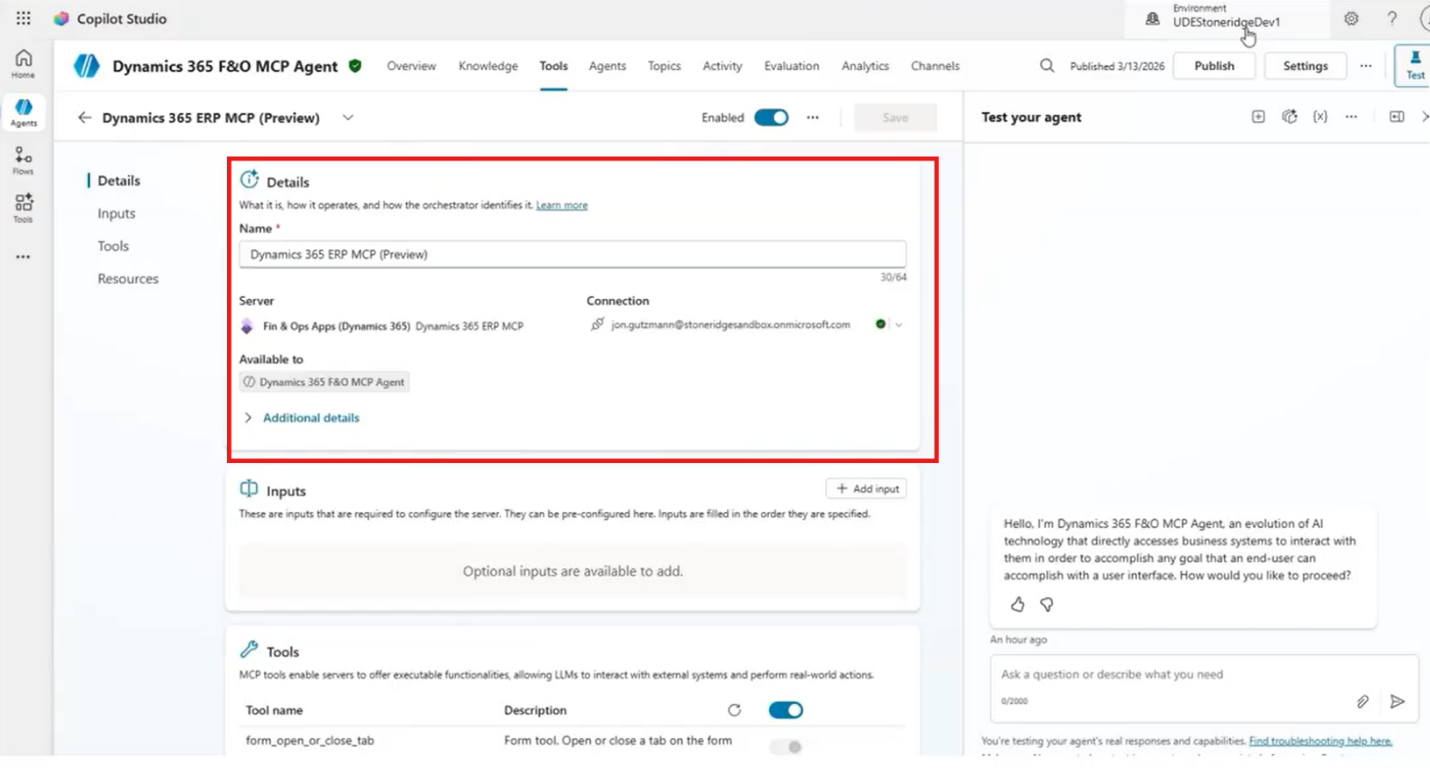
Credentials and Security
Credentials are another important consideration. Like in Part 1 with Business Central, you can use End user credentials or Maker-provided credentials.
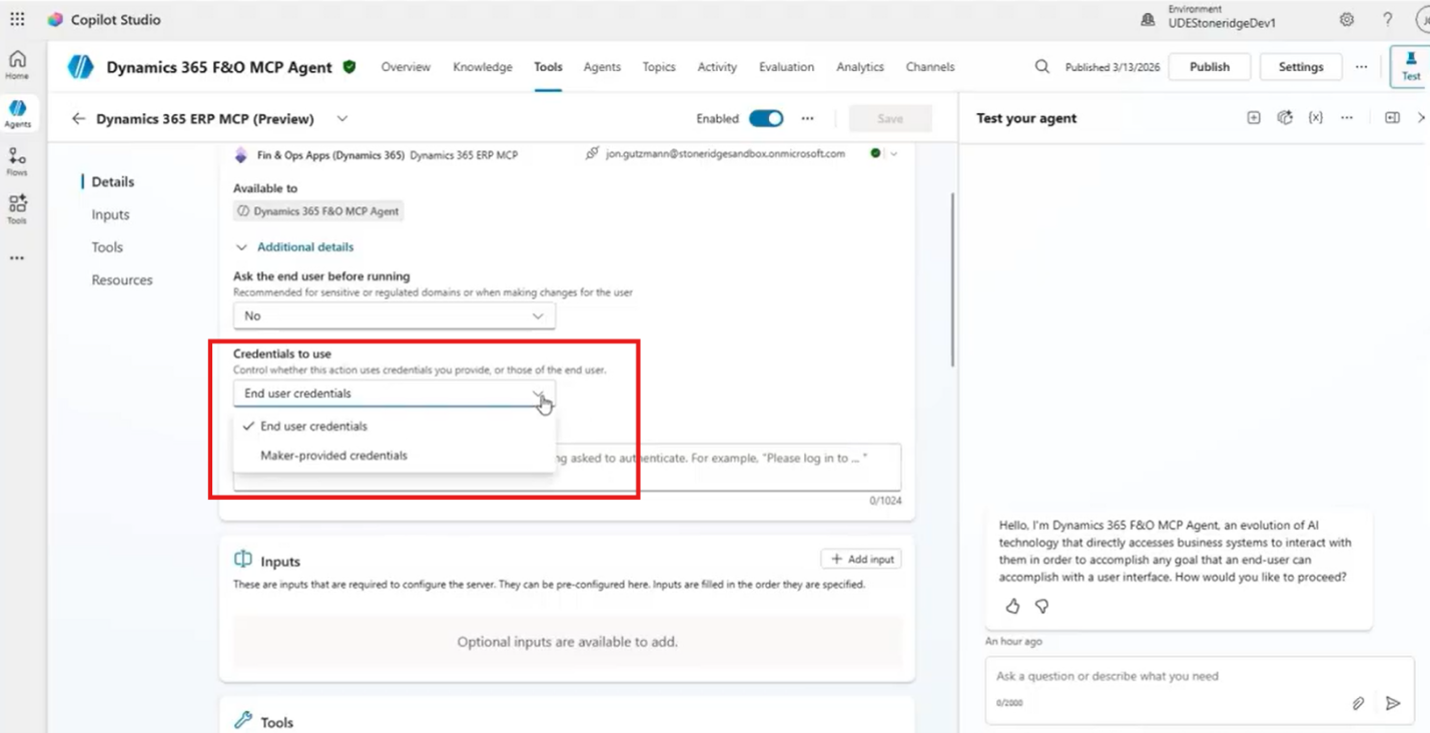
For our example, we will use end-user credentials, allowing the user's existing Finance and Supply Chain Management security to flow through to the agent. That means the agent isn't suddenly able to access information the user couldn't already access within the ERP. Individual tools can also be disabled to further restrict what an agent can do.
Instructions
Finally, you can give the agent instructions that tell it how to approach a specific task. We recommend built-in Microsoft guidance to encourage the agent to work with data entities before relying on form interactions. Those instructions help shape how the agent reasons through a request.
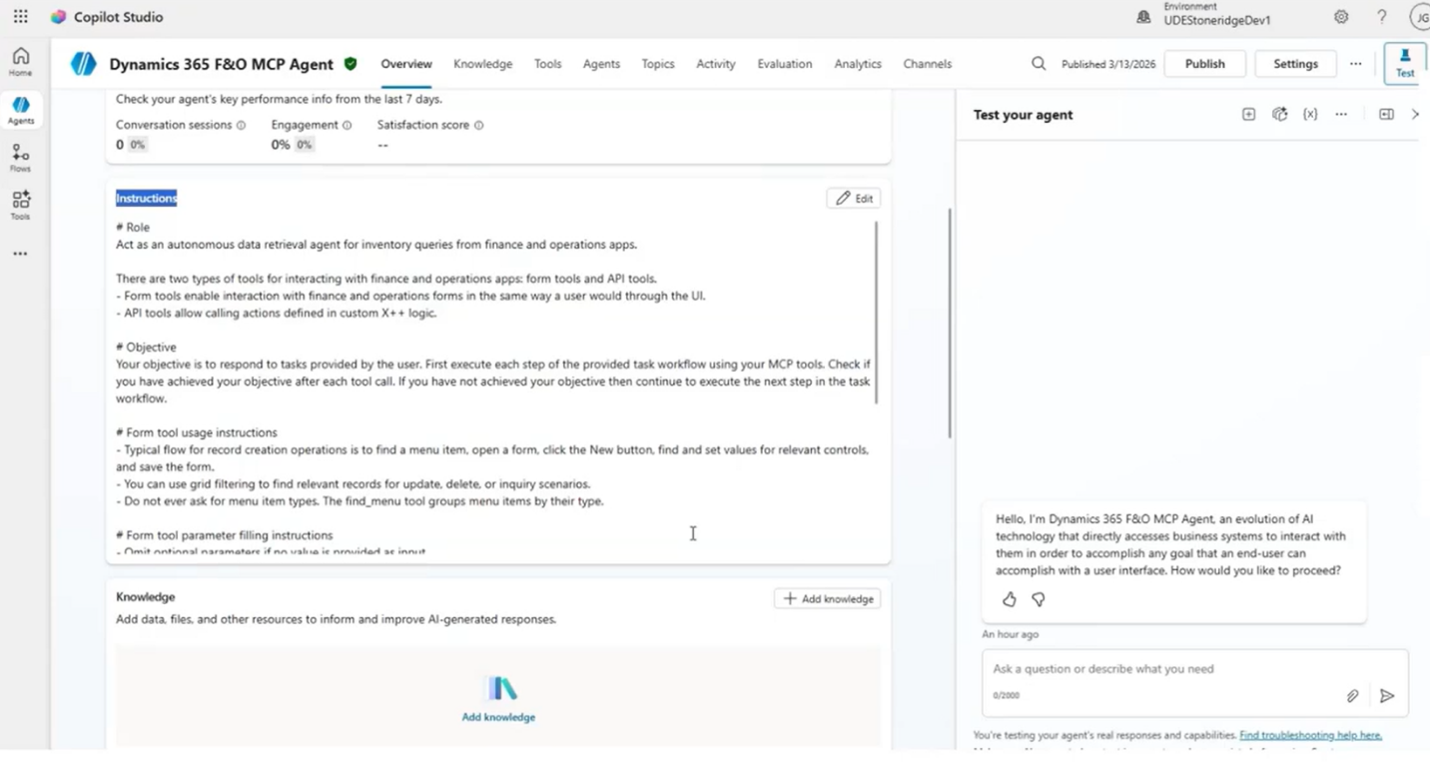
The important takeaway is how little traditional development is required for this scenario. It’s quite simple. You just have to configure the model, add the MCP tool, establish instructions, and then let your agent reason through the data.
Demo: MCP in Finance and Supply Chain Management — Querying Purchase Orders and Inventory
Our demonstration for this blog will center on a straightforward procurement problem.
Suppose a supplier informs the business that PO20 will be delayed. The obvious next question is: Which items will that delay affect? Rather than creating a custom query specifically for this question, the user asks the Copilot agent.
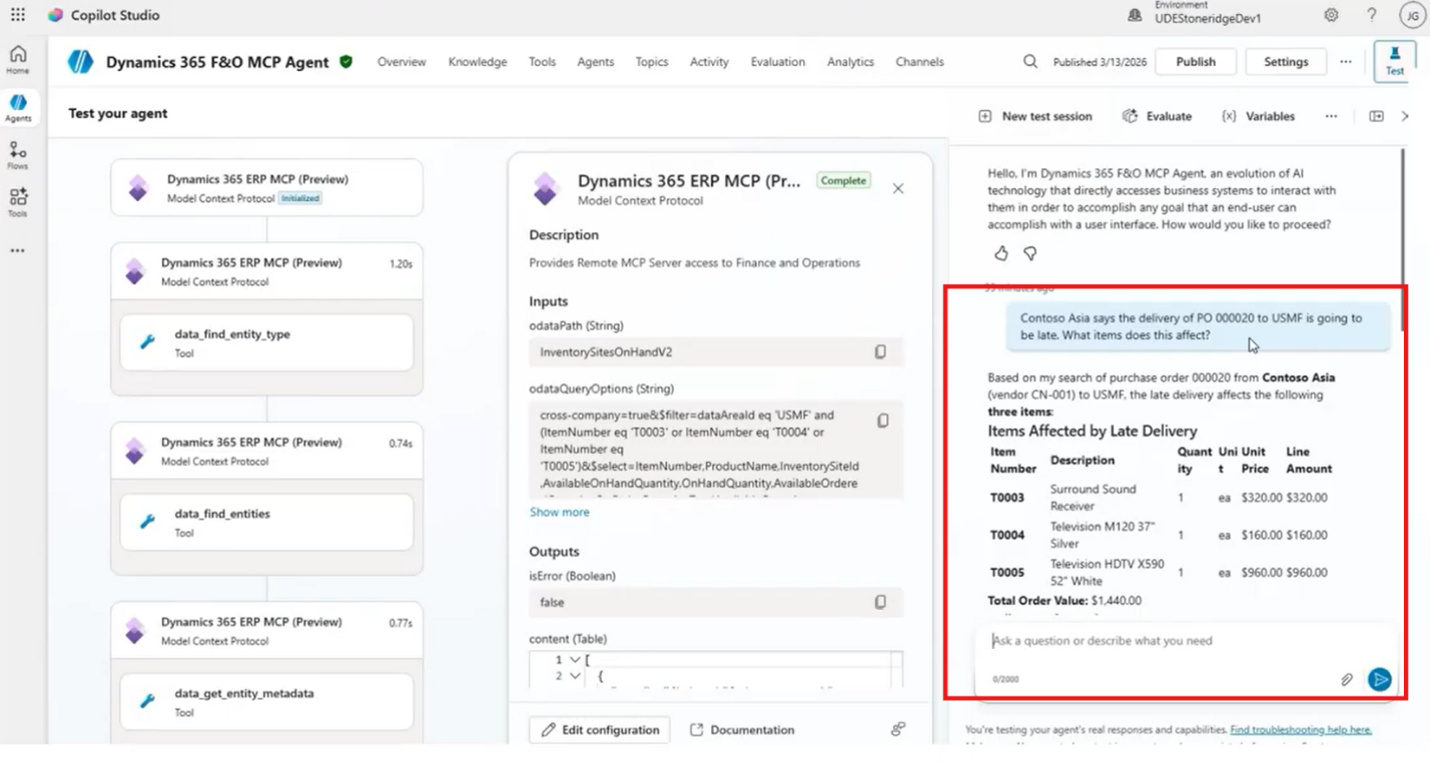
The agent first determines what information it needs. It identifies the purchase order entity and examines the available metadata. Because the question is about items, the relevant information isn't limited to the purchase order header; it extends to the associated line information. It then queries the appropriate data using the purchase order number and returns the affected items.
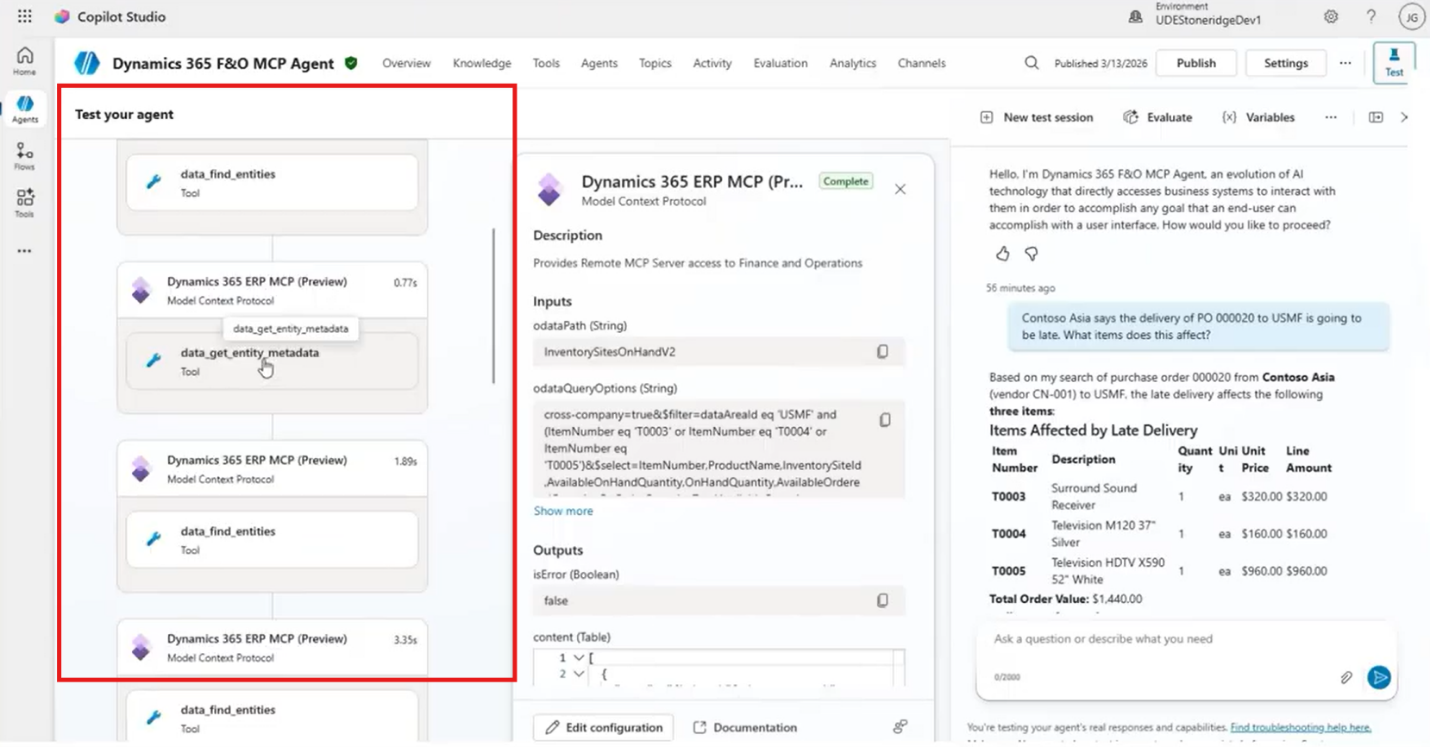
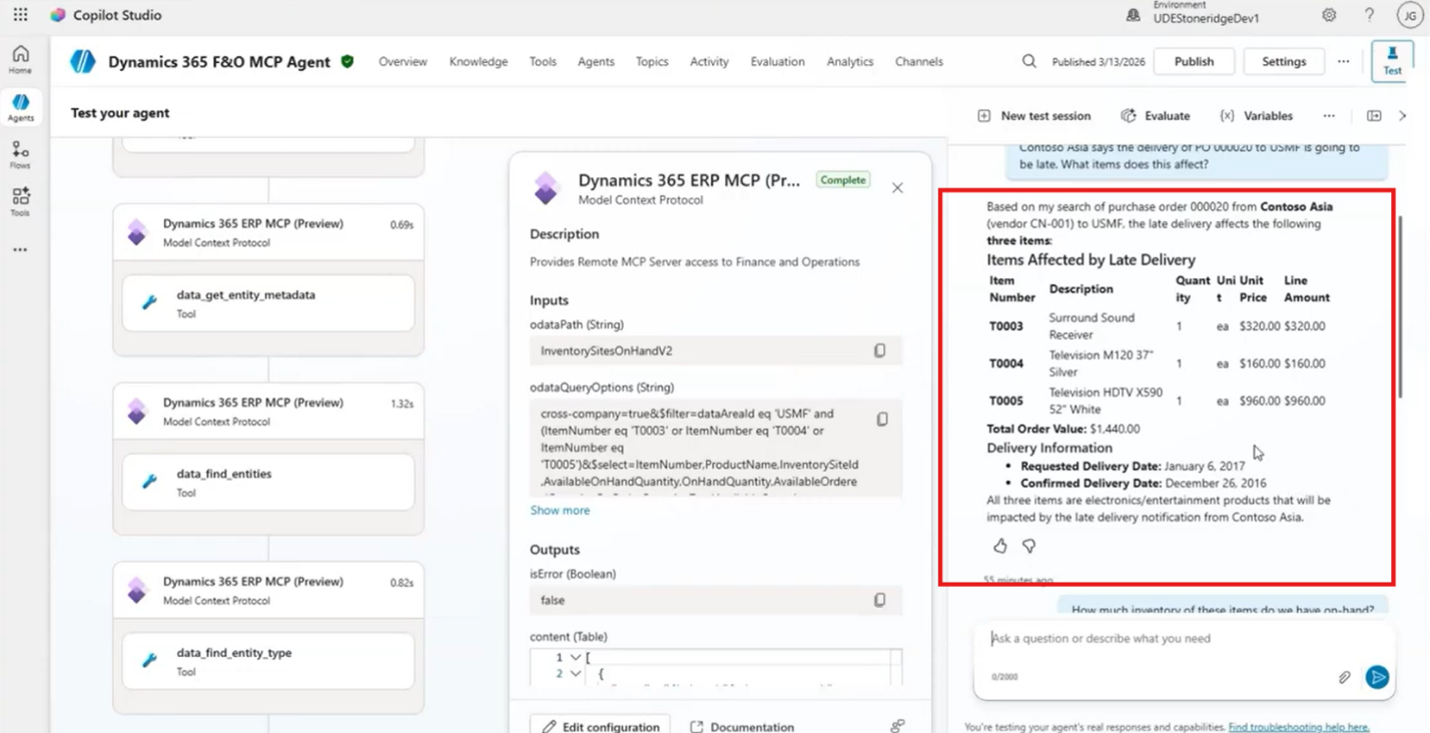
That's already useful, but the next step is where the value becomes more apparent. You can ask the agent:
How much inventory do we currently have for those items?
The agent doesn't need to be given a second hard-coded query. It reasons that inventory information is required, identifies the relevant inventory entity, runs the query, and returns the available quantities.
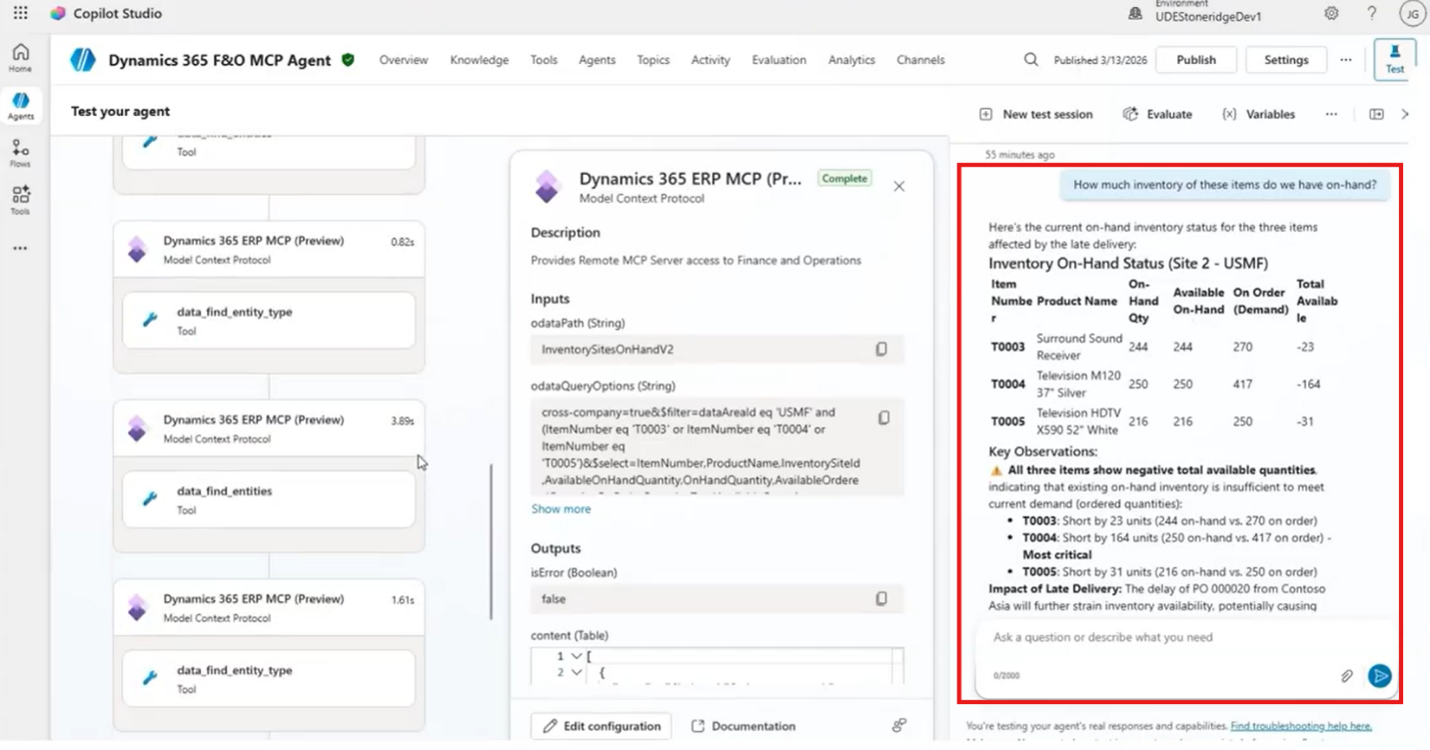
At this point, the inventory position shows negative available quantities for the affected items. One of the examples shows a shortage of 23 units. The presenter then verifies the information directly in Finance and Supply Chain Management and confirms that the MCP result matches the ERP data.
Think about what just happened:
- A procurement or supply chain employee started with a business question:
“A purchase order is going to be late. What does that affect?”
- The agent then reasoned through the ERP’s data to answer two related questions:
Which items are on the delayed purchase order?
What is our current inventory position for those items?
The user didn't need to know which entity to query, which fields to retrieve, or how the underlying data was structured. The agent picked all of that up for them. This is one of the most compelling aspects of MCP. The agent can work from the intent of the question and use the available tools and context to determine how to get the answer.
Efficiency Gains
This type of interaction previously could require significant development work to build APIs and integrations for accessing the data. With MCP, you can accomplish it through configuration and instructions rather than custom code.
For procurement and supply chain teams, that opens up plenty of possibilities.
Imagine asking:
- Which delayed purchase orders are most likely to affect customer commitments?
- What inventory shortages are connected to an overdue supplier shipment?
- Which items have both a supply risk and an existing inventory shortage?
- What purchase orders should our team investigate first?
The point isn't that MCP automatically answers every one of those questions perfectly. The point is that the agent can reason over the ERP's available context rather than requiring a developer to build a separate hard-coded workflow for every question.
And because security flows through from Finance and Supply Chain Management, the agent remains grounded in the access users already have.
Get More from MCP with Stoneridge Software
Connecting an MCP server is exciting. Knowing what to connect, what to expose, and how to turn that connection into something genuinely useful is where the real work begins.
That's where Stoneridge Software can make the difference. Our team brings deep experience with Dynamics 365 Finance and Supply Chain Management, Microsoft technologies, and the real-world processes organizations depend on every day. We can help you identify practical MCP use cases, configure your environment, build agents, and turn AI capabilities into solutions your teams can actually use.
If you're ready to move beyond AI experimentation and start connecting your ERP data to intelligent, actionable experiences, reach out to our experts today!

Under the terms of this license, you are authorized to share and redistribute the content across various mediums, subject to adherence to the specified conditions: you must provide proper attribution to Stoneridge as the original creator in a manner that does not imply their endorsement of your use, the material is to be utilized solely for non-commercial purposes, and alterations, modifications, or derivative works based on the original material are strictly prohibited.
Responsibility rests with the licensee to ensure that their use of the material does not violate any other rights.