















How Microsoft 365 Copilot and AI Agents are Changing the Way We Work
Artificial intelligence is no longer a future concept. It's now a part of the way people work every day.
AI adoption isn't about replacing people. It's about helping people work smarter by reducing friction and bringing information, automation, and assistance directly into the tools they already use.
This blog and video takes a look at how Microsoft 365 Copilot, agents, and automation are helping organizations reduce that friction. We'll also look at Microsoft's vision for AI adoption, where AI is delivering value today, and the governance strategies that help organizations scale AI responsibly.
The Challenge: Too Much Information Across Too Many Systems
The reason organizations are investing in AI isn't because they need more technology. It's because employees often struggle to access the right information and complete work efficiently across a growing number of applications.
Most employees spend their day moving between applications. They might be working in Outlook, chatting in Teams, storing documents in SharePoint or OneDrive, and managing business processes in Dynamics 365.
Many organizations also rely on non-Microsoft applications for specialized business functions. The result of this is often fragmented information and inefficient processes.
People often spend time trying to access information around a lot of different products in order to get the result that's needed.
The challenge isn't a lack of information. It's finding the right information quickly and using it effectively.
Solving these challenges requires more than another application or dashboard. It requires a different approach to how people interact with information and technology, which is where Microsoft's concept of the frontier firm comes in.
What Is a Frontier Firm?
Microsoft has introduced the "frontier firm" to describe organizations that are using AI to support and transform business processes.
The frontier firm provides a framework for how organizations can use AI to work more efficiently and make better use of the information they already have.
Becoming a frontier firm isn't an overnight switch. It is an iterative process.
Organizations tend to move through different stages of AI adoption:
- People using AI assistants to help with daily work
- Human and AI agent teams working together
- Agent-driven processes that operate with human oversight
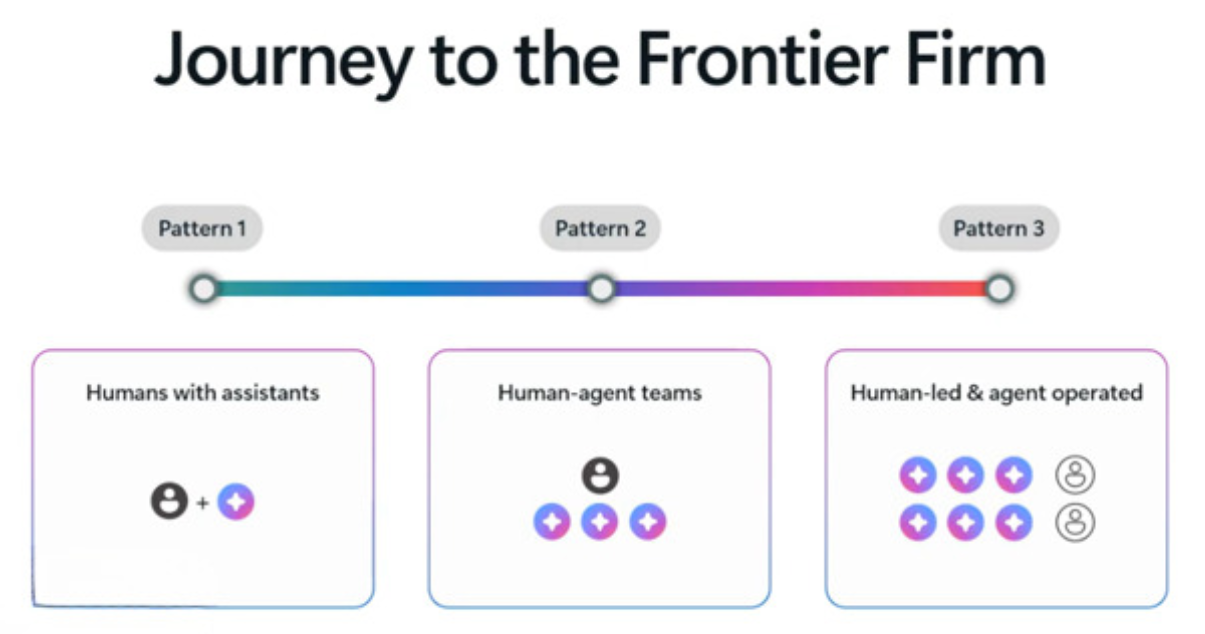
The goal is to gradually expand how AI supports the organization while maintaining control, governance, and business expertise.
As organizations move through these stages of AI adoption, the skills that drive innovation begin to change as well. Rather than relying solely on technical specialists to build solutions, AI makes it possible for the people closest to the business process to play a larger role in designing and improving how work gets done.
Why Process Expertise Matters More Than Ever
For years, organizations have focused on bridging the gap between technical experts and the people who run the business.
Low-code tools helped make technology more accessible, but there was still a clear difference between what a professional developer could build and what a business user could create. AI is changing that.
Because Copilot and agents can understand natural language, business users can increasingly describe what they want instead of needing to write code.
Why does that matter? In the past, organizations relied heavily on technical expertise to turn ideas into solutions. Today, Copilot and AI agents are helping close that gap by allowing users to describe what they need in plain language. The result is a greater focus on process expertise, the knowledge held by the people who understand how the business actually operates.
This shift is at the heart of Microsoft's vision for AI in Microsoft 365:
- Upgrade every process
- Empower every expert
- Accelerate every developer
A developer is no longer just someone who writes code, it's someone who can use AI to create solutions, automate tasks, and generate content that helps move the business forward.

Organizations can now focus more on process expertise, the knowledge held by the people who actually run the business, and you can use AI to help turn that knowledge into automation and solutions.
Giving business users the ability to create solutions is a significant shift, but technology alone doesn't guarantee success. To create lasting value, organizations need to understand where AI can have the greatest impact and build a strategy that supports continued adoption and improvement.
What Does It Take to Move Forward with AI?
Successfully adopting AI isn't just about turning on a new tool. Organizations need to understand where they are today and where they want to go next.
There are three important areas to focus on:
- Understand Your Team's Reality and Ambition: Focus on practical opportunities to improve efficiency with AI today.
- Give People Access to AI: People discover AI's value when they have the opportunity to use it.
- Create a Culture of Continuous Iteration: Successful AI adoption happens through continuous learning and improvement.
To support this journey, you can focus on three core components within the Microsoft 365 ecosystem:
- Copilot for AI-powered assistance and content generation
- Apps that extend business processes and productivity
- Agents that can automate tasks and perform work on a user's behalf
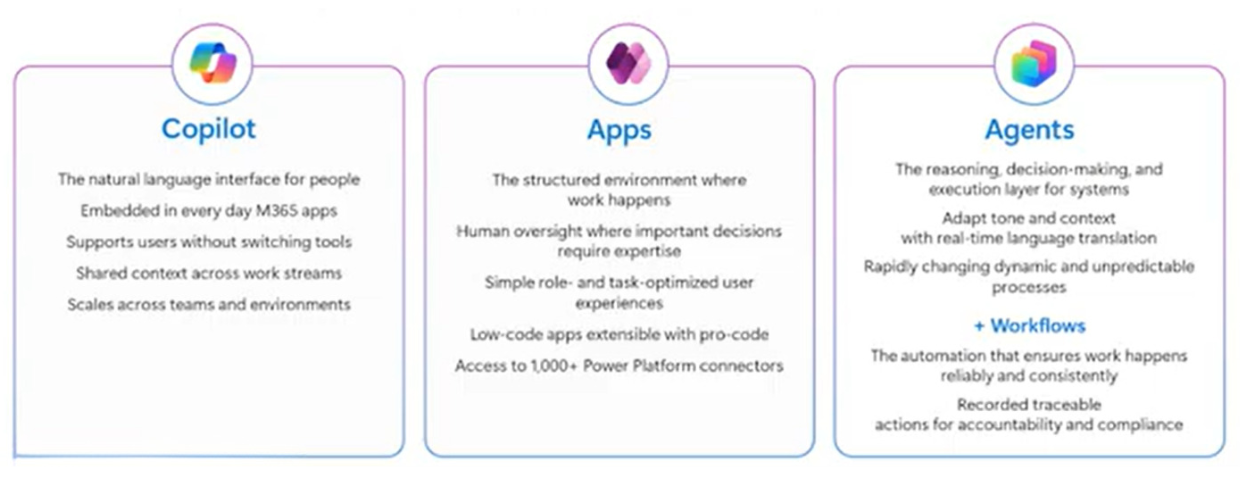
Just as important are the management and governance tools that support them. Organizations can monitor usage, manage policies, govern environments, and ensure agents operate within established security and compliance requirements.
These capabilities form the foundation of Microsoft's approach to AI enablement, helping organizations adopt AI while maintaining the visibility and control needed to scale it responsibly.
Beyond supporting adoption, they are also helping drive a broader shift in the Microsoft 365 experience.

AI Is Becoming the New User Interface
One of the biggest changes happening in Microsoft 365 is how people interact with technology.
We are seeing the concept of AI as the new UI emerge.
Rather than relying solely on clicks, menus, and screens, users can increasingly interact with business applications through natural language and AI-powered assistance.
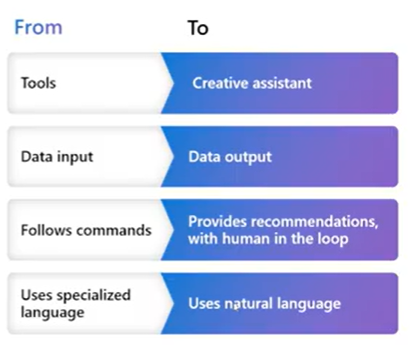
That means:
- Asking questions instead of searching for information
- Giving instructions instead of clicking through multiple screens
- Receiving recommendations and generated content based on business data
This shift allows employees to work in the applications they already use every day. Through agents and automation, users can stay in tools like Outlook or Teams while AI handles tasks behind the scenes.
For example, work can now begin with something as simple as sending an email to an agent. An organization could automatically identify late orders, gather the reason for the delay, and send customer updates, all through plain-language interactions rather than manual clicks and workflows.
This move toward text and voice interactions fundamentally changes how people work with business systems, making it easier to access information and complete tasks from wherever they are already working.
While that shift may sound futuristic, many organizations are already seeing practical value from AI in the tools their employees use every day.
How Is AI Impacting Work?
While AI continues to evolve, many organizations are seeing value from practical, everyday use cases. Employees are already using AI to save time, improve communication, and automate routine tasks across Microsoft applications. So, what does that actually look like in practice?
Outlook: Improve Communication
One of the most common uses for Copilot is in Outlook, where users are summarizing emails, generating content, and improving communications before they hit send.
One tip is to write your own email and then use Copilot as an editor to improve clarity, refine tone, and identify language that may be confusing.
Teams: Get Answers Faster with Agents
In Microsoft Teams, organizations are publishing agents that help employees quickly find information and complete common tasks.
One common example is an HR policy agent that can search company handbook information and answer employee questions directly within Teams, eliminating the need to search through documents manually.
Microsoft 365: Simplify Daily Tasks
Across Microsoft 365, AI helps users work more efficiently by automating everyday activities and surfacing information when it's needed.
Common use cases include:
- Creating PowerPoint presentations and Word content
- Researching topics and gathering information from OneDrive
- Organizing inboxes and calendars
- Finding information across emails, chats, and files
- Summarizing meetings and identifying action items
- Reviewing and providing feedback on RFPs
Dynamics 365: Extend Business Process Automation
AI capabilities are also expanding within Dynamics 365, where agents can support business processes that were once highly manual.
Examples include purchasing, financial reconciliations, sales order processing, quote generation, and customer pricing inquiries. Many of these capabilities are becoming native to the platform and can be tailored to an organization's specific business requirements.
Co-Work: A New Way to Get Work Done
One exciting capability is Microsoft Co-Work.
Co-work is a great example of AI as the new UI. Rather than acting as a simple chat interface, Co-Work functions more like a personal assistant in Microsoft 365.
Instead of simply answering questions, Co-Work can complete tasks on your behalf, including:
- Organizing your inbox by identifying spam and low-priority messages
- Highlighting urgent emails and meetings that need attention
- Generating daily email digests and other scheduled updates
- Gathering information ahead of meetings
- Building timelines of interactions with prospects and customers
What makes Co-Work different is that users can assign a task and let the system work in the background. Rather than spending time sorting emails or gathering information, you can focus on the work that requires their attention.
This shift highlights how AI is evolving from a tool that assists users to one that can take action on their behalf. The next step is extending AI beyond productivity tasks and into business process automation.
Moving Beyond Assistance to Automation
Copilot is also enabling a new level of business process automation.
Using technologies like Model Context Protocol (MCP), AI agents can interact with applications similarly to a human user.
Agents can:
- Enter data into systems
- Update records
- Complete repetitive tasks
- Trigger workflows
- Send notifications and follow-up communications
For example where an agent can receive information, calculate adjustments, update records in Dynamics 365, and sent confirmation emails, all based on natural language instructions.
Without a single line of code.
Instead, the process was defined through step-by-step instructions written in plain language.
The result is a powerful new approach to automation that can extend across business systems and processes.
Governance Still Matters
As AI capabilities expand, so does agent access to information inside of your tenant AI adoption is about more than enabling new capabilities. It's also about creating the right guardrails.
That is why Microsoft has security, privacy and compliance tools to help you manage the rollout, capabilities, and adoption of agents.
Power Platform Admin Center: Establishing Guardrails
You can use the Power Platform Admin Center to define how agents are created, shared, and used across the business.
It is a dashboard where you can:
- Set what's allowed
- Set what connectors and actions are allowed by agents
- Limit sharing or co-authoring of those agents
- Disable publishing in certain channels
These controls help prevent the uncontrolled growth of agents across the organization while ensuring they only have access to approved data sources and actions.
The platform also supports governance processes for moving agents into production.
You have the ability to define pipelines to certify agents for production and broader sharing.
This allows organizations to establish review and approval processes before agents are deployed to larger audiences.
Copilot Dashboard: Understanding Adoption
Governance is only part of the equation. Organizations also need visibility into how AI is being used and where it is creating value.
The Copilot Dashboard provides insights into licensing, usage patterns, employee adoption, and overall engagement with Copilot experiences. Leaders can monitor trends over time and better understand where AI is having the greatest impact across the organization.
Advanced Reporting and Viva Insights
For deeper analysis, organizations can use advanced Copilot reporting and Viva Insights.
These tools help measure adoption rates, evaluate usage trends, and understand the time-saving impact of AI-powered capabilities such as meeting summaries and content generation. By bringing this information into Viva Insights, organizations can connect AI usage data with broader workplace productivity metrics.
These tools allow organizations to:
- Monitor adoption and usage
- Control agent permissions
- Manage connectors and actions
- Restrict publishing and sharing
- Measure employee engagement
- Track business impact
This visibility allows you to scale AI responsibly while maintaining security and compliance requirements.
While governance provides the structure needed to scale AI responsibly, successful adoption doesn't happen overnight. Like any business transformation, it takes time, experimentation, and a willingness to learn along the way.
AI Adoption Is a Journey
Every organization is on a different path.
Some are just beginning to explore chat experiences and email assistance. Others are deploying agents and automating business processes.
It's going to take a little bit of an investment. It's not something that's going to be magically happening immediately.
The most successful organizations are approaching AI as an ongoing process of learning, experimentation, and improvement.
Getting Started with Copilot in Microsoft 365
AI is already changing how work gets done inside Microsoft 365.
From drafting emails and summarizing meetings to managing workflows and automating business processes, Copilot and AI agents are helping organizations reduce manual effort and work more efficiently.
But technology alone isn't what drives successful adoption. The organizations making the most progress are combining AI capabilities with strong process expertise, thoughtful governance, and a culture of continuous learning.
The question is no longer whether AI will become part of the workplace. The focus now is understanding where it can create the most value for your team and taking the first steps toward adoption.

Under the terms of this license, you are authorized to share and redistribute the content across various mediums, subject to adherence to the specified conditions: you must provide proper attribution to Stoneridge as the original creator in a manner that does not imply their endorsement of your use, the material is to be utilized solely for non-commercial purposes, and alterations, modifications, or derivative works based on the original material are strictly prohibited.
Responsibility rests with the licensee to ensure that their use of the material does not violate any other rights.