














Authentication Registration Campaigns and Passkeys: What the March 2026 Update Means
What is an Authentication Registration Campaign?
Within Microsoft Entra ID there is an identity-security feature that proactively prompts users to register for a more secure authentication method than SMS or email OTP. Currently, it is limited to the Microsoft Authenticator app and is automatically managed by Microsoft unless customized by an administrator.
With authentication registration campaigns using passkeys reaching general availability in March 2026, this feature is becoming an important tool for organizations looking to strengthen authentication methods across their tenant.
Why Companies Use Registration Campaigns
By configuring this feature, you can:
- Enable and enforce MFA
- Provide your users with a more gradual rollout using the snooze settings
- Be better prepared for a handful of Microsoft-managed conditional access policies
- Move toward passwordless or even recently announced passkey adoption
- Improve your overall identity security posture
Many organizations still do not apply multifactor authentication or rely on less secure methods like SMS and email-based verification. Registration campaigns help transition users to stronger authentication methods in a more structured way while maintaining a manageable user experience.
How to Configure a Registration Campaign
Authentication registration campaigns are configured within the Microsoft Entra ID authentication methods policy. From there, administrators can customize how the campaign operates within their tenant.
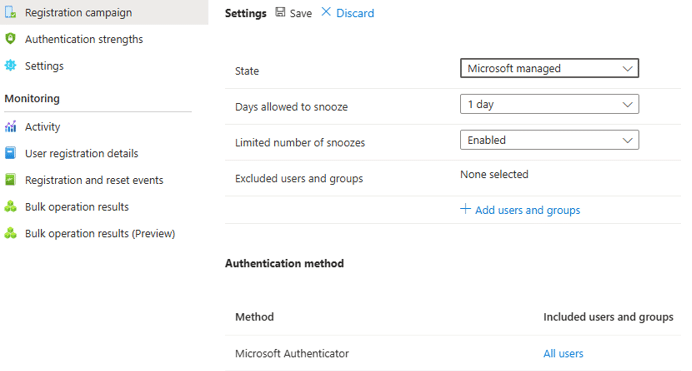
When a registration campaign is enabled, users are prompted during sign-in to register a stronger authentication method. Instead of requiring an immediate change, users can temporarily snooze the prompt based on the configuration set by the administrator. This allows organizations to gradually move users toward stronger authentication methods without creating disruption.
Administrators can also target specific user groups and control how frequently users are prompted, making registration campaigns a flexible way to guide adoption across a tenant.
Common configuration options include:
- Targeting specific users or groups for the campaign
- Defining how often users can snooze the prompt
- Aligning the campaign with recommended MFA and Conditional Access policies
This allows organizations to introduce stronger authentication requirements gradually while maintaining control over the rollout.
Why This Matters
Many studies suggest that proper configuration of MFA can prevent as much as 80–90% of cyber-attacks, which is why MFA adoption has long been a priority within Microsoft environments.
With authentication registration campaigns using passkeys now reaching general availability, organizations can begin using this feature to support recommended authentication methods such as passkeys.
Once synced passkeys are configured in your tenant, you can roll out passkeys as the authentication registration campaign default, essentially eliminating an entire class of attacks in your tenant. There are a myriad of reasons, illustrated in my previous blog, why passkeys represent the future of authentication, and this feature can help streamline that transition.
How can the Stoneridge Team Help?
Every tenant and user base are different. The Stoneridge team can help:
- Configure a custom MFA adoption strategy
- Implement authentication method requirements
- Build conditional access policies to enhance security across your organization
Our team is happy to answer questions, talk through your goals, and guide you through the next steps, at your pace. Reach out to us to start the conversation.

Under the terms of this license, you are authorized to share and redistribute the content across various mediums, subject to adherence to the specified conditions: you must provide proper attribution to Stoneridge as the original creator in a manner that does not imply their endorsement of your use, the material is to be utilized solely for non-commercial purposes, and alterations, modifications, or derivative works based on the original material are strictly prohibited.
Responsibility rests with the licensee to ensure that their use of the material does not violate any other rights.