














Collections in D365 Finance & Supply Chain for Beginners: Everything You Need to Know
Collection management is a fundamental part of every business – despite industry, despite tenure, and despite expertise – every business requires some kind of collections process. Some processes seem like a well-oiled machine while others can be segmented – causing delays, confusion, and overall lack of collecting. The process that your organization utilizes for collections is directly tied to your bottom line – making it deeply important.
It is no secret that organizations will have different requirements when it comes to collections – in fact, the Credit and collections module within Dynamics 365 Finance & Supply Chain (or Dynamics 365 Finance & Operations - fondly known as D365 F&O) was designed with that in mind.
Credit and collections within D365 Finance is incredibly configurable – giving your organization the ability to have a solution tailored directly to its needs. The goal of this blog is to provide you with some high-level insight on collections work within D365 – with the help of the Credit and collections module.
Aging in Dynamics 365 F&O
Aging Buckets
Aging buckets are one of the integral components of the collections process. Aging buckets are known as “Aging period definitions” within F&O.
As stated above, this module is incredibly configurable. Not only can we break down the individual buckets or segments that make up an aging period definition within F&O – we can also create more than one.
For example, let’s say your organization typically manages collections in 30, 60, 90, and 180 day buckets. We would create an aging period definition that houses each of those buckets. It might look something like this:
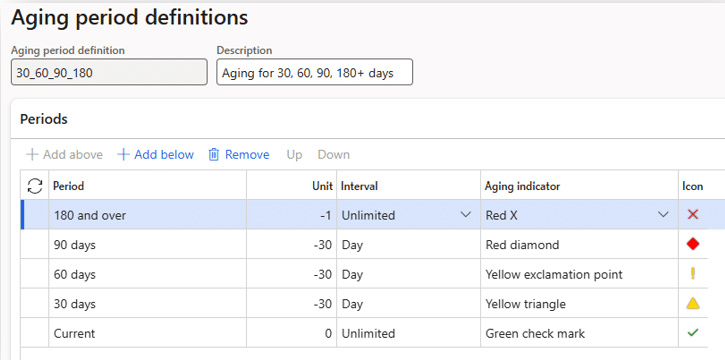
However, maybe your organization also needs to view collections by 2 weeks before the due date and 2 weeks after the due date. We can create an additional aging period definition that houses the weekly buckets as shown below:
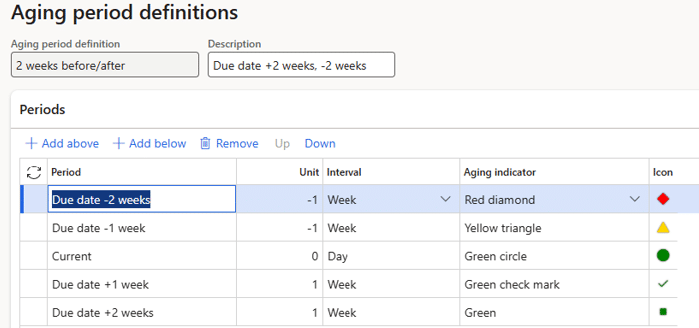
As you can see from the screenshots, we have a lot of options when it comes to configuring aging period definitions within F&O.
Aging Snapshots
Aging snapshots tend to be a crowd favorite. Aging snapshots within F&O allow you to have a real-time “snapshot” of a customer’s credit and collections history.
For example, maybe you want to know what each of your customers’ collections look like as of the end of the previous month - aging snapshots allow you to collect data like that.
A great thing about aging snapshots is that they can be set up to run as a batch job and/or it can be run manually. Most clients prefer to have a daily batch job and users managing collections will run the snapshot ad hoc as needed.
Managing Collections in Dynamics 365 F&O
As you’re working through your list of overdue customers, you’re probably tracking progress or what you did – left a voicemail, was promised payment, etc. For some, that means writing it down on a piece of paper. I used to track it in an Excel spreadsheet.
Collections Activities
However, in F&O, you can log your activities directly into the system. There are actually four types of activities you can choose from: actions, appointments, events, and tasks. Typically, I see actions and tasks get used most often. Below are explanations of each of the four activities:
- Action: Record something you’ve done (example: you left a voicemail for a customer)
- Appointment: Record an appointment that will be done in the future (example: you have a call scheduled with the customer to discuss a disputed invoice at 2 pm next Thursday)
- Event: Record a completed event (example: after your meeting on Thursday, you record an event and document what progress was made)
- Task: Record something you need to do (example: you need to follow up with the customer and ensure you get payment details on Friday)
The really great thing about these activities is that you can select a type, input a purpose, notes, and even the times in which the activity occurred. That way, you have all of the context needed to track your collections progress.
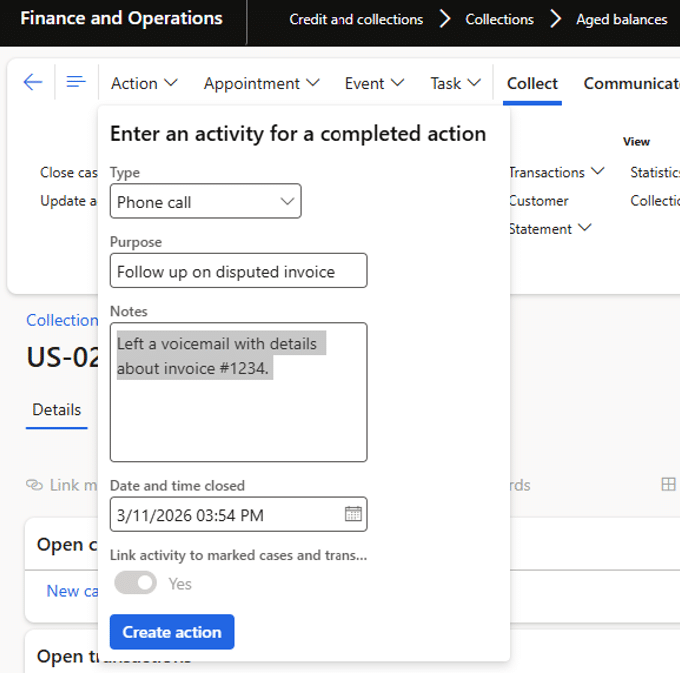
For example, let’s say you’ve called a customer and left a voicemail. As a result, you need to log an action within F&O. We could choose a type of “Phone call”, input the purpose of the phone call, add additional details in the “Notes” section, and ensure that the “Date and time closed” field is accurate. See the screenshot below for a visual reference.
Collections Agents
If you have multiple folks working on collections in your organization, collections agents might be a great option for you! You can create collections agents, assign them to a collections team, and then create collection pools to ensure that individuals are only seeing/managing what they are responsible for.
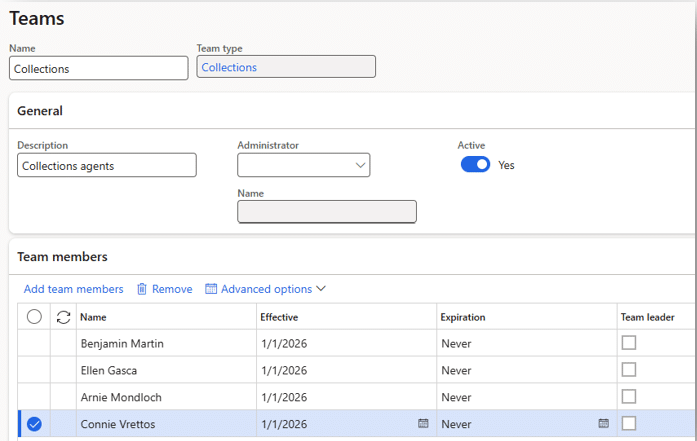
For example, let’s say you have a collections team of four people: Arnie, Benjamin, Ellen, and Connie. See the table below to identify how team member responsibility is organized.
| Team Member Name | Customers Managed |
| Arnie Mondloch | Accounts beginning with A-M |
| Benjamin Martin | Accounts beginning with A-M |
| Ellen Gasca | Accounts beginning with N-Z |
| Connie Vrettos | Accounts beginning with N-Z |
First, we would create an active collections team and include these four users.
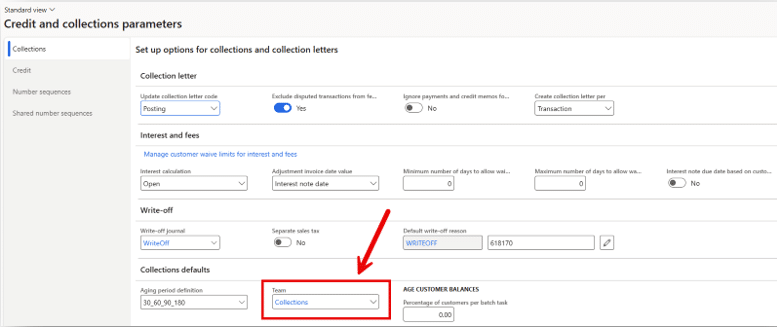
Next, we would assign the collections team in the Credit and collections parameters.
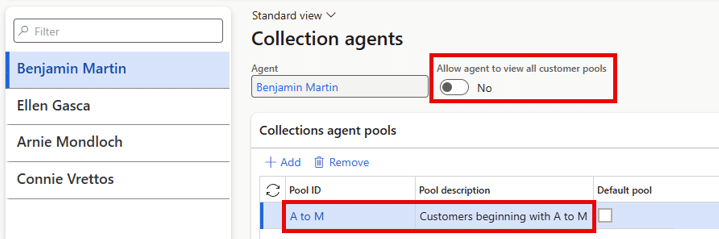
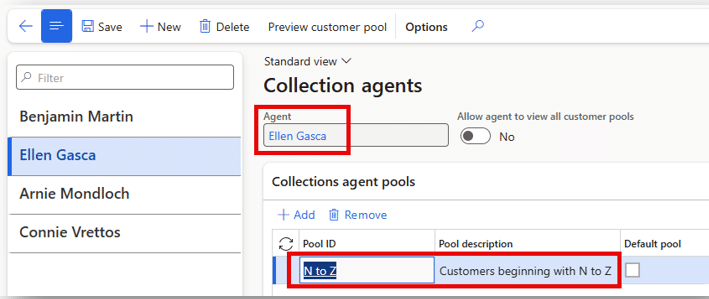
Then, we would set up the four team members as collection agents and use the “Collections agent pool” fast tabs to define the responsibility for each agent. We can even define if agents should have the ability to view other pools aside from their own or not.
Collection Letters
When payment gets too overdue, organizations must find a way to escalate the situation. Most of the time, this results in a collection letter or a series of collection letters.
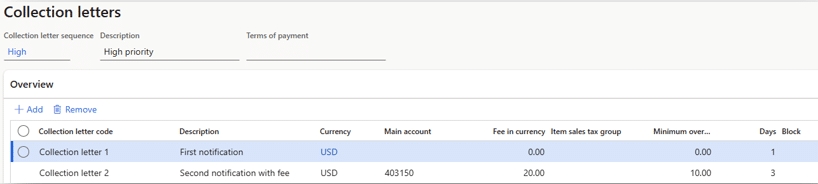
F&O has something called a “Collection letter sequence” and it allows us to automate the collection letter process. When we configure the Collection letter sequence, we define the parameters in which a collection letter should be generated.
For example, if it is high-priority item, maybe we want to generate a collection letter after a payment is overdue by one day. If a payment reaches 3 days overdue, we should generate a second collection letter and include a $20 fee. To support this business process, our collection letter sequence will look something like this:
After we’ve configured the collection letter sequence, there is a periodic job that will create collection letters for us based on the parameters defined in our collection letter sequence.
F&O even includes the “Valid collection letter code” field on the customer transactions page to provide visibility of collection letter status on a transactional level.

Workspaces
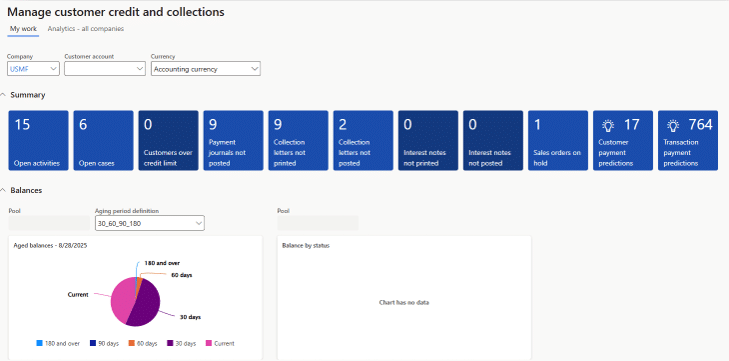
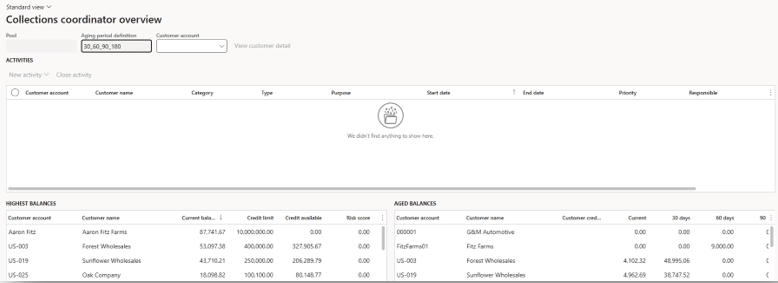
There are two workspaces included in the Credit and collections module: Customer credit and collections and Collections coordinator. Both workspaces are well-loved and provide visibility in a way that supports team members’ productivity. Below are some brief details on each:
- Customer credit and collections
- This is a great high-level workspace for both credit management and collections. Although it is high-level, it has a lot of “drill-down” capability – allowing team members to get to more granular details with a few clicks.
- Collections coordinator
- This workspace is excellent for the team members who are actively following up on overdue balances and need more granular detail up-front.

Key Takeaways
The Credit and collections module within F&O is robust – there are so many options, making it an awesome solution for many different companies with very different requirements.
We all know the importance of defining and executing a strong collections process. Credit and collections within F&O allows you to not only support that process, but automate it- making it more user-friendly, more efficient, and more productive.
If you’re interested in learning more about what collections within F&O could look like for your business, our team would be happy to help you explore your options.

Under the terms of this license, you are authorized to share and redistribute the content across various mediums, subject to adherence to the specified conditions: you must provide proper attribution to Stoneridge as the original creator in a manner that does not imply their endorsement of your use, the material is to be utilized solely for non-commercial purposes, and alterations, modifications, or derivative works based on the original material are strictly prohibited.
Responsibility rests with the licensee to ensure that their use of the material does not violate any other rights.