















Fix It Before It Fails: How AI Transforms Dynamics 365 Field Service
Field operations teams are increasingly using AI to respond faster, reduce downtime, improve technician productivity, and manage operational costs. Microsoft Dynamics 365 (D365) Field Service, however, brings these capabilities together in a more connected and proactive way by combining AI, as well as, IoT data, and workflows to identify potential issues earlier and help resolve them before failures lead to costly downtime.
This shows up across the entire work order lifecycle. Instead of relying solely on phone calls and manual processes, organizations can use connected asset data, intelligent scheduling, and operational insights to move from issue detection to technician assignment more efficiently.
In this blog and YouTube video, we’ll walk you through how AI in D365 Field Service helps reduce manual effort, improve decision-making, and create more efficient service operations without overcomplicating the technician experience.
From Reactive Repairs to Predictive Service
Traditionally, service requests begin after a customer notices a problem and places a call. But with IoT-connected assets and AI-driven workflows in D365 Field Service, the service process can begin much earlier. Connected equipment can automatically surface issues like abnormal vibration, temperature fluctuations, or other performance indicators before a failure becomes critical.
That shift supports a more predictive service model by helping organizations:
- Detect potential issues earlier
- Reduce unexpected downtime
- Automatically generate work orders
- Connect work to the right technician faster
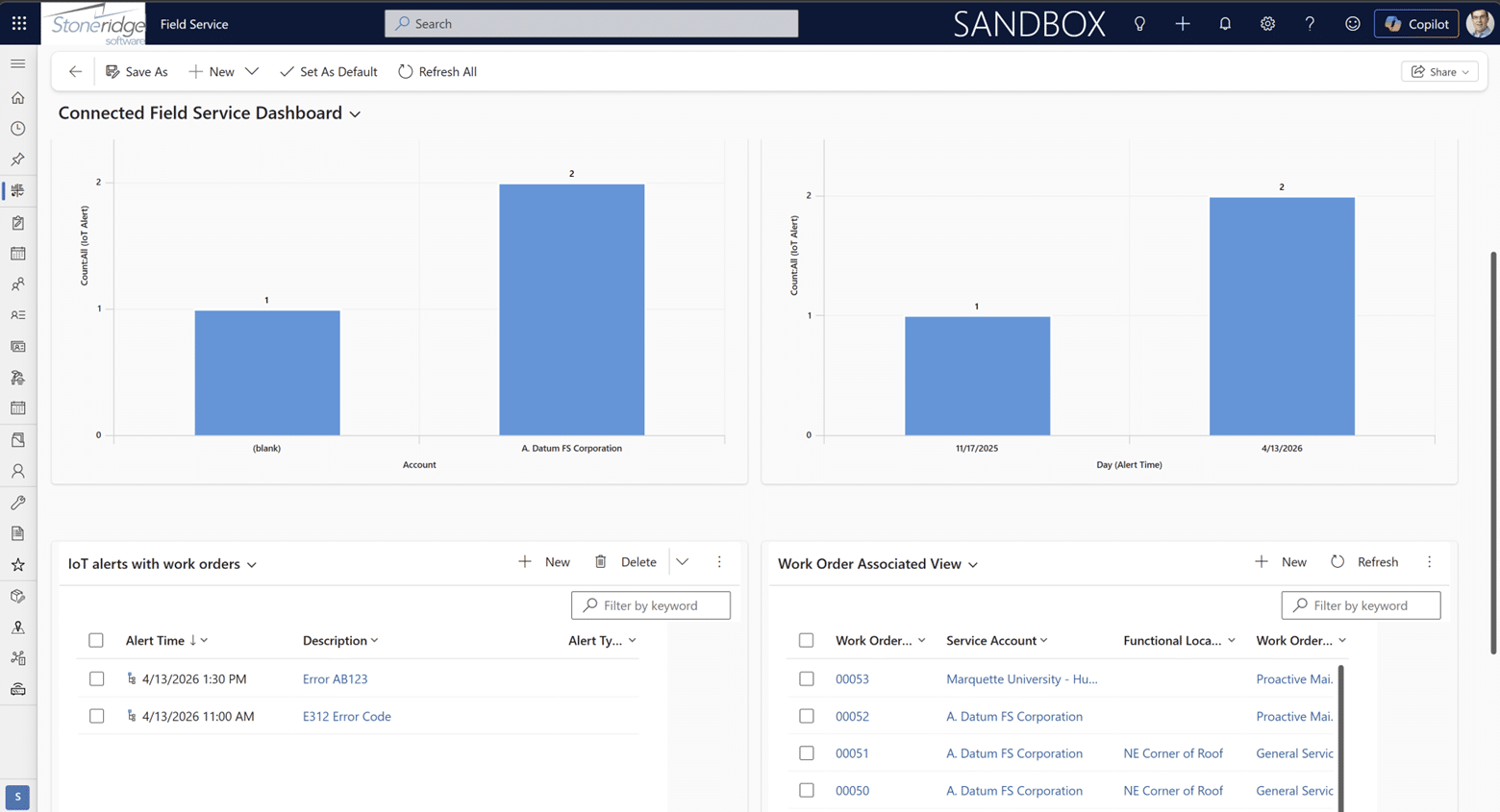
D365 Field Service can also use incident types (work order templates) to help standardize the repair process. These work order templates automatically include the tasks, products, and skill sets associated with a specific issue, helping technicians arrive better prepared to complete the job efficiently.
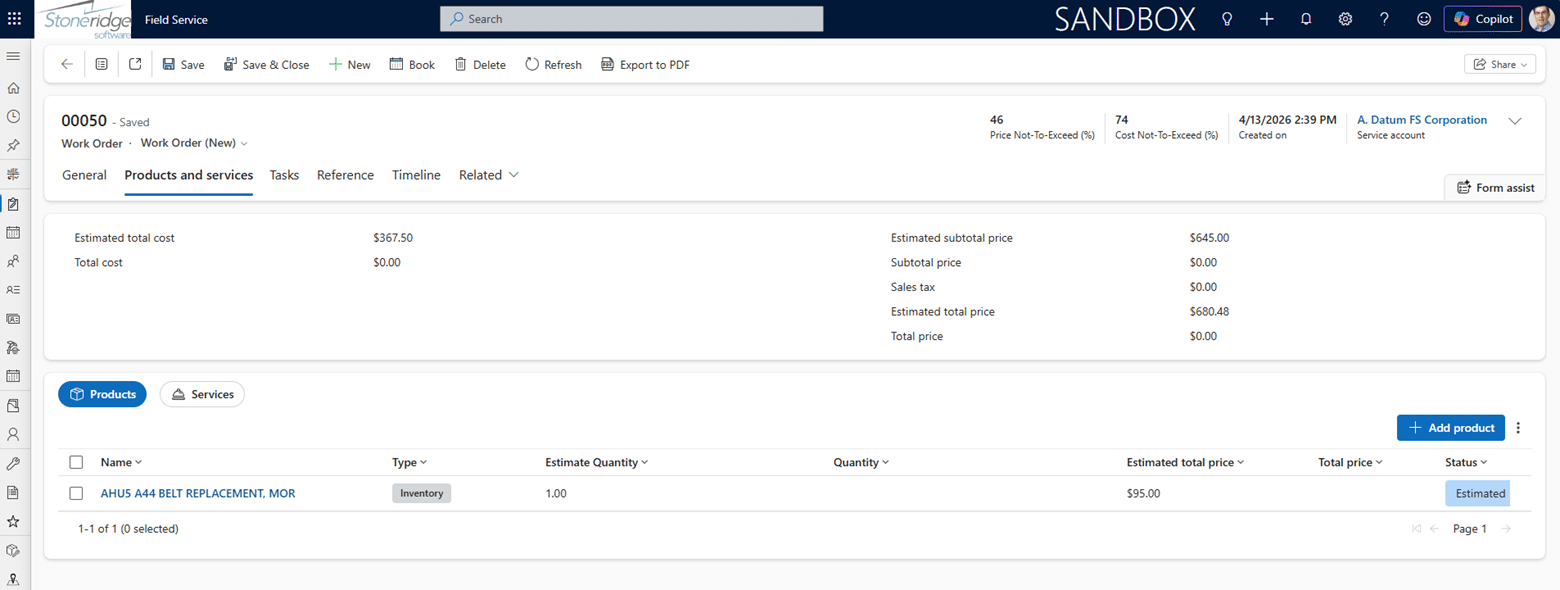
This is especially important in field service, where dispatch decisions directly impact cost and productivity. Not every alert requires immediate action, and organizations may still choose to triage certain issues before scheduling service. But when a response is needed, AI-driven workflows help teams move faster, make more informed decisions, and take a more proactive approach to service delivery.
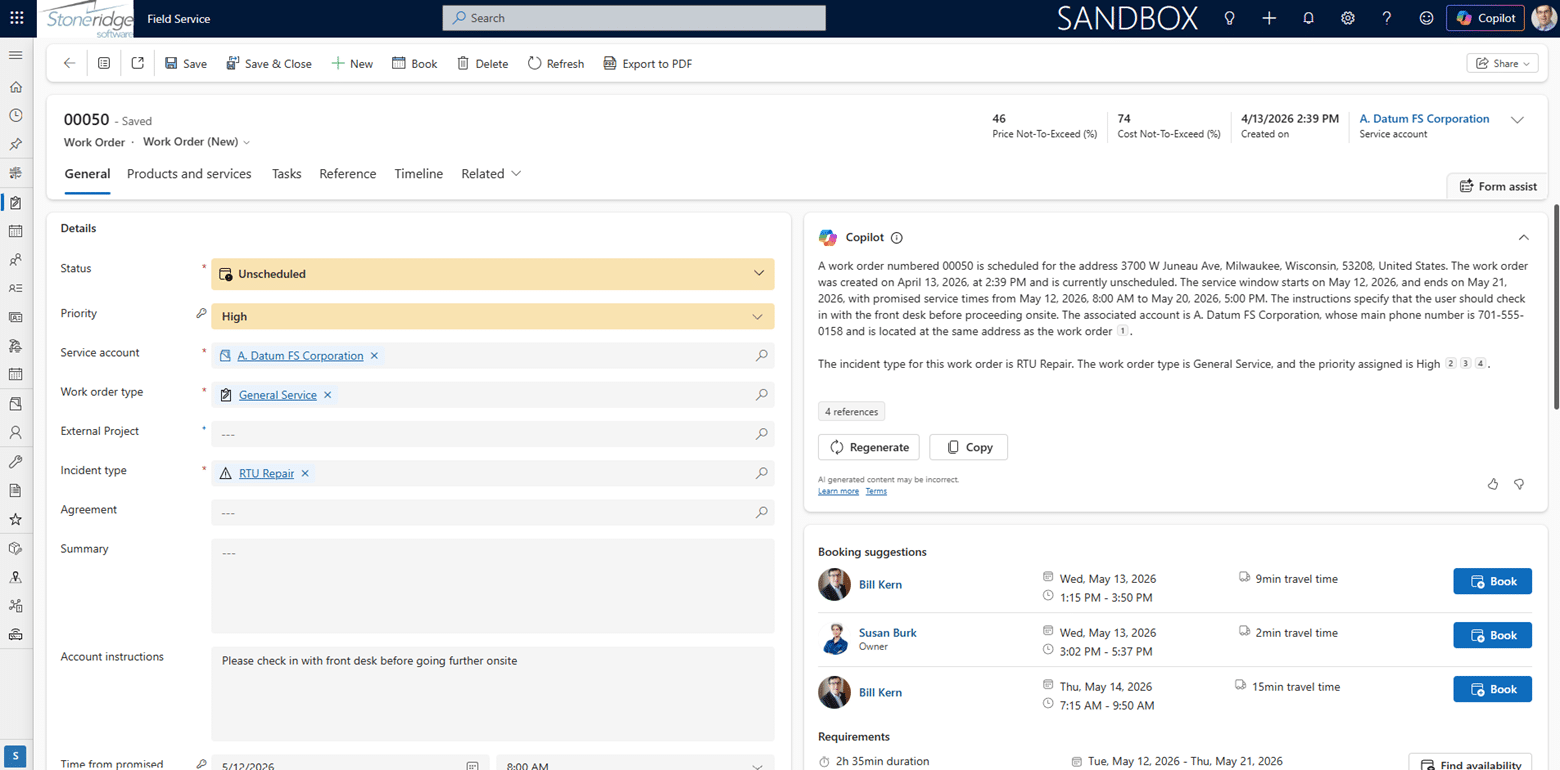
Once a work order is created and summarized through AI, the next step is getting it to the right technician as quickly and efficiently as possible.
AI-Assisted Scheduling Gets the Right Technician to the Right Job
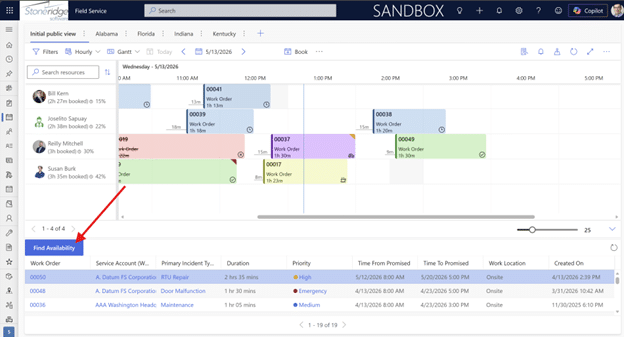
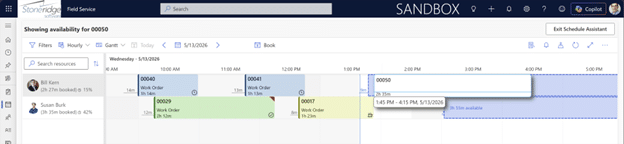
Microsoft Dynamics 365 Field Service extends operational efficiency into scheduling by using AI to match work with the most appropriate technician. Instead of relying on manual coordination, dispatchers are supported with recommended resources based on:
- Skills and certifications
- Territory and location
- Availability and capacity
- Proximity to the job site
This helps ensure the right technician is assigned the first time.
It also reduces the time spent on manual scheduling decisions. In many cases, suggested technicians are surfaced immediately after a work order is created, allowing dispatchers to assign work with fewer clicks and less back-and-forth, streamlining one of the most time-consuming parts of field operations.
Over time, the platform improves scheduling accuracy by using historical repair data. It analyzes how long similar jobs have actually taken in the field to refine:
- Estimated job durations
- Scheduling windows and time expectations

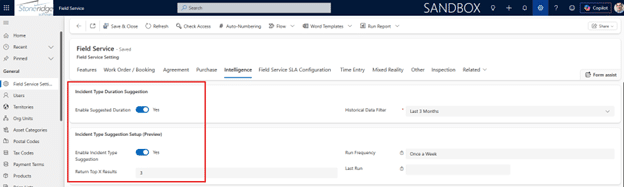
This helps organizations move away from static estimates and toward more realistic planning, improving day-to-day execution.
The impact is straightforward. When duration estimates are more accurate, organizations can:
- Fit more work orders into a technician’s day
- Improve technician utilization without adding headcount
- Increase overall field capacity
AI-assisted scheduling also accounts for real-world constraints, including:
- Technician travel distance
- Current location and routing efficiency
- Availability at the time of assignment
This reduces unnecessary drive time and helps improve response efficiency, while still ensuring the right skill match for the job.
The result is a more efficient dispatch process, less administrative effort in the back office, and more time spent getting technicians to work that is properly matched, scheduled, and ready to execute.
As the work order moves from scheduling into execution, the focus shifts from assigning the job to helping technicians complete it efficiently in the field.

Copilot Helps Technicians Spend Less Time on Administrative Work
Once a technician arrives on site, their value is in doing the repair, not spending time navigating systems or completing paperwork. Copilot helps reduce that administrative burden so they can stay focused on the job.
Instead of working through disconnected systems or re-entering data, technicians can quickly understand the work ahead. Copilot provides plain-language summaries of work orders, giving immediate context before they even begin. This reduces time spent scrolling, searching, or interpreting complex fields on a mobile device.
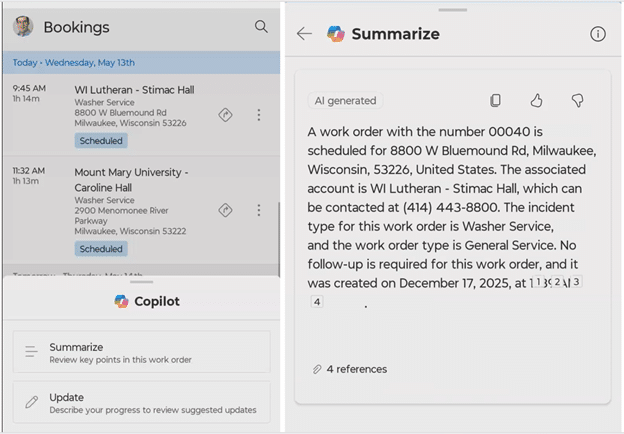
During execution, technicians can update work in simpler ways, including:
- Natural language updates (e.g., “completed all tasks”)
- Voice-to-text entry on mobile devices
- Quick updates to tasks, labor time, and materials
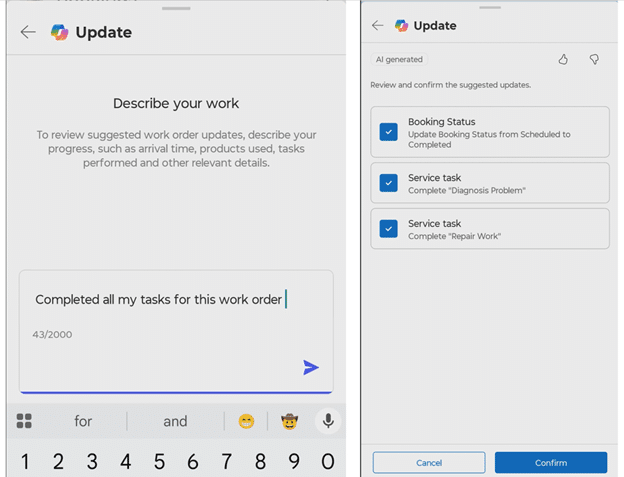
This reduces manual clicks and helps limit errors from retyping or switching between screens.
Copilot also supports field activities like inspections and documentation through allowing technicians to:
- Capture photos and videos from the job site
- Complete inspection checklists and service tasks
- Access linked knowledge articles for troubleshooting guidance
This makes it easier to follow processes without slowing down the work.
At the end of a job, Copilot even helps generate a service report that includes time on site, tasks completed, parts used, and customer confirmation. This reduces after-the-fact administrative work and speeds up closeout.
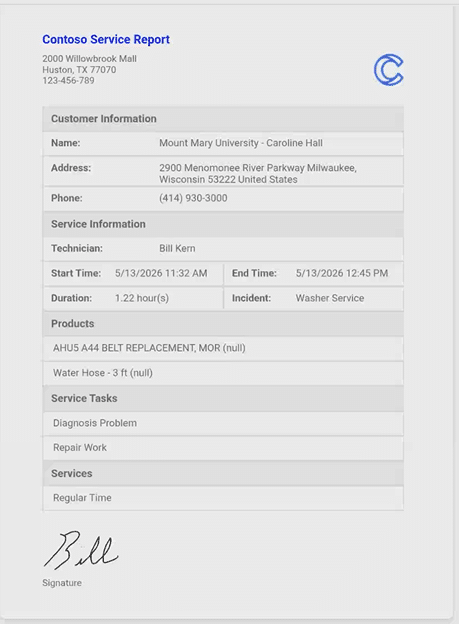
The result is a simpler technician experience; less administrative overhead, fewer manual steps, and more time focused on completing the work in the field.
As work orders move through the full lifecycle, from creation to completion, exceptional value emerges when all of that activity is captured and used to improve future decisions.
Service Data Becomes Actionable Intelligence
D365 Field Service allows you to capture data across the entire work order lifecycle, turning day-to-day service activity into usable insight for the business.
At the operational level, this data can be used for reporting and analysis in tools like Power BI, helping teams understand what is actually happening in the field. This includes visibility into:
- Work order volume by priority or type
- Incident trends and recurring issues
- Technician performance and workload distribution
- Repair and completion time patterns
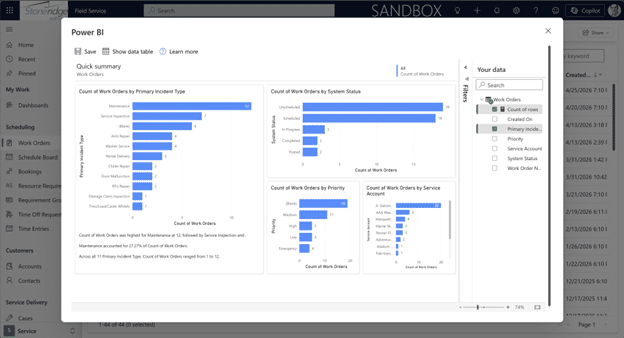
This allows service managers to move beyond tracking activity and start coaching more effectively. For example, they can identify where technicians may need additional support, or where certain types of work consistently take longer than expected.
Copilot also helps surface insights directly from this data, such as summarizing high-priority work orders or highlighting patterns that might otherwise be difficult to see in raw reports.
This data foundation enables more advanced capabilities that shift operations from reactive to proactive. AI-driven agents can help organizations anticipate demand and reduce manual planning in areas like:
- Inventory forecasting based on upcoming work orders
- Preventive maintenance planning across customer contracts
- Automated purchasing recommendations for required parts and materials
For example, if a large number of preventive maintenance visits are scheduled, the system can help estimate what parts will be needed, such as filters or components, and recommend when to order them. This reduces manual counting, spreadsheet tracking, and delays caused by missing inventory.
Also, the impact is not just efficiency in reporting, it’s better planning across the entire service operation. You also reduce errors, improve readiness, and ensure technicians have what they need before they arrive on site.
The result is a shift from looking backward at what happened to using service data to actively shape what happens next, whether that’s improving technician performance, refining scheduling accuracy, or preparing inventory before demand hits.
A More Connected and Efficient Work Order Lifecycle with AI
Across the work order lifecycle, D365 Field Service brings together AI, IoT, Copilot, and operational data to improve how service work is detected, scheduled, executed, and analyzed.
The goal is not to add complexity, it’s to reduce it. From identifying issues earlier, to assigning the right technician, to helping technicians complete work with less administrative effort, AI is embedded throughout the process to make each step more efficient and more connected.
At a practical level, this means:
- Faster identification and resolution of service issues
- More accurate and efficient scheduling decisions
- Reduced administrative work for technicians in the field
- Better visibility into performance and service trends for managers
- Continuous improvement driven by real operational data
The impact spans both people and processes. Technicians spend more time fixing what is broken and less time on manual updates. Managers gain clearer insight into what is happening across their service organization and can use that data to coach teams and improve outcomes.
AI helps service organizations work faster, stay more informed, and operate in a more proactive way across the entire lifecycle. The result is a simpler, more connected service operation where issues are resolved faster, decisions are better informed, and teams are better equipped to deliver consistent service at scale.
Explore AI in Dynamics 365 Field Service
If you’re interested in learning more about how AI in Microsoft Dynamics 365 Field Service can improve your service operations, streamline technician productivity, and support a more proactive service model, the team at Stoneridge Software can help.
Whether you’re just starting to explore Field Service capabilities or looking to optimize an existing implementation, Stoneridge can provide guidance, demos, and implementation support tailored to your organization’s needs.
Contact Stoneridge Software to learn more or schedule a conversation about D365 Field Service and AI-driven service operations.


Under the terms of this license, you are authorized to share and redistribute the content across various mediums, subject to adherence to the specified conditions: you must provide proper attribution to Stoneridge as the original creator in a manner that does not imply their endorsement of your use, the material is to be utilized solely for non-commercial purposes, and alterations, modifications, or derivative works based on the original material are strictly prohibited.
Responsibility rests with the licensee to ensure that their use of the material does not violate any other rights.