














Subscription Billing in Dynamics 365 Finance & Operations: A Practical Approach to Recurring Billing
Is your business in a situation where you need a solution for recurring billing? During requirements gathering, organizations often identify several key billing requirements.
Ask yourself these questions:
- Do you use contracts with customers for billing?
- Do you charge or bill them on a regular basis, whether monthly, quarterly, or annually?
- Do you need to relieve inventory or have consistent use of items to bill your customers?
- Do some of your contracts have a ‘do not exceed or bill’ when you reach a certain amount for a particular line?
- Would you like to use trade agreements to control pricing on those contracts?
That is too many questions to start off a blog, but the goal was to get you thinking about your billing requirements. If the answer to many of those questions or even one of them is Yes, the solution could very well be the Subscription Billing module in Dynamics 365 Finance & Operations. The sections below go through these questions 1 by 1 to explain why Subscription Billing is the answer.

Contract Based Billing Management
Do you use contracts with customers for billing?
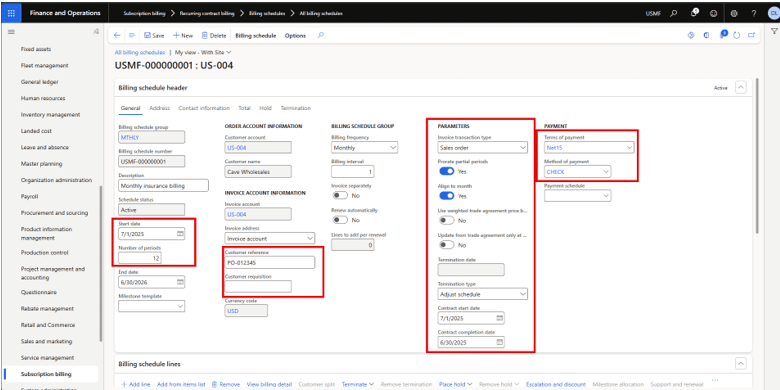
Well, most recurring billing solutions would have some sort of contract outlining how often billing takes place, or how the billing would be completed. Will billing be based on a fixed rent? Could it be a percentage of sales in a franchisee situation? Regardless of your billing needs, Subscription Billing should be able to fill the bill.
You fill in:
- the start date
- number of periods (to be discussed next)
- details such as terms of payment, method of payment
- some parameters,
- the customer PO
- and start your billing process.
Flexible Recurring Billing Schedules
Do you charge or bill customers on a regular basis, whether monthly, quarterly, or annually?
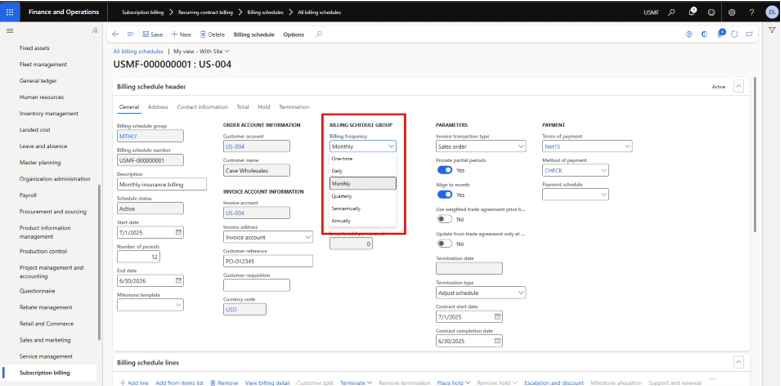
You can set up the following sequences: One-time, Daily, Monthly, Quarterly, Semiannually, or Annually.
That should cover any scenario you could come across.
Pricing Control Using Trade and Sales Agreements
Would you like to use trade agreements to control pricing on those contracts? Do you have various pricing needs?
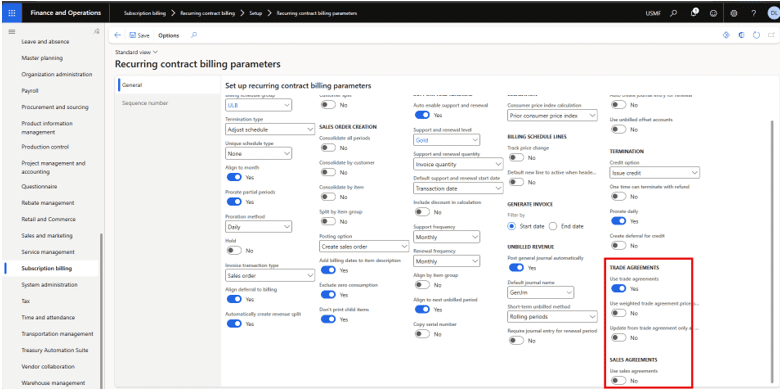
In the Subscription Billing parameters, there is a setting to enable trade agreements or even sales agreements if they are a better fit. Those can be used with the Standard pricing method on each of the contract lines. There is also a setting to have the prices increased when they happen on the trade agreement or when the contract renews.
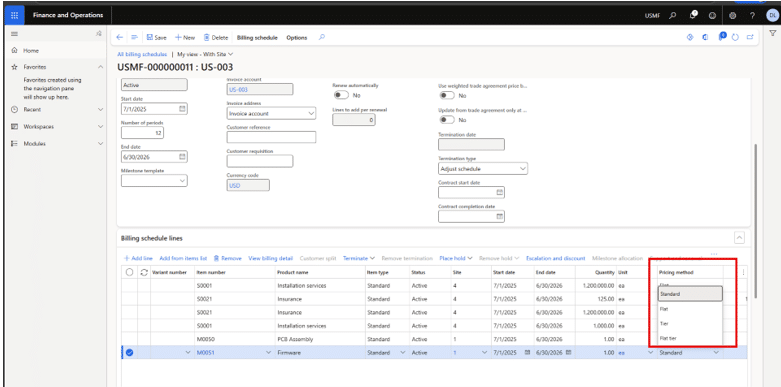
The Pricing method is used for pricing at the line level. The Standard allows the use of trade agreements and sales agreements and Flat allows for manual entry of a price, but there also Tier and Flat tier. Flat and Standard are by far the most common options.
Inventory and Item‑Based Billing
Do you need to relieve inventory or have consistent use of items to bill your customers?
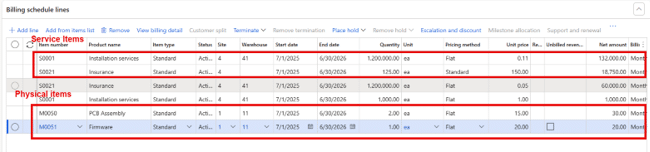
You can use items to allow for the relieving of inventory if that is the case. Just define the site and warehouse on the contract line to facilitate the shipping of those items. The quantity can be overridden on each line for each billing period if it is not always the same. It will just reflect the quantity on the contract for the next billing period.
Service items can also be used to get consistency for the sales lines (if using sales orders) and make for line level reporting. They can also be used on trade agreements for the pricing aspect if different customers have different pricing.
Billing Limits and Not‑to‑Exceed Controls
Do some of your contracts have a ‘do not exceed or bill’ when you reach a certain amount for a particular line?
This can be done on a line-item level. If you go to the ‘Advanced pricing options’ after highlighting a line item, you can accomplish this.
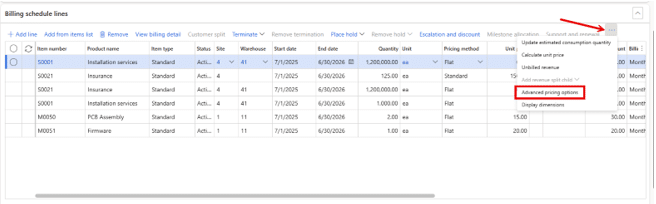
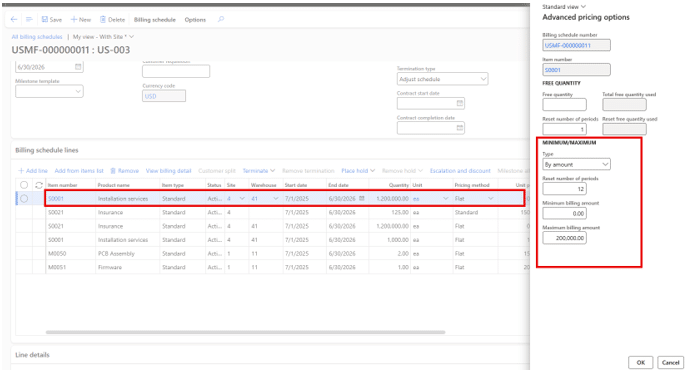
Once you select ‘Advanced pricing options,’ it opens this window below. You can add free quantities. Under the Minimum/Maximum section you can put in minimums or maximums by quantity or amount. In my example below, I have a $200,000 maximum which will reset in 12 months back to zero and start over for the top line on my billing contract.
Managing Contract Updates and Period Adjustments
Do you need to change the quantity or value of many contracts each billing period?
You can do this via the Open in Excel functionality. Go to the Billing Detail Lines inquiry and set your date restriction on either the Billing start date or Billing end date. I will set mine for the next starting month (i.e., Apr 1). When you export out, it will have the header dates (i.e., the contract start and end dates), but you can make changes and import into the contract and it will update.
Bringing Recurring Billing Requirements Together
This was high-level overview of a few key capabilities of Subscription Billing. Hopefully this got you thinking about the wide range of recurring billing scenarios and gave you an idea of what features you can use to manage and maintain your billing process. Happy billing!
If your organization is evaluating Subscription Billing or experiencing challenges with recurring billing in Dynamics 365 F&O, contact Stoneridge to discuss your requirements and next steps.

Under the terms of this license, you are authorized to share and redistribute the content across various mediums, subject to adherence to the specified conditions: you must provide proper attribution to Stoneridge as the original creator in a manner that does not imply their endorsement of your use, the material is to be utilized solely for non-commercial purposes, and alterations, modifications, or derivative works based on the original material are strictly prohibited.
Responsibility rests with the licensee to ensure that their use of the material does not violate any other rights.