














Understanding Segments and Triggers in Dynamics 365 Customer Insights – Journeys
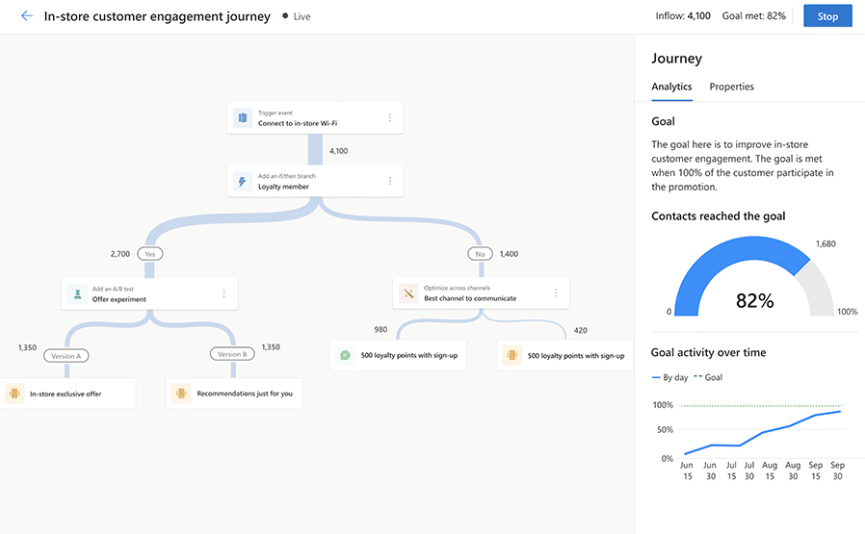
Marketing moves fast, and organizations are constantly looking for ways to reach the right audience with the right message at the right moment without missing a beat.
Dynamics 365 Customer Insights-Journeys (formerly Dynamics 365 Marketing) empowers marketers to build audiences through segments and triggers, then activate those audiences through automated, highly personalized journeys that optimize timing and targeting.
In this blog, we’ll walk through how segments and triggers work, how they fit into customer journeys, and how organizations like yours can use these tools and built-in analytics to understand which strategies deliver the strongest engagement and most effective marketing.
We will focus on five key areas:
- Segments: What they are and how they work.
- Triggers: A look at their purpose and how they operate.
- Journeys with Segments: How to set up smart marketing journeys by segmenting your audience.
- Journeys with Triggers: Setting up automated triggers to send marketing communications quickly.
- Analytics and Insights: Using stats and key metrics to improve marketing performance.
Building the Right Audience with Intelligence
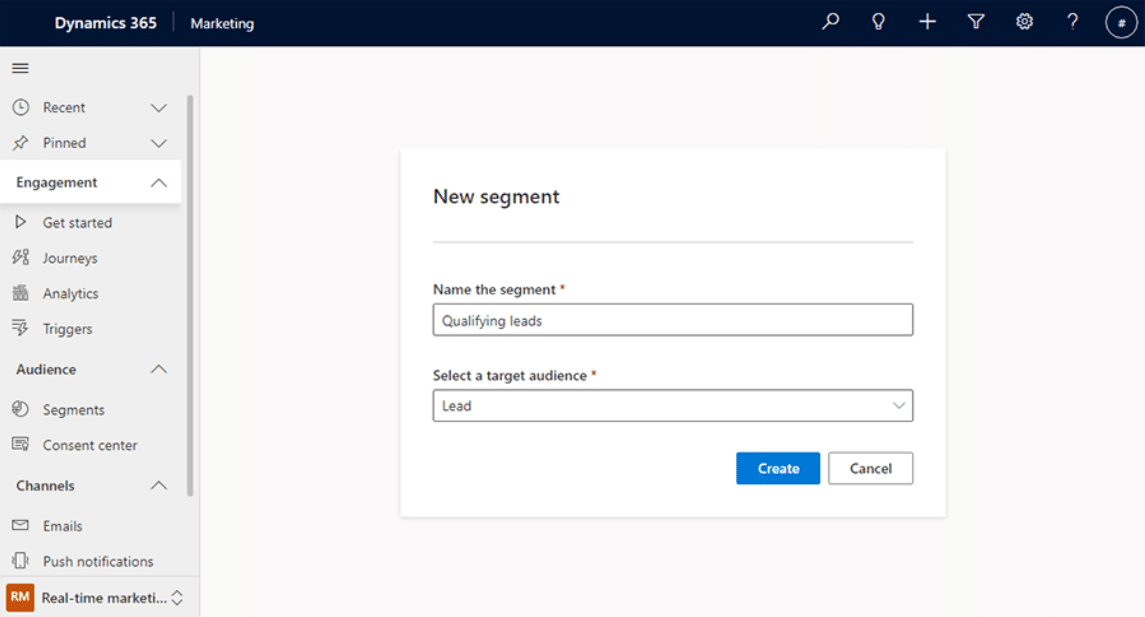
Marketing journeys won’t mean much unless you know exactly who you are sending a message to. Before we jump into definitions and examples, let’s look at the two audience record types you can use in Dynamics 365 Customer Insights-Journeys:
Contacts
This could be any contact within your system, whether it’s a customer, subscriber, or another type of stakeholder. Contacts can be targeted with marketing messages through either segments that you build, or they can receive targeted messages when a specific trigger is set off. The system also allows you to segment audiences based on account or company data that is related to the contact or group of contacts.
Leads
Leads function similarly to Contacts in that they can be sent targeted messages based on segments or triggers. You can also use the system to segment leads based on account or company data, like contacts. Leads are in your system but haven’t been turned into customers yet; however, marketing to them is equally important.
What Are Segments in Dynamics 365 Customer Insights-Journeys?
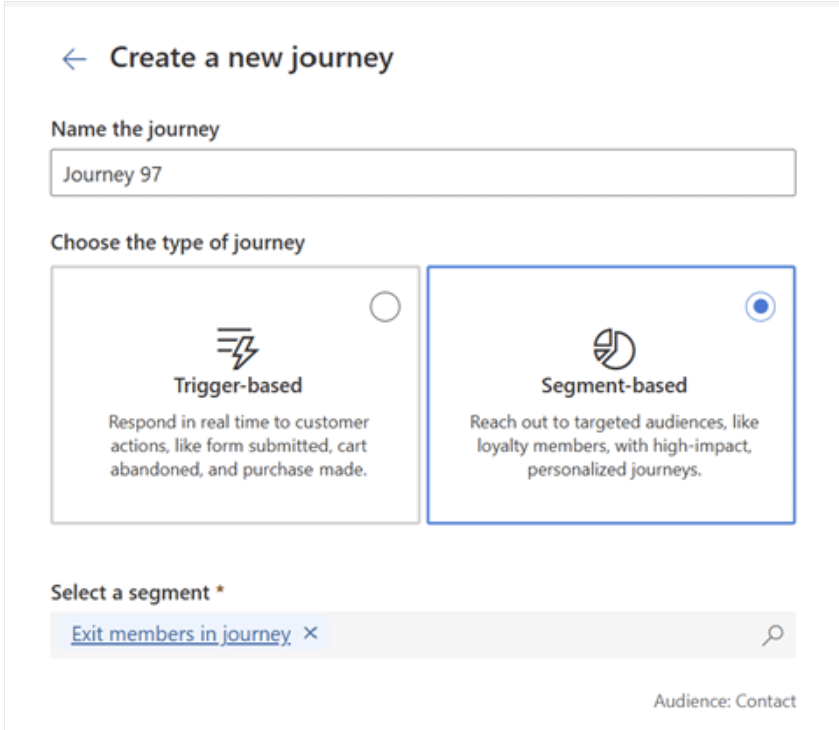
Segments are audience lists and groups of contacts and leads who meet specific criteria. You can put segments together based on shared attributes or behaviors.
For example, you might want to create a segment based on where they are located geographically to promote an event in that state. Or maybe you want to create a segment for customers who have worked with your company for 5 or more years to thank them for being long-time customers. Whatever the shared characteristic is, segments make sure you target the right people with effective messages.
Types of Segments
Customer Insights – Journeys gives you two major types of segments:
Dynamic Segments
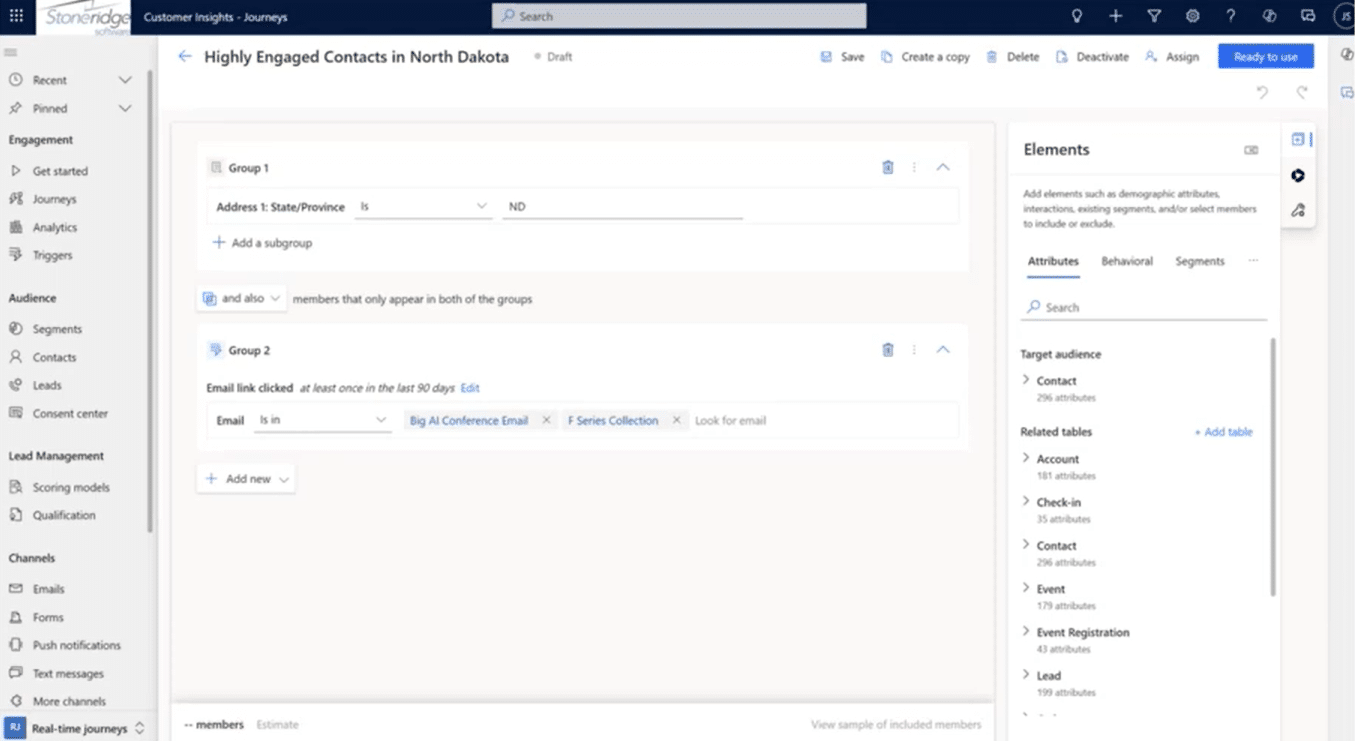
Dynamic segments operate like continuously updating queries. The list changes as data changes—adding new people who meet the criteria and removing people who no longer do. These segments are evaluated continuously if you are using them in an active journey, and daily if you are not.
This keeps journeys fresh and ensures newly qualified contacts and leads enter your campaigns at the right moment.
Dynamic segments can be built using three types of data:
- Attribute-Based Criteria that includes data from the contact or lead record and/or any related table (accounts, opportunities, etc.)
- Example: Contacts whose account industry is “Manufacturing.”
- Behavioral Criteria, which includes engagement or interaction data like email opens, link clicks, form interactions, and event attendance, among others.
- Example: A segment of North Dakota contacts who opened a specific email and clicked a specific link within the last 90 days.
- Other Segments that can be layered on top of each other, combining or excluding multiple previously built segments.
Static Segments
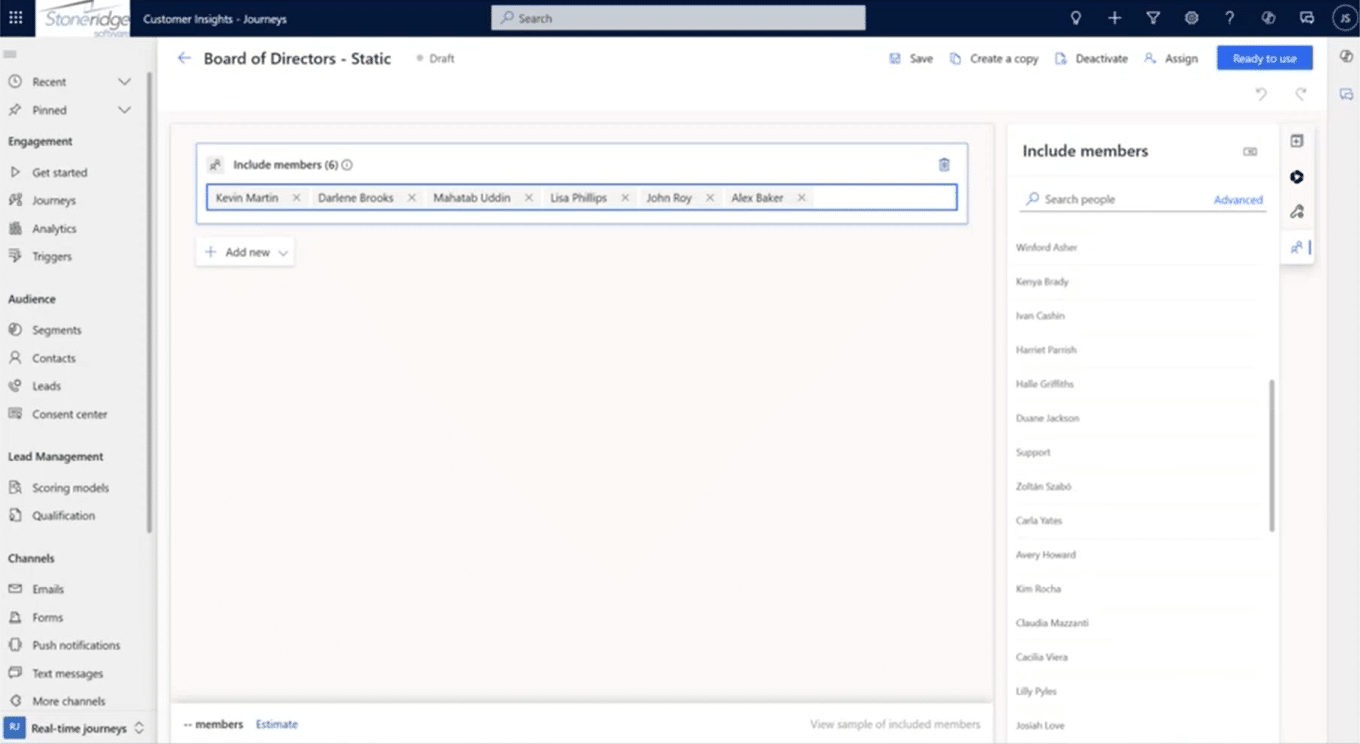
Static segments are “hard lists,” created manually or generated once from a query and then locked in place. You can build static segments through two methods:
- Cherry-picking individuals: This could include building segments for groups you know have shared characteristics, such as the Board of Directors, long-time clients, or customers who buy a specific product.
- Running a one-time query and freezing the results: For example, you run a query to create a segment for all contacts who live in Minnesota or create one for clients who haven’t purchased anything from you in 6 months or longer.
Static segments are primarily useful for temporary communications, internal groups, or lists that should never change unless a user deliberately updates them.
Additional Uses for Segments
Segments are more than entry points. They can also:
Act as Exclusion Lists
Exclusion lists are a way to send a marketing message to a certain segment while omitting some based on shared characteristics. For example, you may choose to exclude Board Members from a marketing nurture if they have already been briefed on the content. Similarly, if you have clients across the US and want to host events in their area locations throughout the year, you can exclude certain geographical segments.
For example, if you are planning two major client events – one that is open to all clients and one that is open only to clients in Texas – you would want to drive contacts from the second group to the Texas event. When sending out communications about upcoming events, you could then create a segment of contacts located in Texas and exclude them from general communications while sending them targeted communications that promote that event.
Act as Exit Criteria
A segment can automatically pull a person out of a journey. A common example is that if a contact becomes part of a “Won Opportunity” segment, they may be automatically removed from a marketing nurture journey, as they’ve already made a purchase.
Understanding Segment Membership Over Time
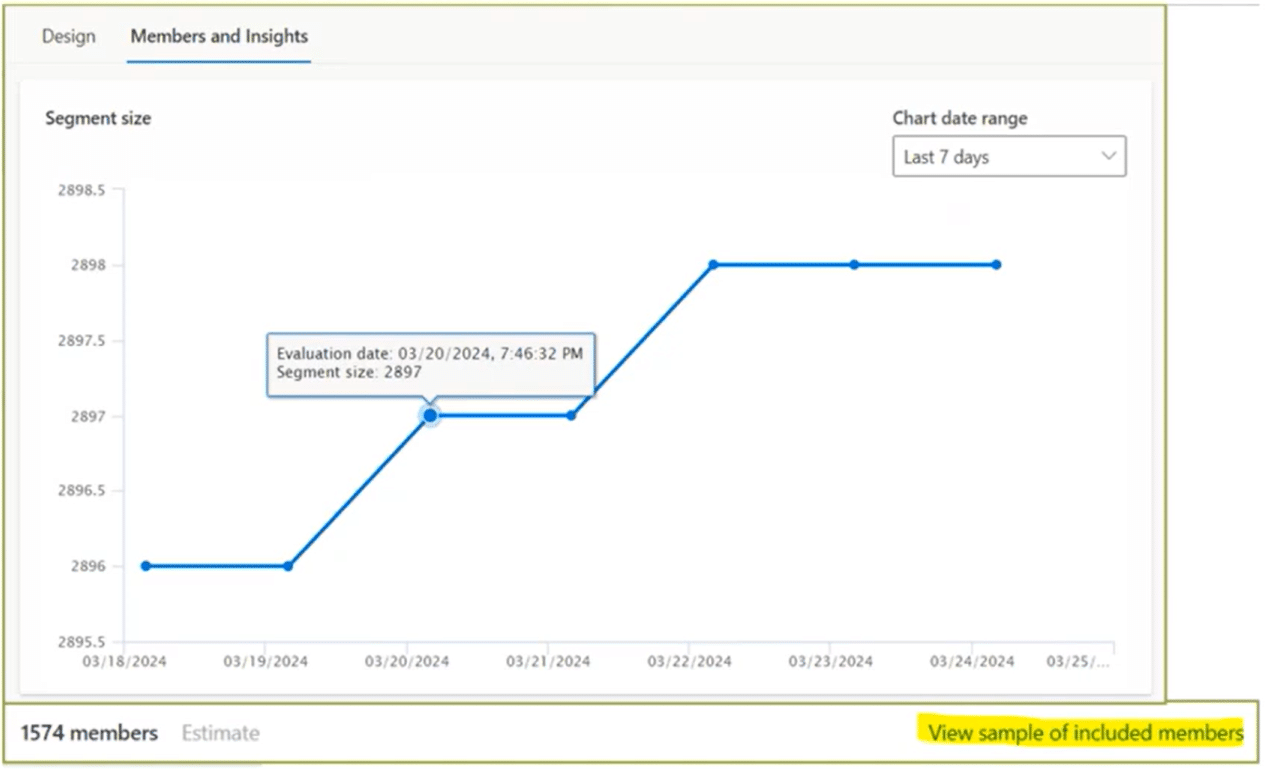
Customer Insights – Journeys includes built-in insights for every segment, allowing marketers to monitor how membership grows or changes over time. This includes:
- Total number of members
- Membership trend graphs
- Time-based growth or drop-off
It’s a simple but powerful way to validate whether your segment logic is working as intended.
Triggers: Real-Time Audience Activation
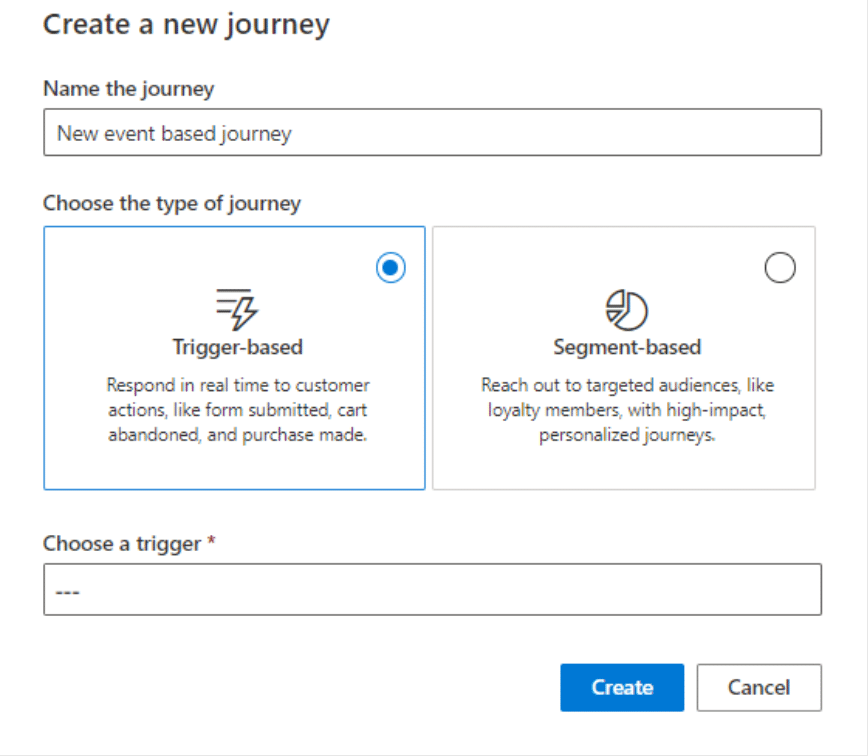
If segments represent strategic audience planning, triggers represent real-time, event-driven marketing. They bring customers or leads into journeys immediately when something happens or when they take an action.
What Are Triggers?
Triggers activate when a data event occurs in Dynamics 365 or through integrated systems such as Customer Voice. This includes:
- Record creation
- Record updates
- Specific field changes
- Form submissions
- Survey responses
- Stage changes in a sales process
This real-time responsiveness is what elevates an organization’s marketing from static campaigns to meaningful, timely interactions.
Types of Built-In Triggers
Customer Insights – Journeys includes roughly 60 out-of-the-box triggers. A few commonly used examples include:
1. Web Form Submission
Perhaps the most popular trigger, these come into play when someone submits:
- A “Contact Us” form
- A Newsletter signup
- Event registration
The journey will respond instantly, sending a thank-you email, follow-up resources, or assigning tasks internally, like following up on a lead.
2. Stage Change in a Sales Process
These work well for opportunities using a business process flow, such as:
- Entering a new stage: When a profile goes from a lead to an opportunity.
- Reaching the “Close” stage: Notify the appropriate staff that a deal is almost done so they can do what they have to do to get it across the finish line.
- Winning or losing the opportunity: This sends messages to appropriate members of your team so the organization can reflect on your successes and learn from what went wrong.
These events can automatically put the associated contact into a corresponding journey.
3. Survey Submissions via Customer Voice Integration
Customer Insights integrates with Microsoft’s survey tool, Customer Voice. Triggers can activate when:
- A survey is submitted
- A specific survey question is answered a certain way
For example, if a recipient gives a low satisfaction score, the trigger could initiate a service recovery journey.
Building Custom Triggers
While out-of-the-box triggers can satisfy a lot of common business processes, your business is unique, which is why you can create your own and tailor them to your organization. For example, you can create a custom trigger for when a user marks an opportunity as won in your system. For this, you define:
- The table (Opportunity)
- The related audience (Contact linked via Contact ID)
- What action to monitor (Record update)
- Which field to listen to (Status = Won)
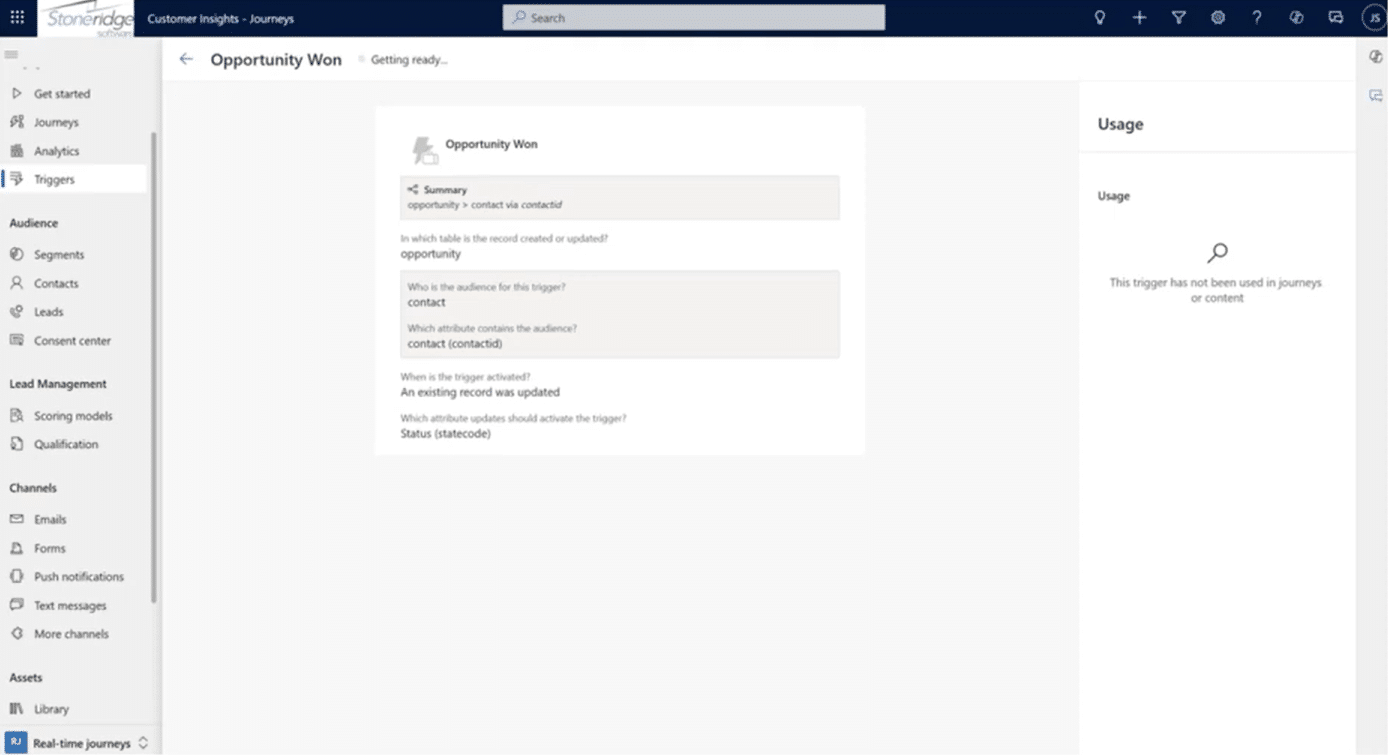
While the trigger itself fires on any status update, the journey conditions ensure only “Won” updates bring people into the journey.
Triggers can also be used inside journeys to initiate branching, check email interactions, and run Power Automate flows (like updating a record or sending internal notifications).
Journeys with Segments: Guiding Targeted Audiences Through Automation
Now that you understand the nuts and bolts of what segments and triggers are, let’s look at how they function within the broader context of a customer journey.
Segments pinpoint who exactly is going to be part of a targeted journey. These work well with structured workflows that guide contacts or leads through a series of automated marketing steps.
Using Segments at Journey Entry
When you add a segment as the entry point for a journey, the system will initially ask you what type of journey you are creating. Options include:
- One-time journey: Send communication only to the people in a specific segment at a specific time.
- Continuous journey: Keep running the journey; when new people meet the segment criteria, they enter automatically.
- Scheduled repeats: Re-trigger the journey at set intervals.
Each business’s marketing efforts are unique, but using segments in the journal entry aligns an audience with the purpose of a marketing campaign, whether it’s a monthly newsletter or a long-term nurture track.
Example: Segment-Based Journey Design
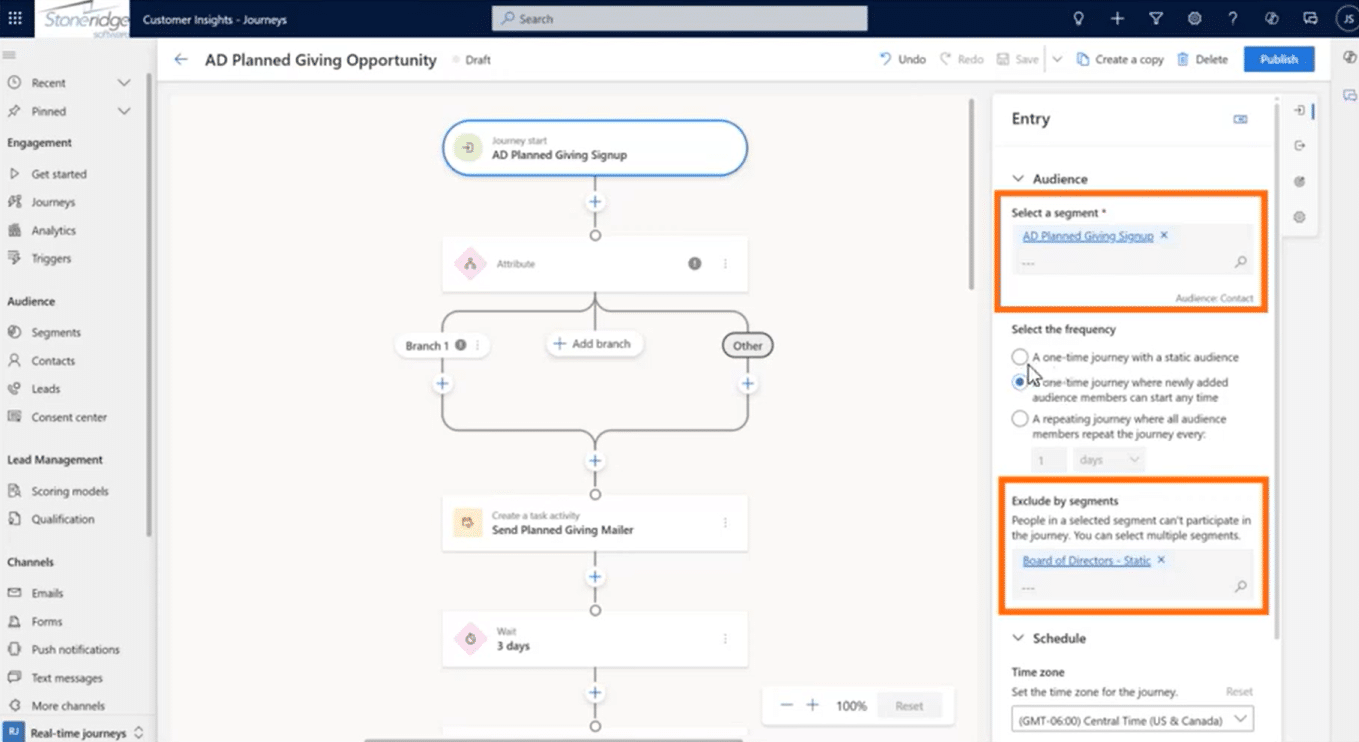
Here is a brief example outline of how a segment-based journey can operate:
- Entry segment: Contacts who meet defined conditions.
- Exclusion segment: Board of Directors.
- Ongoing evaluation: New contacts who qualify continue to join.
- Potential exit segment: Those attached to won opportunities.
Journeys with Triggers: Real-Time, Reactive Marketing
Triggers bring individuals on a journey the moment something meaningful happens.
Trigger-Based Entry
Instead of waiting for someone to meet static criteria, the journey begins immediately when:
- A form is submitted
- An opportunity stage changes
- A survey is completed
- A record is updated
This makes it ideal for things like post-form thank you journeys, "close won" onboarding journeys, service feedback loops, and sales-triggered follow-ups.
Adding Additional Conditions in the Journey
Even though the trigger fires on a general event, the journey can refine the audience further. For example, a journey may trigger when an opportunity is updated, but only proceeds if the status of an opportunity is updated to "Won", if the estimated revenue from an opportunity reaches a certain threshold, or any other conditions your organization defines.
Triggers Inside the Journey Flow
Triggers aren’t limited to journey entry. They can also:
1. Branch the Journey
Example: After sending email #1, wait to see whether the contact clicks the link.
- If yes: Send more detailed content
- If no: Send a more general follow-up
2. Perform Actions via Power Automate
Triggers can integrate with Power Automate to:
- Update records
- Create tasks
- Send internal notifications
- Write data to SharePoint
- Run any supported automation
Looping Customer Insights – Journeys to the broader Microsoft Power Platform ecosystem allows you to streamline your efforts even further, saving time and resources.
Example Trigger-Based Journey
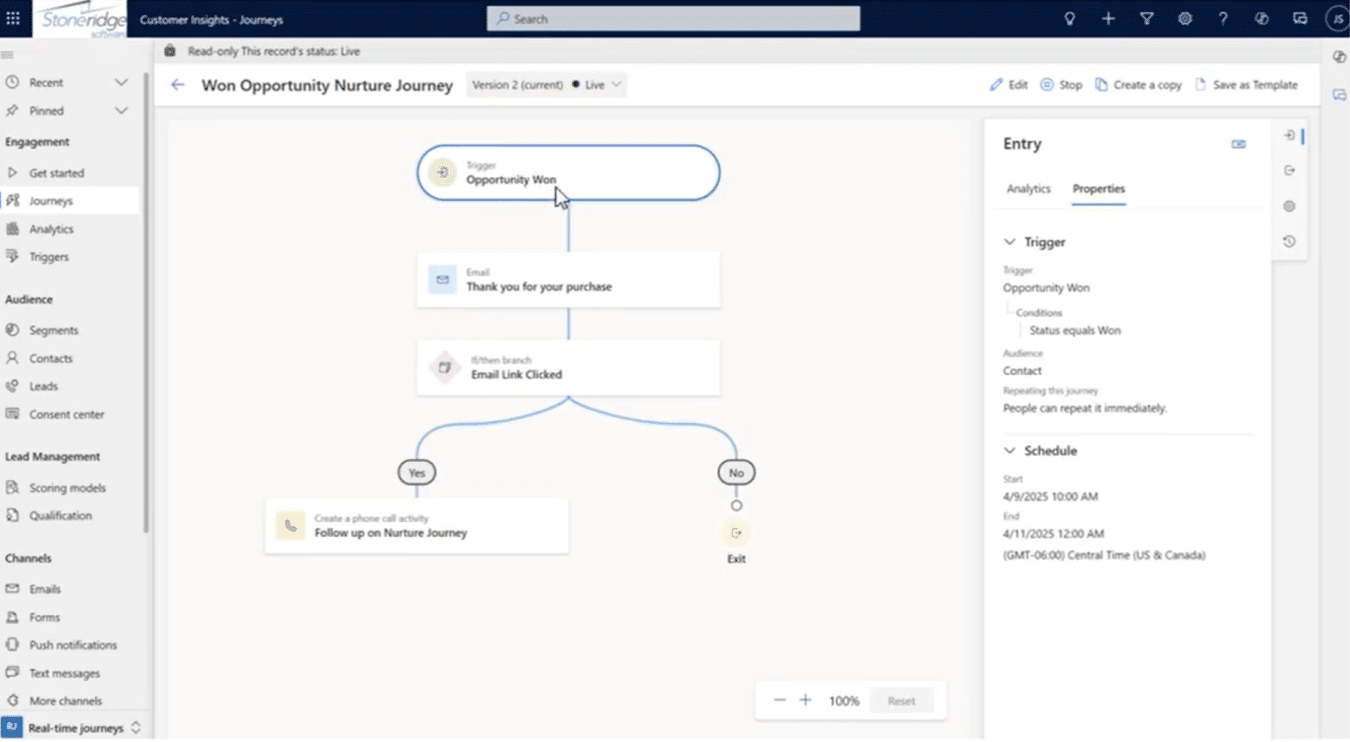
A brief outline of how a trigger-based journey might go and how it can help connect your marketing and sales teams and strategies:
- Entry trigger: Opportunity Won
- Condition: Only proceed if status = Won
- Mid-journey branch: Check if the contact clicked a link in a previous email
- Outcome:
- If yes → Create a phone call record
- If no → End journey
Analytics and Insights: Measuring What Works

Once journeys are running—both segment-based and trigger-based—Customer Insights offers robust analytics to understand performance.
Comparing Segment vs. Trigger Journeys
To determine which method is best for your organization, you can evaluate:
- Which journey type results in better open rates
- Whether triggers drive higher click-through
- Whether timing impacts engagement
- Whether personalized real-time responses outperform scheduled sends
This data is essential for shaping future strategy and determining how you can structure your marketing and communications efforts to target the right people and boost sales.
Channel Performance
Customer Insights - Journeys supports multiple communication channels, including email and SMS/text messaging. In the system, you can use both and then analyze:
- Do contacts respond more to text or email?
- Which channel produces higher click-through?
- Should the organization lean more heavily into mobile-first outreach?
There’s even AI-driven branching that evaluates a contact’s historical engagement and automatically chooses the best channel (email vs. SMS) for that individual. This is huge, as it allows you to find the channels that your audiences engage with the most so you can obtain maximum reach.
Segment Membership Insights
Earlier we looked at segment size trends, but these insights extend to journey performance as well. You can examine how contacts progress through journeys, drop-off points, conversion indicators, and impact of behaviors, like link clicks.
Analytics provide the visibility needed to refine segmentation and automation decisions over time. When you are equipped with a powerful marketing tool like D365 Customer Insights - Journeys and have access to in-depth analytics, you can focus your marketing efforts on what works.
Why You Should Start Using Segments and Triggers in D365 For Your Marketing Today
Segments and triggers are the foundation of effective marketing in Dynamics 365 Customer Insights – Journeys. Segments help marketers build strategic audiences based on rich attribute and behavioral data, while triggers enable real-time responsiveness driven by meaningful customer actions.
Together, they empower organizations to:
- Deliver targeted, relevant communication
- Respond immediately to customer engagement
- Automate marketing at scale
- Align customer journeys with real behaviors
- Continuously learn and optimize through analytics
Whether you’re nurturing leads, onboarding new customers, or delivering timely follow-ups, Customer Insights – Journeys provides the intelligence and automation needed to streamline your marketing efforts and build stronger, more personalized connections.
Ready to Get Started with Smart Marketing in Dynamics 365 Customer Insights-Journeys?
Reach out to the Stoneridge team! We can help you set this up and pinpoint areas where segments and triggers can help you boost your marketing efforts and drive business.

Under the terms of this license, you are authorized to share and redistribute the content across various mediums, subject to adherence to the specified conditions: you must provide proper attribution to Stoneridge as the original creator in a manner that does not imply their endorsement of your use, the material is to be utilized solely for non-commercial purposes, and alterations, modifications, or derivative works based on the original material are strictly prohibited.
Responsibility rests with the licensee to ensure that their use of the material does not violate any other rights.