















My Two Favorite Things, Together: Copilot Cowork + Dynamics 365 (and a Faster Way to Get Answers from Your Business Data)
Last week, Microsoft enabled a new feature that dramatically increases the value of Microsoft Dynamics solutions. As I told our company at the weekly meeting, Microsoft has basically combined my two favorite technologies: Copilot Cowork and Dynamics 365. Now you can query your Dynamics 365 Finance and Operations or CRM databases through the Copilot Cowork experience and the possibilities are endless.
What is Copilot Cowork?
Cowork was a concept developed by Anthropic with their Claude models where they developed Claude Cowork which uses their powerful LLMs to take action on your desktop applications. It basically opened up any capability to be triggered by a prompt. Microsoft, who now uses Claude models in Copilot, took that concept and put it into the Cloud and connected it to their Work IQ platform (formerly called the Microsoft Graph - the data behind all your productivity apps - Outlook, Excel, Word, PowerPoint, SharePoint, etc).
Now you can use Copilot Cowork to do anything across your productivity apps.
The Claude models are very powerful and better than the Open AI models at creating robust content. When you combine all your context with that powerful model, you can create amazing presentations, analyze Excel spreadsheets, generate emails from content across your data and schedule activities to recur whenever you'd like.
If you'd like to learn more about it, check out this great blog: Copilot Cowork Agent Explained: Best Practices, Cost & Availability, and Which Claude Model to Use. I've been burning through credits ever since it came out a few weeks ago.
What are Dynamics 365 MCPs?
Microsoft has built MCPs (Model Context Protocol interfaces) that allow you to write prompts from the Copilot interface to interact with data from Finance & Operations, CRM/Dataverse and Business Central. They are using that plumbing to enable the connection between Cowork and the business applications. The MCP honors your security inside of the Dynamics applications so you can only access functionality and data that your user has permissions to access. (Business Central doesn't connect to Cowork today but they are working on it and expect it to be available in the next few months.)
We have more information on our blog about the Wave 1 features which include updates to the MCPs: Building Agents That Actually Work: From MCP to Trustworthy Automation.
How to Connect Copilot Cowork to Your Dynamics Data
There are some server/company settings that you need to enable as well as a change you need to enable as a user in the Cowork interface. On the server side, you need to do the following:
- Make sure your environment is part of the "Frontier" program: https://learn.microsoft.com/en-us/microsoft-365/copilot/cowork/use-cowork
- Enable Copilot Frontier in M365 Admin Center on https://admin.microsoft.com
- For F&O, enable the "Dynamics 365 ERP Model Context Protocol server" in "Feature Management" in the System Administration area of your F&O instance. For Dataverse / CRM, we didn't have to change anything on that side.
- For F&O, add Cowork to the "Allowed MCP clients". The ClientID is 6ab48b67-cd74-4ad4-81af-5932984589be
As an end user, you first need to add the Cowork agent to your Copilot M365 home screen. Once you've done that, you navigate to Cowork (Frontier) you will now see a new "slider" icon on the left side of the prompt window.
Click on that slider and turn on Dynamics 365 ERP or Dynamics 365 Sales (to get into CRM) option to enable the ability to search through those databases. The first time you do it, you will need to select an environment as I showed below from our production instance:
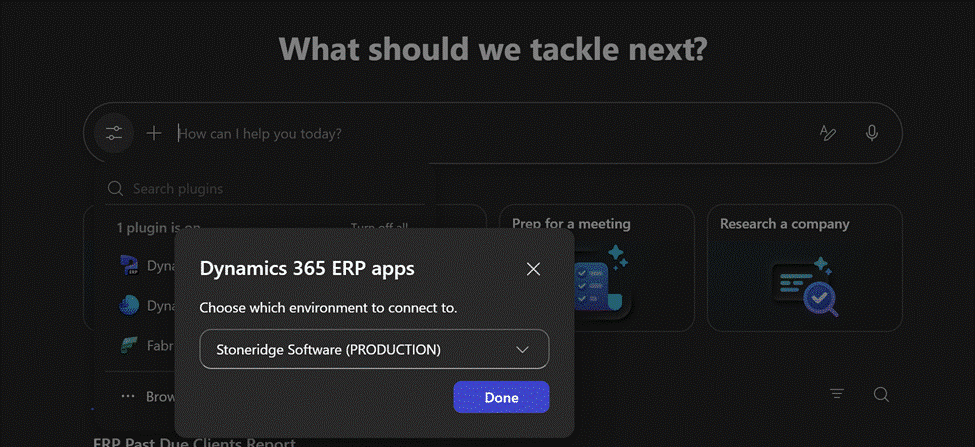
Once you have the environment connected, you can search away. I would encourage you to use only the plugins that you need. If you're searching F&O, just choose that rather than having Sales on as well.
What You Can Do with Cowork in Dynamics 365?
The possibilities are almost endless - I made a list earlier this week of all the things you can do and I feel like I haven't even scratched the surface yet. The first thing I did with the D365 F&O connection was look up our collection data by asking what clients have a balance that's more than 60 days past due and what their latest payments have been. Two minutes later and I had a nice chart telling me all that information. The first thing I tried with the Sales data in D365 Customer Engagement was to ask for our Stoneridge Connect virtual event attendee information grouped by client. That took about four minutes but it came out just the way I wanted. Amazing insights delivered instantly.
Yesterday, I did a combo search where I asked to find all the data about a client across both ERP and CRM asking this:
Can you put together a summary of client activity as if I'm client partner who meets with a client regularly? Let's use [Company Name] as an example. Pull a summary of their support cases from CRM, their project activity from CRM, any opportunities from CRM and their current outstanding balance and recent payments from our ERP”
I got everything I needed as a snapshot for that client meeting in one query - pretty crazy that I can do that so quickly.
As I do more with it, I'll have more suggestions out here but I really encourage you to stop what you're doing and go use this new capability right away.
If you're not at a place where you can start using this right away, reach out to our team for assistance! For Stoneridge clients, I've been offering a free Executive AI Briefing where I sit down with your leadership team to present some high-level content on AI but mostly take questions and help guide them on their next steps with AI. If you'd like more information on that, check it out here: AI Executive Briefing | Microsoft Copilot Strategy Session | Stoneridge Software


Under the terms of this license, you are authorized to share and redistribute the content across various mediums, subject to adherence to the specified conditions: you must provide proper attribution to Stoneridge as the original creator in a manner that does not imply their endorsement of your use, the material is to be utilized solely for non-commercial purposes, and alterations, modifications, or derivative works based on the original material are strictly prohibited.
Responsibility rests with the licensee to ensure that their use of the material does not violate any other rights.