















Take Control of Product Changes with Engineering Change Management in Dynamics 365
Product changes are a fact of life and can sometimes become headaches for your organization.
Components become unavailable, designs evolve, customers request modifications, and new products move from concept to production. These challenges, and many more, aren’t simply about making a change. They’re about making the change without losing control of everything that happens around it.
That's where Engineering Change Management (ECM) in Dynamics 365 Finance and Supply Chain Management (FSCM) can help. ECM gives you a structured way to manage product versions, engineering changes, approvals, bills of materials (BOMs), and the downstream business impacts of those changes. Instead of simply overwriting an existing product structure, you can maintain a deliberate, traceable history of what changed, when it changed, and why.
In this blog and video, you'll learn what ECM is, how to set it up, and how to use engineering change requests and engineering change orders to manage a product from initial design through release.
What Is Engineering Change Management (ECM)?
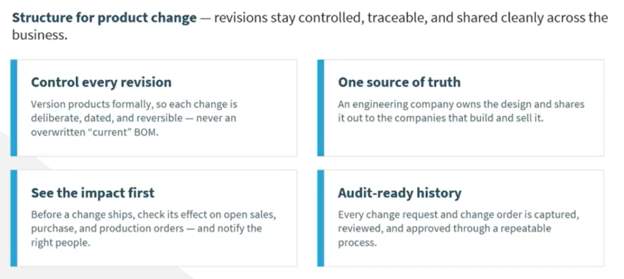
At its core, ECM provides structure around product changes in FSCM. It gives you more robust version control and allows you to manage product revisions without simply replacing the current product structure.
You may already be using BOM versions and route versions in Dynamics 365. ECM doesn't replace those concepts. Instead, it provides a more structured process around the engineering product and the changes made to it.
With ECM, each engineering product version can carry its own:
- Bill of materials
- Route
- Effective dates
- Product lifecycle state
- Engineering attributes
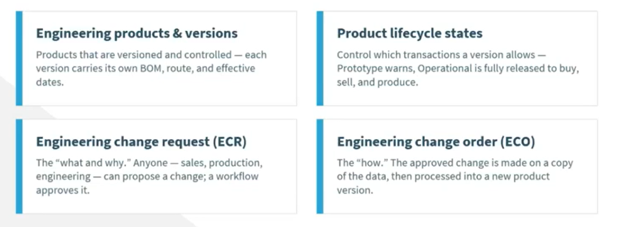
You can also use product lifecycle states to control which business processes are permitted for a particular product version. For example, you might have a product in a prototype or design state that isn't ready for normal purchasing or production. Later, you can move it into an operational state.
Perhaps more importantly, ECM lets you understand the impact of a proposed change before you make it. You can identify affected sales orders, purchase orders, and production orders and determine who needs to be notified.
Every request and change order can also become part of an audit-ready history. Changes can be captured, reviewed, approved, processed, and ultimately completed through a repeatable process.

ECM for Engineering vs. Operational Companies
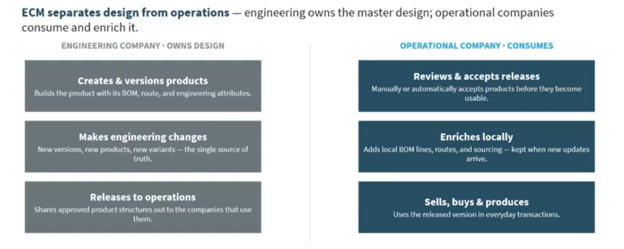
ECM becomes particularly useful when your organization separates product design from day-to-day operations.
A common structure is to have an engineering company that owns the product design and one or more operational companies that manufacture, purchase, and sell those products.
In this model, the engineering company is the single source of truth for product design. Your engineering team can create products, develop BOMs and routes, establish engineering attributes, and create new versions. After a design is approved, the engineering company releases the product structure to the operational companies.
Your operational companies then review and accept those releases before using them. They can also enrich the product for local requirements, for example, by adding local BOM lines, routes, or sourcing mechanisms, while retaining the engineering information provided through the release.
This separation can be valuable if you operate across multiple legal entities or manufacturing locations. Engineering can maintain centralized control over the design while operational teams retain the flexibility they need to run their individual businesses.
If your organization doesn't have a separate engineering company, ECM can still provide value. The important thing is establishing a controlled process for creating, changing, reviewing, and releasing your products.
ECM Setup in Dynamics 365 Finance & Supply Chain
ECM was introduced as a feature in Dynamics 365 FSCM and was turned on by default beginning with version 10.0.36. Depending on your environment, you may also need to enable the version product dimension.
Once you're ready to configure ECM, you'll want to establish several foundational components.
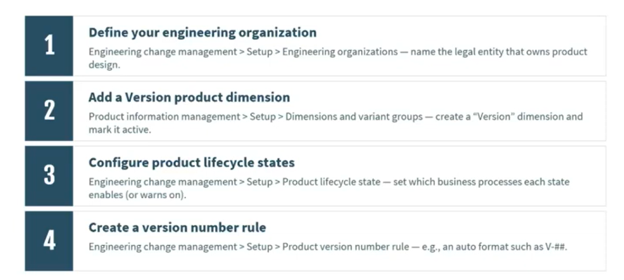
Define Your Engineering Organization
First, identify the legal entity that will own your product designs. If you're using separate engineering and operational companies, this becomes the central engineering organization from which products are developed and released.
You'll also want to establish your product dimensions and variant groups, including an active version dimension.
Configure Product Lifecycle States
Product lifecycle states determine which business processes are enabled, blocked, or allowed with a warning for a product.
This gives you control over what users can do with a product depending on where it is in its lifecycle. You can also create your own lifecycle states to match your organization's processes.
Create Version Number Rules
Next, establish how your product versions will be numbered. You can configure rules for automatically incrementing versions or use a manual numbering structure that fits your organization's naming conventions.
Establish Release and Readiness Policies
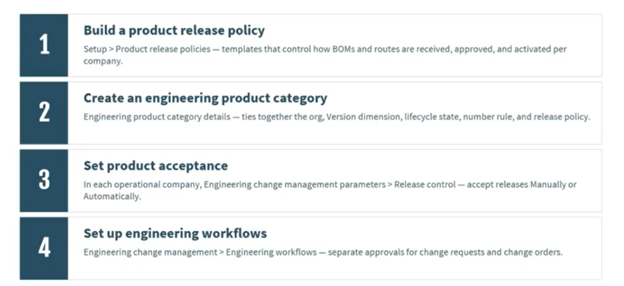
Product release policies determine which operational companies can receive your engineering products and which product information—such as BOMs and routes—can be released.
Readiness policies help you determine whether a product has all the required information before it can move forward.
Create Engineering Product Categories
Engineering product categories tie many of these settings together. A category can define product dimensions, configuration technology, lifecycle state, version numbering rules, release policies, readiness policies, and engineering attributes.
For example, you might have different attributes for electrical components than you do for speaker parts. Those attributes become part of the engineering product and can be tracked as part of the engineering change process.
Configure Workflows and Readiness Checks
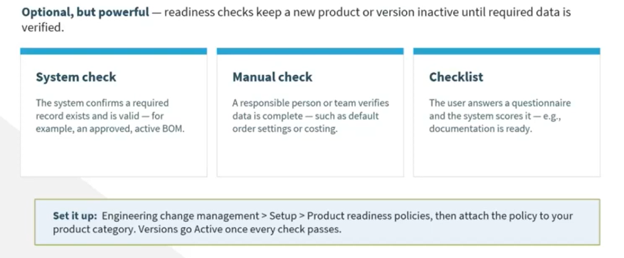
Finally, configure your engineering workflows. You can establish separate approval paths for engineering change requests and engineering change orders.
Readiness checks can also help keep a new product or version inactive until required information has been verified. These checks can be system-based, manually completed by a responsible person, or handled through a checklist where users answer questions and the system evaluates the results.
Creating Engineering Products
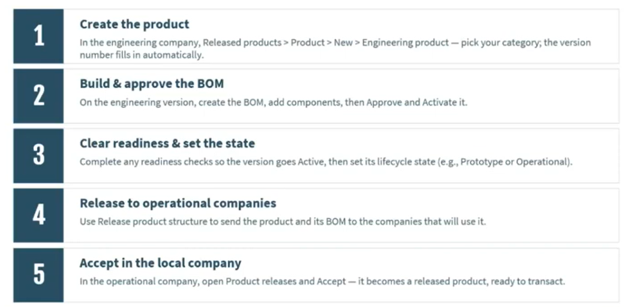
Once your foundation is in place, you can begin creating engineering products.
You can create an engineering product directly from the engineering organization, which is typically something your engineering team will handle. You can also initiate the process through an engineering change request, allowing other users to propose the creation or modification of a product.
Once the product is created, you can build and approve the BOM, clear readiness requirements, establish the appropriate lifecycle state, release the product to operational companies, and have those companies accept it.
Creating an engineering product is slightly different from creating a typical released product.
Creating Product Changes
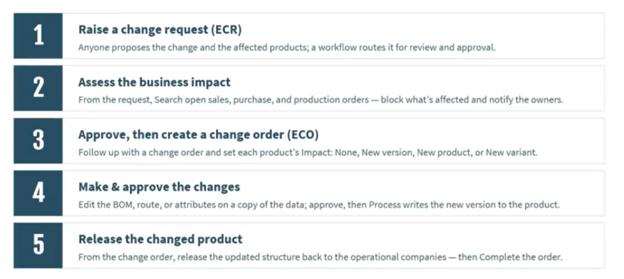
From the Released products area, you can create an engineering product by selecting New > Engineering product. Select the engineering product category and product owner, then enter the product number, name, and search name.
The engineering product category is particularly important because it brings many of your predefined settings into the new product.
Alternatively, you can use an engineering change request when you want someone outside the engineering function to initiate the process.
Demo: ECM in Action
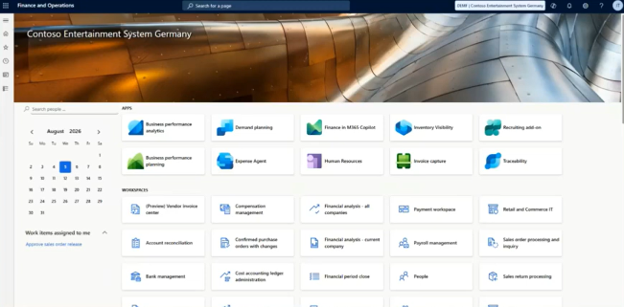
Let's walk through how you can use this tool to benefit your organization.
1. Configuring ECM Parameters
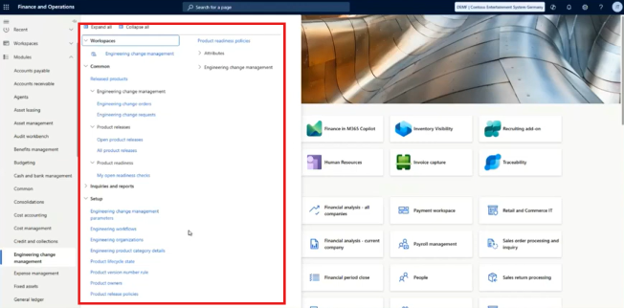
Start by switching to your engineering company. From the Engineering Change Management module, review the available setup options.
- Open Setup and review your Product lifecycle states.
- Define whether each business process is enabled, blocked, or enabled with a warning for each state.
- Review your Product version number rules and determine whether versions are automatically generated or manually assigned.
- Configure your Product release policies.

- Configure your Product readiness policies
- Define which operational companies can receive engineering products.
- Determine which product information, like BOMs and routes, can be released.
- Review the engineering product categories.
- Define the product dimensions, lifecycle state, version number rule, and configuration technology associated with each category.
- Add engineering attributes appropriate to each category.

- Configure your engineering change request and change order workflows.
- Establish readiness checks to verify that required information exists before a product can move forward.
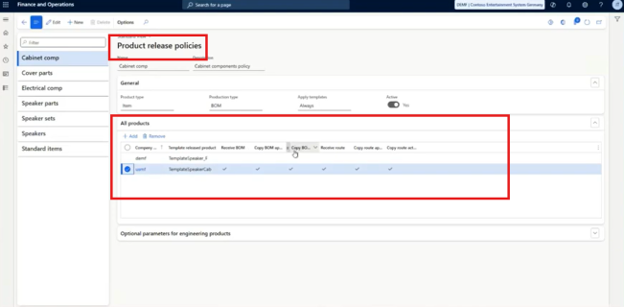
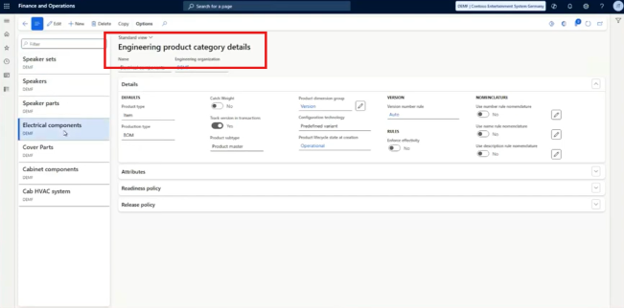
Before users begin creating or changing products, establish your rules. This makes ECM a controlled process rather than another place where users can make uncontrolled product changes.
2. Creating a New Engineering Product
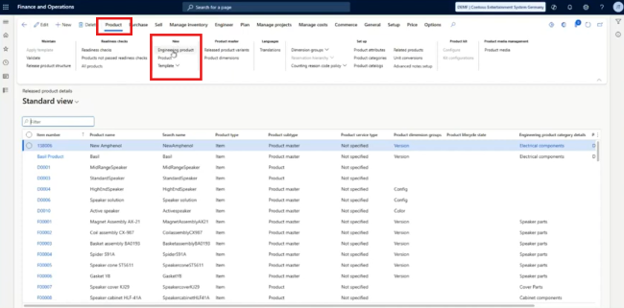
Once your setup is complete, you can create your first engineering product.
- Navigate to Released products.
- Select New.
- Choose Engineering product.
- Select the appropriate engineering product category.
- Assign the product owner.
- Enter the product number.
- Enter the product name and search name.
- Add a description if needed.
- Save the product.
The category you select determines much of the information and behavior associated with the engineering product, including versioning and engineering attributes.
3. Creating an Engineering Change Request
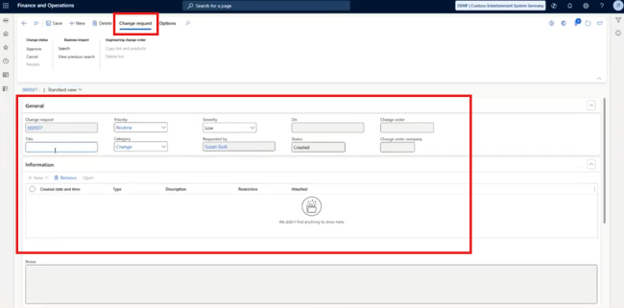
If you aren't an engineering user or want to establish a controlled intake process, you can initiate an engineering change request.
Think of the request as the "what" behind a proposed change. The change order defines how the approved change will be carried out.
To create one:
- Create a new engineering change request.
- Enter a description of the requested change.
- Set the priority.
- Select the appropriate category, such as change, new development, or issue.
- Assign a severity level, such as low, medium, high, or critical.
- If you're changing an existing product, identify that product.
- If you're requesting a new product, provide the information engineering needs to create it.
- Add supporting information as necessary, including files, images, notes, or URLs.
- Save the request.
- Submit it through your configured workflow.
- Review and approve the request as appropriate.
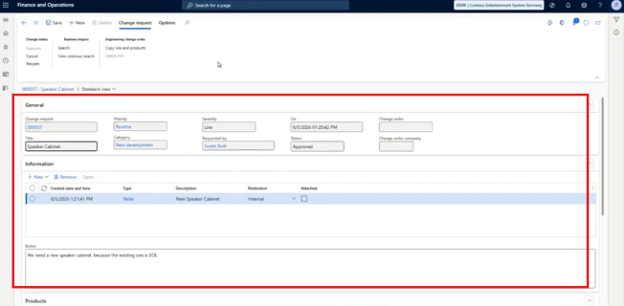
This gives users a structured way to tell engineering what they need without allowing them to bypass the engineering process and directly modify the product.
4. Creating an Engineering Change Order
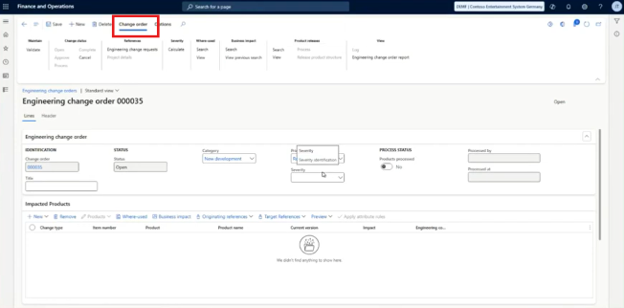
Once the engineering change request is approved, you can create the engineering change order. The change order represents how the approved change will be developed and processed as a new product version.
To create the change order:
- Start from the approved change request.
- Create a new engineering change order.
- Copy the relevant information and products from the request when appropriate.
- Enter the change order description.
- Identify the impacted product.
- Choose whether you're modifying an existing product or creating a new one.
- If creating a new product, select the engineering product category.
- Enter the product number.
- Enter the product name and description.
- Allow the system to assign the appropriate version information.
- Save the new engineering product.
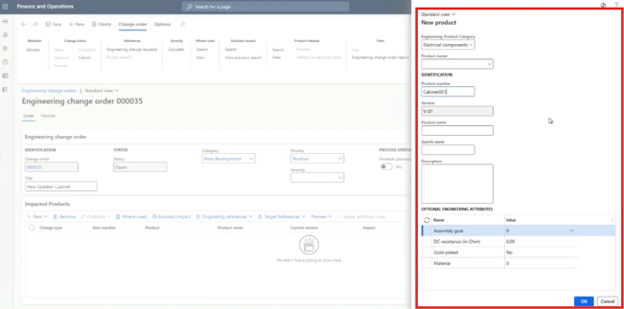
At this point, you're moving from the request into the actual engineering work.
5. Reviewing Business Impacts and Affected Orders
One of the most useful parts of ECM is the ability to understand the potential business impact before the change is processed.
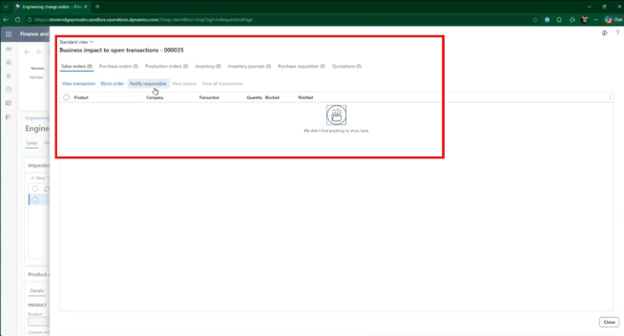
From the change order, you can identify where the product is used and which transactions may be affected.
You can review:
- Sales orders
- Purchase orders
- Production orders
- Other affected business processes
For affected sales orders, you can also determine whether the order should be blocked from release and whether the responsible person should be notified.
You can also use product preview to compare the current and original values and identify what has changed.
This is where ECM can move your organization beyond simply tracking revisions. You're not just asking, "What did we change?" You're also asking, "What will this change affect?"
6. Managing BOMs, Product Changes, and Approvals
Once your product is established, you can make the actual engineering changes.
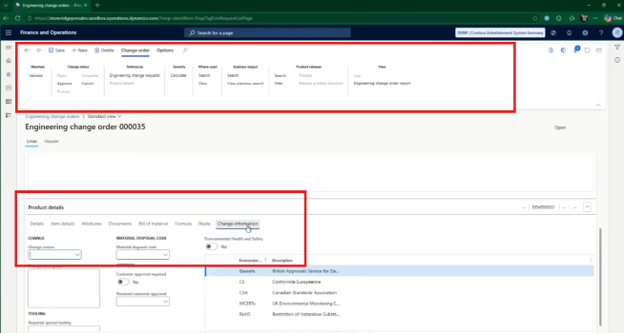
Within the change order, you can:
- Define product details and ownership.
- Establish effective dates.
- Create a new BOM.
- Define BOM lines.

- Use the BOM designer when appropriate.
- Make changes to formulas or routes as needed.
- Document why the change is being made.
- Review the resulting product preview.
- Validate the product.
- Approve the change.
- Process the change.

- Release the resulting product information to your operational companies.
- Complete the change order once the process is finished.
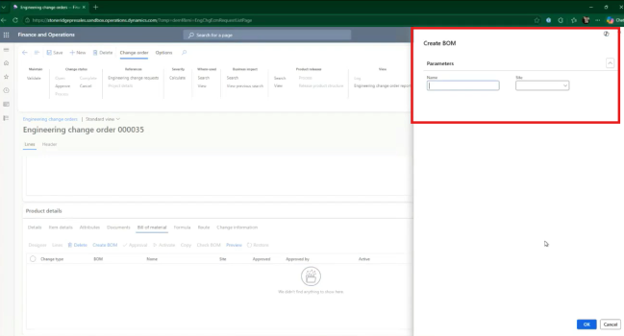
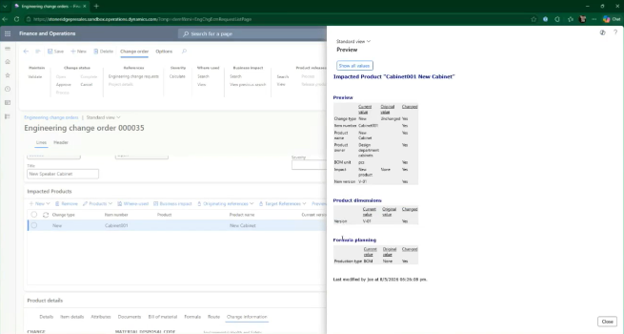
The BOM and related product structures remain part of the controlled change process. As you make modifications, the product preview allows you to see the resulting changes.
Processing the change doesn't erase its history. The change order remains available, and after all work is finished, you can complete the order to close the process while preserving the audit trail.
Want to Use ECM to the Fullest Today? Talk to the Stoneridge Experts!
Engineering Change Management gives you a structured way to manage product changes, maintain version history, understand business impacts, and create a repeatable approval process inside Dynamics 365 Finance and Supply Chain Management.
However, technology is only part of the equation. You also need to configure it around how your organization designs, manufactures, purchases, and sells products. That’s where working with a Microsoft Inner Circle partner like Stoneridge Software can help.
Our experts can help you get ECM set up to your specifications, optimize ECM and the tools you’re already using, and provide ongoing support as your business evolves.
Reach out to the Stoneridge Software experts to learn more about what ECM in Dynamics 365 can do for you.

Under the terms of this license, you are authorized to share and redistribute the content across various mediums, subject to adherence to the specified conditions: you must provide proper attribution to Stoneridge as the original creator in a manner that does not imply their endorsement of your use, the material is to be utilized solely for non-commercial purposes, and alterations, modifications, or derivative works based on the original material are strictly prohibited.
Responsibility rests with the licensee to ensure that their use of the material does not violate any other rights.