















Business Central Wave 2 2026: Your New AI Copilot Is Ready for Monday Morning
Think of the best employee you’ve ever worked with. They flagged the missing delivery ticket before anyone else knew something was wrong, and you never had to double-check their work. Now imagine giving every person on your team a little more of that.
That’s the idea behind the Business Central Wave 2 2026 release. Smarter AI agents do the matching and the chasing, and your people make the final call.
You’ll also get fixes for workarounds you’ve probably been living with for years, plus one deadline you shouldn’t miss.
Here’s what’s new, who it helps, and how to get ready.
A Quick Note on How Microsoft Is Releasing Features
Microsoft has recently announced a shift in how it rolls out new features. Instead of defined wave releases, it’s moving to continuous updates, with the AI at Work roadmap showing when each feature is coming. That makes sense in a market where AI capabilities change this quickly, since getting features into your hands sooner beats waiting for a release date (or a postponement notice).
You can still count on Stoneridge Software to bring you the highlights twice a year. We’ll keep our April and October wave webinars and content, so you won’t have to dig through the roadmap on your own to see what matters for your business.

AI Agents: Agents Propose, People Decide
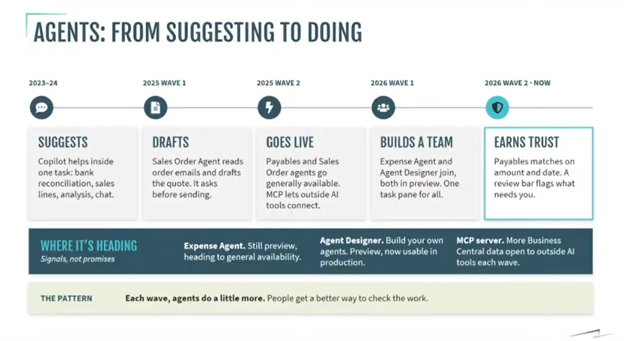
Business Central’s AI has come a long way. In 2023 and 2024, Copilot handled single tasks like bank reconciliations and analysis. Then came the sales order agent, followed by the payables agent. Now, more agents are joining the mix, and MCP (Model Context Protocol) is playing a bigger role. With each wave, agents take on more of the rote work, while your team spends its time reviewing and deciding. You stay in control: you can keep a human in the loop wherever you want one.
Easier Ways to See and Review Agent Work
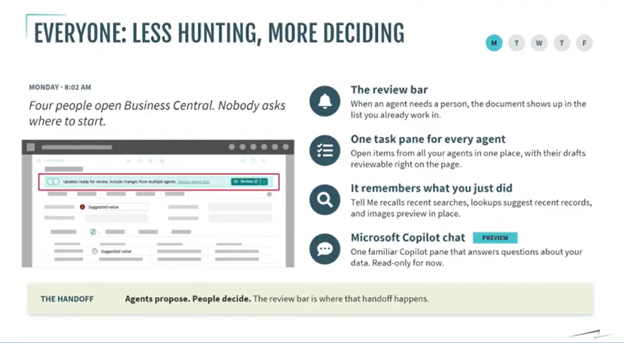
- Review bar: A bar at the top of the screen tells you when an agent has work waiting for you, whether you’re in vendors, purchase invoices, or anywhere else.
- Agent task pane: Your agents and the items they need you to review appear on the right side of the screen.
- Smarter search: The magnifying glass now tracks your search history and shows the results from those searches. It also previews the document you’re after, such as an invoice. You can research on one side of the screen and act on the other.
- Copilot chat (preview): This is read-only and must be switched on. It’s a good way to test the waters and ask questions in your sandbox.
A Payables Agent That Guesses Better
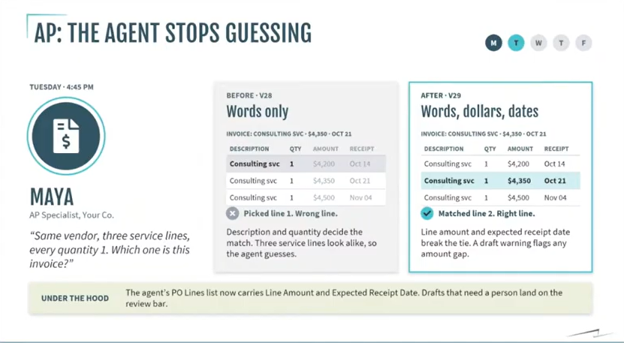
If you’ve piloted the payables agent, you may have heard—or voiced—its biggest complaint: it sometimes matched the wrong invoice line. Picture a $4,350 invoice with three lines that share the same description and quantity. The agent matched on description and quantity alone, so it could pick the wrong line, which your AP team then had to correct.
In this release, matching also looks at amount and receipt date, so the agent is far more likely to land on the right line. If it still isn’t sure, it flags the invoice for a person to review. You get faster processing without giving up oversight.
Operations: Fewer Workarounds, Better Communication
If you run warehouses, production, or subcontractors, this section is for you.
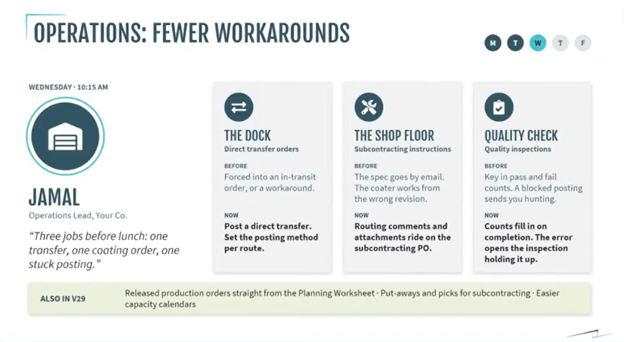
- Direct transfers: You can now post a direct transfer between locations even if pick and ship are turned on. That means no full in-transit transfer order and no item reclass journal workaround.
- Subcontracting: You can attach comments, riders, and design documents to the purchase order itself. When the PO changes, those requirements update too, so your subcontractor works from current instructions. That cuts down on rework, scrap, and awkward customer conversations.
- Quality inspections: Passed and failed quantities now fill in automatically. If an incomplete inspection blocks a production order from posting, you can see and fix the problem right on the production order instead of hunting through the inspection table.
The theme is fewer workarounds and better communication, with knowledge travelling alongside the work. There’s room to grow here, especially for multi-step subcontracting, but it’s encouraging to see Microsoft continuing to invest.
Finance: Give Your Friday Afternoon Back
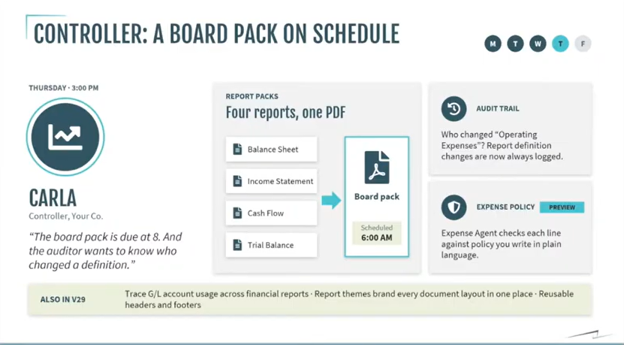
Anyone who has closed the books knows the feeling. The numbers are validated, it’s 3:00 on a Friday, and now you have hours of report building ahead of you. These features are aimed squarely at that.
- Report packs: Bundle your balance sheet, income statement, cash flow statement, and trial balance into one pack, then schedule it to be assembled and sent at a specific time.
- Change log for report definitions: Business Central has long tracked transactional changes. Now it also tracks changes to your reports. If someone moves a field or changes a G/L account, you’ll know who did it and when.
- Report visibility for G/L accounts: You can validate the accounts in your trial balance and see which reports they appear in.
- Expense policy (preview): Upload your expense policy in plain English, and Business Central reads it and applies the rules. You don’t have to hand-build per diems or lodging limits. It’s still in preview, so try it in your sandbox.
The IT Heads-Up: SOAP Web Services Are Going Away
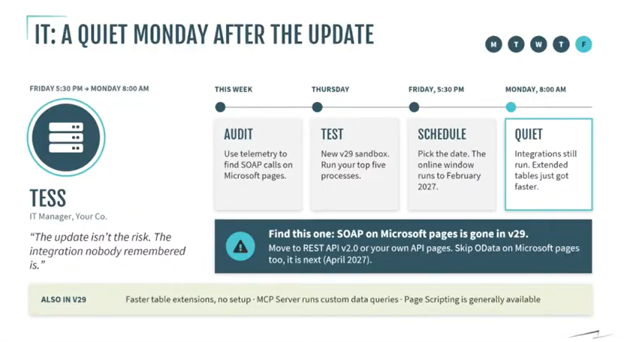
Not every feature in this wave is fun, but this one matters. Microsoft is deprecating SOAP web services, and once you upgrade, any SOAP-based integration will stop working. Your code units and extensions aren’t the issue. The SOAP endpoints are.
- Move SOAP integrations to REST APIs or custom APIs.
- Don’t move them to OData. It’s next on the deprecation list.
- Use the telemetry tools in Business Central (and the Power BI telemetry reports) to see which SOAP calls are still in use.
- Don’t forget third-party add-ons. Most ISVs have already moved to APIs, but you should confirm that yours have. Integrations like scanners are easy to skip during upgrade testing, and they’re the ones most likely to hurt you.
As the webinar put it, the update isn’t the risk. The integration nobody remembered is. You have until February to schedule your update, so you have time to do this right.
Your Monday Morning Checklist
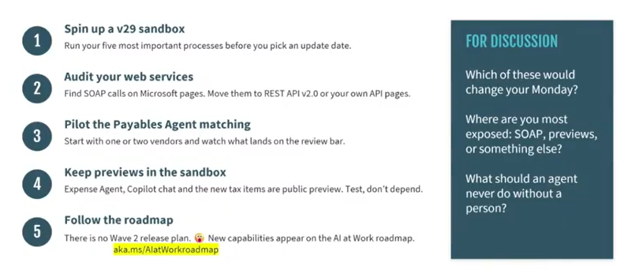
- Spin up your v29 sandbox and run your most important processes. You probably have more than five.
- Audit your web services using the telemetry tools, so there are no SOAP surprises.
- Pilot the payables agent and see how it works for your team.
- Keep previews in the sandbox. Features like expense policy and Copilot chat are worth exploring, but preview features can change, and you may have to fall back to manual steps if something goes wrong. Talk to your partner before moving any of them into production.
- Bookmark the roadmap (Microsoft’s “AI at Work” roadmap) so you can see what’s coming next.
Make the Most of What’s Next with Stoneridge Software
Business Central is changing quickly, with AI agents doing more work and new features arriving continuously. The benefits go to businesses that implement these features well. That’s where Stoneridge Software comes in. Our team can help you set up a proper v29 sandbox, test your processes, identify integrations that need updating, and pilot AI agents so they fit how you work.
If you’re ready to implement, integrate, and get the most out of the latest features and AI capabilities in your Microsoft solutions, contact Stoneridge Software today. Let’s give your team their Friday afternoons back.

Under the terms of this license, you are authorized to share and redistribute the content across various mediums, subject to adherence to the specified conditions: you must provide proper attribution to Stoneridge as the original creator in a manner that does not imply their endorsement of your use, the material is to be utilized solely for non-commercial purposes, and alterations, modifications, or derivative works based on the original material are strictly prohibited.
Responsibility rests with the licensee to ensure that their use of the material does not violate any other rights.