















Dynamics 365 Business Central 2026 Wave 1: New Tools and Features
The 2026 Wave 1 release for Microsoft Dynamics 365 Business Central is here with another strong signal that Microsoft is doubling down on AI, usability, and real-world business process improvements.
As a Business Central partner working closely with organizations that want to stay ahead of the curve, we see this release as more than just incremental updates. It’s about making AI practical, simplifying integrations, and streamlining day-to-day operations across finance, supply chain, and beyond.
Continue reading or watch the video for a break down of what matters most in the 2026 Wave 1 release for Business Central and what you should care about.
Copilot and AI Agents Updates
AI continues to receive top billing, and this release brings meaningful progress in making Microsoft Copilot more usable, controllable, and extensible inside Business Central.
MCP: The Gamechanger for Copilot Integration
One of the most important (but behind-the-scenes) updates is support for Model Context Protocol (MCP). This essentially means:
- Easier integration between Business Central and Copilot Studio
- Less reliance on complex API configurations
- A more streamlined way to build AI-driven experiences
You won’t “see” MCP in the user interface (UI), but you will feel its impact if you’re building or extending AI capabilities. If your organization is serious about creating AI agents, MCP is a must-have that removes some major barriers to optimizing agents for your business.
This feature is available right now if you have Business Central version 27.1 or later. You can turn it on in the Feature Management section.
Smarter, More Manageable AI Agents
Microsoft continues to evolve prebuilt Copilot agents such as the Payables Agent and Sales Order Agent to make them usable in real-world business scenarios. A lot of these enhancements were based on user feedback.
Key improvements include:
- Processed email categorization in Outlook: Helps teams understand what the agent has already handled in shared inboxes so you aren’t duplicating tasks an agent already completed.
- Centralized task pane in Microsoft Outlook: A single place to view all agent-generated tasks.
- Transaction-level visibility: You can now see, review, and approve AI activity and content directly on documents.
- “Created by” and “Modified by” AI indicators: Clear visibility into where AI is impacting your data by gaining insights into what the agent is working on, specifically
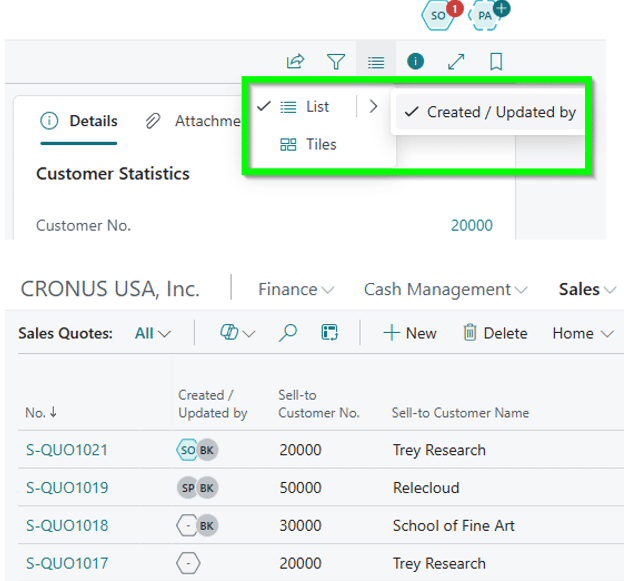
- Stop all agent activity instantly: Critical for testing or halting unintended automation or retooling processes based on feedback or desired improvements.
These updates solve a key problem a lot of users had with agents before: trust and control. AI is only useful if users can see what it’s doing and have specific insights into its actions. This makes it safer for your team to use AI and makes it easier for managers to intervene when an automated process isn’t working.
Build Your Own Agents (AL Development)
A major step forward is the ability to design custom agents using AL directly in Business Central. While some development is still required, especially for automation triggers, this opens the door to industry-specific automation, custom workflows, and tailored AI experiences within your environment.
Think of Microsoft’s default agents as templates, while AL development serves as the way for you to customize agents even further.

Map New Dataverse Fields in Business Central
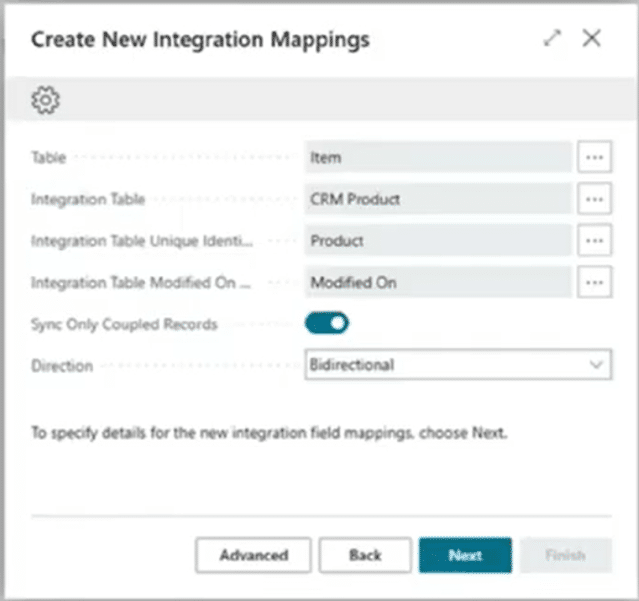
If you’re integrating Business Central with Dynamics 365 Customer Engagement systems (Sales, Service, Marketing) via Microsoft Dataverse, this update has several big implications.
Previously, you were limited to standard field mappings and needed custom integrations required extensions, and development. Now, you can map additional fields and tables directly from the Ui. This means:
- Faster integrations
- Less reliance on developers
- Greater flexibility for evolving business needs
It’s an under-the-radar feature, but it will deliver long-term value for clients that need it.
Supply Chain Management Updates
This release brings a strong focus on improving real-world supply chain workflows, especially in areas that were previously clunky or manual.
Streamlined Drop Shipment Processes
Drop shipments get a major usability overhaul:
- Create purchase orders more easily from sales orders
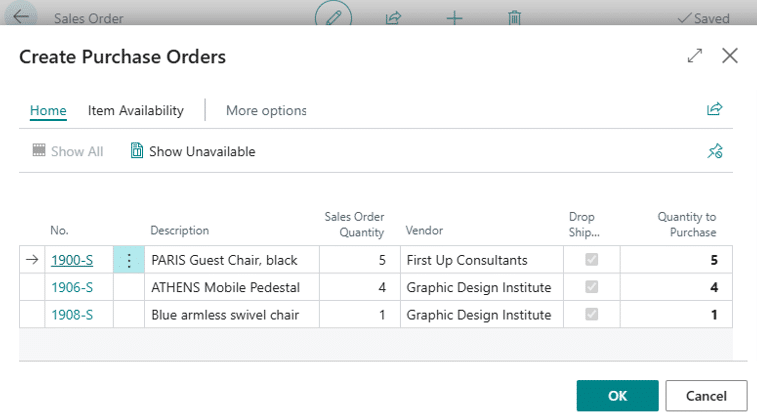
- Post purchase invoices independently from related sales invoices
- Improved reversal functionality when sales and purchase documents aren’t invoiced
Previously, these processes were tightly coupled and rigid. Now, they’re flexible and much more intuitive.
Improved Inventory and Variant Management
Inventory continues to evolve, especially for companies managing product complexity.
Enhancements Include:
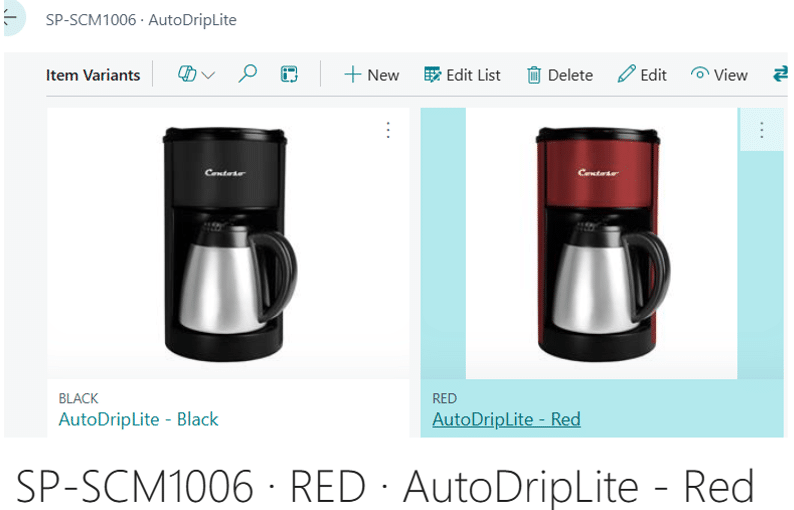
- Images on item variants: Especially useful for e-commerce integrations like Shopify where you might want to highlight different products.

- Expanded item attributes for variants: Offers better product differentiation
- Improved filtering on receipts and shipments: Faster document lookup and navigation
- Built-In Approvals for Inventory Processes: Approvals now extend to Requisition worksheets and item journals. Before, you had to build these approvals yourself, but now, they are available out of the box.
Additional Supply Chain Improvements
Some other enhancements in the supply chain space of Business Central include, but are not limited to:
- Better matching of purchase invoices to receipts
- Emailing posted shipments and receipts directly
- Date formulas for automated posting period control
- Enhanced subcontracting capabilities (for manufacturing scenarios)
- Improved usability in Manufacturing
- Using date formulas to control allowed posting periods
- Sustainability management updates, like New APIs and sales document report layouts
- And much more
These are the kinds of updates that don’t make headlines—but dramatically improve daily operations.
Additional Enhancements
This release is packed with smaller – yet highly impactful enhancements that will streamline your workday.
External Storage Support for Document Attachments
This is a major update for scalability, as you can now store attachments outside of Business Central. This reduces your database size, decreases data clutter while keeping your records intact, and significantly improves performance.
This is especially valuable for AP-heavy environments managing large volumes of documents.
Development Updates
Key updates for developers within your environment include:
- Expanded MCP capabilities, including enabling troubleshooting the MCP Server for AL
- The ability to evaluate AL coding agents with Business Central
- Gen more secure outgoing HTTP calls by default
- Making apps that use Base64 encoding faster
- Run AL tests from Visual Studio Code
- More resources for building Copilot extensions
These enhancements increase the flexibility developers have in creating and implementing customizations and reinforce Microsoft’s push toward an AI-first development model.
E-commerce Updates
While the Shopify-Business Central connector is already a powerful tool, Microsoft continues to invest in improvements that will make it better. They include the ability to:
- Assign custom collections to items exported to Shopify
- Export items to Shopify with product options based on item attributes
- Sync images of product variants between Business Central and Shopify
- Use checkout currency when you create sales documents from Shopify orders
These updates are huge for Businesses running e-commerce on Business Central.

Financial Management Updates
There are several important updates to financial management within Business Central:
Tax and Compliance
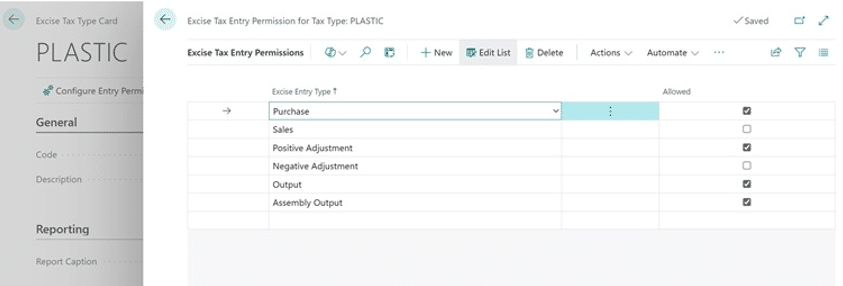
- Excise tax calculations (based on quantity/volume) – Plastic and sugar are common examples Microsoft uses
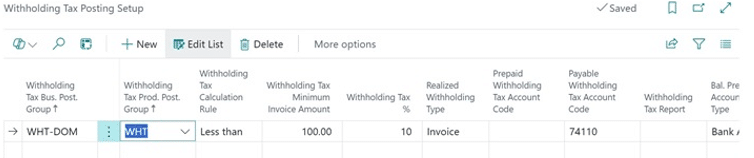
- Expanded vendor withholding tax functionality
Fixed Assets and Expense Management
- Enable Investment Boost for fixed assets and accelerated deprecation methods for fixed assets
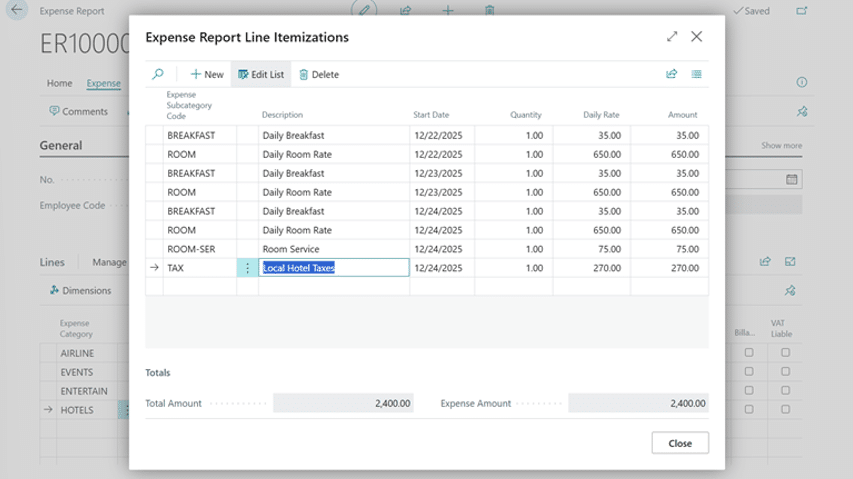
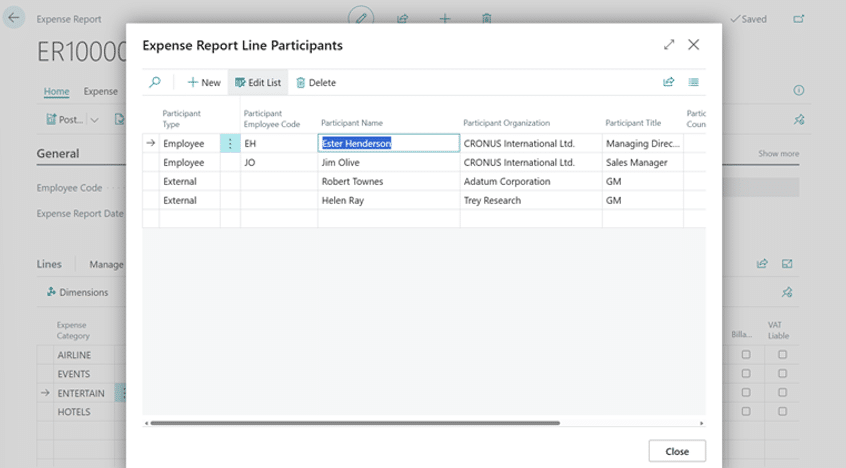
- Basic expense reporting functionality has been added that allows your employees to submit expense reports more easily
Billing
- Reduce time spent on recurring invoices through a quicker subscription billing process.
- Use self-billed invoices to generate purchase invoices on behalf of the vendor (particularly useful for manufacturing companies)
Note: This is a starting point—not a replacement for advanced expense management tools.
Governance and Administration Updates
For IT and compliance teams, this release will bring:
- Improved audit capabilities across user groups and permissions
- The ability to connect AI agents to the admin center through the MCP server
- Index usage management for performance tuning (cost per company)
These features are especially valuable for regulated industries that have strict safety and compliance rules to follow.
Updated Outlook Integration
Microsoft is revisiting and improving the Business Central-Outlook experience to include faster performance, better usability, and a more seamless interaction. If you have tried it before and thought it was a bit too clunky, it’s worth taking another look with this wave release.
Reporting and Data Analysis Updates
Reporting continues to evolve with tighter integration between Business Central, Microsoft Power BI and Excel. New Capabilities include:
- Power BI reports for:
- Customer loyalty
- Manufacturing
- Subscription billing
- Five additional Excel layouts for inventory reports
- Lifecycle management for report layouts (draft – pending – approved – deployed - retired)
This brings much-needed structure to reporting governance and cleaner visibility into your data.
Financial Reporting Updates
Significant improvements to financial reporting:
- Add organizational logos to reports
- Schedule and distribute reports automatically
- Run reports across multiple dimension values (e.g., departments)
This is a big step forward, especially for organizations coming from legacy tools like Management Reporter in Dynamics GP.
Enhanced Word Add-in for Report Layouts
For those using Word-based reports, this wave release brings improved formatting capabilities and better usability.
Modernizing Inventory Reports
A continued shift away from legacy RDL layouts toward Excel-based reporting and Word layouts, which aligns reporting with tools that users typically prefer.
New APIs for Approvals and Permissions
Microsoft introduces APIs for:
- Approval workflows (who did what, when)
- Permissions and access auditing
This is a major win for auditors, IT teams, and compliance reporting, as it gives the right people within your organization the access they need to do their jobs effectively while protecting them from data that is irrelevant to their jobs. Simultaneously, it also provides greater visibility into how your access and permissions are structured.
Important Reminder: Slow Down and Take Your Time
The wave releases can feel overwhelming for many organizations, and some may be tempted to immediately dig into everything they can get their hands on and start using it on their live data. However, not every feature should be turned on immediately. Before you manually enable features or install apps, it’s important to follow this best practice:
- Always test new features in a sandbox first, using dummy data
- Evaluate the impact on existing processes and determine where it could be used
- Roll out strategically and smartly, not all at once – You can’t boil the ocean.
Ready to Optimize Your Business Central Environment with Wave 1 Enhancements? Talk to Stoneridge Software!
Our team will work with you to identify which features will deliver real value, implement AI and Copilot strategies, optimize performance, and ensure your systems evolve alongside your business.
We walk with you every step of the way, from selecting the new features that are right for you to supporting your environment once they are implemented.
Connect with the Stoneridge team today to learn more!

Under the terms of this license, you are authorized to share and redistribute the content across various mediums, subject to adherence to the specified conditions: you must provide proper attribution to Stoneridge as the original creator in a manner that does not imply their endorsement of your use, the material is to be utilized solely for non-commercial purposes, and alterations, modifications, or derivative works based on the original material are strictly prohibited.
Responsibility rests with the licensee to ensure that their use of the material does not violate any other rights.