














Fixing Data in Business Central: Where Table Data Editor Fits (and Where It Doesn’t)
Why Data Corrections Get Risky as Business Central Environments Mature
As Business Central environments mature, data accuracy becomes just as important as functionality. Extensions can help solve operational gaps—but some tools go deeper, touching the data layer itself.
This post continues our extension review series, where we evaluate tools not only by what they can do, but by when they should be used, and when they shouldn’t. (You can read the first review on Simple Object Designer here.)
In this article, we take a closer look at the Data Editor Tool (Table Data Editor) and explore where it fits in a healthy Business Central environment, what risks it introduces, and how to decide whether internal use or partner-led support is the better path.
This post is intended for Business Central users, administrators, and teams responsible for maintaining data integrity and long-term system health.
As Data Grows, Small Issues Carry Bigger Consequences
The data flow within an ERP system begins with the legacy data set. It becomes live with everyday manual entries done by users, and expands with automated integrations. A growing data set puts a lot of weight on the information to be reliable, consistent, and audit-ready.
Business Central provides several mechanisms for this, including (not limited to):
- Prevents master data (customers, vendors, items, etc.) from being deleted if it appears in any document, ledger, or related record
- Blocks any changes to closed periods or documents that have already been finalized
- Provides change log entries for traceability
All corrections in the system must follow the system rules to protect accuracy and auditability. For example, this includes inventory updates from a physical count, changes to a posted invoice requested by a customer, or fixing records that no longer align with actual events.
Business Central allows:
- Create offset entries to fix previous transactions
- Block master data that should no longer be used
These tools cover most situations, but not all. Sometimes these corrections are difficult, and some cannot be handled using the usual tools available to users.
When Standard Correction Tools Aren’t Enough
Users sometimes reach system states where the available correction tools cannot resolve the problem, preventing them from moving forward.
Goals:
- Customer goal: fix issues without risking integrity or auditability
- Customer goal: minimize downtime
- Customer goal: reduce external dependencies
- Stoneridge Software's goal: prioritize life-long customer relationships over short-term gains
Two Ways to Resolve Blocked Data Issues in Business Central
- Table Data Editor
- Stoneridge Software support
Table Data Editor—Use Cases, Limits, and Risks
Option 1: When the Table Data Editor (TDE) is Appropriate
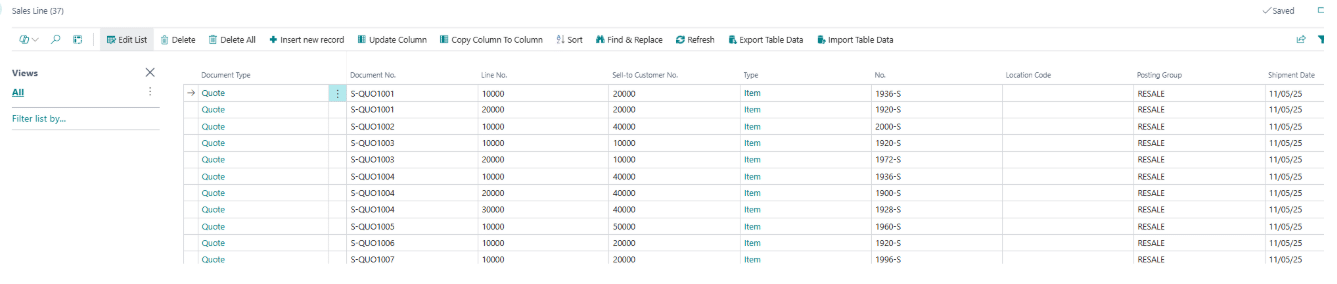
The Data Editor Tool provides administrators and consultants with unrestricted access to Business Central tables, enabling professional data management across all critical scenarios. Execute complex data migrations with validation bypass. Set up test scenarios in minutes. Perform surgical data fixes with full audit trails. Clean up legacy data efficiently. Gain complete visibility into table relationships for troubleshooting. This MIT-licensed tool delivers direct database access with enterprise-grade logging for compliance and change tracking. Link to Appsource.
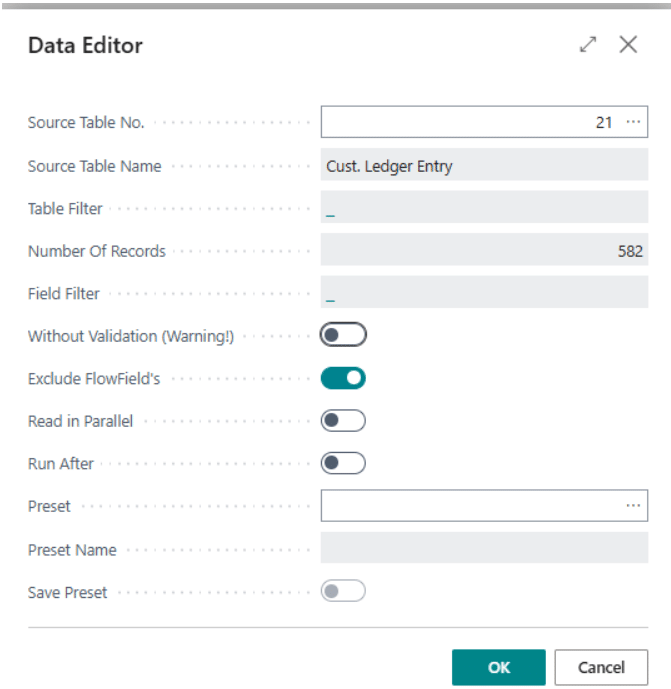
Use the TDE only when the system is stuck and no standard correction exists. Examples include:
- A posted record is blocked because of an invalid field or broken link
- A user cannot reverse or correct a document using standard features
- An integration created inconsistent or orphaned data
- A one‑time cleanup is needed where normal tools cannot recreate the correct state
- You need to inspect related tables to understand how data is connected
Using the TDE lets a skilled user make a precise edit to unblock the system while keeping the change contained.
When You Should Not Use the Table Data Editor
Do not use the TDE if:
- A standard correction, blocking, or reversal path exists
- The issue affects financial or audit‑sensitive records that should be fixed through ledger entries
- You are unsure which tables or fields are involved
- The fix requires more than a small, targeted change
- Your environment has many Super users (TDE is unsafe if everyone can open it)
Who Should Have Access to the Table Data Editor
TDE access should be given only to users who:
- Understand Business Central table structure and data relationships
- Know how changes affect ledgers, dimensions, balances, and related records
- Can analyze root causes, not just symptoms
- Can review and explain change logs
- Are comfortable validating downstream effects after the fix
Risks of Editing Table Data Directly
Using the TDE carries real risks:
- Breaking links between tables (example: ledger entries no longer matching documents)
- Silent corruption that appears months later
- Creating data that does not follow system rules and cannot be reversed
- Invalidating audit trails or financial records
Guardrails for using the Table Data Editor safely
To use the TDE safely:
- Restrict access to a small group of expert users
- Ensure permissions are set so only authorized people can open the tool
- Keep logging enabled at all times
- Do not delete log data when uninstalling the tool
- Document why the change was needed and what was modified
- Validate all related ledger entries after the fix
- Treat TDE as a last‑resort option only after confirming standard solutions do not work
- Review any custom or ISV areas that may require additional corrections
Note: A Stoneridge‑specific version of the tool was created to improve safety and control. The pages are not searchable. The tool is kept out of sight for standard users to avoid unintended access.
When Partner‑led Support is the Safer Option
Option 2: Stoneridge Software Support
Stoneridge Software support gives customers access to specialists who understand how Business Central works end‑to‑end. Instead of changing data directly, the team looks for the safest and most accurate correction path using standard system features first. When a manual correction is required, they validate the impact across the entire system.
Situations Where Support is the Better Choice
Use Stoneridge support when:
- The issue affects multiple areas of the system
- You are unsure whether Business Central has a built‑in fix or workaround
- Ledger entries, valuations, or dimensions may be impacted
- The root cause isn’t clear
- Your team does not have deep Business Central knowledge
- You want to prevent similar issues from happening again
The Stoneridge team provides:
- Deep understanding of standard and custom Business Central functionality
- Knowledge of how changes flow through ledgers, inventory, tax, jobs, and integrations
- Ability to identify whether an issue comes from setup, data, customizations, or external systems
- Experience with edge‑case corrections and recovery scenarios
- Guidance for customers so similar issues can be prevented in the future
What Support Prioritizes Over Speed
The main tradeoffs when using Stoneridge Support are:
- Fixes may take longer due to investigation and validation
- You introduce an external dependency for certain types of corrections
These tradeoffs exist because Stoneridge prioritizes accuracy and long‑term system health over speed.
How Stoneridge Reduces Risk During Complex Corrections
Stoneridge reduces the risks of manual corrections by:
- Checking whether a standard feature solves the issue before touching data
- Reviewing related tables and ledger entries to confirm the fix is correct
- Validating the impact across all functional areas
- Ensuring faulty master data is blocked and replaced properly
- Documenting what was corrected and why
- Providing tips and guidance so customers can handle simpler cases on their own
This process ensures the solution is safe, repeatable, and audit‑aligned.
Precautions Before Installing or Using Table Data Editor
- Before installing the Table Editor Tool from AppSource, take care of the permissions in Business Central. Check that only the selected users have access to it. A user with ‘Super’ permission set will have access to the tool.
- Make sure to activate Logs in the TDE setup to have an audit trail.
- If you decided to uninstall the TDE – do not delete the data. This will allow to see logs after subsequent installation.
Validate Downstream Impact Across Ledgers and Integrations
- When correcting data manually, always ensure related ledger entries are addressed appropriately. Business Central includes multiple ledger entry types, such as:
- General Ledger
- Customer Ledger
- Vendor Ledger
- Item Ledger
- Resource Ledger
- Warehouse Ledger
- Value
- VAT
- Bank Ledger
- Check Ledger
- Job Ledger
- Other standard Ledger entries
- ISVs can have their own Ledger Entries or transactions that need to be reversed. For example:
- Credit card EFT authorizations
- Tax Ledger
- Commission Ledger
- Ect.
- Customizations in your system can have their own data that needs to be adjusted after manual data editing.
- The rules are in place to help keep your data in a consistent way across many areas in Business Central. Manual tempering in one can backfire in another.
Conclusion: Choosing the Right Level of Intervention
The Table Data Editor can be a powerful tool when a Business Central environment is blocked and no standard correction path exists. In the right hands, it allows precise adjustments that restore system functionality.
However, because it operates outside standard business logic, it carries significant responsibility and risk.
The key is not whether the tool is available, but whether it is appropriate for the situation. In many cases, standard features or structured support provide a safer and more sustainable resolution.
If you are evaluating how to handle complex data corrections in Business Central—or deciding whether internal expertise is sufficient—reach out to our team to assess the safest and most effective approach for your environment.
Curious how this review format applies to a different type of extension? Read our Simple Object Designer review here to see the first post in this series.

Under the terms of this license, you are authorized to share and redistribute the content across various mediums, subject to adherence to the specified conditions: you must provide proper attribution to Stoneridge as the original creator in a manner that does not imply their endorsement of your use, the material is to be utilized solely for non-commercial purposes, and alterations, modifications, or derivative works based on the original material are strictly prohibited.
Responsibility rests with the licensee to ensure that their use of the material does not violate any other rights.