















From Dynamics GP to the Cloud: Building an ERP Strategy for the Next Decade
Most organizations don't replace their ERP because it's broken; they replace it because their business has changed and they need to keep up with the times.
Technology that once supported growth eventually becomes the thing that limits it. New security threats emerge, employees expect instant access to information, customers demand faster responses, and AI has reshaped entire industries. The organizations that thrive are not the ones reacting to these changes. They are the ones proactively preparing for them.
History offers plenty of examples of leaders who succeeded because they planned long before everyone else did. One of my favorite examples is Singapore. In 1965, it was a newly independent nation with few natural resources and an uncertain future. Rather than focusing solely on immediate challenges, its leaders created a long-term vision, committed to it, and patiently executed the strategy over decades.
At Stoneridge, it’s our belief that the same philosophy applies to ERP modernization. Moving from Microsoft Dynamics GP to a cloud platform like Dynamics 365 Business Central isn't simply a technology upgrade. It's an opportunity to build a foundation that supports your organization for the next decade and beyond.
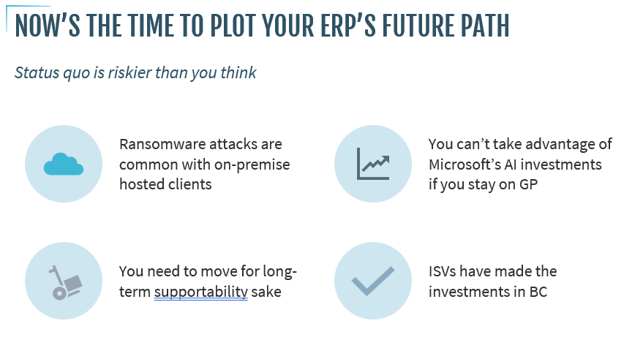
In this blog and video, we’ll analyze four business scenarios that illustrate why planning today matters more than waiting until tomorrow.
Strategy Before Technology
One of the biggest misconceptions about digital transformation is that it starts with technology. The reality is that it starts with leadership.
Successful organizations share three characteristics:
- They have a clear vision for where they want to go.
- They commit the resources necessary to get there.
- They understand that meaningful transformation takes time.

Those same principles helped transform Singapore from a small island nation into one of the world's strongest economies are the same principles that lead to successful ERP modernization projects. The organizations seeing the greatest success with cloud ERP aren't simply installing new software. They're building a roadmap for how technology will support their business over the next five to ten years.
With that strategy in place, let's examine four situations that every executive should consider.

Scenario 1: A Security Incident Changes Everything
The On-Premises Reality
Imagine arriving at work Monday morning to discover your ERP environment has been encrypted by ransomware. Employees can't access financial data, operations grind to a halt, and customers begin calling.
Meanwhile, your IT team is determining whether backups are intact, how much data can be recovered, and how long recovery will take. Then there is also the conundrum of whether you want to pay the ransom (you shouldn’t).
Unfortunately, this isn't a hypothetical scenario. Cyberattacks continue to increase in both frequency and sophistication, particularly against organizations maintaining on-premises infrastructure. The burden of protecting that infrastructure falls almost entirely on your internal team.
That includes:
- Server maintenance
- Backup strategies
- Security patching
- Disaster recovery planning
- Network monitoring
- Hardware lifecycle management
Every one of those responsibilities introduces risk and potentially high costs.
The Cloud Difference
Cloud ERP fundamentally changes that equation. Rather than relying solely on internal infrastructure, organizations benefit from Microsoft's ongoing investment in enterprise-grade security, redundancy, monitoring, and disaster recovery capabilities.
While no environment is immune to cyber threats, moving to the cloud significantly reduces the operational burden of maintaining and protecting critical business systems.
Instead of worrying about keeping servers alive, your IT team can focus on creating business value.
Scenario 2: Your Technology Becomes the Bottleneck
Technology rarely fails all at once. Instead, it slowly becomes harder to maintain. Perhaps the server is nearing the end of life, maybe key employees who understand Dynamics GP are approaching retirement, or third-party vendors begin shifting their investments elsewhere. No matter the scenario, support will become difficult to find.
Eventually, small issues become larger business risks.
Adding to this challenge is Microsoft's announced end of mainstream support for Dynamics GP in December 2029. That deadline doesn't mean your business suddenly stops operating, but it does mean the ecosystem surrounding GP will continue evolving toward cloud-first solutions.
The Cloud Difference
A cloud-based product like D365 Business Central is an evergreen platform that continuously evolves. Instead of planning large upgrade projects every several years, organizations receive ongoing innovation through Microsoft's cloud platform Wave releases.
That means:
- Regular feature enhancements
- Continuous security improvements
- Better integration with Microsoft 365
- Reduced infrastructure costs
- Greater scalability as your business grows
Modern technology is easier to maintain and gives your organization room to grow.
Scenario 3: An Executive Decision Can't Wait
Imagine one of your largest customers calls requesting expedited delivery. This sends your team into sprint mode:
- Your operations team needs inventory information immediately.
- Finance wants to understand profitability.
- Sales wants customer history.
- Leadership needs approval within the hour.
- Reports need to be generated.
- Data needs to be reconciled.
- Employees work from different systems.
- Approvals happen through email chains.
In many on-premises environments, gathering that information means waiting. The opportunity slows down because information isn't immediately available.
The Cloud Difference
Cloud ERP creates a connected business that includes real-time access to information and approvals that can happen from virtually anywhere.
Executives can access dashboards whether they are in the office, travelling, or meeting customers. Instead of waiting for information, leaders can act on it quickly and effectively.
Scenario 4: Your Competitors Begin Leveraging AI
This may be the most important scenario of all, as AI tools like Microsoft Copilot are rapidly becoming a competitive differentiator. Organizations are already using Microsoft Copilot to:
- Summarize meetings
- Draft documents
- Analyze data
- Research competitors
- Generate presentations
- Automate repetitive work
- Accelerate decision-making
However, AI is not the strategy itself, but it is an accelerator. The organizations seeing the greatest value begin with a clear business vision and then identify where AI can amplify that strategy. Business Central is built for that future, but Dynamics GP isn’t.
Microsoft's investments in AI continue to focus on its cloud applications, where Copilot capabilities are being integrated directly into everyday business processes.
The Best Time to Plan for AI in the Cloud is Now
Waiting to modernize delays an ERP project and your ability to capitalize on AI. It’s important to:
- Establish your vision: What is your long-term goal and how can AI play a role?
- Build a strong plan:
- What steps should you take now to ensure future success?
- When should you plan to transition to a cloud-native platform that supports AI?
- How do you build AI capabilities in our team members?
- What is the ultimate return on investment from these efforts?
- Commit to the plan: Think about what it will take from budget and resource perspectives and ensure that you can commit to it.
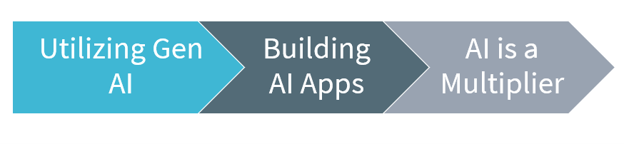
At some point, AI will impact your business at almost every level. The most successful organizations are the ones who plan for it and use a three-phase approach:
- Utilizing Generative AI: Practice prompting with everyday workflows like using Copilot to for something in SharePoint or Outlook, creating a Word document or an Excel spreadsheet, recording and summarizing Teams meetings, and more. This gets you and your team used to using AI.
- Building AI Apps: This step requires a little more thought into how different members of your team will use AI and will require trial-and-error testing.
- Using AI as a Multiplier: At this point, you can start doing vibe coding, connecting Copilot agents, utilizing Cowork to build skills and automate routine tasks and building AI into all your applications so more people get used to using it. You can also use specific Microsoft Agents in Microsoft 365 and various Dynamics 365 ERP and CRM tools as well.
Why Now Is the Right Time
One of the biggest mistakes organizations make is assuming they need to wait until support ends before planning their migration.
The best ERP projects begin well before deadlines force action. Planning early allows organizations to:
- Build a thoughtful roadmap
- Budget appropriately
- Minimize disruption
- Train employees gradually
- Evaluate AI opportunities
- Reduce implementation risk
Successful cloud migrations are about much more than replacing Dynamics GP; they’re about positioning your organization for long-term success.
As you begin evaluating your roadmap, keep these principles in mind:
- Build your strategy before selecting technology.
- Address business risks before they become business disruptions.
- Modernize with security and resilience in mind.
- Choose a platform that continues to evolve alongside Microsoft innovation.
- Prepare your organization for AI, not just cloud ERP.
- Start planning early while you still control the timeline.
The organizations that gain the greatest competitive advantage aren’t necessarily the first to adopt new technology; they are the ones with the clearest vision for how technology supports their business goals.
Start Building Your Roadmap with Stoneridge Software Today!
Whether you're exploring your options, building a business case, or actively planning your migration, the right partner can make all the difference. Stoneridge Software has helped organizations across industries modernize their ERP environments, reduce risk, and prepare for the future.
If you're beginning the journey from Dynamics GP to Dynamics 365 Business Central, connect with the Stoneridge experts today! Together, we'll build a roadmap that supports your business not just through your migration, but for years to come.

Under the terms of this license, you are authorized to share and redistribute the content across various mediums, subject to adherence to the specified conditions: you must provide proper attribution to Stoneridge as the original creator in a manner that does not imply their endorsement of your use, the material is to be utilized solely for non-commercial purposes, and alterations, modifications, or derivative works based on the original material are strictly prohibited.
Responsibility rests with the licensee to ensure that their use of the material does not violate any other rights.