














Getting Started with MRP in Business Central: Practical Setup and Common Challenges
If you are reading this, you have probably searched online to learn about Materials Requirements Planning (MRP) and yielded tens of thousands of results. You may have narrowed it down to using it in Business Central and still received thousands upon thousands of results. Let me help you out a bit more.
So, You Want to Get Started on MRP....
Here's an introduction on how to use Business Central to get you what you need, when you need it and how much you need, but not too much.
I am not going to discuss the nuts and bolts of lead times, reorder quantities, outbound warehouse handling time, or reorder points. Most discuss what MRP is, the Master Production Schedule, Inventory specifics, Just in Time Production. Undoubtedly, they will have some impressive diagrams. I have yet to see one that will discuss the real-life challenges you will face setting up MPR.
Why MRP Requires Ongoing Management
MRP is not for the faint of heart. It is not a one and done solution, it requires management.
Successfully leveraging the planning features of Business Central, or any other ERP, is NOT the soul domain of the Planning Department. Sales, Purchasing, Warehouse and Shipping / Receiving all have impacts on your ability to plan, to use MRP. Most of your Primary Value Chain activities will impact planning. They must be on board.
There is a feature in Business Central, available on the Sales Orders page called ‘Order Promising’ & ‘Capable-to-Promise’. Once you are running planning your sales team can leverage this feature to provide realistic shipment dates. No more calling or emailing the operations team to get a lead time/shipping date.
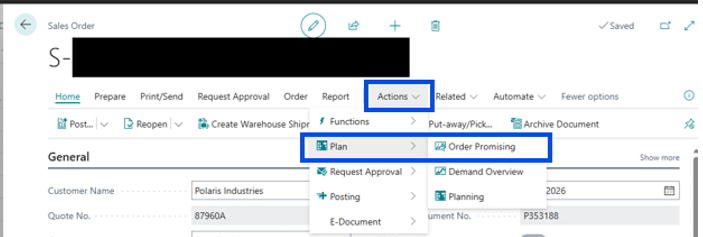
Pro Tip: Use the Make to Order production or assembly policy for very low demand items. Provide a lead time sufficient for your operations team to produce.
More on that later, just keep in mind this is a nice way to get your sales team on board and provide a tool that leverages Business Central rather than email and phone calls.
Your entire ENTERPRISE is involved with MPR, not just the planning group.
A planner will run into two challenges head on, Demand and GIGO.
What is demand?
Demand is simply the quantity of products your customers are willing and able to purchase within a given date range. That is your sellable goods in finished good inventory, simple. What quantity of a given finished good available depends upon your quantity on hand, the quantity in your production queue, inbound purchase orders if you resell and the active sales orders in your ERP.
GIGO, Garbage In, Garbage Out.
Simply stated, the quality of your data is critical when attempting to plan.
How Sales Teams Benefit from Planning Features
Do you have old sales orders open, just sitting there for months or years? Those are increasing the demand of those items on sales orders.
Likewise, do you have old purchase orders stating you have products inbound? Those are telling a planner they do not need to be ordered because those items are due to arrive.
I have not mentioned old production orders or if the shipping/receiving department records their shipments and receipts accurately and timely?
That was a long-winded way of saying:
The entire Enterprise impacts the planner’s ability to run MPR/planning.
AND
There is no substitute for data quality.
Humble diagram:
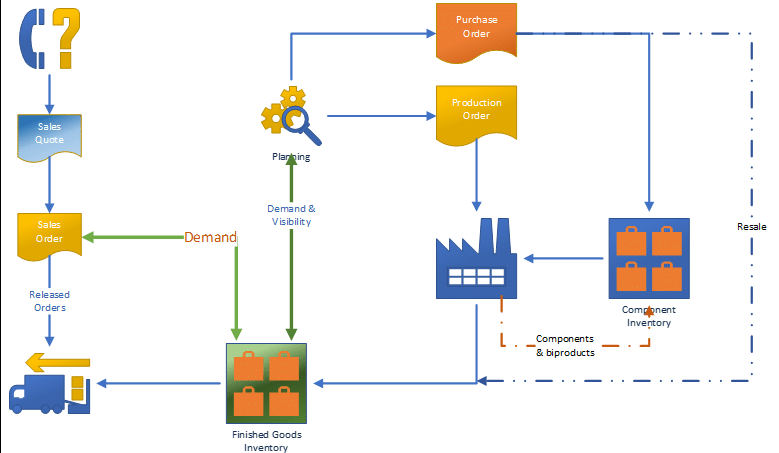
Simply stated: Sales orders create demand against your finished good inventory. Finished goods demand creates demand upon inventory, production and/or purchases based upon the item or component availability at a given point in time.
How to Start Implementing MRP in Business Central
As I said before, planning is not a one and done solution. You do not need to set up planning for every one of your items.
Eat the elephant one bite at a time.
Select five finished goods items. If you are a manufacturer you will need to include the components in the bill of materials for each item. Start with those five or so items that are fast movers. If you are like most firms 20% of your product generates 80% of your activity.
Set Up a Sandbox and Prepare Your Data
Create a sandbox! This will allow you to make changes without impacting your operations. Search for purchase, sales and production orders that include the items you are using for your test. Those will need to be cleaned up before you attempt planning.
Configure Planning Settings and Test Availability
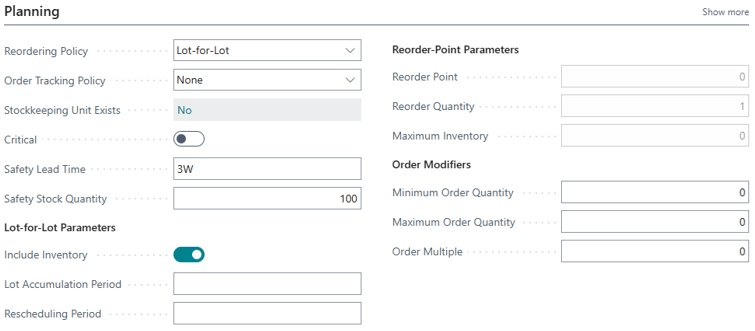
The Planning Fastab on an item card is where you will find the parameters that drive your process. Remember, you are just getting started.
Follow the KISS rule. Keep It Simple Stu…
Lot for Lot is the reorder policy that will cover the vast majority of your replenishment needs.
Note the Safety Lead Time of ‘3W’, that’s three weeks. Safety Stock Quantity is 100. Given this example, when the quantity on hand falls below 100 your planning process will prompt you to purchase, manufacture or assemble depending upon your replenishment method. You may even add minimum and maximum order quantities if for instance you have a vendor that provides an incentive to order over a given quantity.
As you are testing reach out to your teammates to gain support for cleaning the data in their specific areas of responsibility.
Test the Capable to Promise feature for an item you have in stock.
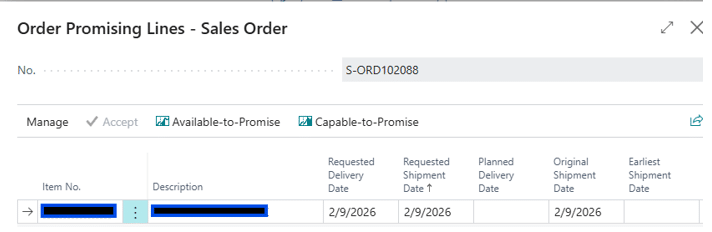
Use the Available-to-Promise to see if you have the item in stock and available. If none is available, try the Capable-to-Promise. That will look at lead times and availability of components.
NOTE: Be sure you have removed all transaction documents in your sandbox that contain the test item.
For a very simple test:
- Change the replenishment method to ‘Make to Order’.
- Enter a value in ‘lead time’
- Ensure you have zero quantity on hand.
- Create a sales order and select Capable-to-Promise
Now you can refer to those articles that discuss replenishment methods, reorder policies and reorder points in the Replenishment and Planning Fastabs on the item cards.
Next Steps and Support for MRP Planning
I will follow up with another blog article that steps through testing the concepts. In the meantime create that sandbox, select your test items and begin cleaning up your transaction documents.
If you are evaluating MRP or looking to improve an existing planning setup, our consultants can help you review your configuration and identify the next steps.
Contact Stoneridge Software to discuss your planning goals or learn more about implementing MRP in Business Central.

Under the terms of this license, you are authorized to share and redistribute the content across various mediums, subject to adherence to the specified conditions: you must provide proper attribution to Stoneridge as the original creator in a manner that does not imply their endorsement of your use, the material is to be utilized solely for non-commercial purposes, and alterations, modifications, or derivative works based on the original material are strictly prohibited.
Responsibility rests with the licensee to ensure that their use of the material does not violate any other rights.