














What Microsoft’s Model Context Protocol (MCP) Really Is (and Why It Matters)
Every so often, Microsoft introduces a capability that quietly changes how we build intelligent systems. It doesn’t always arrive with a big announcement, but once you understand it, you realize it solves a problem many teams have been working around for years.
Model Context Protocol (MCP) is one of those capabilities
If this is your first time hearing the term, you’re not behind. MCP is new, and most people are just beginning to encounter it as Microsoft expands how Copilot and agents connect to business systems. The name itself doesn’t help much either. As one of our engineers joked during a recent walkthrough:
“Don’t be annoyed with Model Context Protocol… fancy words Microsoft invented to get you scared, but it’s not really scary.” — Anna Smorodynova
She’s right. MCP sounds complex, but the idea behind it is actually very practical.
This post explains MCP in plain terms: what it is, why Microsoft built it, and how it changes the way AI agents interact with business data. While we’ll use Business Central examples in this blog to make it tangible, MCP itself is much broader than any single application.
What Is MCP? (A Human Explanation)
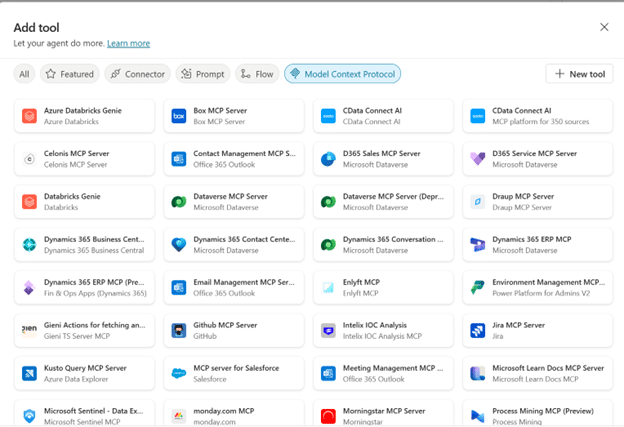
Think of MCP like a universal adapter for AI agents.
Normally, if you buy a new gadget, you need the right cable for every device—one for your phone, one for your laptop, one for your camera. That’s how traditional AI integrations work: you hardcode a separate “flow” for every question or system.
MCP changes that. Instead of building dozens of custom cables, you create one adapter with multiple ports. Each port represents a connection point that tells the agent:
- What data it can access (e.g., Business Central invoices, CRM contacts)
- What actions it can take (e.g., read, update, calculate)
Once those ports are defined, the agent can figure out on its own which one to use and when—no need to pre-build every possible scenario.
In short:
MCP gives AI agents a standardized way to plug into real systems, so they can dynamically orchestrate tasks without you writing endless custom logic.
Think of MCP as a Map, not a Script
Traditional integrations tell an agent exactly what to do for every scenario—like following a rigid script. MCP flips that model. It provides a map: enough structure for the agent to navigate and figure out the best route on its own.
With MCP, you can:
- Expose multiple systems or data domains
- Define which operations are allowed
- Let the agent decide when and how to use each connection
This is a major shift from the old way of building integrations, moving from static flows to dynamic orchestration.
Why MCP Exists
Before MCP, building an intelligent agent usually meant making a long list of decisions up front:
- Which system does this question relate to?
- Which API should I call?
- What data does this user have permission to see?
- How do I handle follow-up questions?
Developers solved this by creating:
- Individual APIs
- Topics for each question type
- Orchestration logic to connect everything together
It worked. BUT, it was fragile and time-consuming. Every new question often meant writing new logic.
MCP was introduced to reduce that complexity. Instead of scripting behavior, MCP provides a standardized way to expose connection points and rules. The agent then uses its existing reasoning capabilities to interpret the user’s request, look at the available options, and dynamically choose the most appropriate data source.
That’s the key difference: MCP doesn’t make the agent smarter, it just gives the agent a map of what’s possible, so it can apply its intelligence effectively.
What MCP Enables (Beyond a Single Application)
While we are showcasing MCP with tools like Business Central, its implications go much further
MCP provides a standardized way to expose multiple systems and capabilities to an agent, enabling it to:
- Access and work across multiple data sources
- Respond to follow-up questions using structured context
- Respect permissions and operational rules defined in each connection
- Scale easily by adding new endpoints without rewriting orchestration logic
You might define MCP connections for:
- ERP data
- CRM data
- Operational systems
- Reporting layers
- Internal tools
Each connection point represents a capability the agent can draw from when responding—making integrations dynamic, not hardcoded.
A Concrete Example Using MCP with Business Central
To make this more tangible, let’s look at how MCP works using Business Central as an example.
In this demonstration, an agent was connected to Business Central using Model Context Protocol (MCP). (*Read here for written version of the step-by-step Business Central, Copilot and MCP Guide.)
Instead of hardcoding which API to call, the agent was given access to a set of MCP-defined connection points (sales orders, customers, inventory). Each one describing what data is available and what operations are allowed (read, update, query).
When asked:
“Show me sales orders that include item 1896.”
The agent:
- Looked at the available MCP capabilities
- Selected the appropriate Business Central endpoint
- Queried the data and returned structured, accurate results
Then, when the follow-up question came:
“What else was on those orders?”
The agent continued the conversation seamlessly—without additional configuration or custom logic—because MCP provided the context needed to interpret the question and reuse prior results.
Key takeaway:
MCP doesn’t script every step; it gives the agent a map of capabilities, so it can apply its reasoning to context dynamically, rather than relying on rigid flows.
Why This Matters for AI Strategy
From an AI architecture perspective, MCP addresses several long-standing challenges:
- Fewer brittle integrations: Replace dozens of tightly coupled flows with flexible, standardized connection points.
- Dynamic orchestration for natural interactions: MCP gives the agent structured options, so it can respond to varied questions without rigid scripting.
- Alignment with security models: MCP enforces system permissions—if a user lacks access, the agent won’t surface restricted data.
- Faster iteration and scalability: Add or refine MCP connections without rebuilding the entire agent experience, enabling rapid expansion across systems.
How to Think About MCP Going Forward
If you’re new to MCP, here’s the mindset I recommend:
- Think in domains, not endpoints.
Define the areas of the business an agent should understand, rather than scripting every possible question. - Start broad, then refine.
Begin with multiple MCP connections, observe how the agent uses them, and narrow scope as needed. - Enable dynamic reasoning.
MCP works best when you avoid over-controlling behavior. It provides structured context so the agent can apply its reasoning effectively. - Plan for growth.
MCP is foundational. Microsoft is clearly building toward richer, more autonomous agent behavior over time.
Wrap Up on Using MCP
Model Context Protocol may be a new term, but the challenge it addresses is familiar. Teams have wanted AI agents that can understand business data without requiring extensive custom logic.
MCP is Microsoft’s answer to that challenge. It provides a standardized way for agents to interact with real systems with flexibility, security, and scale — while preserving the structure and permissions that businesses need.
If this is your first introduction to MCP, you’re not alone. Most organizations are just beginning to explore it. But it’s worth paying attention to, because MCP represents a fundamental shift in how intelligent systems will be built across the Microsoft ecosystem moving forward.
If you’d like help exploring MCP and shaping your AI strategy, we’d love to chat. Reach out to our team to see how we can help with MCP, Copilot and AI strategy.

Under the terms of this license, you are authorized to share and redistribute the content across various mediums, subject to adherence to the specified conditions: you must provide proper attribution to Stoneridge as the original creator in a manner that does not imply their endorsement of your use, the material is to be utilized solely for non-commercial purposes, and alterations, modifications, or derivative works based on the original material are strictly prohibited.
Responsibility rests with the licensee to ensure that their use of the material does not violate any other rights.