















Dynamics GP to Business Central: What You Need to Know and Your Questions Answered
Dynamics GP has been a reliable part of daily operations for many businesses for decades.
If your organization still uses it, it’s probably because it’s familiar, reliable, and has supported countless teams through growth, change, and everything in between. As much as that’s true, Microsoft’s cloud strategy continues to move forward, and organizations looking for greater visibility, automation, and AI capabilities are starting to ask the same question:
What's The Best Path Forward?
It’s a tough question to answer on your own. If you are in the early stages of considering a move to the cloud, you’re probably weighing a lot of factors such as:
- When should you start planning?
- What does the migration process look like?
- Will it disrupt your business?
- What advantages and upgrades do the Microsoft Cloud really provide?
Whether you want to do a full or phased move from GP to Business Central or want a hybrid model by hosting GP in Azure, the good news is transitioning doesn’t have to feel overwhelming. In this blog and video, we’ll walk through the stages of migrating to the cloud, what you can expect during the process, and answer some frequently asked questions that often come up with clients.

When to Start Planning a Move from GP to Business Central
The short answer is right away, especially if your business is considering a cloud migration. The earlier you plan, the easier it’s going to be.
One misconception to be aware of about moving from GP to Business Central is that you need to have everything ready all at once. In reality, the opposite is true. It’s important to slow down and evaluate your options, understand your environment, workflows, and processes, and find a timeline that works within your means and budget.
Rather than setting unrealistic deadlines and reacting to unexpected circumstances, a phased approach allows you to schedule your transition around busy times like fiscal year-end or budgeting cycles. It also reduces unnecessary pressure and allows your team to make smart, thoughtful decisions.
Planning Early Gives You More Choices
Organizations that begin planning early are often able to answer important questions long before they become urgent.
For example:
- What data should we bring into Business Central?
- Are there outdated records that should be cleaned up?
- Are there opportunities to modernize payroll or HR systems?
- Which third-party applications still make sense?
- What integrations will we need moving forward?
If you plan early, you don’t need to make these decisions overnight. Instead, you can make them gradually, allowing your team to evaluate options and prioritize improvements before implementation.
Migration Preparation Goes Beyond Technology
One of the most valuable aspects of starting early is that it shifts the focus away from technology alone. Instead of asking, "When do we install Business Central?", organizations begin asking:
- How do our processes work today?
- Where are our inefficiencies?
- What do we want our future state to look like?
- How can we simplify operations before moving?
This type of preparation often uncovers opportunities to improve workflows long before the migration itself begins.
A Migration Assessment Helps Remove the Guesswork
For organizations that aren't quite sure where to begin, a migration assessment with a trusted implementation partner provides an excellent starting point. This allows you to work alongside experts to better understand:
- Your current environment
- Potential migration considerations
- Budget expectations
- Timeline planning
- Areas that may require additional preparation
It gives you clarity without pressure, allowing you to make confident decisions. You can learn more here!
What the Cloud Migration Process Looks Like
One of the biggest unknowns for organizations considering Business Central is what happens after they decide to move forward. Every implementation is unique, but successful cloud migrations follow a structured process designed to minimize disruption while giving users time to become comfortable with the new system before go-live.
It’s not as simple as installing software and hoping for the best; you need to build it around people, processes, and technology working together.
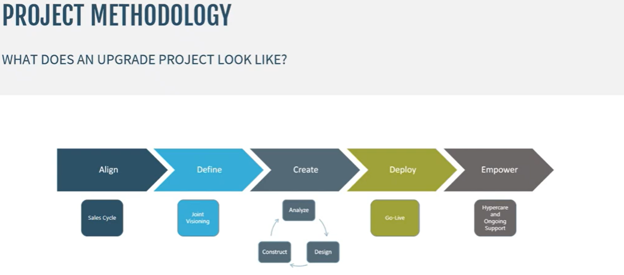
This is what it typically looks like:
Step 1: Project Kickoff
Start with a kickoff meeting to introduce you to the implementation team that will guide the project. This will include project managers, functional consultants, and solution architects.
The goal here is to foster collaboration from the start. Your implementation team will work alongside your organization – and users – to ensure everyone understands project goals, timelines, and expectations.
Step 2: Joint Visioning Sessions
Once the team is comfortable, your implementation partner will begin to understand your business. Joint visioning sessions focus on learning:
- Your business processes
- Operational requirements
- Unique workflows
- Organizational priorities
- Integrations
Rather than forcing your organization into a one-size-fits-all approach, these sessions will help shape how Business Central supports your needs, replicates or improves your processes, and updates your workflows.
Step 3: Data Preparation
Once your business requirements are understood, attention turns to your data.
Data Considerations:
- Historical data
-
- GL
- AP
- AR
- Data cleaning prior to the implementation
- Data consistency
- Payment Terms
- No. Series
- Duplicate master records
- Data consistency
Implementation teams provide templates that help extract information from Dynamics GP using familiar tools such as SmartLists or SQL Server. Stoneridge consultants have experience working with both GP and Business Central and can help guide organizations through this process while ensuring important information is prepared correctly for migration.
Good data preparation lays the groundwork for a successful implementation and fewer disruptions to your operations.
Step 4: Joint Process Design
Once the data starts flowing to the cloud, your team will start to work directly inside Business Central. In this stage, everyone will focus on understanding how familiar business processes work within the new system. Users learn:
- How Business Central handles day-to-day tasks
- What information needs to be entered
- How reporting is generated
- Differences between GP and Business Central workflows
- Some processes can be moved over to Business Central from GP or can be replicated. However, it’s important to remain open to the possibility that there may be tools in Business Central that can improve those processes.
Rather than simply replicating old processes, organizations can enhance processes by learning more about what Business Central can do.
Step 5: End-to-End Business Process Testing
Walking through complete business processes is one of the most valuable parts of the project. You will complete full operational scenarios like:
- Creating purchase invoices
- Paying vendors
- Reconciling bank accounts
- Following transactions through the entire accounting process
This helps ensure every workflow functions as expected before users begin relying on the system for daily operations.
Step 6: Conference Room Pilot
This stage is where more users become involved in the implementation. The conference room pilot allows users to test realistic business scenarios using Business Central in a controlled environment.
By allowing employees to experience the system before launch, organizations reduce uncertainty and provide users with valuable hands-on experience.
Step 7: User Acceptance Testing
Before go-live, users perform final testing to verify everything works as expected, validating:
- Business processes
- Integrations
- Reporting
- Data accuracy
- Day-to-day operational tasks
This is also the opportunity for you to gain final user feedback before the implementation is completed and you’re ready to go-live.
Step 8: Go-Live and Hypercare
You’ve done the testing, you’ve completed the go/no-go review, and the final pieces of data have migrated to Business Central. Data is reconciled between subledgers and the general ledger to ensure accuracy before Business Central becomes the official production environment.
The process doesn’t end there, though. At this point, the project goes into “hypercare”, where the implementation team continues supporting users, answering questions, and helping to resolve issues that employees have when working with the system. Once everyone is comfortable, your organization will transition to ongoing support.
From there, you can begin planning future enhancement phases.
How the Microsoft Cloud Foundation Supports AI and Future Improvements
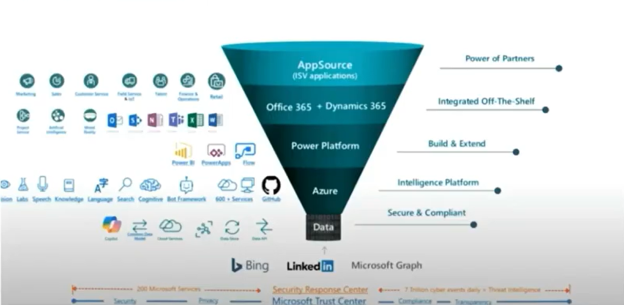
Moving from Dynamics GP to Business Central isn't simply about changing ERP systems.
It's about establishing a modern technology foundation that allows your organization to take advantage of capabilities that simply weren't practical in traditional on-premises environments in a cloud-first platform. It’s not just a different deployment model with new licensing and infrastructure; it’s about eliminating the need for costly physical servers, manually applying patches, managing cybersecurity tools, and planning disruptive hardware upgrades. It’s a significant shift that handles more operational complexity and allows you to spend more time using technology rather than maintaining it.
AI Starts with the Right Foundation
One of the biggest reasons organizations are evaluating Business Central today is AI. Features like Microsoft Copilot, intelligent automation, and future AI capabilities aren't standalone products. They’re woven directly into your ERP system through natural language processing and task-specific AI agents. They are also connected to the broader Microsoft ecosystem, creating seamless connections between the tools you use every day.
By moving to Business Central, organizations position themselves to take advantage of AI capabilities that help technologies work together across Microsoft's business applications.
That includes opportunities to connect Business Central with solutions like:
- Microsoft Outlook
- SharePoint
- Microsoft 365
- Copilot
- Azure services
Instead of stitching together disconnected systems, organizations benefit from an ecosystem designed to share information more naturally.
Built for Modern Business
Cloud technology also provides flexibility that's difficult to replicate with traditional on-premises environments. Business Central allows you to:
Organizations can:
- Scale resources as business needs change
- Support remote access
- Improve visibility through reporting
- Reduce infrastructure management
- Adopt new capabilities more quickly
Rather than constantly planning hardware investments around peak business periods, cloud resources can better align with changing operational demands.
Technology Is Only One Piece of the Puzzle
Of course, technology alone doesn't create successful digital transformation. It also requires buy-in from the people who power your business and improvements to the processes they work with.
Business Central provides a solid foundation, giving you the greatest value by improving how employees work, streamlining operations, and creating a platform that supports future innovation. Also, as AI and other cloud-based technologies continue to evolve, organizations that have already modernized their technology platform will be in a much stronger position to take advantage of what's next.
Frequently Asked Questions
When organizations begin planning to move from Dynamics GP to Dynamics 365 Business Central, many of the same questions come up frequently. From email platforms and integrations to user adoption and third-party solutions, understanding these common concerns can help remove uncertainty and make planning easier.
Here are answers to some questions we often get:
Can We Stay on Google Mail After Moving to Business Central?
Yes, you can. If your organization currently uses Google Workspace, you don't necessarily have to switch to Microsoft 365 when you move to Business Central. Business Central supports Google Mail, allowing organizations to continue sending invoices, quotes, reports, and other communications through Gmail.
The key is configuring Business Central correctly, so it integrates with your Google environment.
Can We Use a VPN with Business Central?
It depends on how Business Central is deployed:
- If you're using Business Central in the Microsoft Cloud (SaaS), a VPN isn't required. One of the benefits of a cloud-based ERP is that users can securely access the application without connecting through your organization's internal network.
- If you're running Business Central on premises, however, VPN requirements may still apply depending on your environment and security configuration.
For organizations transitioning from GP to Business Central, eliminating the need for VPN access is often one of the practical advantages of moving to a cloud-first platform.
What Is the Most Challenging Part of a Business Central Transition?
Every organization is different, so while there is no universal answer, the biggest challenge is getting buy-in from the people involved in the transition.
Getting buy-in from users who are very used to GP can be tough, especially when employees know where data is and understand their daily workflows front to back. While Business Central replicates many common GP processes, there are still going to be significant changes.
Some common ways to help address this issue and make users feel more confident include:
- Introducing the solution early in the process
- Giving employees the chance to provide feedback throughout
- Let them participate in testing
- Let them validate business processes to make sure they work
- Give them all the time they need to become comfortable with the solution before it’s launched.
Confidence is key. Instill confidence in your team, and you will have a smoother migration.
Do We Have to Replace or Retire Our Existing ISVs?
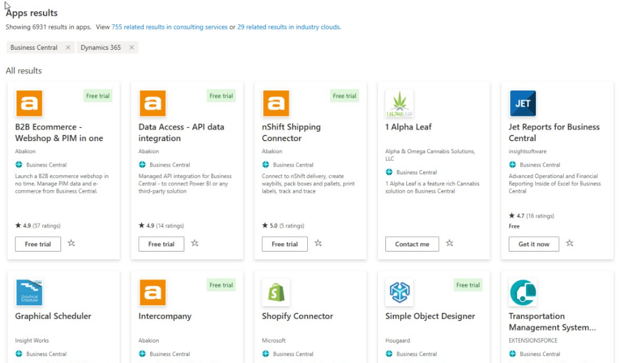
Every third-party solution should be evaluated individually, but it’s important to know which ones can be moved into your new system.
Some ISVs already offer Business Central versions of their products. Others may still provide value in your future environment, while some functionality may already exist within Business Central itself, meaning an additional solution is no longer necessary.
Rather than assuming every ISV needs to be replaced, organizations should begin by asking a few questions:
- What business problem does this solution solve today?
- Does a Business Central version already exist?
- Is similar functionality built directly into Business Central?
- Does this solution still align with where our business is headed?
Answering these will give you a clearer picture of what needs to come along for the ride in your new system and what can be left behind.
Can You Integrate On-Premises Services with Business Central in the Cloud?
Absolutely. While integration methods differ from traditional on-premises environments, Business Central includes modern tools for securely connecting cloud and on-premises systems.
Instead of relying on older connection methods commonly used with on-premises ERP systems, Business Central leverages technologies such as APIs, web services, and OData endpoints to securely exchange information between systems.
These communications are encrypted, authenticated, and designed around modern cloud security practices. Microsoft also provides additional platform capabilities that allow organizations to connect on-premises databases, file shares, and other business systems to cloud applications when needed.
Although some integration strategies may change during a cloud transition, the Microsoft platform provides the tools needed to securely connect systems while supporting a modern cloud architecture.
Why Move from Dynamics GP to Business Central?
There are many ERP solutions on the market, so why do so many Dynamics GP organizations choose Business Central?
One of the biggest reasons is momentum. Thousands of organizations have already made the move from GP to Business Central, creating a well-established community of users, implementation partners, best practices, and migration knowledge. While every migration is unique, these resources help simplify many common scenarios and provide a more familiar path forward for existing GP customers.
Business Central also fits within the larger Microsoft ecosystem. The benefits of going from GP to Business Central extend beyond replacing one ERP with another. It gives you access to connected technologies like Microsoft 365, the Power Platform, Copilot, and more that support collaboration, security, reporting, automation, and AI across your entire business.
Ultimately, choosing Business Central isn't just about staying within the Microsoft family; it's about selecting a platform supported by an established migration community, modern cloud technologies, and an integrated ecosystem that can continue to evolve alongside your business.
Ready to Start Planning Your Transition? Talk to the Stoneridge Team Today!
At Stoneridge Software, we've helped organizations successfully navigate the transition from Dynamics GP to Business Central with a proven, collaborative approach focused on people, processes, and technology. From initial assessments and migration planning to implementation, training, and long-term support, our team is here to help you move forward with confidence.
Contact the experts at Stoneridge Software to schedule a Dynamics GP migration assessment and learn more.
This blog is co-authored by: Maggie Foster, Scott Frappier, and Deb Shcaffer
Under the terms of this license, you are authorized to share and redistribute the content across various mediums, subject to adherence to the specified conditions: you must provide proper attribution to Stoneridge as the original creator in a manner that does not imply their endorsement of your use, the material is to be utilized solely for non-commercial purposes, and alterations, modifications, or derivative works based on the original material are strictly prohibited.
Responsibility rests with the licensee to ensure that their use of the material does not violate any other rights.