














Elevating Patient Engagement with Dynamics 365: From Device Approval to Post Support Excellence
Patients today expect more than reliable medical devices—they want personalized communication, seamless support, and a voice in their own care. Yet for many companies, delivering on this promise is challenging due to fragmented systems and disjointed support workflows.
In this blog, we’ll explore how Microsoft Dynamics 365 (D365) Customer Service, enhanced with automation and AI, helps medical device organizations transform the entire patient journey, from initial engagement to long-term support, keeping the patient experience at the center of every interaction.
To understand how technology can help, it’s important to first look at the challenges patient support teams face today.
The Patient Support Challenge
Before adopting modern tools, many medical device companies struggle with fragmented, inefficient support systems. Patient inquiries often land in different inboxes or phone lines, leaving agents to juggle multiple browsers, sticky notes, and manual triage processes just to track down information. Without a unified view of the patient, support teams are forced into reactive service, responding to issues as they arise rather than anticipating needs. The result is delays in care, inconsistent service delivery, and growing frustration for patients who expect more seamless, coordinated support.
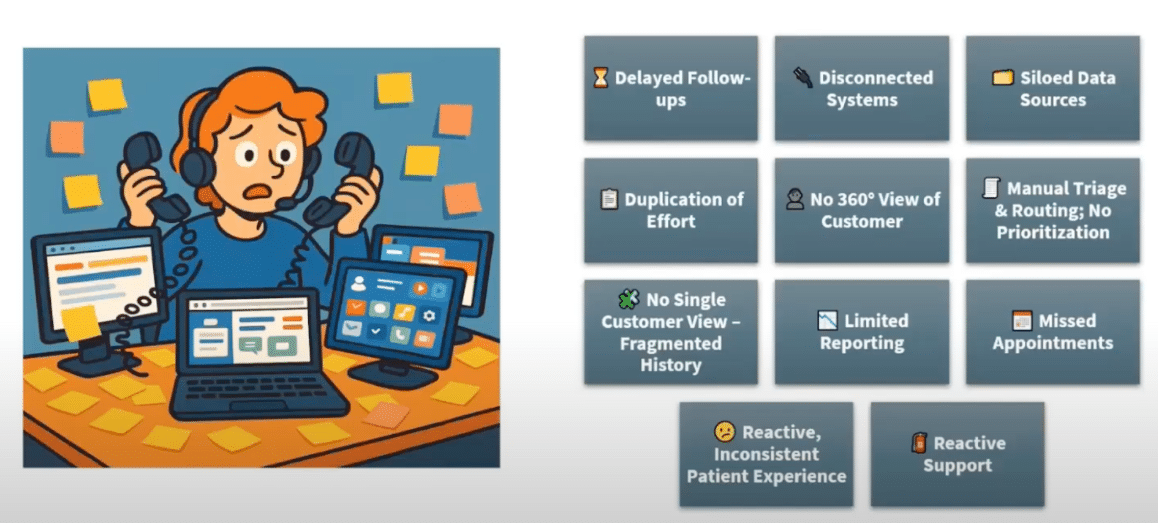
Fortunately, modern solutions like D365 offer tools that address these challenges, enabling support teams to move from reactive, disjointed service to proactive, seamless patient engagement.
Transforming Patient Engagement with Dynamics 365
With D365, the patient experience looks very different. Instead of toggling between disconnected systems, agents work within a single, unified platform that provides a complete 360° view of each patient through various tools:
- AI-driven tools automatically prioritize cases based on urgency, guide agents through next best actions, and surface relevant knowledge articles in real time.
- Automated routing ensures inquiries land with the right specialist the first time, reducing delays and errors.
Together, these capabilities streamline compliance tasks, improve resolution speed, and deliver the consistent, personalized support patients expect, ultimately building trust and satisfaction throughout the patient journey.
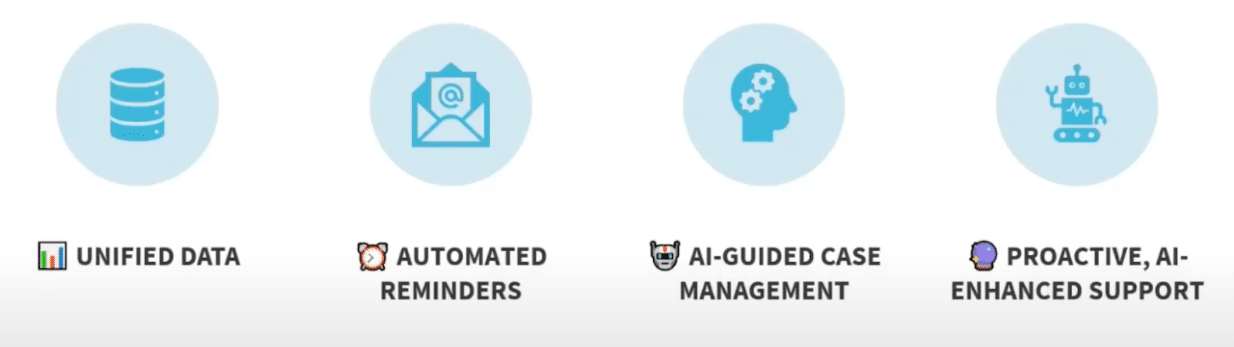
These capabilities don’t just sound good on paper—they translate into real, measurable improvements for both support teams and patients.
Real-World Impact
The difference isn’t just theoretical, it shows up in measurable results. With D365, one medical device company cut its first response time from 24 hours down to just three. This paid huge dividends for both the support agents and the patients:
- Agents who once spent most of their day navigating multiple systems saw their handle time reduced by half, freeing them to focus on the conversations that matter most.
- Patients noticed the change too, with customer satisfaction climbing by 24%. And by extending engagement through self-service portals and AI-powered bots, the company drove a 32% increase in self-service adoption.
Together, these improvements demonstrate how a connected, intelligent platform can move patient support from reactive to proactive, building trust at every stage of the journey.
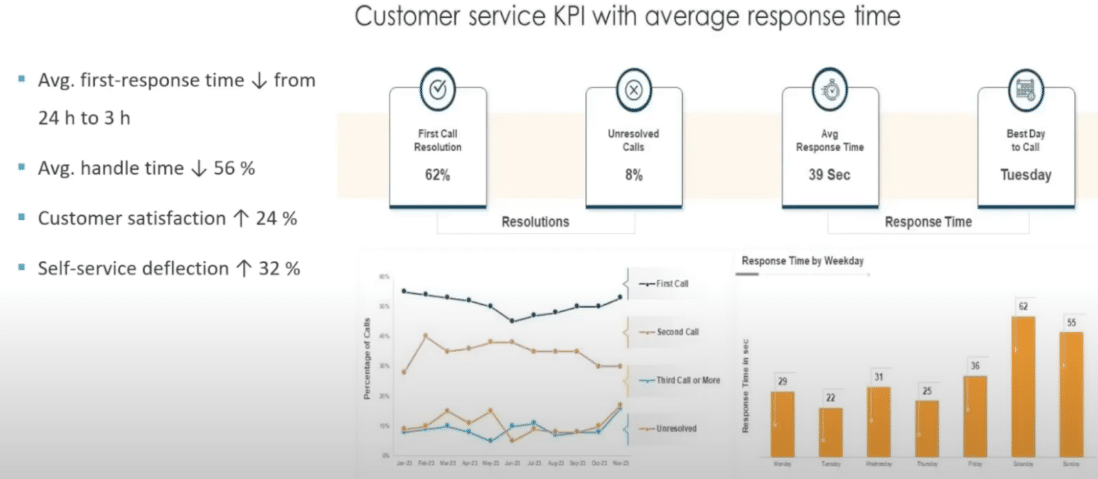
Seeing these results in practice means looking closer at how D365 supports the patient journey from end-to-end, connecting every touchpoint and streamlining the experience for both patients and agents.
Dynamics 365 in Action: End-to-End Patient Journey
With D365, the patient experience is no longer fragmented. The platform supports true Omnichannel communication, whether a patient reaches out by phone, email, chat, portal, or an AI-powered bot, their interactions are captured in one place and connected to their record.
Patients can engage through self-service tools such as portals for checking status, booking appointments, or getting quick answers from virtual agents. This reduces dependency on live agents while still providing a seamless path to escalate when needed.
On the agent side, the Customer Service Workspace brings everything into a single screen. Agents can:
- Manage cases quickly and effectively
- Surface relevant knowledge articles in real time
- Rely on AI guidance for case prioritization and resolution
- Make smart and fast decisions in providing timely, high-quality care through built-in KPI dashboards and performance and workload visibility
Supervisors also benefit from this unified approach. With real-time insights, they can track team performance, monitor Service Level Agreements (SLAs), and adjust staffing with intelligent scheduling tools. This creates a closed loop where patient needs, agent efficiency, and organizational goals stay aligned.
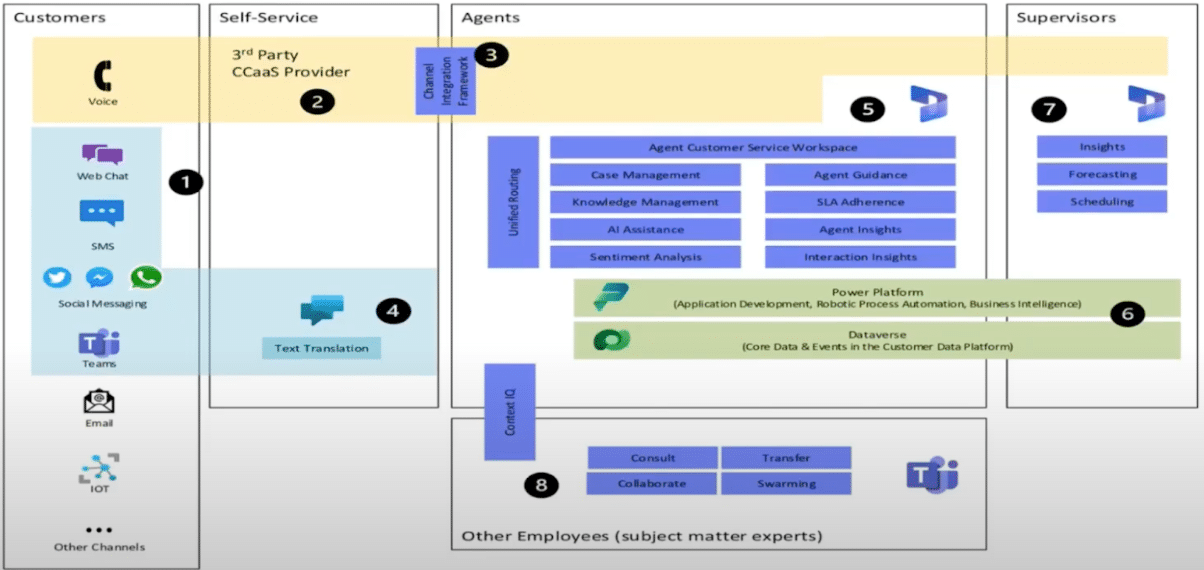
Together, these capabilities form a complete comprehensive patient journey, from self-service to agent engagement to supervisor oversight, ensuring every touchpoint is consistent, efficient, and patient-centered.
Automation and AI: Driving Smarter Support
Automation and AI are at the core of how D365 transforms support. Routine interactions no longer rely on manual effort. For example, cases can be created automatically from emails, chats, or other channels, ensuring nothing falls through the cracks and agents can focus on resolution rather than intake. A general support cycle using Dynamics 365 follows this path:
- Once a case is active, AI-guided case management provides real-time summaries and context, helping agents quickly understand patient history, recent interactions, and recommended next steps.
- In one demo scenario, an agent received a call from a patient requesting a new device. D365 automatically summarized the patient’s prior interactions, including the defective device, insurance details, and pending tasks, giving the agent everything needed to proceed efficiently.
- An integration with Power Automate handles complex but repeatable tasks.
- In the same scenario, once the patient’s insurance was verified, an automated email was sent via Power Automate with next steps, and a follow-up task was created for scheduling. This reduced manual steps and ensured timely, consistent communication.
- Frontline staff can access in-app notifications to surface reminders, escalations, and follow-up needs at the right time. This keeps agents on track without requiring them to switch systems.
- Finally, sentiment analysis runs in the background of conversations, flagging when a customer is becoming frustrated or dissatisfied.
- For example, if AI detects a slightly negative sentiment in a patient’s chat, it triggers a visible alert for the agent and enables proactive escalation to a supervisor if needed.
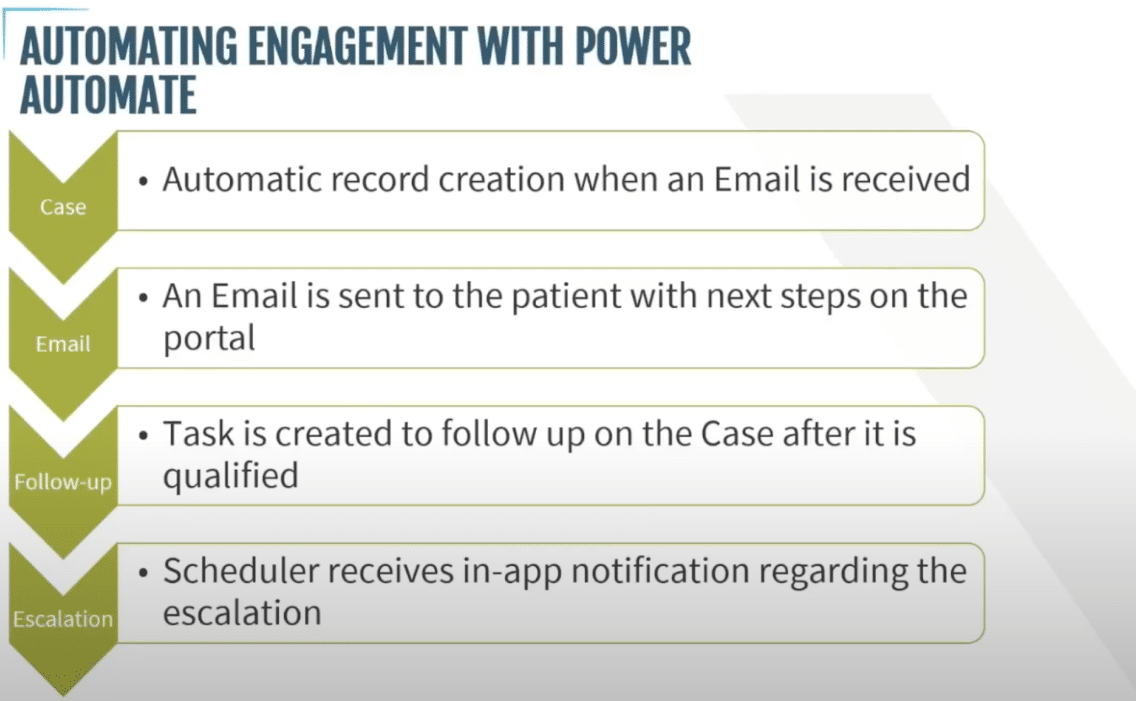
Together, these capabilities make patient service smarter, faster, and more proactive, driven not just by people, but by automation and AI working seamlessly behind the scenes.
Patient Portals and Self-Service
Patient portals play a pivotal role in empowering patients to manage their own care journey. With D365, patients can access multi-step forms to complete tasks such as device approval, insurance verification, or follow-up confirmations, streamlining processes that once required multiple calls or emails.
AI-assisted chatbots further enhance self-service capabilities, allowing patients to ask questions, book appointments, or escalate issues to a live agent when necessary.
For instance, if a patient receives an automated email with a link to the portal after insurance approval. They could acknowledge documentation and move forward with scheduling, completely guided by the system.
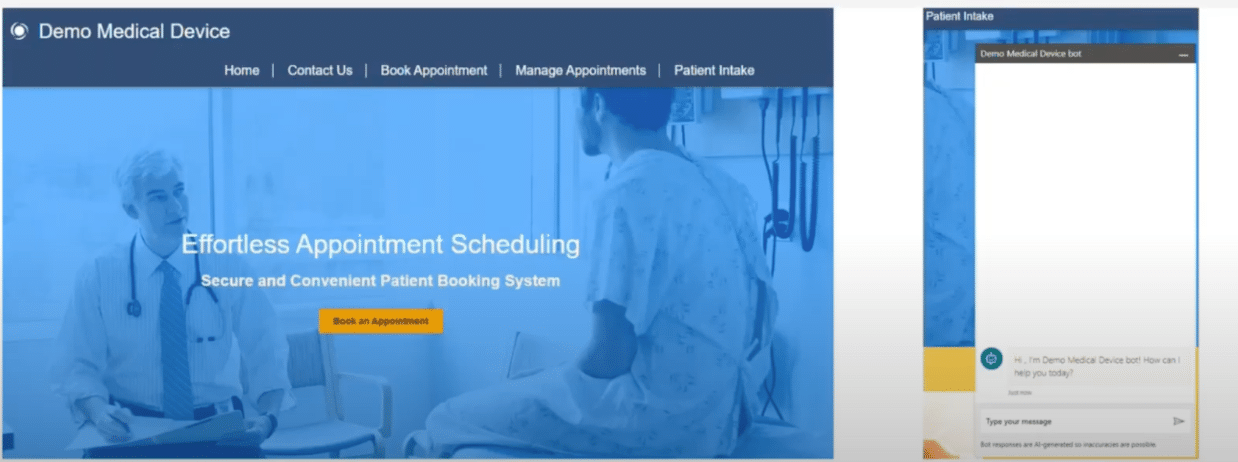
Portals also provide actionable insights for the organization. KPIs such as case resolution, escalations, and patient sentiment are tracked automatically, giving both agents and supervisors a clear picture of patient engagement and operational effectiveness.
By providing transparent, convenient, and AI-assisted self-service, portals reduce friction, accelerate processes, and ensure patients feel informed and in control throughout their care journey.
Enhancing the Agent Experience
D365 transforms the agent experience by providing a centralized, multi-session workspace that allows agents to manage multiple cases concurrently. Each interaction, whether phone, chat, or email, opens in its own tab, enabling agents to seamlessly switch between conversations without losing context. There are several key benefits:
AI-Driven Conversation Summaries
These summaries consolidate key details from emails, tasks, and phone calls, providing a real-time overview that can even be accessed mid-call. This ensures agents never lose track of critical information and can respond efficiently, reducing handle time and improving patient satisfaction.
Sentiment Detection
The system monitors both voice and chat interactions, flagging conversations that are turning negative or require urgent attention. For example, if a patient expresses frustration, the AI highlights the conversation with an alert, allowing the agent, or a supervisor, to intervene promptly.
Translation Tools
To support a diverse patient base, translation tools are integrated directly into the workspace, enabling agents to communicate in multiple languages without disrupting workflow.
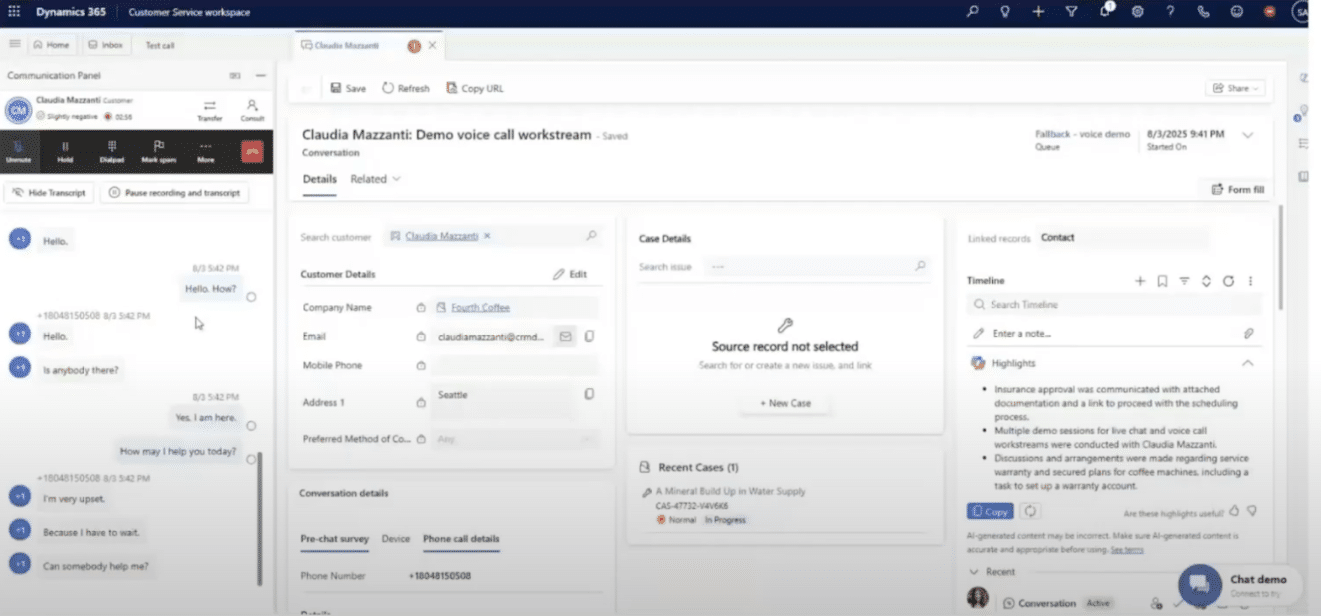
Collectively, these capabilities reduce call abandonment, streamline case handling, and empower agents to deliver faster, more informed, and empathetic support.
Empowering agents with the right tools is only part of the story, D365 also gives organizations the ability to measure performance and outcomes, turning insights into actionable improvements across the entire patient support journey.
Measuring Success with KPIs and Analytics
One of the most compelling benefits of D365 is its ability to measure and visualize success across the patient support journey. In recent implementations, organizations have seen measurable improvements:
- A 25% boost in agent productivity.
- A 35% reduction in support call volume.
- A 22% increase in patient satisfaction.
These results are tracked using multiple integrated tools. Customer Voice surveys collect feedback immediately after calls or chats, while in-call or in-chat surveys capture sentiment in real time. All survey responses, along with case data, are centralized within D365, giving teams a single source of truth for reporting and analysis.
How Power BI Enhances the Process Further
Performance data is then visualized through Power BI dashboards, allowing supervisors and managers to monitor KPIs, track trends, and identify areas for improvement. Dashboards can display metrics such as average handle time, case resolution rates, and patient sentiment, providing actionable insights that help optimize both agent performance and patient experience.
By connecting feedback, case management, and analytics, D365 enables a data-driven approach to patient engagement, ensuring that both operational efficiency and satisfaction are continuously improved.
Final Thoughts: Empower Your Customers by Empowering Your Team
From device approval through ongoing support, D365 transforms the way medical device organizations engage with patients. By unifying interactions across channels, automating routine tasks, and leveraging AI-enabled insights, the platform enables proactive service, empowers agents, and ensures compliance. Patients experience faster resolutions, more personalized interactions, and greater confidence in their care, while organizations gain actionable insights, operational efficiency, and measurable improvements in satisfaction.
Elevate Your Patient Engagement and Support Operations with Stoneridge!
Reach out to our experts today or schedule your Dynamics 365 Customer Service demo today! Stoneridge Software specializes in helping medical device organizations leverage D365, automation, and AI to transform the entire patient journey, from device approval to post-support excellence.

Under the terms of this license, you are authorized to share and redistribute the content across various mediums, subject to adherence to the specified conditions: you must provide proper attribution to Stoneridge as the original creator in a manner that does not imply their endorsement of your use, the material is to be utilized solely for non-commercial purposes, and alterations, modifications, or derivative works based on the original material are strictly prohibited.
Responsibility rests with the licensee to ensure that their use of the material does not violate any other rights.